Get in touch
  • OpenCart
  • CRM and integrations
  • v1.0.2

Multi-Store Stock Sync for OpenCart — shared stock across several stores

Several OpenCart (and WooCommerce) stores, one warehouse: the master holds the stock, satellites follow it by SKU or Model. A sale on any site shows on all of them within seconds, options with quantities too. Pro adds prices by site role, shared reviews and auto-reconciliation; one licence on the master, for life.

Download Free
Pro · lifetime licence The more sites, the less each one costs
Compatibility
OpenCart 4.0.2 – 4.1.x, 3.0.x and 2.3.0.2 (tested on 4.1.0.3, 4.0.2.3, 3.0.5.0, 2.3.0.2) · in one network with WooCommerce (Multi-Store Stock Sync for WooCommerce plugin)
Version
v1.0.2 (OpenCart 4)
v1.0.1 (OpenCart 3.x)
v1.0.1 (OpenCart 2.3)
Licence
one site, lifetime
Trial
7 days, no card, one per site
Updated
26 September 2026
Or all 144 Pro modules with All Access — 4 990 ₴ / year

What Free has,
and what Pro adds

The free version works with no time limit. Pro adds the rest of the features in the table.

Feature Free Pro
Store roles: master (warehouse, source of truth) and satellites, unlimited satellites ✔ ✔
OpenCart and WooCommerce stores in one network: either can be the master or a satellite ✔ ✔
Satellite connection with one key, every message signed with HMAC-SHA256 and replay-protected ✔ ✔
Products matched by SKU, Model or "SKU, and Model when SKU is empty" ✔ ✔
Option values with their own quantity sync like variations (Option SKUs tab) ✔ ✔
Sales, cancellations, order edits and deletions, manual edits in the product form reach every store ✔ ✔
Items without stock counting (Subtract stock = No) get the availability ✔ ✔
Queue with retries: while another site is down, changes wait and arrive exactly once ✔ ✔
Sync log filtered by level, site and SKU ✔ ✔
Connection status, Check connection, Push all stock, Send the queue now, pause ✔ ✔
Catalogue comparison with the master and a report of SKUs found on one side only ✔ ✔
Cron URL for the server cron of stores without visitors ✔ ✔
Builds for OpenCart 4.x, 3.x and 2.3; admin in English, Ukrainian, Russian ✔ ✔
Prices for each satellite: product price or customer group price × coefficient, rounding — ✔
Default customer group special with dates, option value prices — ✔
Reviews by SKU across all sites of the network, with rating, without author e-mails — ✔
Hourly automatic reconciliation of satellites with the master — ✔
E-mail when a site of the network stops answering and when it is back — ✔

What it looks like

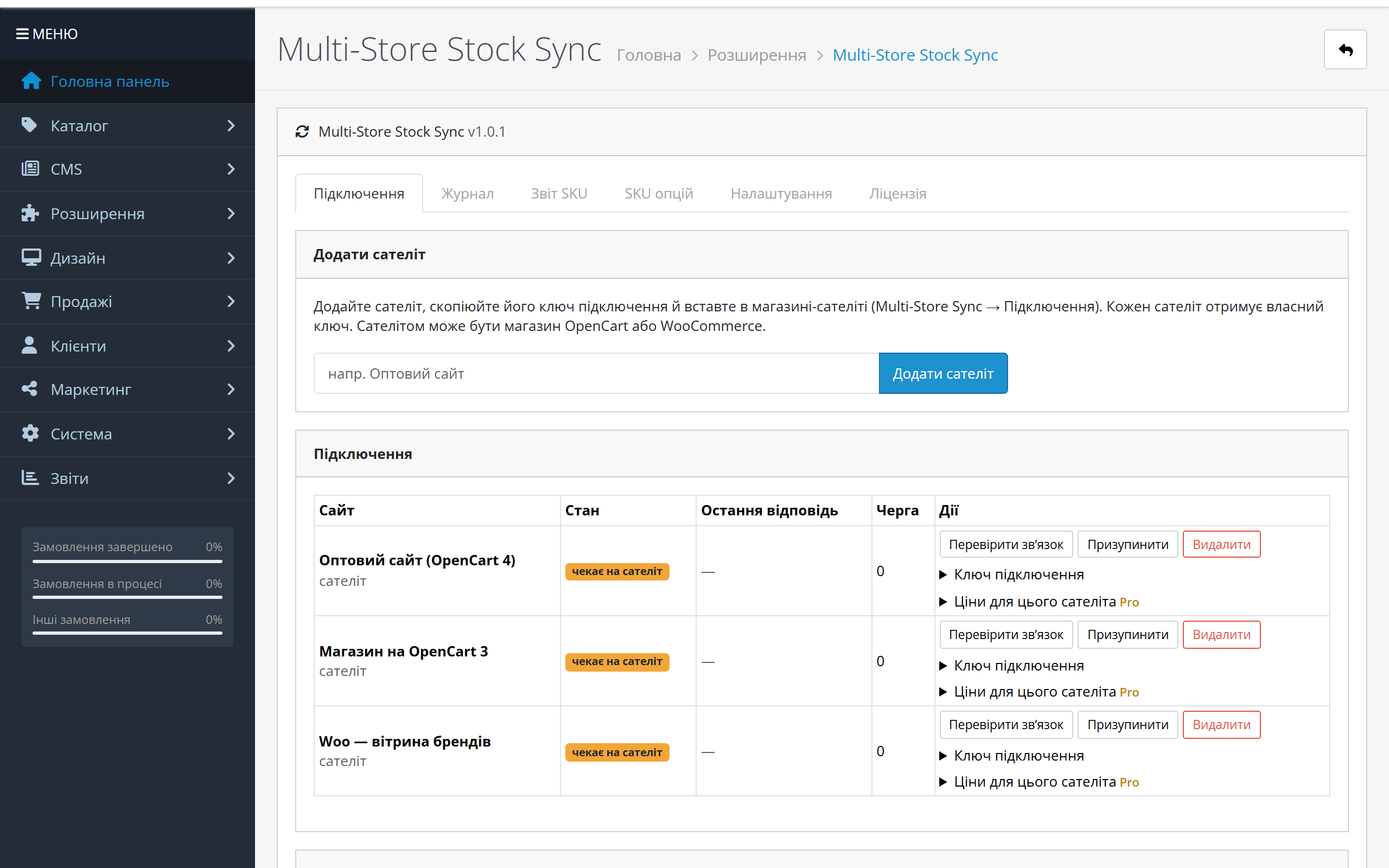
OpenCart 4 master with three satellites: OpenCart 4, OpenCart 3 and WooCommerce
Master on OpenCart 4.1, Connections tab: three satellites just added — OpenCart 4, OpenCart 3 and WooCommerce. Each has its own connection key, Check connection, Pause and Remove buttons and prices for this satellite (Pro).
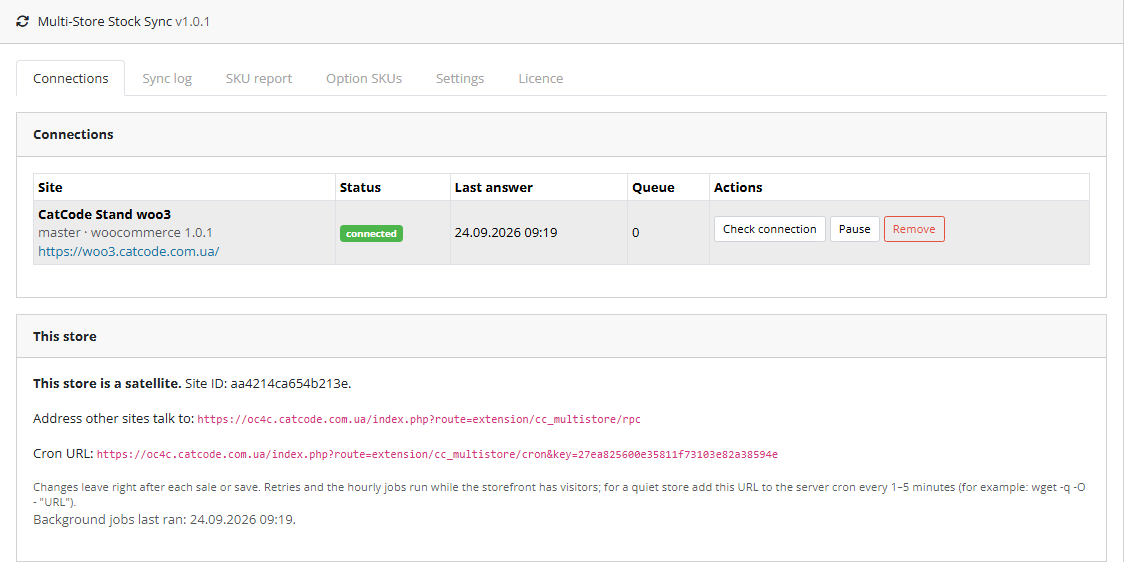
OpenCart 4.1 satellite connected to a WooCommerce master
A mixed network the other way round: OpenCart 4.1.0.3 is a satellite, the master is a WooCommerce store with plugin 1.0.1. Below are the address other sites talk to and the cron URL for the server cron.
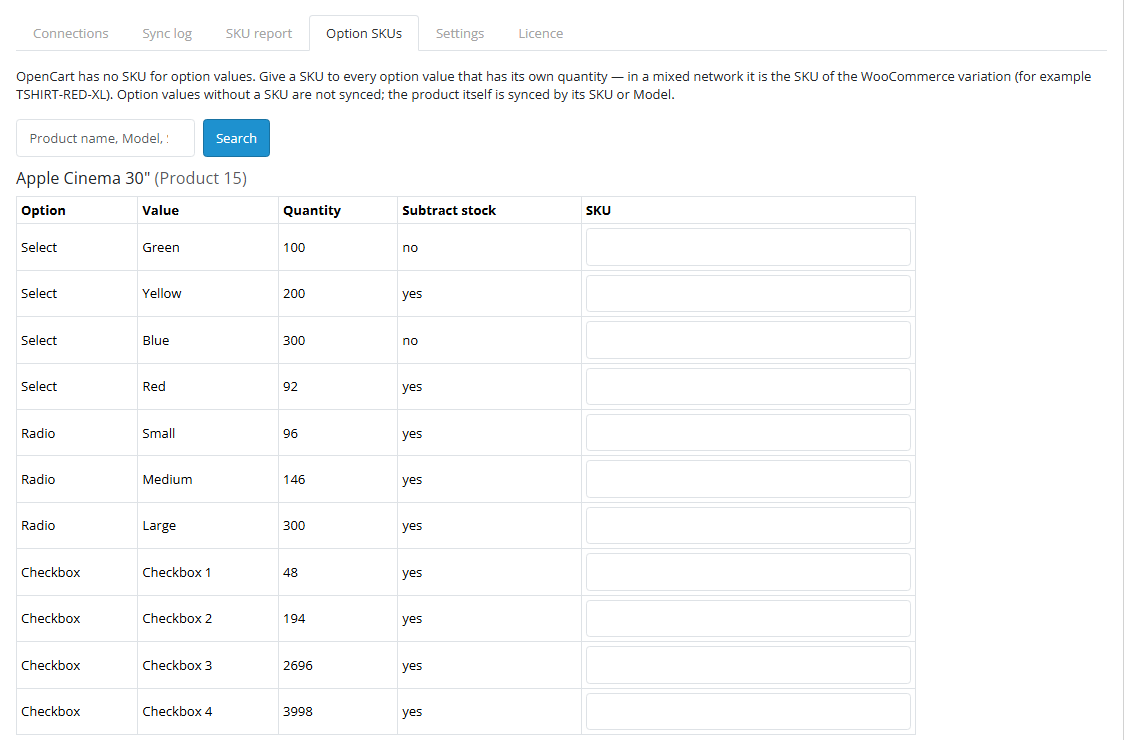
Option SKUs tab: SKUs for option values with their own quantity
Option SKUs tab: OpenCart has no SKU for option values, so the module gives them a field of its own. An option value with an SKU syncs on its own — in a mixed network it is the SKU of the WooCommerce variation.

Key points

What the buyer sees

The buyer sees the right availability on any site of the network — and nothing else.

What the admin gets

Extensions → Extensions → Modules → Multi-Store Stock Sync, six tabs: Connections, Sync log, SKU report, Option SKUs, Settings, Licence.

How much it costs

UAH 1,290 — a one-time payment, lifetime licence. No yearly fees: the module and its Pro features stay yours.

The trial starts when you ask

A fresh install is the free version, nothing switches on by itself. The “Try Pro for 7 days” button → e-mail → the key right in the window and by e-mail.

One key — one site

Moving the store? Unbind the licence on the old domain and activate it on the new one yourself. If our server is unreachable, Pro keeps working for 14 more days. For studios — keys for 5 or 25 sites, or unlimited.

Technical requirements

  • OpenCart 4.0.2 – 4.1.x (tested on 4.1.0.3 and 4.0.2.3), 3.0.x (tested on 3.0.5.0) or 2.3.0.2. Versions can be mixed within a network.
  • PHP — whatever your OpenCart version needs; the 2.3 build was tested on PHP 7.0, the others on PHP 8.2 and 8.3.
  • WooCommerce in the network — with the Multi-Store Stock Sync for WooCommerce plugin 1.0.1+.
  • Stores must reach each other over HTTPS: each one takes messages at its own index.php?route=…/cc_multistore…/rpc address (the exact one is on the Connections tab). If a firewall sits in front of the store, let this address through; OpenCart’s maintenance mode closes it.
  • The same SKUs (or Models) for products and option values on every store — the module matches products by them.
  • Server clocks must not drift apart by more than 5 minutes — older messages are rejected as replay protection.
  • A quiet store without visitors: add the Cron URL from the Connections tab to the server cron every 1–5 minutes. On OpenCart 4 the module also registers an hourly task in the built-in cron.

Version history

v1.0.2 OC 4.x Current 26 September 2026

A satellite on the PDO database driver accepts a repeated sale price from the master again without an error.

v1.0.1 First release September 2026

For OpenCart 4.x, 3.x and 2.3, compatible with Multi-Store Stock Sync for WooCommerce 1.0.1.

Frequently bought with Multi-Store Stock Sync for OpenCart

4 modules in one order — 40% cheaper than separately

“Store starter” bundle Multi-Store Stock Sync Nova Poshta Premium LiqPay Telegram notifications and Viber/SMS for customers Need more — all 144 modules in All Access for 4 990 ₴.
3 790 ₴ lifetime instead of 6 260 UAH bought separately
Buy the bundle →

Full module description

Multi-Store Stock Sync for OpenCart is a module for anyone selling the same products in two or more stores: a retail and a wholesale domain, a store in another language, a second brand, a separate storefront for a marketplace. There is one warehouse, so there should be one stock figure. Without sync a manager copies numbers between admin panels by hand, and a customer pays for an item that is already gone.

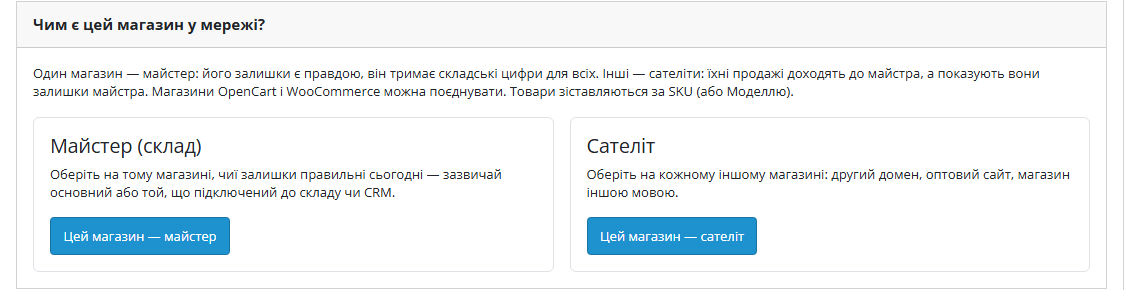
The module makes one store the master: its stock is the truth. The others are satellites that follow the master by SKU or Model. A sale, a cancellation, an order edit or a manual quantity change on any site shows on all the others within seconds — for products and for option values with their own quantity.

OpenCart and WooCommerce in one network. This module and the Multi-Store Stock Sync for WooCommerce plugin speak the same protocol. The master can be OpenCart with other OpenCart 4, 3, 2.3 stores and WooCommerce sites as satellites, or the other way round: WooCommerce keeps the warehouse and OpenCart storefronts follow it. OpenCart option values are matched to WooCommerce variations by SKU.

What the buyer sees

The buyer sees the right availability on any site of the network — and nothing else. The last two units sold on the wholesale site — a few seconds later the retail site shows zero. An order is cancelled — the units are back on every site.

  • Checkout is not slowed down. The module waits for nothing during checkout: the change goes into the queue and is delivered in the background right after the buyer gets the response.
  • Options too. A colour or size with its own quantity syncs on its own: “red” sold — every site gets minus one “red” and minus one of the product itself, just as OpenCart does.
  • Items without stock counting (Subtract stock = No) get only the availability: out of stock on the master — quantity 0 on satellites.

What the admin gets

Extensions → Extensions → Modules → Multi-Store Stock Sync, six tabs: Connections, Sync log, SKU report, Option SKUs, Settings, Licence.

  • Connected in a minute. On the master — Add a satellite, copy the key; on the satellite — paste the key and Connect. Right after connecting the satellite compares the catalogue and takes the master’s stock for every matching SKU.
  • Status of every site: last answer, last error worded in the admin language, how many changes wait in the queue. Buttons: Check connection, Push all stock, Send the queue now, Pause, Remove.
  • The sync log records what went where and with what result: sale −2 from an order, stock now 19. Filter by level, site and SKU; you set how long it is kept (30 days by default).
  • The SKU report lists products found on one side only — usually a typo in an SKU or Model that would otherwise take weeks to find.
  • Option SKUs. OpenCart has no SKU for option values, so the module gives them a field of its own, with search by name, Model or SKU. If the SKUs already sit in a column added by another module, one button takes them over.
  • Matching by SKU, by Model or “SKU, and Model when SKU is empty” (the default). The OpenCart 4.1 product form has no SKU field, so there the Model is effectively the key.

Pro: prices, reviews, auto-reconciliation, alerts

  • Prices by site role. For each satellite, a price source: the product price on the master or a customer group price (the group’s special, otherwise its discount for 1 item). Then a coefficient (1.2 = +20%, 0.9 = −10%, or an exchange rate) and the number of decimals. Separate price lists here are OpenCart’s own customer groups, so no new fields appear in the product form.
  • Specials with dates. With the “product price” source the master can send the default customer group’s special along with its dates — the satellite keeps a special row of its own and updates it without piling up duplicates. The satellite’s own specials are left alone.
  • Option prices: the network gets the full price of the value (product ± modifier), and on the satellite it becomes a modifier of its own product price again.
  • Reviews travel between all sites by SKU: name, text, rating and date, without the author’s e-mail, without duplicates and without echo. Reviews approved after the feature is switched on are shared; OpenCart 4.1 recalculates the product rating.
  • Hourly auto-reconciliation fixes drift caused by failures or imports on its own — no button needed.
  • An e-mail when a site of the network stops answering, and another one when it is back.

How it works — step by step

  1. A change happens on a satellite: an order gets a status that takes stock, is cancelled, edited or deleted, or the admin changes a quantity in the product form. The module catches it through OpenCart’s own events and records the exact difference (−2, +1) with a unique event number.
  2. Right after the buyer gets the response, a background worker sends the change to the master in a signed message.
  3. The master applies the difference to its stock. Delivering the same event again changes nothing — it is written off exactly once.
  4. The master sends the new figure with a version to every satellite. An older version never overwrites a newer one.
  5. Values that came from the network are not sent back — two sites cannot bounce the same change between them.
  6. If the master is down, changes wait in the queue and are retried with a growing pause. Once it is back, the queue arrives exactly once.

How much it costs

UAH 1,290 — a one-time payment, lifetime licence. No yearly fees: the module and its Pro features stay yours. One licence covers all three builds — OpenCart 4.x, 3.x and 2.3.

One licence — the whole network. The key is activated on the master (one domain). Satellites — OpenCart or WooCommerce — need no key: the master tells them Pro is on. Three stores or ten — the price is the same. If your master is WooCommerce, the licence is bought for the WooCommerce plugin, and OpenCart satellites get Pro from it.

Moving the master to another domain? Release the licence with the Release button on the old one and activate it on the new one.

Trial first, then payment. The free 7-day Pro trial starts from the “Try Pro for 7 days” button on the master’s Licence tab with just an e-mail, no card needed. A fresh install is the plain Free version; the trial never starts by itself. After the trial only the Pro features stop, the stock keeps syncing.

Under the hood

  • Changes, not figures. A satellite sends the master a difference with a unique event number, not “there are 17 here now”. So two simultaneous sales on different sites never overwrite each other.
  • Exactly once. The event number is kept on the master; the same event repeated after a network failure returns “already counted” instead of writing the item off again.
  • Precise OpenCart events. Sales, cancellations, order edits and deletions are counted by order lines, with the quirks of OpenCart 4.1, 4.0 and 3.x/2.3 handled (different order history events, OpenCart 4 product variants, specials in different tables).
  • SKU changed together with the quantity? If one save of the product form changes both the SKU/Model and the quantity, the satellite does not send a difference from the old SKU — it simply takes the master’s stock for the new one.
  • Security. Every message is signed with HMAC-SHA256 and carries a timestamp and a one-time nonce; a foreign signature, a stale message or a replay is rejected. The connection key is shown only in the module admin.
  • Nothing extra leaves the store. Only SKUs, stock and availability travel between sites (in Pro — prices and reviews without e-mails). Customer data goes nowhere, CatCode receives nothing.
  • Its own error handler. All sync code runs under its own error handler: OpenCart 4 sends any PHP warning to an error page, and a minor hiccup in the sync must not break a checkout.
  • Cleans up after itself. Uninstalling removes its tables, events, cron tasks and settings; products and stock stay as they are.

How to install

  1. OpenCart 4: Extensions → Installer → upload cc_multistore.ocmod.zip (keep the file name) and click Install. OpenCart 3: Extensions → Installer → cc_multistore-oc3.ocmod.zip. OpenCart 2.3: upload the contents of the upload/ folder from cc_multistore-oc2.ocmod.zip to the store root (FTP or the hosting file manager).
  2. Extensions → Extensions → Modules → Multi-Store Stock Sync → Install, then Edit.
  3. On the store whose stock is right today, click “This store is the master”. On the Connections tab enter a satellite name, click Add a satellite and copy its key.
  4. On another store (OpenCart or WooCommerce) choose “This store is a satellite”, paste the key and click Connect. The satellite compares the catalogue and takes the master’s stock.
  5. If you have options with their own quantity, give them the same SKUs on the Option SKUs tab of every OpenCart store (in WooCommerce these are the variation SKUs).
  6. Check the SKU report — it lists products whose SKU or Model did not match. For Pro: on the master paste the key from the e-mail after payment or start the 7-day trial.

Questions
about the module

Didn't find the answer? Message us on Telegram and we'll reply within a business day.

@catcode_support Setup, compatibility, activation
Can OpenCart and WooCommerce be in one network?

Yes. The OpenCart module and the WooCommerce plugin speak the same protocol: the master can be OpenCart with other OpenCart and WooCommerce sites as satellites, or the other way round. OpenCart option values are matched to WooCommerce variations by SKU.

What if two sites sell the last unit in the same second?

Both sales reach the master as separate changes and both are counted, so the master's stock goes below zero and every site shows zero. The sync keeps the numbers right, but it cannot stop two checkouts that finished before the first sale reached the master (usually a few seconds).

Does the module copy products or orders between stores?

No. Every store keeps its own product pages and its own orders. Only the stock is shared (plus prices and reviews in Pro); products are matched by SKU or Model.

Do I need a licence for every store?

No. The licence goes on the master only. On satellites the same module runs without a key — they learn from the master that Pro is on. If the master is WooCommerce, the licence is for the WooCommerce plugin; if it is OpenCart, it is this one.

What happens when the master is down?

Sales on satellites do not stop. Changes go into the queue and are retried; when the master is back, the queue arrives exactly once. The satellite shows "connection error", and "not answering" after five failures in a row.

My store updates stock by importing a file or from accounting software. Is that picked up?

The module catches orders and product form saves in the admin. Changes another module writes straight into the database are invisible to it — Push all stock on the master or Compare with the master now on a satellite evens them out, and in Pro the hourly auto-reconciliation does it for you.

Not quite what you are looking for?

We build custom modules for WordPress, WooCommerce, OpenCart and Shopify. Tell us about the task and we'll prepare an estimate.

Order a custom module