
















OpenCart
Viva.com Payments for OpenCart 2.3, 3.x and 4.x — Smart Checkout payments
Free + Pro
1 290 UAH≈ €26
v1.0.1
 Website auditA PDF report by email in 3 minutesCheck a website
Everyday tasks
Image compressorSize, quality and WebP in bulkQR generatorLink, Wi-Fi, payment to IBANVAT calculator20, 14, 7% and amount in wordsTransliterationOfficial Ukrainian standardWebsite checks
PHP and pluginsPHP version, WordPress, pluginsGoogle Merchant feedFields, prices, GTIN, imagesDomain emailSPF, DKIM, DMARC, blacklistsAI search readinessllms.txt, bots, markupAll 9 toolsEnter at least 2 characters


For shops in Croatia: the additional price of 10.09.2026 next to every price and a daily CSV or XML price list by 8:00, as required by the decisions in NN 101/2026, applied from 17.11.2026. Admin and storefront in Croatian. Pro adds anchor import from CSV and the Omnibus log, export, a date per category or brand. Perpetual licence.
The free version works with no time limit. Pro adds the rest of the features in the table.


A line appears under the price: “Cijena na 10.09.2026.: 19,99 €”. The Ministry recommends the date alone, without the words “sidrena cijena”, so that is the default, and the wording can be changed per language.

At installation the module records the current price of every product as an anchor marked “to check”.

The base version costs 0 UAH. Pro costs 1,290 UAH, a one-time payment with a perpetual licence.

A fresh install is the free version, nothing switches on by itself. The “Try Pro for 7 days” button → e-mail → the key right in the window and by e-mail.

Moving the site? Unlink the licence on the old domain and activate it on the new one yourself. A staging copy (staging., dev.) works with the same key and does not take a site slot. For studios — keys for 5 or 25 sites, or unlimited.
 OpenCart 4.0.2+ and 4.1.x, 3.x or 2.3.0.2, a separate build for each line.Taxes: a VAT rate by the shop address, because prices in the list include VAT.Currency: EUR must exist in the OpenCart currency list.Schedule: 4.x has the OpenCart scheduler, 3.x and 2.3 need a hosting cron job or the first-visit fallback.Themes: tested on the default themes. Another theme can use a field with a CSS selector for the line.
Before updating to this version, note the settings and the licence key, or replace the files over FTP without uninstalling: later updates keep them.
For OpenCart 4.x, 3.x and 2.3: the sidrena cijena on the storefront, the anchor editor, the daily CSV and XML price list, the archive, a public address, Croatian translation.



Sidrena Cijena & Cjenik for OpenCart covers two requirements for shops in Croatia. Next to every retail price there must be the additional price that applied on 10.09.2026, and the site must carry a price list in .csv or .xml by 8:00 every day. These are the Government decisions in Narodne novine 101/2026, whose application was moved to 17.11.2026 by the decisions in NN 110/2026.
A line appears under the price: “Cijena na 10.09.2026.: 19,99 €”. The Ministry recommends the date alone, without the words “sidrena cijena”, so that is the default, and the wording can be changed per language. The line is on the product page and on cards in categories, search, specials, brands and product modules. The footer gets a link to the price list.
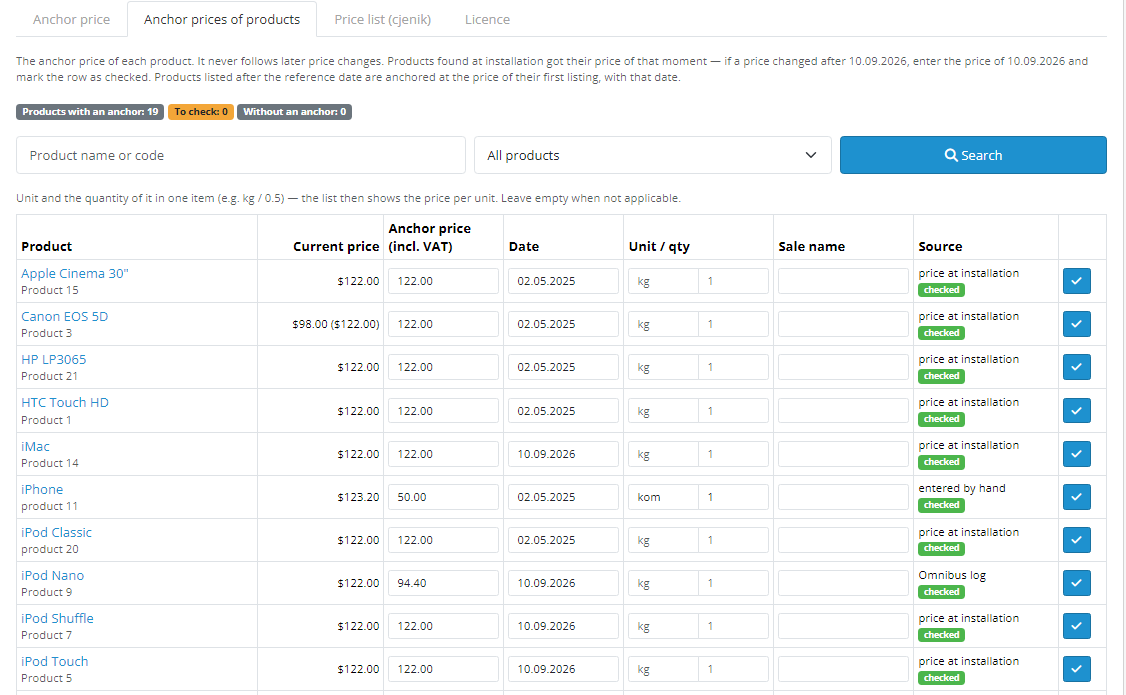
At installation the module records the current price of every product as an anchor marked “to check”. The editor shows the current price next to the anchor and takes the date, the unit with quantity for the price per unit, and the sale name. A counter shows how many rows still wait for a check. The storefront is switched on only by hand, once the anchors are checked.
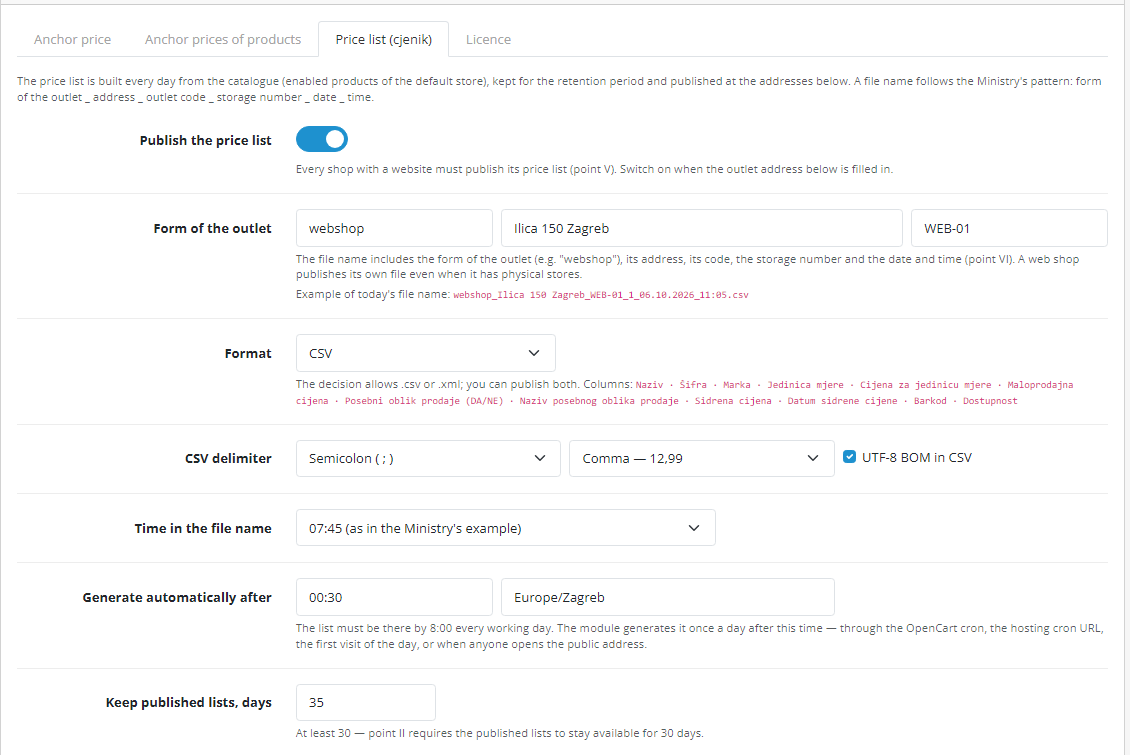
The price list tab holds the outlet details for the file name, the format CSV, XML or both, the delimiter, the run time, retention of at least 30 days, and the code and barcode sources.
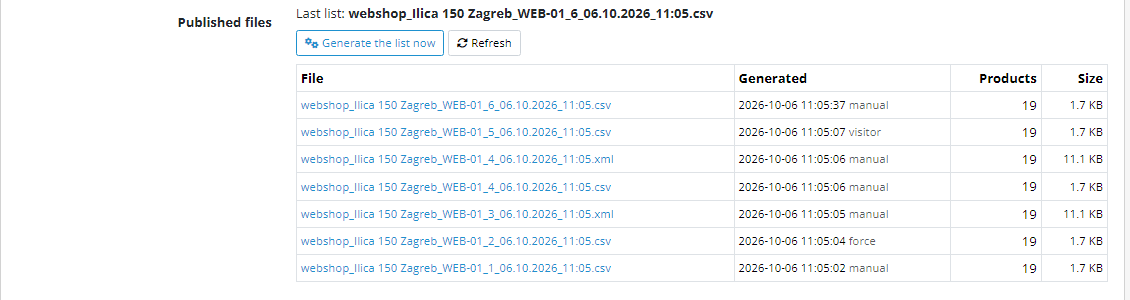
Further down the same screen lists the published files, and the public address gives the list of files to people and JSON to software.
webshop_Ilica 150 Zagreb_WEB-01_6_06.10.2026_11:05.csv.Didn't find the answer? Message us on Telegram and we'll reply within a business day.
 @catcode_support
Setup, compatibility, activation
The module records current prices as anchors marked "to check" and does not switch the storefront on by itself. If a price changed after 10.09.2026, enter that day's price by hand or by import, then switch the display on.
There is no official schema: neither the decision nor the Ministry clarification sets column names, a delimiter or an XML schema. The module uses the words of the decision for the columns. If the Ministry publishes a schema, the format will need an update.
No, the OpenCart build has only the web shop price list. Separate store files, a services list and the morning check exist only in the WooCommerce build.
An option with a surcharge does not become a separate row: the list carries the base price. The list and anchors are built for the main store and the default customer group.
The list converts prices to EUR at the shop rate, so EUR must exist in OpenCart.
No. The module is a tool built on the decisions in NN 101/2026 and NN 110/2026 and the Ministry of Economy clarification. Check how they apply to your shop with your accountant.
No reviews yet. Be the first.
No questions yet. Ask one — we answer within 24 hours.
We build custom modules for WordPress, WooCommerce, OpenCart and Shopify. Tell us about the task and we'll prepare an estimate.
Order a custom module
—
Charged in UAH; your bank converts it to your currency. EUR price is approximate.

CatCode assistant
Just now


CatCode assistant
Online

I’ll help with your website task
Describe your website task — I’ll find a ready-made module or pass it to a developer for an estimate. Modules, custom features, layout, integrations, speed, migration, technical SEO.
