Black November: −35% on all modules until 30 November Black November: −35% until 30 November Choose a module

Get in touch
OpenCart

Returns & Exchanges Manager for OpenCart — product returns and exchanges

Return and exchange requests instead of the stock OpenCart form: items from the customer's own order, guests by order number plus e-mail or phone, return period, statuses, waybill and e-mails. Pro — photos, refund, coupon and replacement order in one click.

Pro · lifetime licence Staging copies are included. The more sites, the cheaper each one
Compatibility
OpenCart 2.3.0.2, 3.0.x and 4.0.2 – 4.1.x
Version
v1.0.1 (OpenCart 4)
v1.0.0 (OpenCart 3.x)
v1.0.0 (OpenCart 2.3)
Licence
a site + a staging copy, lifetime
Trial
7 days, no card, one per site
Updated
01.11.2026
Or all 509 Pro modules with All Access — 3 244 UAH / year ≈ €66

The module in action — 40 sec

Clear even without sound: Ukrainian subtitles

What Free has,
and what Pro adds

The free version works with no time limit. Pro adds the rest of the features in the table.

Feature Free Pro
Account requests: items and quantities from the customer's own order ✔ ✔
Guests open the order with its number plus e-mail or phone; 8 failed attempts — 15-minute pause ✔ ✔
Refund or exchange with a wish, reason, comment ✔ ✔
Return period (14 days by default) from the "Complete" status or the order date ✔ ✔
Protection against a second request for the same items ✔ ✔
The stock "Returns" links in the footer, account and order lead to the module; old records stay ✔ ✔
Request statuses with an e-mail to the customer, private note, history ✔ ✔
Return waybill with Nova Poshta / Ukrposhta tracking and an e-mail to the store ✔ ✔
E-mails to the customer and the store, a note in the order history ✔ ✔
Photos with the request: JPG / PNG / WebP, files closed to direct access — ✔
Refund record with order history and order status — ✔
Coupon for the refund amount (single use, expiry date) — ✔
Zero-value replacement order with the chosen option, stock deducted — ✔
Restock manually or automatically on "Goods received" — ✔
Non-returnable categories and products, custom period per category — ✔
Nova Poshta auto-status, Telegram, CSV export — ✔

What it looks like

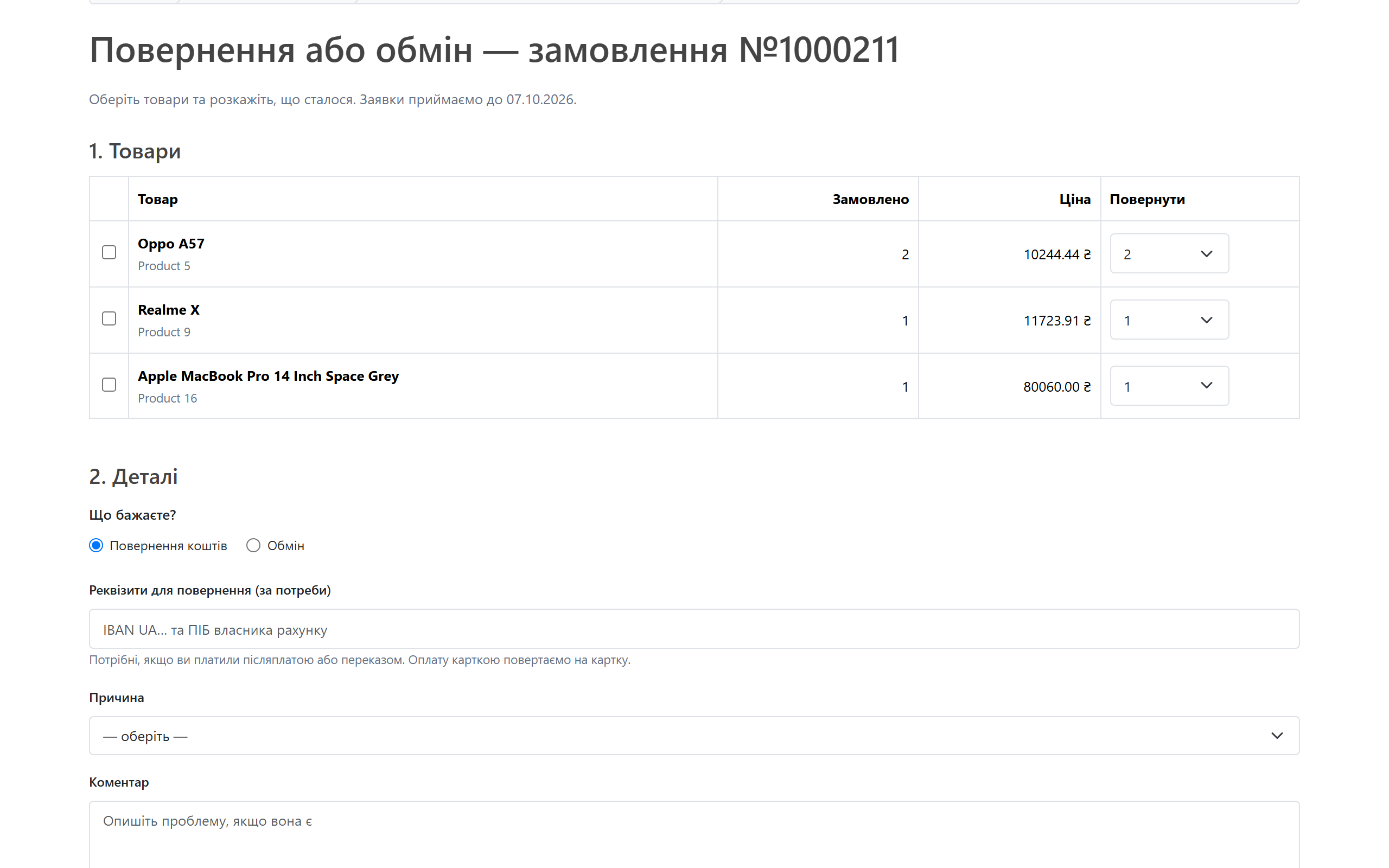
Module return form on the OpenCart 4 storefront
The storefront form on OpenCart 4: order items with quantities, refund or exchange, reason, comment and photos (Pro). On top — the last day requests are accepted.
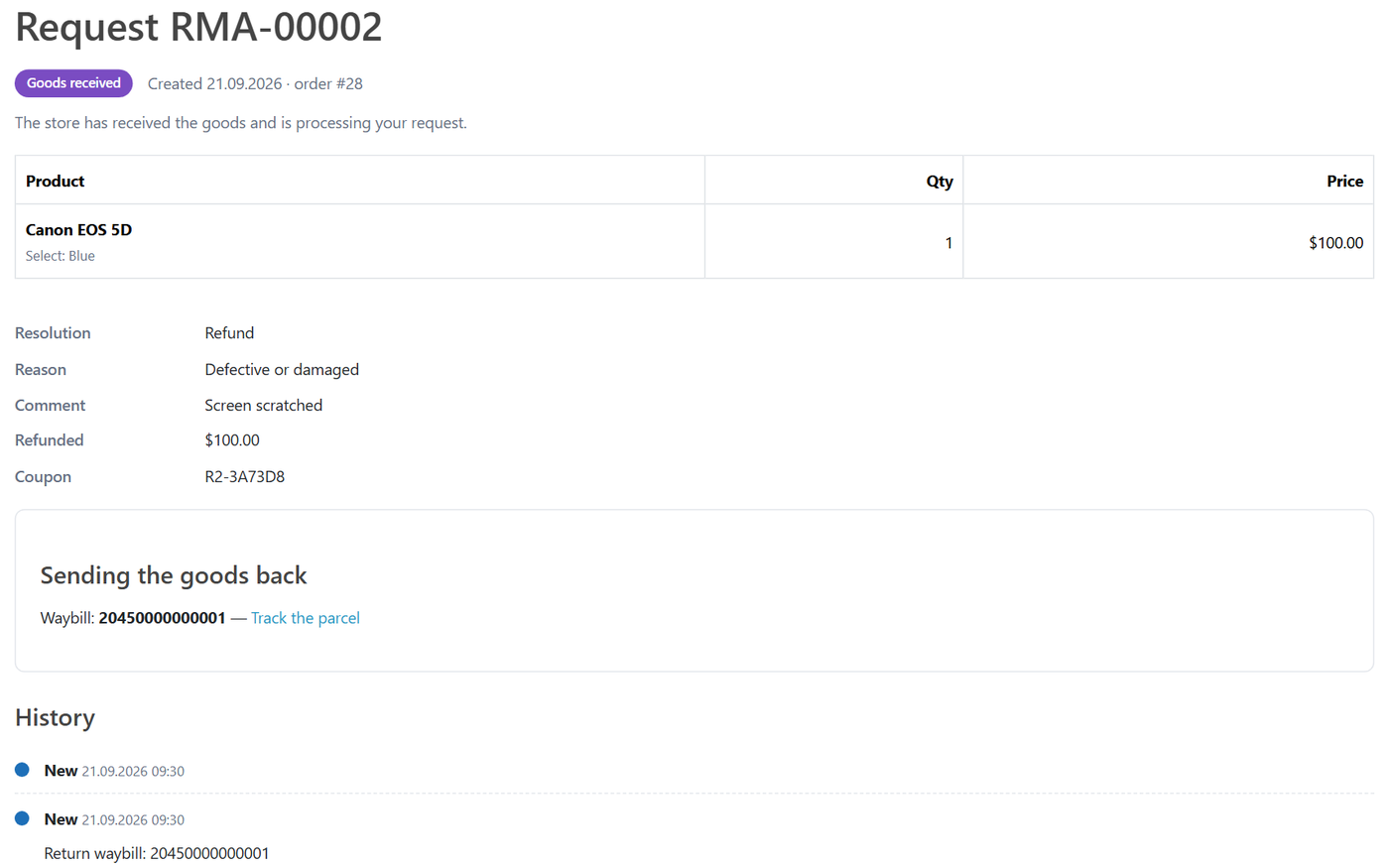
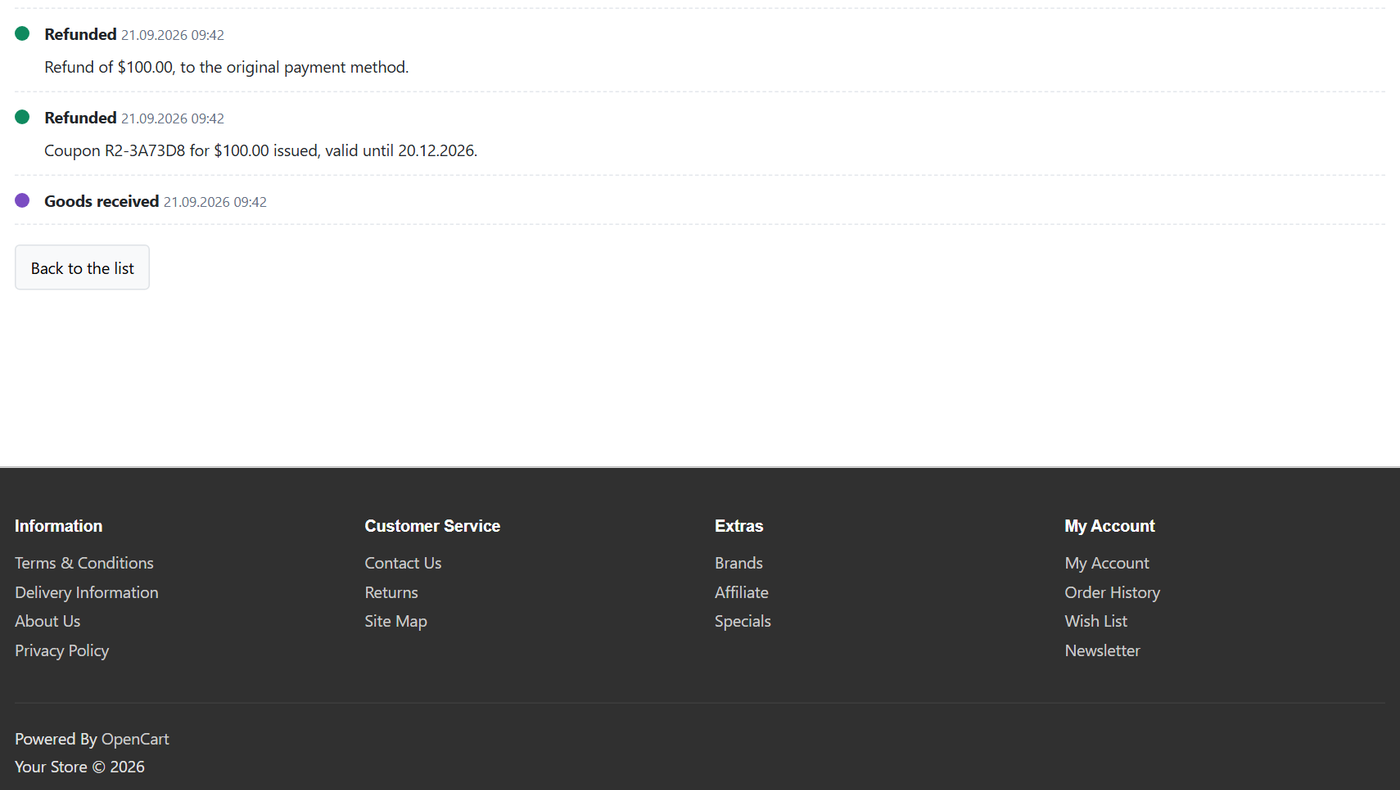
Guest request page with a waybill
Guest request page with a waybill (2)
A guest request: items with the option, resolution, reason, the saved waybill with a tracking link and history.

The trial starts when you ask

A fresh install is the free version, nothing switches on by itself. The “Try Pro for 7 days” button → e-mail → the key right in the window and by e-mail.

One key — a site and a staging copy

Moving the site? Unlink the licence on the old domain and activate it on the new one yourself. A staging copy (staging., dev.) works with the same key and does not take a site slot. For studios — keys for 5 or 25 sites, or unlimited.

Technical requirements

  • OpenCart 4.0.2 – 4.1.x (tested on 4.1.0.3), 3.0.x (tested on 3.0.5.0) or 2.3.0.2
  • PHP 8.0+ for OpenCart 4, 7.3+ for OpenCart 3, 7.0+ for OpenCart 2.3
  • No core file edits: OpenCart events and own tables only
  • Languages: Ukrainian, Russian, English

Version history

v1.0.1 OC 4.x Current 01.11.2026

Before updating to this version, note the settings and the licence key, or replace the files over FTP without uninstalling: later updates keep them.

v1.0.0 First release September 2026

Account and guest return and exchange requests, return period, statuses, waybill with tracking, e-mails and order note, stock-form replacement.

Frequently bought with Returns & Exchanges Manager

All Access Need more? All modules (509) under one licence, new ones are added automatically. 3 244 UAH≈ €66 Learn more →

Full module description

Returns & Exchanges Manager for OpenCart replaces the stock OpenCart returns form with a proper process. The customer picks items and quantities from their own order, gives a reason and says what they want — money back or an exchange. The store works the request through statuses, messages the customer, sees the return waybill and, in Pro, closes the request with one button: refund, coupon or replacement order.

What the customer sees

  • On the order page: the stock return button next to an item opens the module’s form with that item preselected. The “Returns” links in the footer and account lead to the module too.
  • The form: the order’s items with the quantity to return, “Refund” (with bank details if they paid on delivery) or “Exchange” with a wish, a reason, a comment, photos in Pro. On top — the last day requests are accepted.
  • Without an account: order number plus e-mail or phone, then the same form. A link to the request arrives by e-mail.
  • After sending the parcel: the customer adds the waybill and sees a tracking link, and gets an e-mail on every status change.

What the admin gets

  • “Returns & exchanges” under the Sales menu: the request list with status counters, a date filter and search.
  • Request card: items with options, amount, reason, wish, history. Status with an e-mail to the customer, waybill, private note.
  • Pro actions: “Refund” (record + order-history line + order status from the settings), “Coupon”, “Exchange” — a new zero-value order with the chosen option, “Return to stock”. One compensation per request: after a refund no coupon can be issued, and vice versa.
  • Settings: period, order statuses, reasons in three languages, e-mails; in Pro — non-returnable categories and custom periods, Nova Poshta key, Telegram.

How it works — step by step

  1. The order reaches “Complete” — the return period starts on that date (or on the order date, as you choose).
  2. The customer sends a request from the account or as a guest. The module sends e-mails and adds a note to the order history without changing the order status.
  3. Items already requested cannot be claimed again; an order outside the period shows the date the period ended.
  4. The manager approves the request and says where to send the goods. The customer adds the waybill — the store gets an e-mail.
  5. Goods received: in Pro the stock is topped up automatically, and the request is closed by a refund, a coupon or a replacement order.

How much it costs

UAH 1,290 — a one-time payment, lifetime licence. No yearly fees: the module and its Pro features stay yours. One licence covers all three builds — OpenCart 4.x, 3.x and 2.3.

Trial first, payment later. A free 7-day Pro trial starts in the module settings with your e-mail, no card needed. A fresh install is the plain Free version; nothing switches on by itself.

Under the hood

  • Own tables for requests, items, history and files — OpenCart’s stock return tables are left alone.
  • Photos live in a closed storage folder and are served only through a controller that checks access; the type is detected from the file content.
  • Guest access — order number plus its e-mail or phone, a tokenised request link, rate-limited lookups.
  • The licence lives in a separate settings group: “Save” cannot wipe it.
  • Nova Poshta tracking in Pro runs on the OpenCart 4 cron or a hosting-cron URL on 3.x and 2.3.
  • Uninstall removes events and cron but keeps requests and photos, so history is never lost by accident.

How to install

  1. OpenCart 4: Extensions → Installer → upload cc_returns.ocmod.zip and click “Install”. OpenCart 3: Extensions → Installer → cc_returns-oc3.ocmod.zip, then refresh Modifications. OpenCart 2.3: upload the contents of the upload/ folder from cc_returns-oc2.ocmod.zip to the store root (FTP or the hosting file manager).
  2. Extensions → Extensions → Modules → Returns & Exchanges Manager → “Install”, then “Edit”, switch the module on and save.
  3. Requests are under Sales → “Returns & exchanges”.
  4. For Pro: the “Licence” tab → e-mail for the trial or the key after purchase.

Questions
about the module

Didn't find the answer? Message us on Telegram and we'll reply within a business day.

@catcode_support Setup, compatibility, activation
Why is this better than the stock OpenCart returns?

The stock form accepts any order number without checking it, the product as free text and only one per request, with no return period. The module lets the customer pick items and quantities from their own order, checks the period and does not allow claiming the same items twice.

Will the old stock returns disappear?

No. OpenCart tables are not changed, and customers can still see their old records. Switch the module off and the stock form works as before.

Are refunds automatic?

No — OpenCart has no common refund API across payment modules. The module records the refund on the request and in the order history and can change the order status; you send the money in the payment provider's dashboard or by bank transfer.

Can a customer without an account send a request?

Yes: the order number plus the e-mail or phone from that order, in any format (+380…, 067…).

What happens when the trial ends?

The Pro features switch off; requests and history stay. Buy a licence and Pro comes back — for good.

Not quite what you are looking for?

We build custom modules for WordPress, WooCommerce, OpenCart and Shopify. Tell us about the task and we'll prepare an estimate.

Order a custom module