
















WooCommerce
990 UAH644 UAH/year≈ €14
Black November: −35% on all modules until 30 November Black November: −35% until 30 November Choose a module
 Website auditA PDF report by email in 3 minutesCheck a website
Everyday tasks
Image compressorSize, quality and WebP in bulkQR generatorLink, Wi-Fi, payment to IBANVAT calculator20, 14, 7% and amount in wordsTransliterationOfficial Ukrainian standardWebsite checks
PHP and pluginsPHP version, WordPress, pluginsGoogle Merchant feedFields, prices, GTIN, imagesDomain emailSPF, DKIM, DMARC, blacklistsAI search readinessllms.txt, bots, markupAll 9 toolsEnter at least 2 characters

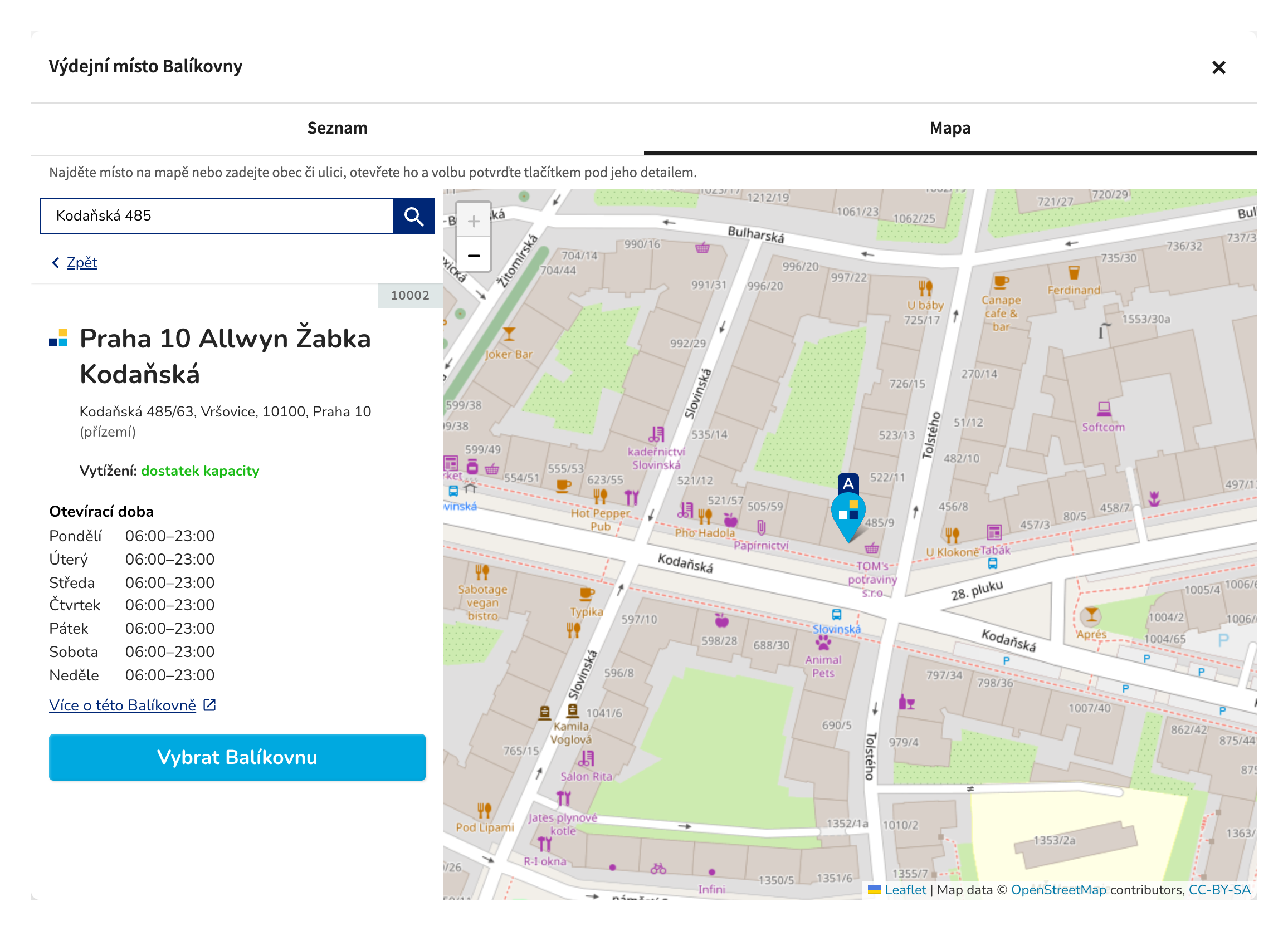
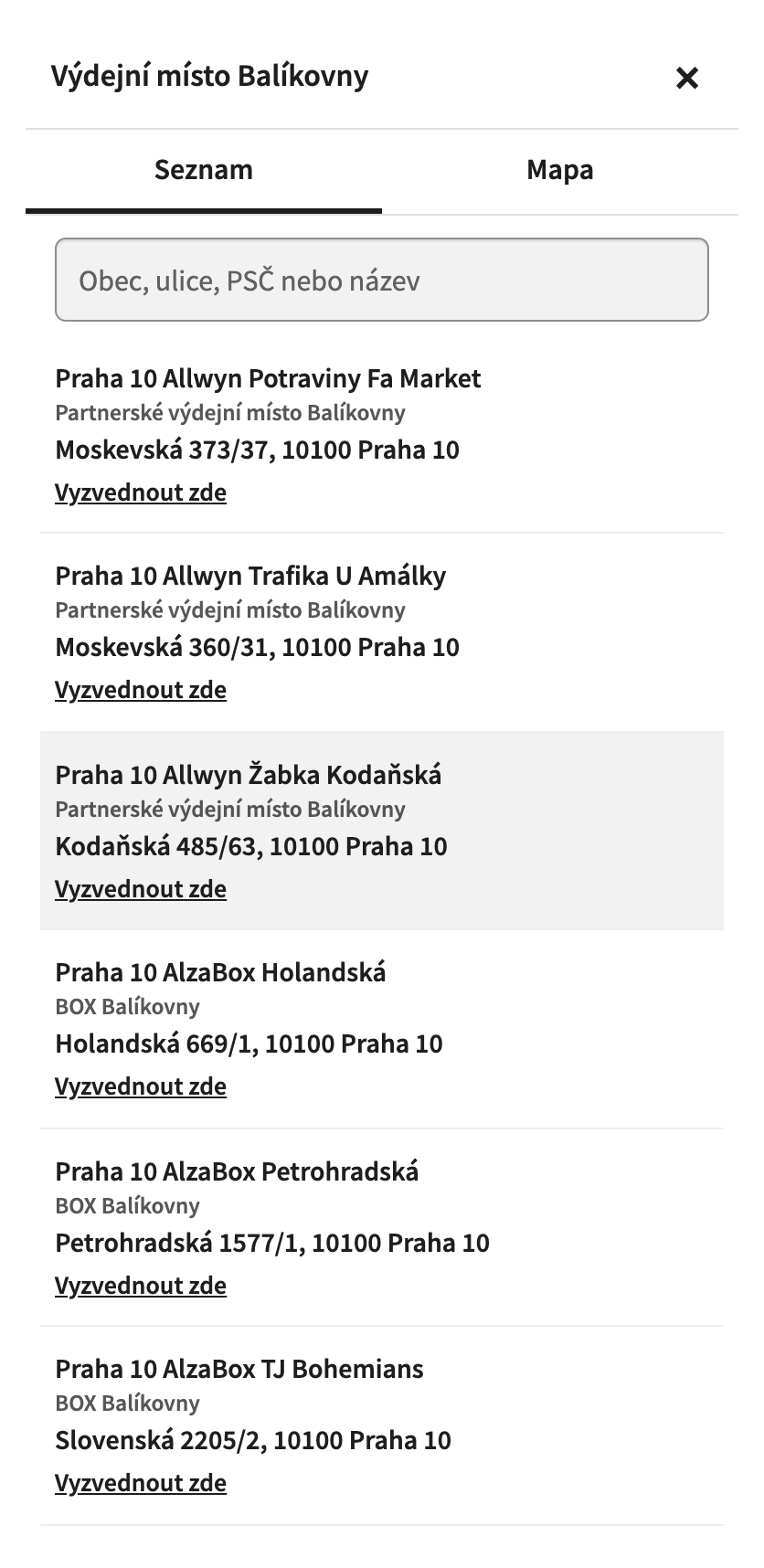
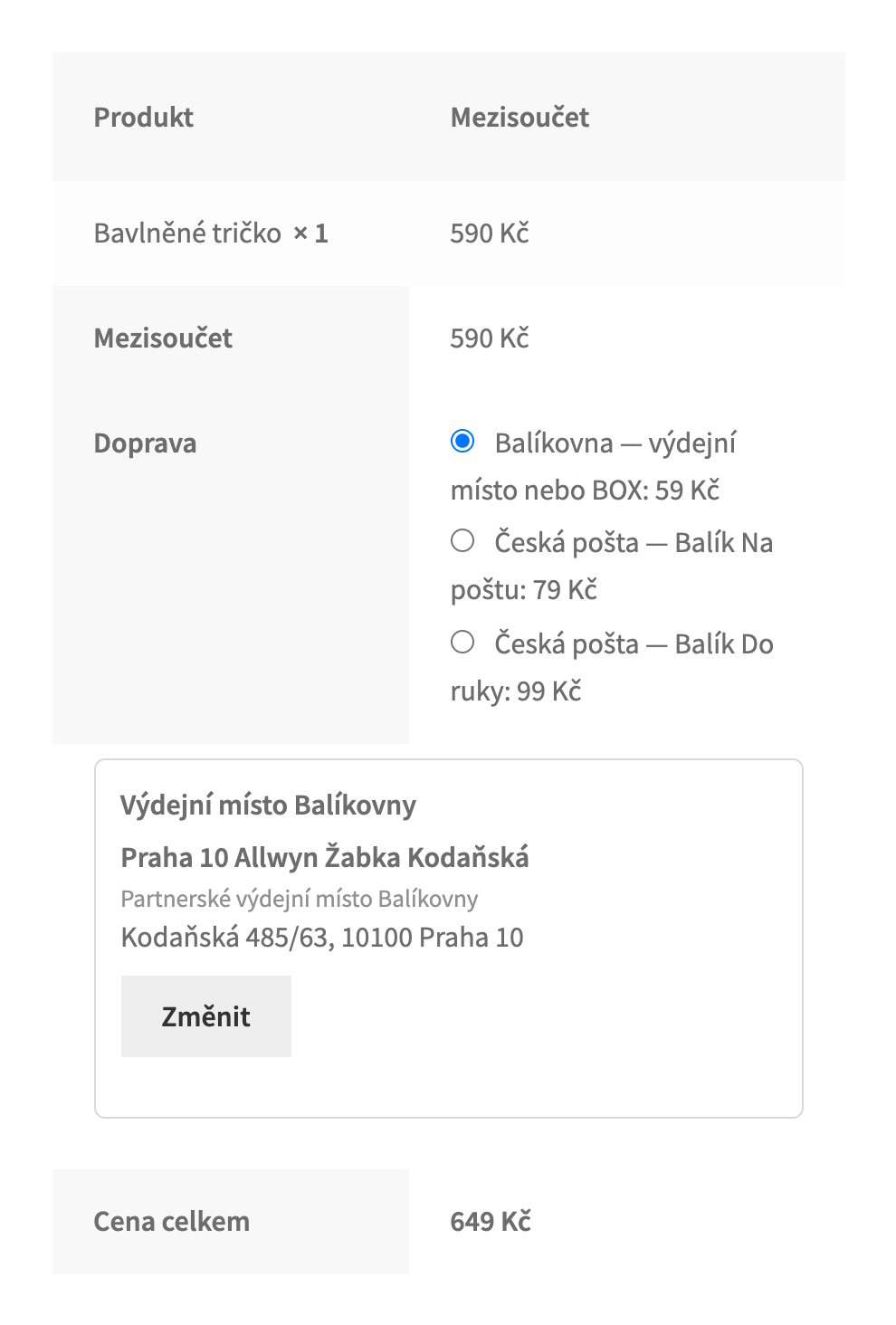
Balíkovna, Balík Na poštu and Balík Do ruky for WooCommerce: the official Česká pošta map at checkout, parcels and labels through the B2B API, cash on delivery, tracking for the buyer.
The free version works with no time limit. Pro adds the rest of the features in the table.


The methods are shown for Czech addresses only. When the buyer chooses Balíkovna or Balík Na poštu, the point picker appears under the delivery method, and only then.

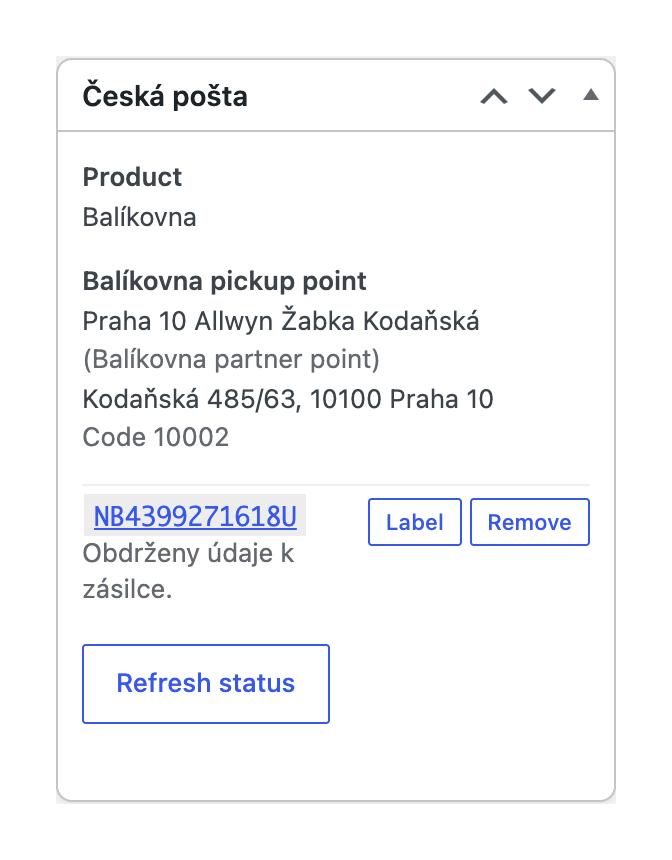
The order screen has a Česká pošta box: service and point with its code, weight, cash on delivery and insured value, the “Send to Česká pošta” button, and after sending the number, status, PDF label and status refresh.

The chosen point is read again on the server from the Česká pošta point service.

A fresh install is the free version, nothing switches on by itself. The “Try Pro for 7 days” button → e-mail → the key right in the window and by e-mail.

Moving the site? Unlink the licence on the old domain and activate it on the new one yourself. A staging copy (staging., dev.) works with the same key and does not take a site slot. For studios — keys for 5 or 25 sites, or unlimited.
 WordPress 6.2+, WooCommerce 7.0+ (HPOS, classic and block checkout), PHP 7.4+.For parcels through the API, a Česká pošta contract with B2B API access.Interface language: English and Czech.
Balíkovna, Balík Na poštu and Balík Do ruky, the official Česká pošta map and the point list on the classic and the block checkout, server-side point check, parcels and labels through the…


Czech Couriers: Balíkovna & Česká pošta for WooCommerce adds three Česká pošta delivery methods to your shop: Balíkovna (pickup point or box), Balík Na poštu (post office) and Balík Do ruky (to the address). The buyer picks the point in the official Česká pošta map or in the list next to it; you send the parcel data from the order screen through the B2B API and print the label. The buyer sees the parcel number and the parcel status in the account and the e-mails. Made for shops selling in the Czech Republic; the plugin speaks English and Czech.
What you need from Česká pošta. The map, the point on the order and tracking of a number you type in work without a contract. Sending parcel data and printing labels through the API need a Česká pošta contract and its B2B API access: the API token and the secret key are generated in Pošta Online → B2B profile management, the technological number and the post code of the submission post office are in the contract.
The methods are shown for Czech addresses only. When the buyer chooses Balíkovna or Balík Na poštu, the point picker appears under the delivery method, and only then. The button opens the official Česká pošta map with address search, “Moje poloha” and opening hours. Balíkovna boxes can be left out of the map with one setting.
Next to the map there is a list tab: search by town, street, post code or name, accents optional, starting with the points near the buyer’s post code. The list comes from a copy of the Česká pošta point list that the plugin refreshes once a day. On a phone the picker opens full screen with the list first; the search field is 16 px, so the phone does not zoom in.
The order screen has a Česká pošta box: service and point with its code, weight, cash on delivery and insured value, the “Send to Česká pošta” button, and after sending the number, status, PDF label and status refresh. Orders shipped with another method can be sent as Balík Do ruky. Without the B2B API you type the number from Podání Online into the order, and the buyer gets the same tracking.
The chosen point is read again on the server from the Česká pošta point service. The order is refused when a point method has no point, the point is closed or of the wrong kind, or the buyer gave no mobile number (Česká pošta sends the pickup code by SMS). The buyer’s address fields are never rewritten in the browser, and the address saved in the buyer’s account stays theirs.
The point is stored on the order (HPOS compatible), optionally written into the shipping address, and shown on the thank-you page, in My account and in the e-mails. As soon as the order has a parcel number, the buyer gets an e-mail with the tracking link. My account shows the number, the link to the Česká pošta tracking page and the current parcel status; the order list has a “Sledovat zásilku” button. The status comes from the public Česká pošta tracking service and is refreshed when the buyer opens the order.
WooCommerce → Czech Couriers: enter the API token, the secret key, the technological number and the post code of the submission post office, save and click “Check the connection”. The secret key is stored encrypted and never shown in the form again. The same page holds the parcel prefixes your contract allows, the cash on delivery service, the account for cash on delivery and the label form.
Checkout settings: boxes in the map, “Download now” for the point list, the payment methods sent as cash on delivery for the order total, the weight of a product without weight, a note on the parcel, the point written into the shipping address, the e-mail with the parcel number and the parcel status in My account.
Prices per weight. For each delivery method, bands of “up to kg = price”: the first band that fits the cart weight gives the price.
Automatic parcels. The parcel data goes to Česká pošta as soon as the order reaches the status you choose; the API call runs in the background, the checkout never waits for it.
Bulk actions. In the orders list: send parcels for the selected orders and print all labels in one PDF.
Insured value. Udaná cena (service 7) on the parcels, for the value of the goods in the order.
Status sync. Every hour the plugin checks the parcel states, writes changes to the order notes and, if you want, marks the order Completed once Česká pošta reports the delivery. Plugin updates come from catcode.com.ua.
Didn't find the answer? Message us on Telegram and we'll reply within a business day.
 @catcode_support
Setup, compatibility, activation
No, it is an independent integration by CatCode. Česká pošta and Balíkovna are products of Česká pošta, s.p.; the plugin is not affiliated with or endorsed by Česká pošta.
Not for the checkout: the Balíkovna map, the point on the order and tracking of a number you type in work without one. Sending parcel data and printing labels through the API need a contract and its B2B API access.
Yes, the map and the list work on both the classic and the block WooCommerce checkout.
Yes. The payment methods you tick in the settings are sent as dobírka for the order total, with the cash on delivery service of your contract.
The parcel prefix is not allowed for your technological number and submission post office. Set the prefixes your contract allows in the settings or ask your Česká pošta business contact.
The Česká pošta API has no call that withdraws parcel data: a parcel not handed over at the counter is not used. "Remove" takes it off the order so you can send a new one.
Pro switches off and the free part keeps working: the delivery methods, the map and the list, parcels from the order screen, tracking for the buyer.
One key works on two sites: the shop and its staging copy.
No reviews yet. Be the first.
No questions yet. Ask one — we answer within 24 hours.
We build custom modules for WordPress, WooCommerce, OpenCart and Shopify. Tell us about the task and we'll prepare an estimate.
Order a custom module
—
Charged in UAH; your bank converts it to your currency. EUR price is approximate.

CatCode assistant
Just now


CatCode assistant
Online

I’ll help with your website task
Describe your website task — I’ll find a ready-made module or pass it to a developer for an estimate. Modules, custom features, layout, integrations, speed, migration, technical SEO.