
















WooCommerce
990 UAH644 UAH/year≈ €14
Black November: −35% on all modules until 30 November Black November: −35% until 30 November Choose a module
 Website auditA PDF report by email in 3 minutesCheck a website
Everyday tasks
Image compressorSize, quality and WebP in bulkQR generatorLink, Wi-Fi, payment to IBANVAT calculator20, 14, 7% and amount in wordsTransliterationOfficial Ukrainian standardWebsite checks
PHP and pluginsPHP version, WordPress, pluginsGoogle Merchant feedFields, prices, GTIN, imagesDomain emailSPF, DKIM, DMARC, blacklistsAI search readinessllms.txt, bots, markupAll 9 toolsEnter at least 2 characters




Sign in and fill in the WooCommerce checkout with your bank (Bank iD, Czech Republic); Pro adds an age check and payment for verified buyers.
The free version works with no time limit. Pro adds the rest of the features in the table.


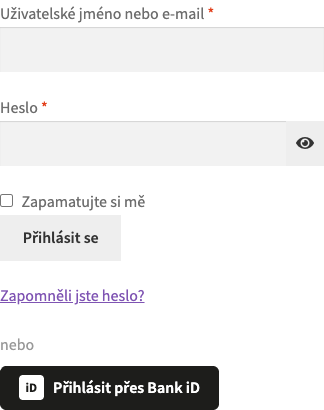
Under the login form in My account and at the checkout there is a “Přihlásit přes Bank iD” button.

WooCommerce → Bank iD: choose the mode, enter the Client ID and Client secret (the secret is stored encrypted), choose the CONNECT or IDENTIFY service, add an SLA identifier if you have one and press “Check connection”.

Age check. A minimum age from 1 to 99 (18 by default) applies to the whole shop or only to chosen categories with their subcategories: alcohol, tobacco, vapes, energy drinks.

A fresh install is the free version, nothing switches on by itself. The “Try Pro for 7 days” button → e-mail → the key right in the window and by e-mail.

Moving the site? Unlink the licence on the old domain and activate it on the new one yourself. A staging copy (staging., dev.) works with the same key and does not take a site slot. For studios — keys for 5 or 25 sites, or unlimited.
 WordPress 6.4+, WooCommerce 8.6+ (HPOS and block checkout supported), PHP 7.4+.A Bank iD application (Client ID and Client secret); for live buyers, a contract with Bank iD.HTTPS on the shop site.
Sign-in and checkout filling with Bank iD on the classic and the block checkout, connecting in My account, the CONNECT and IDENTIFY services, HPOS.


Bank iD Login for WooCommerce lets buyers in the Czech Republic sign in to your shop and fill in the checkout with their Bank iD bank identity: the person picks their bank (Česká spořitelna, ČSOB, Komerční banka, Raiffeisenbank, mBank, Moneta, Air Bank, Fio and others), signs in there, and the shop receives the name, e-mail, phone and address confirmed by the bank. The module works through the official OpenID Connect interface of Bank iD with your own Bank iD application.
What you need from Bank iD. An application on the Bank iD developer portal: the Client ID and Client secret come from there. For live buyers the shop needs a contract with Bank iD, which also sets the price of each confirmation. Bank iD switches on the age and AML checks on the bank side under that contract.
Under the login form in My account and at the checkout there is a “Přihlásit přes Bank iD” button. A returning customer is signed in to their account; a new one gets an account with the details the bank confirmed, or checks out as a guest: you choose in the settings. An e-mail that already belongs to an account is never taken over by a bank sign-in.
Above the checkout form (classic and block) there is a “Vyplnit přes Bank iD” button: after the bank sign-in the first name, last name, e-mail and phone are filled in, and with the IDENTIFY service also the address in the Czech format (“Olbrachtova 1929/62, 140 00 Praha”). By default only empty fields are filled; overwriting is switched on in the settings.
In My account a customer with an existing account can connect or disconnect Bank iD and sign in through the bank from then on. Shop staff (people who manage the shop) sign in with a password only; the bank sign-in is off for such accounts.
WooCommerce → Bank iD: choose the mode, enter the Client ID and Client secret (the secret is stored encrypted), choose the CONNECT or IDENTIFY service, add an SLA identifier if you have one and press “Check connection”. The screen shows the Redirect URI and the list of scopes to allow in the Bank iD application.
The same screen sets where the buttons appear, whether a new customer gets an account, whether the address is filled in and whether what the buyer already typed is overwritten. The module works on the classic and the block checkout and with HPOS. The interface is in English; Czech is included in the Pro build.
Age check. A minimum age from 1 to 99 (18 by default) applies to the whole shop or only to chosen categories with their subcategories: alcohol, tobacco, vapes, energy drinks. An order without a confirmed age cannot be placed: the block is made on the server for both the classic and the block checkout. Above the checkout the buyer sees a clear notice, and the product page shows a note.
Payment methods for verified buyers. Invoice, instalments or cash on delivery appear only after Bank iD has confirmed the buyer with IDENTIFY: an adult not limited in legal capacity. The rule is checked on the server too. Bank iD switches on any additional AML check on the bank side under your contract.
Same person. Optional: the billing name must match the name the bank confirmed.
Confirm again. After the number of days you set (0 means until the bank reports a change).
Bank notifications. When Bank iD reports that a customer’s data changed, the stored confirmation is marked as outdated and the next restricted order asks for Bank iD again. The signature of the notification is checked against the bank keys.
A record on every order. Who confirmed, when, with which service, the age result and the Bank iD transaction ID: in an order note and in a box on the order screen.
Journal. Sign-ins, refused orders and bank notifications are kept for one year; the person is stored in the journal only as a hash.
Didn't find the answer? Message us on Telegram and we'll reply within a business day.
 @catcode_support
Setup, compatibility, activation
No, it is an independent integration by CatCode. Bank iD is a service of Bankovní identita, a.s.; the plugin is not affiliated with or endorsed by Bank iD.
For live buyers, yes: an organisation and a contract, which also sets the price of each confirmation. You create the application and the keys on the Bank iD developer portal.
CONNECT gives the name, e-mail, phone and date of birth. IDENTIFY adds the address and the legal status. Choose the service your contract covers.
Every bank that offers Bank iD: the buyer picks their bank on the Bank iD screen.
Yes. The buttons sit next to the normal form. The exception: products you set under the Pro age check, and payment methods set for verified buyers only.
The link to the account (a pseudonymous identifier that Bank iD issues for your shop only) and the confirmed details the shop asked for.
One key works on two sites: the shop and its development copy.
No reviews yet. Be the first.
No questions yet. Ask one — we answer within 24 hours.
We build custom modules for WordPress, WooCommerce, OpenCart and Shopify. Tell us about the task and we'll prepare an estimate.
Order a custom module
—
Charged in UAH; your bank converts it to your currency. EUR price is approximate.

CatCode assistant
Just now


CatCode assistant
Online

I’ll help with your website task
Describe your website task — I’ll find a ready-made module or pass it to a developer for an estimate. Modules, custom features, layout, integrations, speed, migration, technical SEO.