















WooCommerce
890 UAH579 UAH/year≈ €12
Black November: −35% on all modules until 30 November Black November: −35% until 30 November Choose a module
 Website auditA PDF report by email in 3 minutesCheck a website
Everyday tasks
Image compressorSize, quality and WebP in bulkQR generatorLink, Wi-Fi, payment to IBANVAT calculator20, 14, 7% and amount in wordsTransliterationOfficial Ukrainian standardWebsite checks
PHP and pluginsPHP version, WordPress, pluginsGoogle Merchant feedFields, prices, GTIN, imagesDomain emailSPF, DKIM, DMARC, blacklistsAI search readinessllms.txt, bots, markupAll 9 toolsEnter at least 2 characters
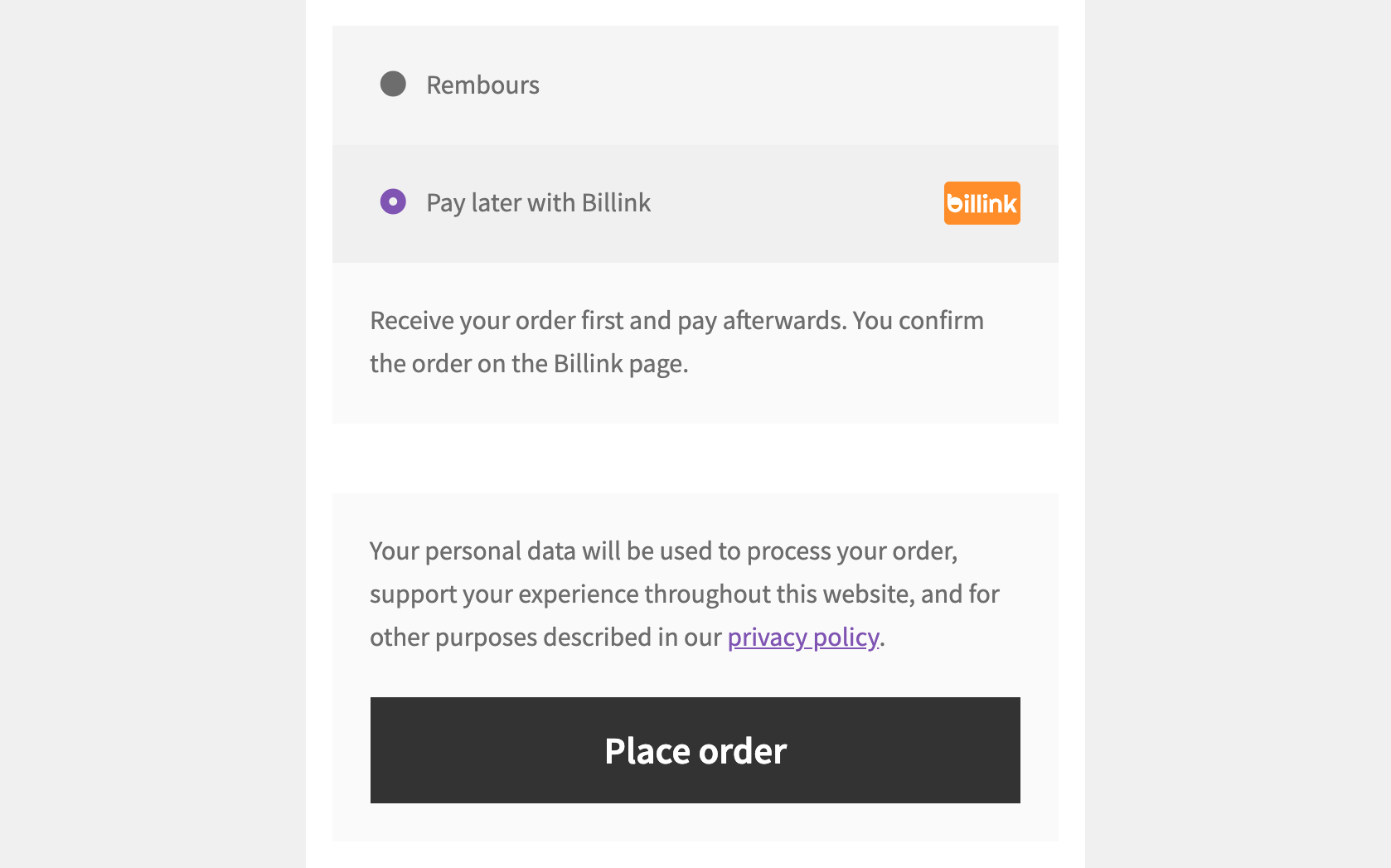
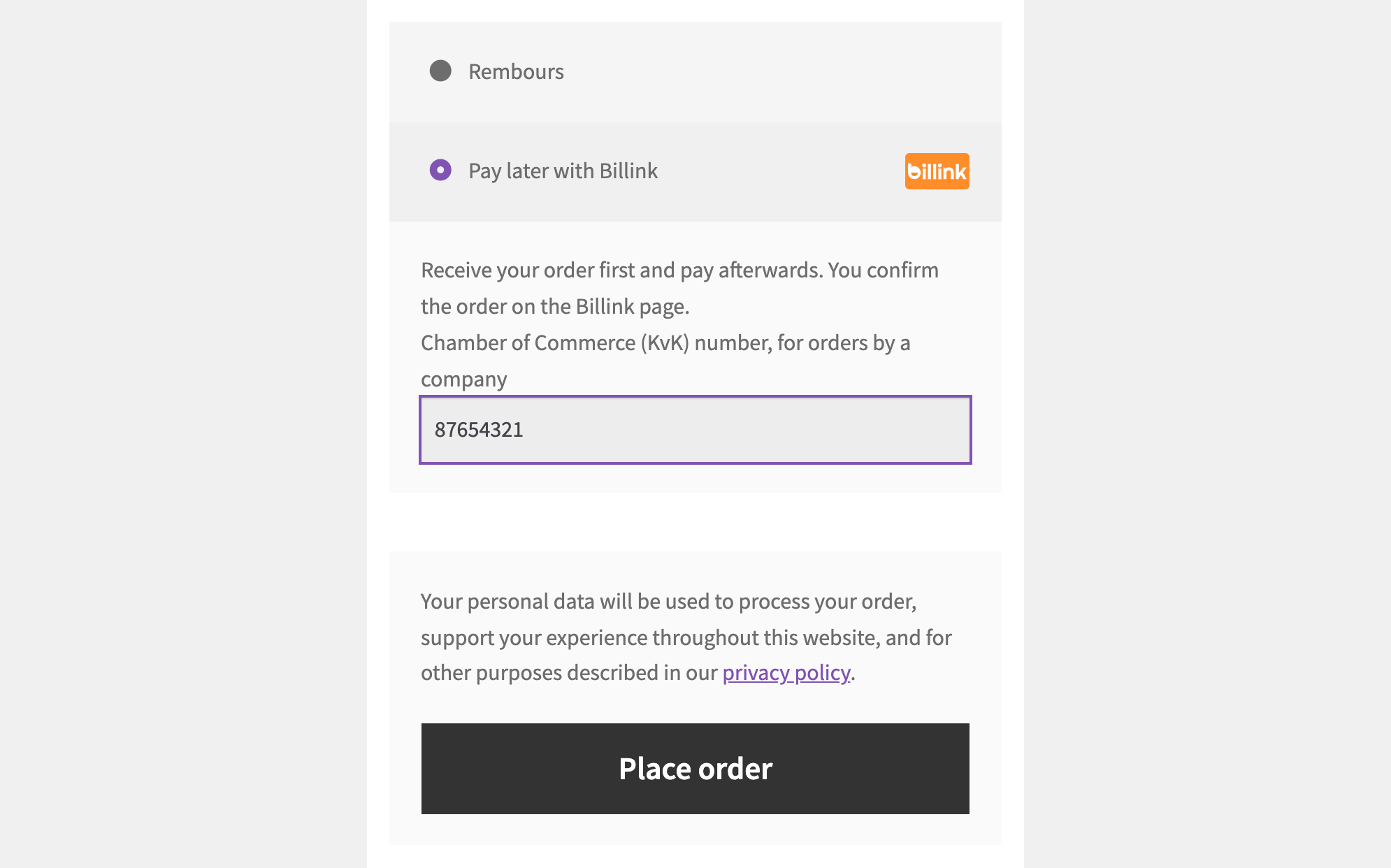
Buyers choose "Pay later with Billink", confirm the order on the Billink page and pay the invoice afterwards; the payment is confirmed by a signed Billink webhook.
The free version works with no time limit. Pro adds the rest of the features in the table.


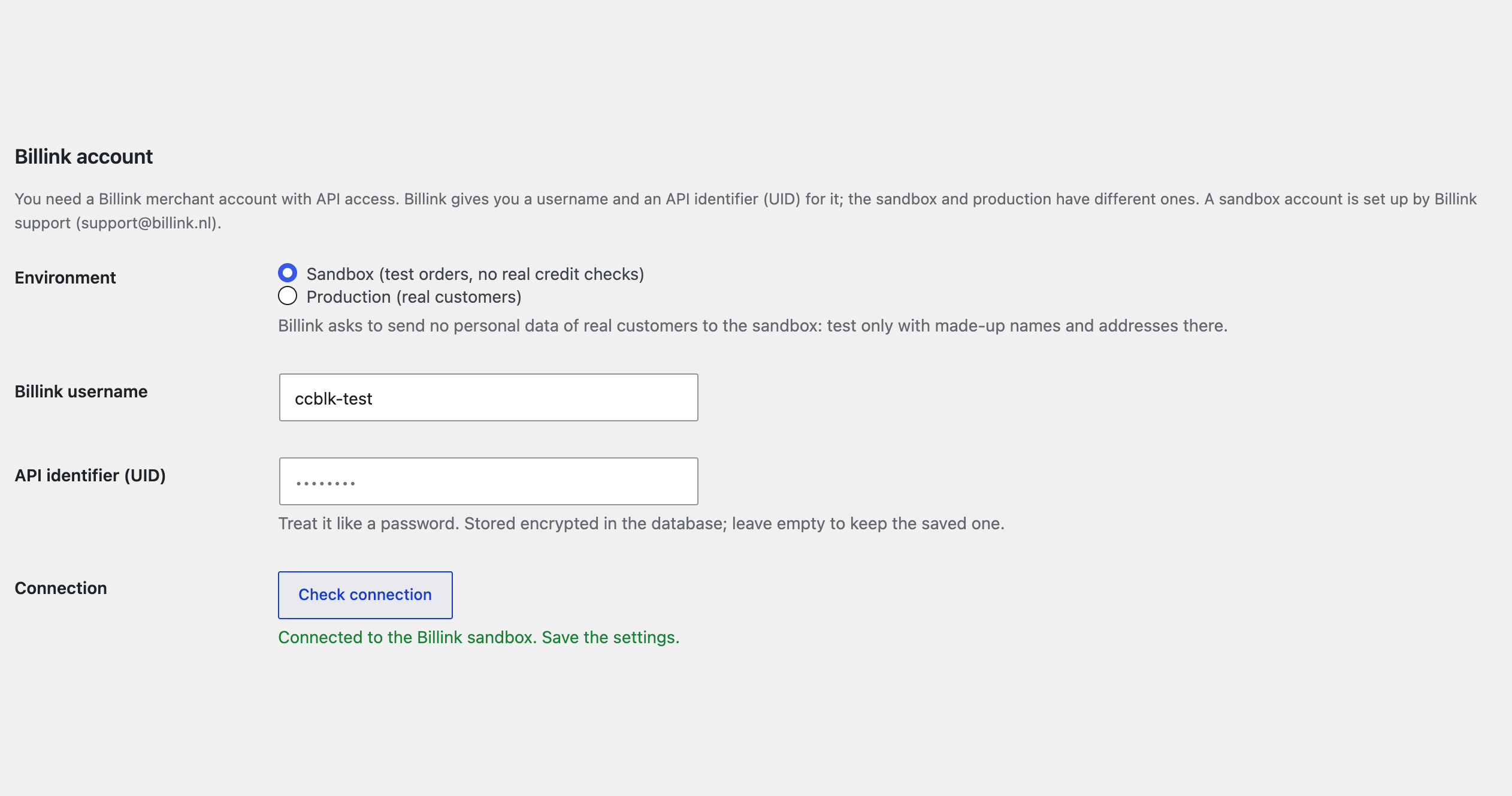
Everything is set up on one page: WooCommerce → Billink pay later.

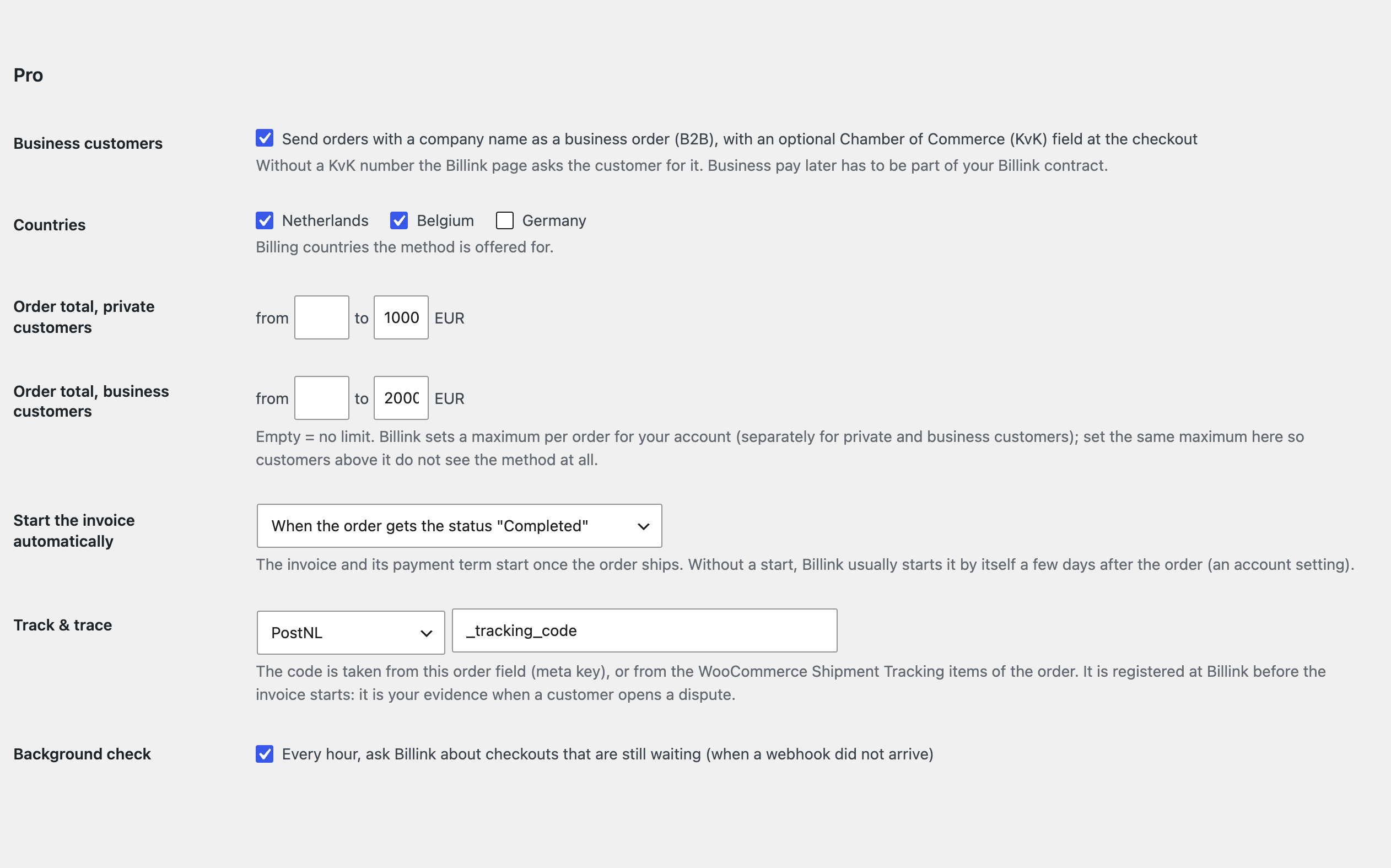
Business customers (B2B): orders with a company name go to Billink as business orders, and an optional Chamber of Commerce (KvK) number field appears at the classic and the block checkout.

The base version is free. Pro costs 1290 UAH for a one-year licence. A year of updates, technical support and all Pro features.

A fresh install is the free version, nothing switches on by itself. The “Try Pro for 7 days” button → e-mail → the key right in the window and by e-mail.

Moving the site? Unlink the licence on the old domain and activate it on the new one yourself. A staging copy (staging., dev.) works with the same key and does not take a site slot. For studios — keys for 5 or 25 sites, or unlimited.
 WordPress 6.4+, WooCommerce 8.6+, PHP 7.4+.A Billink merchant account: username and API identifier.A shop in euros with billing addresses in the Netherlands, Belgium or Germany; the site on HTTPS for the webhooks.
Billink at the checkout, payment confirmed by the signed webhook and the thank-you check, the status check, webhooks from the settings, the AFM warning option, Dutch translation.
Pay Later with Billink for WooCommerce adds the Billink payment method (“achteraf betalen”) to the WooCommerce checkout: the buyer gets the goods first and pays the invoice later. At the checkout the buyer chooses “Pay later with Billink”, lands on the Billink page, confirms the order there, and the shop gets the confirmation from Billink. The module uses the current Billink API (sessions and signed v3 webhooks) and works with the classic and the block checkout and HPOS. You need your own Billink merchant account. This is an independent integration by CatCode; Billink is a trademark of Billink B.V.
Everything is set up on one page: WooCommerce → Billink pay later. Choose the environment (test or live), enter your Billink username and the API identifier (UID, stored encrypted) and press “Check connection”: Billink checks the data without creating anything. The signed webhooks are set up from the same page: paste your signing secret or let the module generate one, and register the webhook address at Billink with one click. For every order the module creates a Billink checkout session with the customer, the billing and delivery address and every order line (products, shipping, fees) with its VAT rate; the street, the house number and the extension are sent separately, taken from the house number fields of Dutch checkout plugins or read from the street address line. The customer is sent to the Billink page. The order is paid when Billink reports the session as completed: by the signed webhook (HMAC-SHA256, deliveries older than 5 minutes are refused, each one is processed once) and by a check with Billink when the customer lands on the thank-you page. A cancelled or expired Billink page cancels the waiting order; when Billink cannot create the order, it fails and the buyer sees a neutral message (the reason is in the order notes), with the cart left intact. The “Check status at Billink” button on the order asks Billink about the session and about the payment of the invoice. The method is offered in euros for billing addresses in the Netherlands, Belgium and Germany. There is an order number prefix for several shops on one account, your logo on the Billink page and the official Billink badge. Optionally the official AFM warning image “Let op! Geld lenen kost geld” can be shown above the method description (off by default).
Business customers (B2B): orders with a company name go to Billink as business orders, and an optional Chamber of Commerce (KvK) number field appears at the classic and the block checkout. Start of the invoice: by hand from the order screen, or automatically when the order gets a status you choose; the track & trace code (from an order field or WooCommerce Shipment Tracking) is registered at Billink first. Refunds from WooCommerce: a full or partial refund becomes a credit note on the Billink invoice. Hold and disputes: pause the reminders for up to 14 days, resume, and open a dispute with Billink categories from the order. Order webhook: the events of the invoice (started, paid, credited, on hold, disputes) appear as order notes. Billink settlement invoices: a list with a date filter and a ZIP with all their documents for reconciliation. A journal of the last Billink calls and webhooks. Limits by country and order total, separately for private and business customers. An hourly background check of checkouts whose webhook did not arrive.
The module is not on wordpress.org yet: the free version and Pro are one archive from this page. Without a key it works as the free version.
Didn't find the answer? Message us on Telegram and we'll reply within a business day.
 @catcode_support
Setup, compatibility, activation
No. It is an independent integration made by us; Billink is a trademark of Billink B.V.
Yes, your own merchant account with API access. The contract and the access are issued by Billink; the module does not do that.
Press "Check status at Billink" on the order: the module asks Billink and pays the order if the session is completed. With Pro the hourly check does this.
Yes, with Pro: orders with a company name go as business orders, with an optional KvK field. Business payment has to be part of your Billink contract.
If you want: the method settings have an option that shows the official AFM image "Let op! Geld lenen kost geld" above the method description. It is off by default.
Yes, with the classic one and with HPOS too.
Pro switches off, the free part keeps working.
No reviews yet. Be the first.
No questions yet. Ask one — we answer within 24 hours.
We build custom modules for WordPress, WooCommerce, OpenCart and Shopify. Tell us about the task and we'll prepare an estimate.
Order a custom module
—
Charged in UAH; your bank converts it to your currency. EUR price is approximate.

CatCode assistant
Just now


CatCode assistant
Online

I’ll help with your website task
Describe your website task — I’ll find a ready-made module or pass it to a developer for an estimate. Modules, custom features, layout, integrations, speed, migration, technical SEO.
