
















OpenCart
1 290 UAH839 UAH≈ €17
Black November: −35% on all modules until 30 November Black November: −35% until 30 November Choose a module
 Website auditA PDF report by email in 3 minutesCheck a website
Everyday tasks
Image compressorSize, quality and WebP in bulkQR generatorLink, Wi-Fi, payment to IBANVAT calculator20, 14, 7% and amount in wordsTransliterationOfficial Ukrainian standardWebsite checks
PHP and pluginsPHP version, WordPress, pluginsGoogle Merchant feedFields, prices, GTIN, imagesDomain emailSPF, DKIM, DMARC, blacklistsAI search readinessllms.txt, bots, markupAll 9 toolsEnter at least 2 characters

TOConline for OpenCart 4.x, 3.x, 2.3 (Portugal): documents from the order page and NIF at checkout free; Pro adds status rules, credit notes, AT and a journal. A licence for life.
The free version works with no time limit. Pro adds the rest of the features in the table.


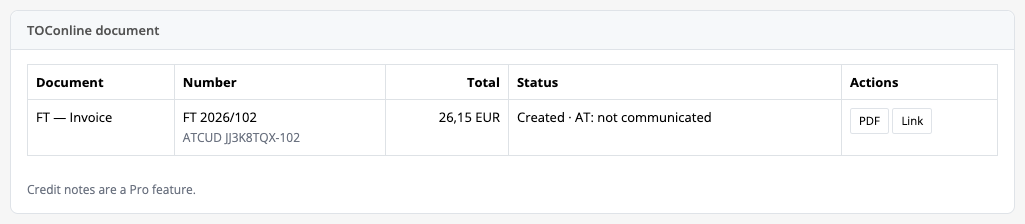
The order page gets a “TOConline document” box: the buyer NIF (you can change it and save it for this order), rows with item code, quantity, price, discount and rate, and the total.

Extensions → Extensions → Modules → TOConline Invoices: six tabs, “Connection”, “Buyer”, “Document”, “Automation”, “Companies” and “Pro”.

A fresh install is the free version, nothing switches on by itself. The “Try Pro for 7 days” button → e-mail → the key right in the window and by e-mail.

Moving the site? Unlink the licence on the old domain and activate it on the new one yourself. A staging copy (staging., dev.) works with the same key and does not take a site slot. For studios — keys for 5 or 25 sites, or unlimited.
 OpenCart 4.0.2.x-4.1.x, 3.0.x or 2.3.0.2; the cURL extension; a store address over https.A TOConline account with a company and access to Dados API.A document in TOConline is final once created: it cannot be voided, changed or deleted, and the only correction is a credit note (Pro). For the first orders check the rows and total in the order box before sending.An unknown result (timeout, server error, unreadable reply) stops the document until you decide: the module first looks for the document in TOConline by the order reference and never sends a second one by itself.A credit note is made for the whole invoice only; there are no partial refunds.Stores tied to an additional company stop with an explanation without Pro and never go into the main company.A 0% VAT row needs an exemption reason; without it the module sends nothing. An EU tax number is not checked in VIES, and the NIF only by check digit.
For OpenCart 4.x, 3.x and 2.3: TOConline invoice-receipts, invoices and simplified invoices from the order page, NIF at checkout with validation, ATCUD, PDF and public link, VAT rates for…


TOConline Invoices for OpenCart 4.x, 3.x and 2.3 issues documents in the Portuguese TOConline service straight from store orders: a button on the order page creates an invoice-receipt (FR), an invoice (FT) or a simplified invoice (FS) in TOConline and shows the document number, ATCUD, PDF and public link.
What you need from TOConline. A TOConline account with a company; a company administrator opens Empresa → Configurações → Dados API, enters the integrator name and e-mail and receives a link (valid for 72 hours) with the client id, secret, OAuth address and API address. The service itself is paid in TOConline under your plan: the module adds no per-document fee.
The order page gets a “TOConline document” box: the buyer NIF (you can change it and save it for this order), rows with item code, quantity, price, discount and rate, and the total. The button creates the document; the box then shows the type, number, ATCUD, total, AT status and the PDF and “Link” buttons.
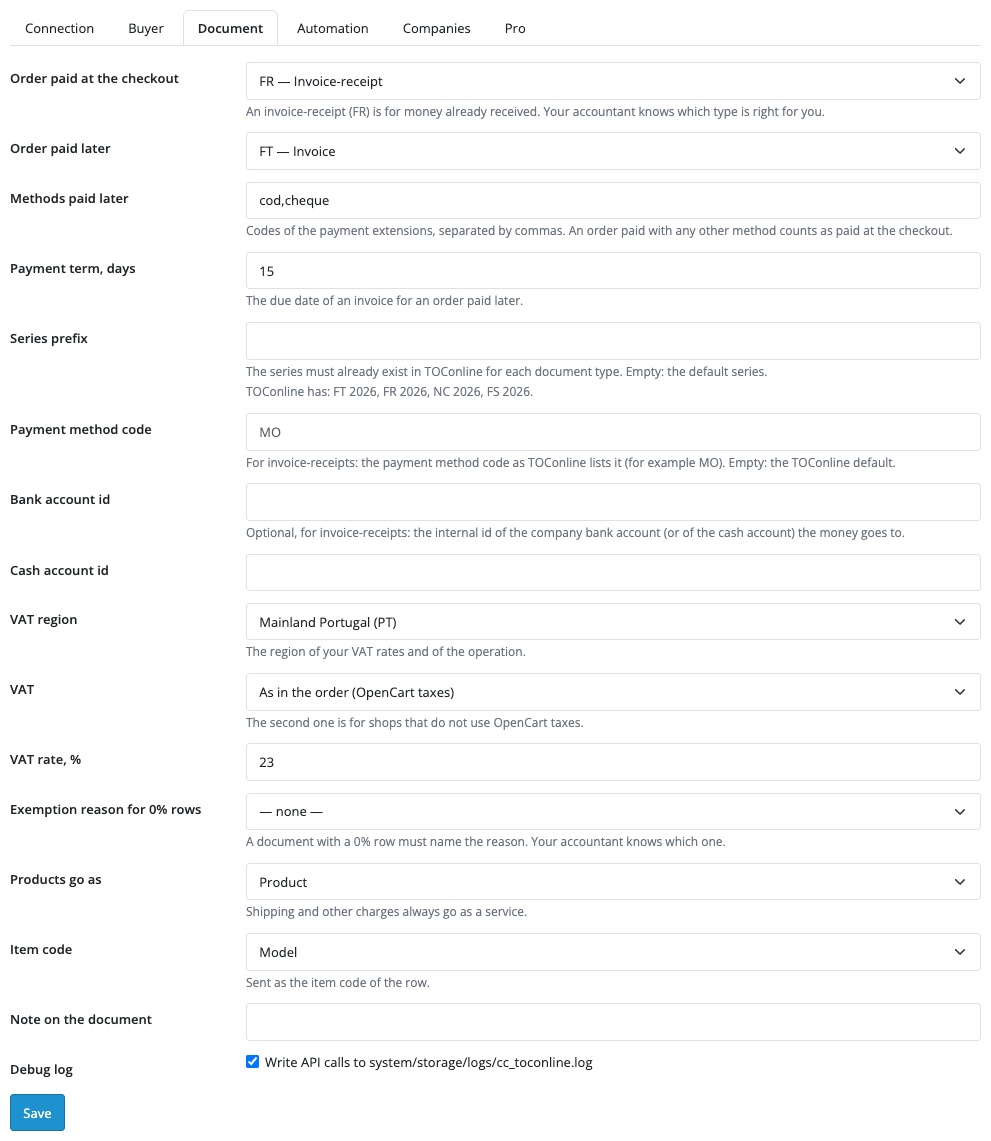
An order paid at checkout gets an invoice-receipt (FR) or a simplified invoice (FS) of your choice; an order paid later (cash on delivery, cheque: you set the list of codes) gets an invoice (FT) with a payment term, 15 days by default. A coupon goes as a row discount, shipping as a service. The module compares the document total with the order total before sending and after it; a mismatch is shown in the note.
Extensions → Extensions → Modules → TOConline Invoices: six tabs, “Connection”, “Buyer”, “Document”, “Automation”, “Companies” and “Pro”. On the first one you enter the client id, secret, OAuth address and API address from the Dados API page and press “Save and check the connection”: the module runs OAuth, stores the tokens encrypted and shows how many document series it found.
On “Buyer” you turn on the NIF field at checkout and the Portuguese NIF check by check digit: a wrong number is rejected next to the field. On “Document” you set the document type for orders paid at checkout and paid later, the list of “pay later” methods, the payment term, the series prefix (the series must already exist in TOConline), the payment method code, the VAT region (mainland, Madeira, Azores), VAT as in the order, prices with VAT or without VAT, the exemption reason for 0% rows, the row type (Product or Service), the item code (model or SKU) and a note.
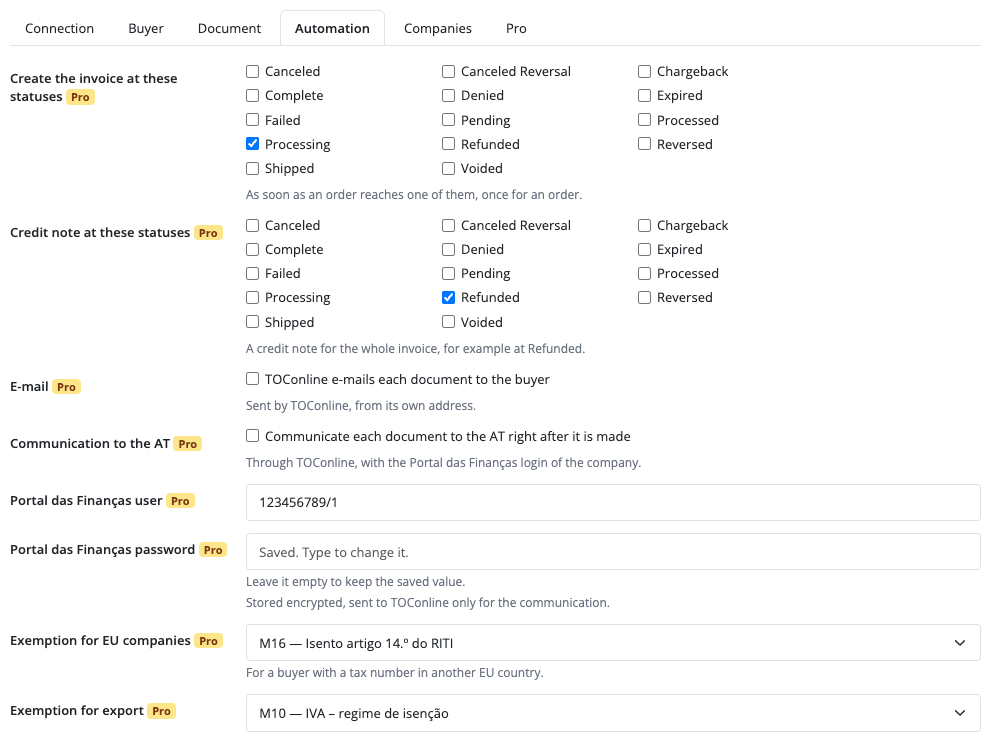
The “Automation” and “Companies” tabs are for Pro. Without a key they open with an explanation and disabled fields, breaking nothing.
Pro issues documents on its own: when an order reaches one of the statuses you pick (for example “Processing”), and creates a credit note for the whole invoice by button or at a refund status (“Refunded”). TOConline can e-mail the document to the buyer, and the module can pass it to the AT automatically or by button (the company Portal das Finanças login is needed; it is stored encrypted). Separate exemption reasons are set for EU companies and export.
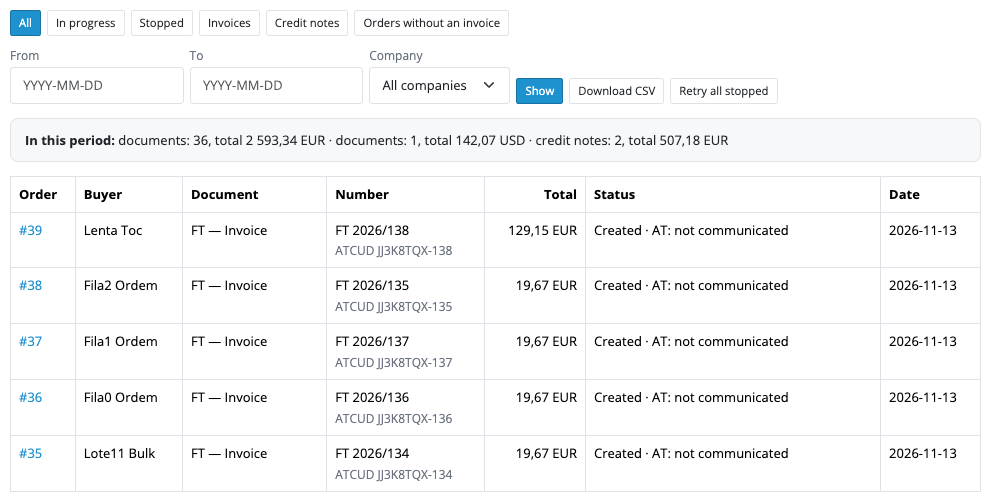
The “TOConline documents” journal in the Sales menu shows each document with its status, ATCUD and AT status in words, filters by status, period and company, and period totals. “Orders without an invoice” gives bulk issuing for past orders, “Retry all stopped” repeats everything stopped, and “Download CSV” exports the journal. Up to three additional TOConline companies are tied to OpenCart stores.
Selling on WooCommerce? There is a separate plugin for it: Invoices with TOConline for WooCommerce.
Didn't find the answer? Message us on Telegram and we'll reply within a business day.
 @catcode_support
Setup, compatibility, activation
No, it is an independent TOConline integration by CatCode. TOConline is a trademark of its owner.
A TOConline account with a company and the Empresa → Configurações → Dados API page: client id, secret, OAuth address and API address.
No: a TOConline document is final once created. It is corrected with a credit note (Pro: a button in the order or a refund status).
The document goes to a final consumer ("Consumidor final"). If an NIF is entered but its check digit is wrong, the buyer sees an error next to the field at checkout.
Pick an exemption reason (M01-M99) in the settings. Without it the document is not issued and the module explains why.
The module stops the document and looks for it in TOConline by the order reference. If there is none, you decide: send again or remove. It never sends a second document by itself.
Yes, in Pro: for orders without an invoice; "Retry all stopped" repeats the stopped ones.
OpenCart 4.0.2.x-4.1.x, 3.0.x and 2.3.0.2: three separate archives in one product.
Yes, for OpenCart it is one payment and a licence for life, for two sites.
Pro turns off, documents queued by status stop with a reason, and the free part keeps working.
No reviews yet. Be the first.
No questions yet. Ask one — we answer within 24 hours.
We build custom modules for WordPress, WooCommerce, OpenCart and Shopify. Tell us about the task and we'll prepare an estimate.
Order a custom module
—
Charged in UAH; your bank converts it to your currency. EUR price is approximate.

CatCode assistant
Just now


CatCode assistant
Online

I’ll help with your website task
Describe your website task — I’ll find a ready-made module or pass it to a developer for an estimate. Modules, custom features, layout, integrations, speed, migration, technical SEO.