
















WooCommerce
990 UAH644 UAH/year≈ €14
Black November: −35% on all modules until 30 November Black November: −35% until 30 November Choose a module
 Website auditA PDF report by email in 3 minutesCheck a website
Everyday tasks
Image compressorSize, quality and WebP in bulkQR generatorLink, Wi-Fi, payment to IBANVAT calculator20, 14, 7% and amount in wordsTransliterationOfficial Ukrainian standardWebsite checks
PHP and pluginsPHP version, WordPress, pluginsGoogle Merchant feedFields, prices, GTIN, imagesDomain emailSPF, DKIM, DMARC, blacklistsAI search readinessllms.txt, bots, markupAll 9 toolsEnter at least 2 characters

A TOConline invoice from every WooCommerce order: the customer by NIF, VAT of the mainland, Madeira and the Azores, PDF; Pro adds documents by status, credit notes, the AT, a document list.
The free version works with no time limit. Pro adds the rest of the features in the table.


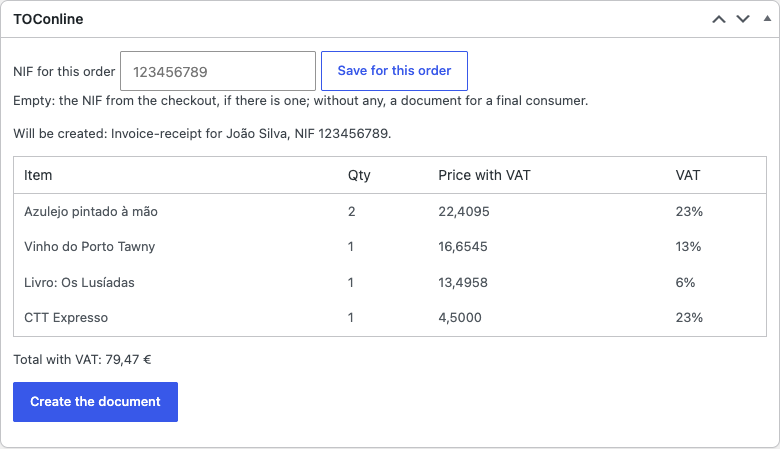
The order gets a “TOConline” box: the rows that will go into the document, the VAT rate of each row, the total with VAT and a NIF field for this order.

WooCommerce → TOConline: enter the Client ID, Secret, OAuth address and API address from the TOConline e-mail and press “Check the connection and load the series”.

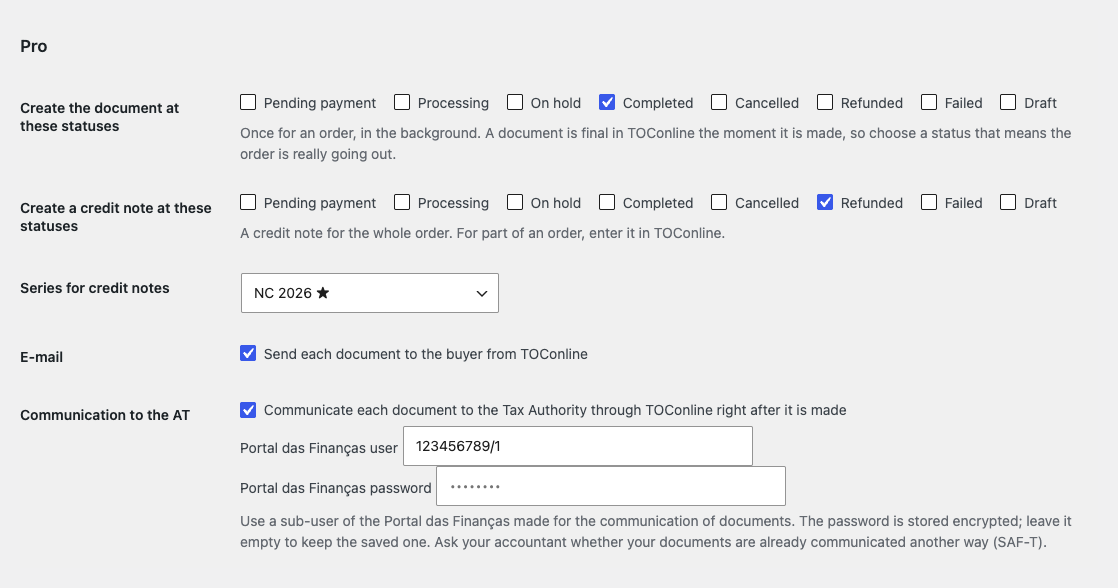
Documents by status. Choose the statuses (for example “Completed”) and every order gets its document in the background, once.

A fresh install is the free version, nothing switches on by itself. The “Try Pro for 7 days” button → e-mail → the key right in the window and by e-mail.

Moving the site? Unlink the licence on the old domain and activate it on the new one yourself. A staging copy (staging., dev.) works with the same key and does not take a site slot. For studios — keys for 5 or 25 sites, or unlimited.
 WordPress 6.4+, WooCommerce 8.6+ (HPOS, block checkout), PHP 7.4+.A TOConline company with an active invoicing (GC) plan and API access through the accountant.Shop currency: euro (EUR); the shop address on https.
November 2026.


Invoices with TOConline for WooCommerce creates an invoice (FT), invoice-receipt (FR) or simplified invoice (FS) in the Portuguese service TOConline from a shop order. A button on the order screen creates the document, the customer is found in TOConline by NIF or created, and the document number and PDF stay with the order. The plugin uses the API of your own TOConline company and is made for shops in Portugal (mainland, Madeira, Azores).
What you need in TOConline. A TOConline company with an active invoicing (GC) plan and API access, which the company gets through its certified accountant (Contabilista Certificado). In TOConline: Empresa → Configurações → Dados API → add the integrator; an e-mail brings a link (valid for 72 hours) with the client id, secret, OAuth address and API address. The shop sells in euros (EUR).
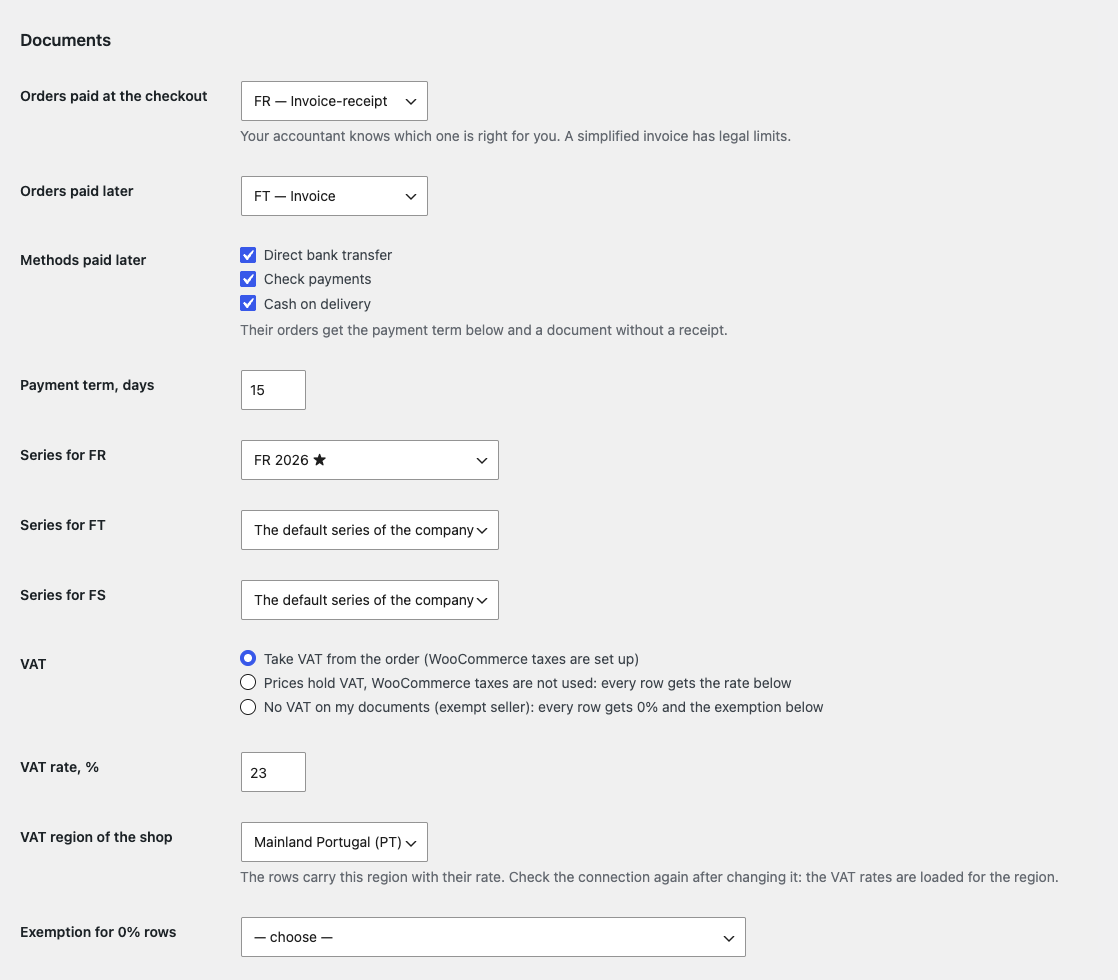
The order gets a “TOConline” box: the rows that will go into the document, the VAT rate of each row, the total with VAT and a NIF field for this order. An order paid at the checkout gets an invoice-receipt (FR) or a simplified invoice (FS), as you choose; an order paid later (bank transfer, cheque, cash on delivery) gets an invoice (FT) with a payment term.
A buyer with a NIF is found in TOConline by the NIF or created; without a NIF the document is made for a final consumer. The NIF comes from the order field (_billing_nif by default, the key can be changed) or is typed in for one order; the check digit is tested. Coupons are taken into the row prices, shipping and fees get their own rows. The document number is kept with the order and in its notes, and the PDF is one click away.
TOConline makes a document final the moment it is created, so the plugin checks the order before it sends anything: the rows add up to the order total, there is no negative fee, a 0% row has its exemption reason, no row carries two taxes. If a check fails, no document exists and the box shows the reason. A double click or a second tab cannot make a second document; when an answer from TOConline is lost, the next try first looks for the document by the reference WC-
WooCommerce → TOConline: enter the Client ID, Secret, OAuth address and API address from the TOConline e-mail and press “Check the connection and load the series”. The plugin loads the document series and the VAT rates of the region. Below are the document types, series, payment term, VAT mode, region, the exemption reason for 0% rows, the means of payment, a note for the document and the NIF field.
VAT comes from the order (WooCommerce taxes), or prices already hold VAT at the rate you set, or the seller is exempt: then every row gets 0% and the chosen exemption reason. The access token (4 hours) and the refresh token (8 hours) are stored encrypted and renewed by themselves. The debug mode writes a WooCommerce log without secrets or tokens.
Documents by status. Choose the statuses (for example “Completed”) and every order gets its document in the background, once. When TOConline does not answer, the document is tried again with a growing pause, up to eight times, and looked for by its reference before each retry. The bulk action “Create TOConline documents” in the orders list does the same for the selected orders.
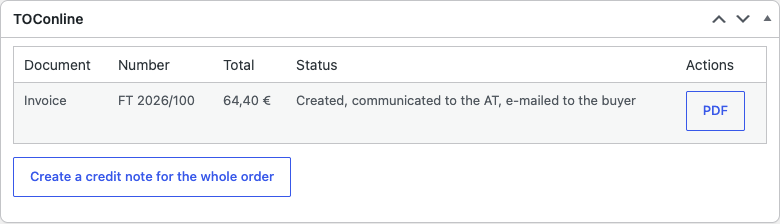
Credit notes. A credit note (NC) for the whole order from a button in the order or at a status (for example “Refunded”), with its own series.
Communication to the AT. Each document is communicated to the Autoridade Tributária through TOConline: automatically right after it is made, or with a button. A Portal das Finanças sub-user for the communication of documents is needed; the password is stored encrypted.
E-mail to the buyer. TOConline sends the document to the buyer itself: automatically or with a button.
Up to three extra companies. Each has its own access details and series prefix; the company can be chosen in the order box. A credit note goes to the company of its document.
Document list. Every document of the shop with the filters “In progress”, “Stopped”, “Created”, “Totals differ”, “Credit notes”; stopped ones with their reason and Retry; “Totals differ” shows documents whose TOConline total differs from the order; the number of stopped ones in the menu; a CSV export of a period for your accountant.
Languages and updates. Interface: English and Português (Portugal); updates from catcode.com.ua.
Selling on OpenCart? There is a separate module for it: TOConline for OpenCart (4.x, 3.x, 2.3).
Didn't find the answer? Message us on Telegram and we'll reply within a business day.
 @catcode_support
Setup, compatibility, activation
No, it is an independent integration made by CatCode. TOConline is a trademark of its owner; the plugin is not affiliated with or endorsed by TOConline.
Through your certified accountant (Contabilista Certificado): in TOConline, Empresa → Configurações → Dados API, the integrator is added and an e-mail brings a link with the client id, secret, OAuth address and API address.
No: a document created through the API is final. A mistake is corrected with a credit note (Pro: a button in the order or a refund status). That is why the plugin checks the order before it sends anything.
The document is made for a final consumer. If a NIF is entered but its check digit is wrong, no document is created and the box shows the reason.
The status says the document may have been made. The next try first looks for it by the order reference and keeps it if it is there. If the look-up is not possible, check TOConline yourself and press "It is not in TOConline".
Yes, in Pro: at the order statuses you choose, in the background, with retries. By hand from the order box it works in the free version too.
In Pro: through TOConline, automatically or with a button, with a Portal das Finanças sub-user.
Pro switches off, the queue by status stops with a reason, and the free part keeps working: connection, a document from the order, NIF, VAT, PDF.
One key covers two sites: the shop and a test copy.
No reviews yet. Be the first.
No questions yet. Ask one — we answer within 24 hours.
We build custom modules for WordPress, WooCommerce, OpenCart and Shopify. Tell us about the task and we'll prepare an estimate.
Order a custom module
—
Charged in UAH; your bank converts it to your currency. EUR price is approximate.

CatCode assistant
Just now


CatCode assistant
Online

I’ll help with your website task
Describe your website task — I’ll find a ready-made module or pass it to a developer for an estimate. Modules, custom features, layout, integrations, speed, migration, technical SEO.