
















WooCommerce
990 UAH644 UAH/year≈ €14
Black November: −35% on all modules until 30 November Black November: −35% until 30 November Choose a module
 Website auditA PDF report by email in 3 minutesCheck a website
Everyday tasks
Image compressorSize, quality and WebP in bulkQR generatorLink, Wi-Fi, payment to IBANVAT calculator20, 14, 7% and amount in wordsTransliterationOfficial Ukrainian standardWebsite checks
PHP and pluginsPHP version, WordPress, pluginsGoogle Merchant feedFields, prices, GTIN, imagesDomain emailSPF, DKIM, DMARC, blacklistsAI search readinessllms.txt, bots, markupAll 9 toolsEnter at least 2 characters

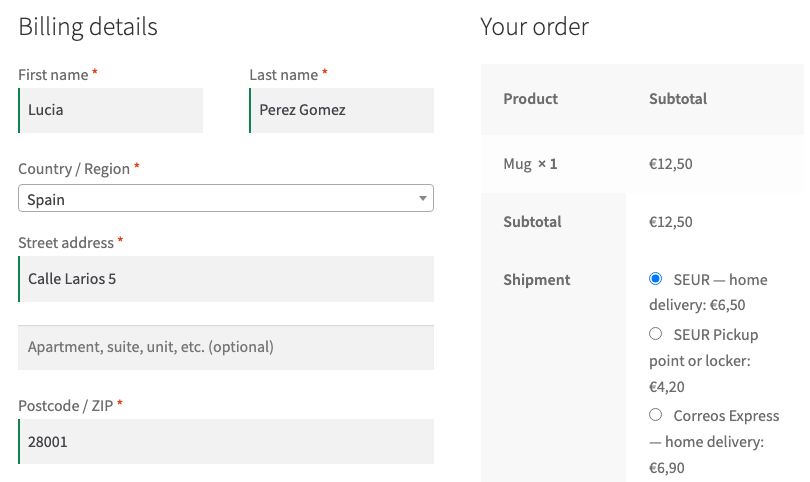
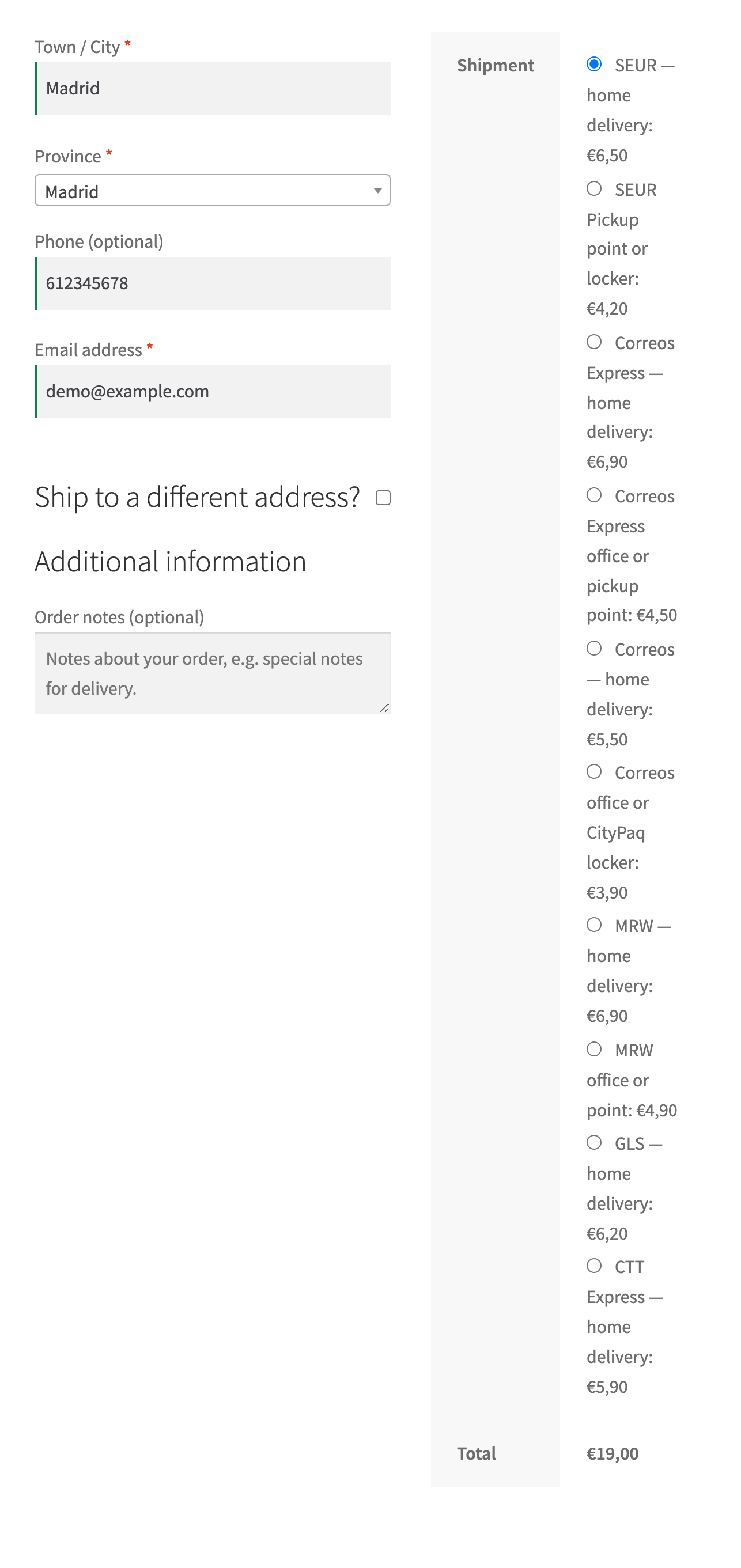

SEUR, Correos Express, Correos, MRW, GLS and CTT Express in one plugin for shops in Spain: address, points and lockers, a waybill, label and tracking from the order. Pro adds automatic and bulk waybills, a live SEUR rate and several parcels.
The free version works with no time limit. Pro adds the rest of the features in the table.



A fresh install is the free version, nothing switches on by itself. The “Try Pro for 7 days” button → e-mail → the key right in the window and by e-mail.

Moving the site? Unlink the licence on the old domain and activate it on the new one yourself. A staging copy (staging., dev.) works with the same key and does not take a site slot. For studios — keys for 5 or 25 sites, or unlimited.
 WooCommerce 7.0+ with the classic or block checkout, HPOS compatibleWordPress 6.2+ · PHP 7.4+A shipping zone with Spain — the methods are shown for Spanish addresses only and only for the regions switched on in the methodA contract with API access: SEUR (client ID and secret, API user, CCC), Correos Express (client code, API user and password). You can switch on one courier or both.Canary Islands, Ceuta and Melilla are outside the EU VAT area; they are off by default and the plugin does not produce customs documents (DUA). Switch them on only if your contract and your taxes cover them.Weight and size — products without a weight use the default weight from the settings; the box size is set there too.Plugin languages: English and Spanish — the plugin is made for Spanish shops.
Block checkout: choosing a pickup point now updates the delivery price and the order total right away; before, the checkout showed a “no such namespace” error and kept the old price.
CTT Express stays off until you switch it on in the settings: its data goes over unencrypted HTTP.
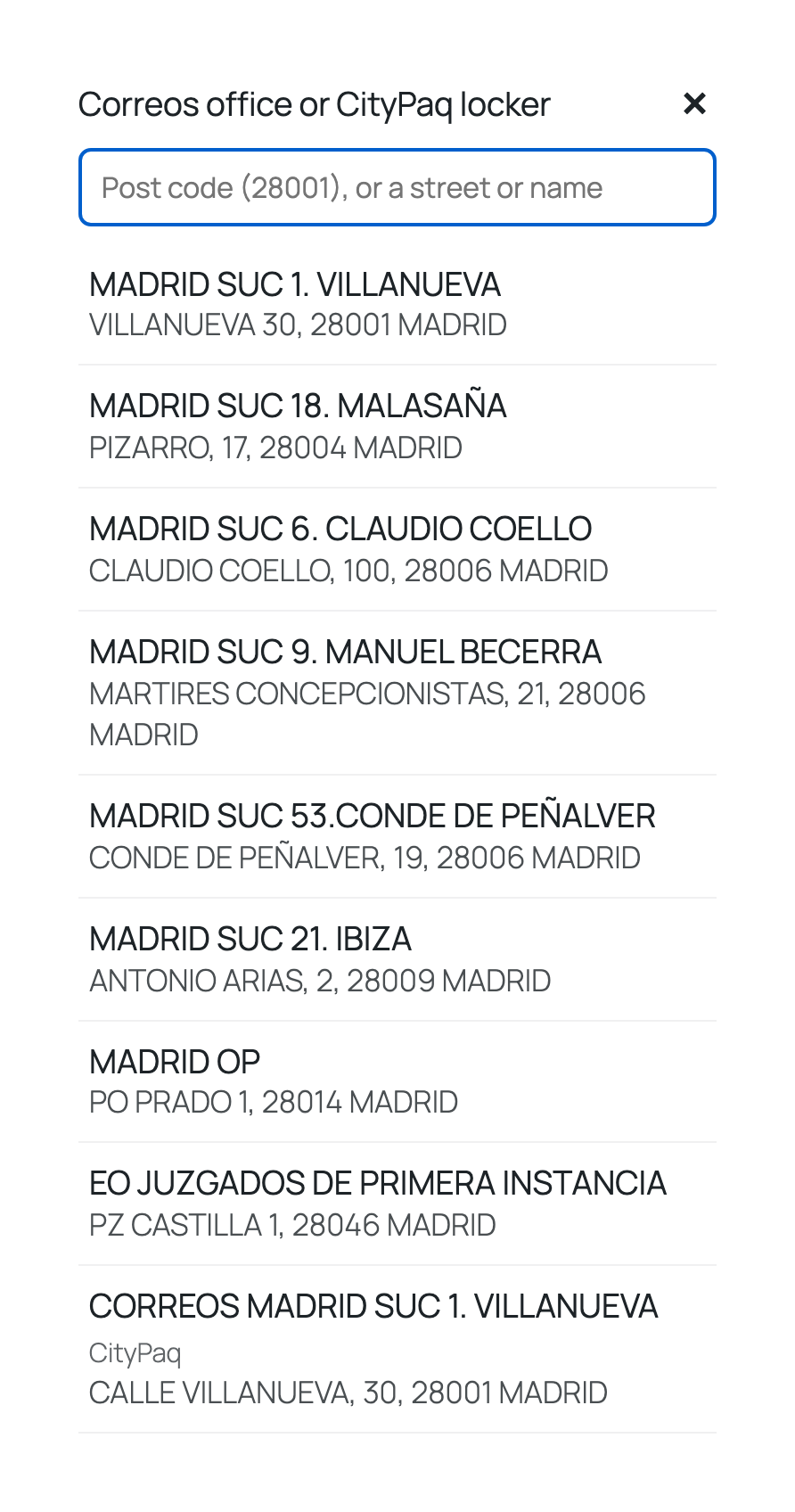
New couriers: Correos (address, office, CityPaq), MRW (address, office, point), GLS and CTT Express (address); waybills, labels, tracking and cancelling.
SEUR (address, SEUR Pickup shop, locker) and Correos Express (address, office, PaqPunto); pickup point picker on the classic and block checkout; waybills, labels, tracking, cash on…


Spain Couriers for WooCommerce is a shipping plugin for shops in Spain. Six couriers in one module: SEUR with SEUR Pickup shops and lockers, Correos Express with offices and PaqPunto, Correos with offices and CityPaq, MRW with offices and points, plus GLS and CTT Express to the address. The buyer chooses delivery to the address or to a pickup point right at checkout, and your staff create the waybill, print the label and see the parcel status without opening the couriers’ portals.
New in 1.1.0: four more couriers. Correos (address, office, CityPaq), MRW (address, office, point), GLS and CTT Express (address only): waybill, label, status and cancelling from the order. The limits, plainly: GLS and CTT Express have no call that lists points, CTT Express works only over unencrypted HTTP, so it stays off until you knowingly switch it on in the settings, and it takes no cash on delivery, Correos carries one parcel per waybill, and Nacex is not included.
What you need. A contract with API access with each courier you switch on: SEUR — client ID and secret, an API user with a password and your customer account (CCC); Correos Express — client code, API user and password. Without a contract the couriers do not issue keys.
An honest word on testing. Neither SEUR nor Correos Express offers public test accounts, so the plugin was tested on a local WooCommerce shop with the courier answers modelled: for SEUR on the official PIC API manual and the official SEUR plugin, for Correos Express on the API contract of the official Correos module for WooCommerce (Correos Express publishes no API documentation). The plugin has not yet worked with the live APIs of either courier. Start on the courier’s test system (SEUR pre-production or the Correos Express test server) during the 7-day Pro trial — if the courier answers differently from what is described, we fix it promptly. Courier errors are shown in the courier’s own words.
Checks of 1.1.0. We have not created a single real waybill through Correos, MRW, GLS or CTT Express. The Correos office and MRW point lists in the tests come from real answers of those services. That server shows a match with the documents, not acceptance by the courier.
The buyer sees the methods of both couriers you added to the shipping zone, with prices. Choosing delivery to a point opens a “Choose a pickup point” panel below the methods: the list starts with the points for the post code of their address. They can type another post code (a 4-digit code missing its leading zero is completed) or search by street or name — accents are ignored, so “odin” finds “ODÍN”. SEUR lockers are marked in the list.
Switching to delivery to the address hides the panel, and the buyer’s address stays their own: the plugin never writes the point’s address into the buyer’s fields, neither on the classic nor on the block checkout. Each courier keeps its own chosen point, so switching between SEUR and Correos Express mixes nothing up. Trying to order delivery to a point without choosing one is refused on the server with an explanation. The same goes for a point the courier never listed and for a cart heavier than the locker weight limit SEUR reports.
The chosen point is shown on the thank-you page, in the buyer’s account and in e-mails together with the tracking link. Optionally the plugin writes the point into the order’s shipping address as well, so e-mails and other tools show it; the address saved in the buyer’s account stays theirs.
spain-couriers-for-woocommerce-1.1.2.zip and activate.Didn't find the answer? Message us on Telegram and we'll reply within a business day.
 @catcode_support
Setup, compatibility, activation
Yes. SEUR and Correos Express give API access only to customers with a contract: SEUR — client ID and secret, an API user and your customer account (CCC); Correos Express — client code, API user and password from your sales or technical contact. You can switch the couriers on one at a time.
The Correos Express API has no cancel call. "Cancel" only marks the waybill cancelled in the shop and adds an order note; if the parcel was already handed over, call Correos Express.
The Correos Express API has no price calculation. Correos Express methods work with a fixed price and free delivery from an order amount; the Pro live tariff is for SEUR only.
Yes, if your contract allows it: regions are switched on per method. By default only the mainland and the Balearic Islands are on, because the Canaries, Ceuta and Melilla are outside the EU VAT area and the plugin does not produce customs documents (DUA).
Delivery methods, the point picker, waybills, labels, tracking and cash on delivery stay free with no time limit.
No reviews yet. Be the first.
No questions yet. Ask one — we answer within 24 hours.
We build custom modules for WordPress, WooCommerce, OpenCart and Shopify. Tell us about the task and we'll prepare an estimate.
Order a custom module
—
Charged in UAH; your bank converts it to your currency. EUR price is approximate.

CatCode assistant
Just now


CatCode assistant
Online

I’ll help with your website task
Describe your website task — I’ll find a ready-made module or pass it to a developer for an estimate. Modules, custom features, layout, integrations, speed, migration, technical SEO.