Get in touch
  • OpenCart
  • Sales and conversion
  • v1.0.1

Size Price Calculator for OpenCart — price by size: per m², running metre, m³

The customer types the width, length or height and sees the price of exactly that size. The catalogue price of the product becomes the price per m², running metre or m³, so OpenCart specials and discounts keep working as usual. Minimum, maximum and step of a size, a minimum area charged, rounding, a fee per piece, the sizes in the cart, the order, the invoice and the e-mails, and "per m²" next to the price in categories. OpenCart 4, 3 and 2.3. The basic version is free; Pro adds price tables, formulas, volume discounts and size lists with SKUs; the licence is for good.

Download Free
Pro · lifetime licence The more sites, the less each one costs
Compatibility
OpenCart 4.0.2 – 4.1.x, 3.0.x and 2.3.0.2 (tested on 4.1.0.3, 4.0.2.3, 3.0.5.0, 2.3.0.2) · PHP as your OpenCart version requires (tested on 7.0, 8.1, 8.3) · mysqli and PDO database drivers
Version
v1.0.1 (OpenCart 4)
v1.0.0 (OpenCart 3.x)
v1.0.0 (OpenCart 2.3)
Licence
one site, lifetime
Trial
7 days, no card, one per site
Updated
26 September 2026
Or all 144 Pro modules with All Access — 4 990 ₴ / year

What Free has,
and what Pro adds

The free version works with no time limit. Pro adds the rest of the features in the table.

Feature Free Pro
Price by area (width × length or width × height), length, perimeter or volume ✔ ✔
Sizes in mm, cm, m, inches or feet; the price per m, m², m³ or ft, ft², ft³ ✔ ✔
The catalogue price = the price per unit: OpenCart specials, quantity discounts and customer-group prices apply as usual ✔ ✔
For every size — a minimum, a maximum, a step and a pre-filled value ✔ ✔
A minimum area charged, rounding of the measure, a fixed fee and a minimum price per piece ✔ ✔
Surcharges of other options per unit or per piece; product weight × measure ✔ ✔
A live calculator on the product page: the same server-side calculation as the cart ✔ ✔
A wrong size never reaches the cart: a message under the field, the add-to-cart button does nothing ✔ ✔
Sizes and area in the cart, mini-cart, checkout, order, invoice, e-mails and the admin ✔ ✔
"€24.00 per m²" next to the price in categories, search, specials and product modules ✔ ✔
A cart line whose size became invalid is never sold at the price per m² — not even when the shop sells out-of-stock products ✔ ✔
Editing an order in the OpenCart 4 admin keeps the price of the size ✔ ✔
Works together with Option Specials, Product Bundles and One Page Checkout ✔ ✔
No core file edits; builds for OpenCart 4.x, 3.x and 2.3; English, Ukrainian, Russian, Spanish ✔ ✔
Products sold by size up to 3 unlimited
Width × height price table, pasted from Excel — ✔
Your own price formula — ✔
Volume discounts: −N% from the area of one piece or of the whole line — ✔
Size lists: every size with its own SKU, price and stock; "only the listed sizes" mode — ✔

What it looks like

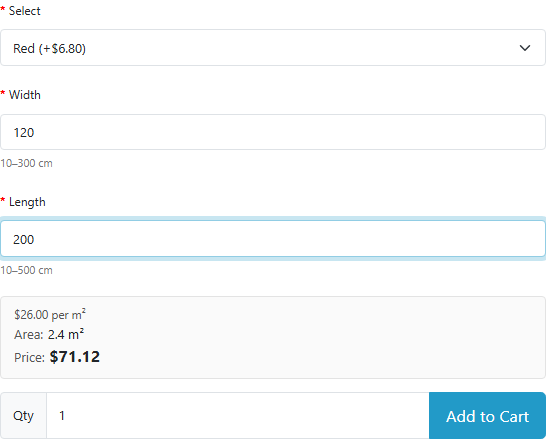
Price-by-size calculator on an OpenCart 4.1 product page: width and length in centimetres, area and price
Product page (OpenCart 4.1.0.3, default theme): under the Width and Length fields — the allowed range in centimetres; the calculator box shows $26.00 per m² (the $20 product price with VAT and eco tax), the area 2.4 m² and the price of one piece, $71.12 with the option. The price updates while the customer types.
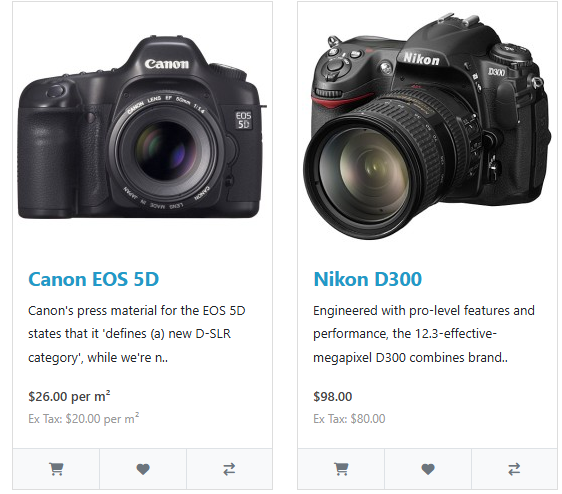
OpenCart category with "per m²" next to the price of a product sold by size
Category: the Canon is sold by area, so its price and ex-tax price read “per m²”. The Nikon is an ordinary product and keeps its plain price. A product sold by length gets “per m”.
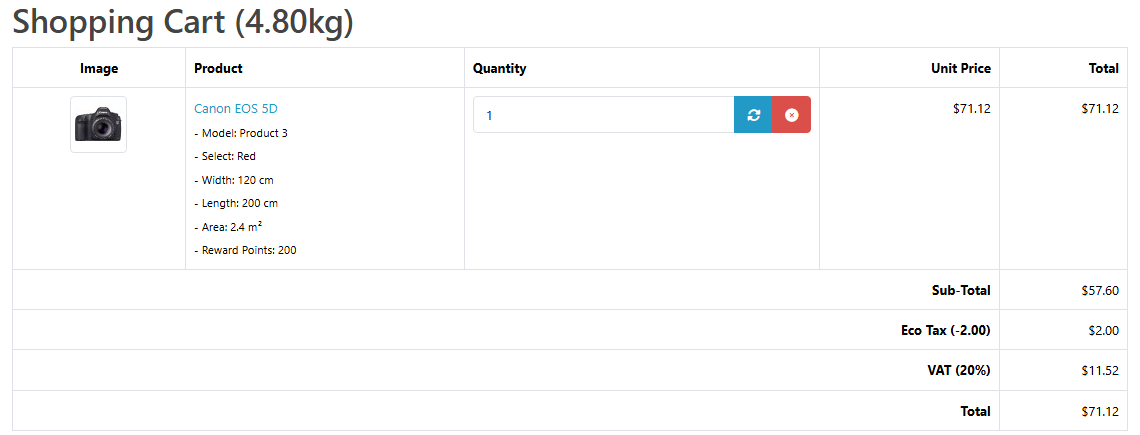
OpenCart cart with the size and the area under the product
Cart: under the product — Width 120 cm, Length 200 cm and Area 2.4 m², the line price is already the price of the size. The same lines go into the order, the invoice and the e-mail to the customer.

Key points

What the admin gets

Extensions → Modules → Size Price Calculator, three tabs: Products, Settings and Licence.

How much it costs

The basic version is free, with no time limit: up to three products by area, length, perimeter or volume with every size and price rule.

The trial starts when you ask

A fresh install is the free version, nothing switches on by itself. The “Try Pro for 7 days” button → e-mail → the key right in the window and by e-mail.

One key — one site

Moving the store? Unbind the licence on the old domain and activate it on the new one yourself. If our server is unreachable, Pro keeps working for 14 more days. For studios — keys for 5 or 25 sites, or unlimited.

Technical requirements

  • OpenCart 4.0.2 – 4.1.x (tested on 4.1.0.3 and 4.0.2.3), 3.0.x (tested on 3.0.5.0) or 2.3.0.2.
  • PHP as your OpenCart version requires: the 2.3 build was tested on PHP 7.0, the 3.x build on 8.1, the 4.x build on 8.1 and 8.3.
  • Database: MySQL/MariaDB with the mysqli or PDO driver (both tested).
  • Theme. The size fields are ordinary OpenCart text options; the calculator finds them by the standard markup. Tested on the default themes of 4.x, 3.x and 2.3; not on Journal, UniShop or other third-party themes. If your theme has a different add-to-cart button, its CSS selector is set in the settings.
  • Not tested: multi-store, OpenCart 4.1 product variants and subscriptions with a product sold by size.

Version history

v1.0.1 OC 4.x Current 26 September 2026

A product with a size list (Pro) can be saved again on the PDO database driver.

v1.0.0 September 2026

First public release for OpenCart 4.x, 3.x and 2.3.

Frequently bought with Size Price Calculator for OpenCart

4 modules in one order — 40% cheaper than separately

“Store starter” bundle Size Price Calculator Nova Poshta Premium LiqPay Telegram notifications and Viber/SMS for customers Need more — all 144 modules in All Access for 4 990 ₴.
3 590 ₴ lifetime instead of 5 960 UAH bought separately
Buy the bundle →

Full module description

Size Price Calculator for OpenCart sells products cut to size: curtains and blinds, glass and mirrors, fabric, carpet, worktops, profiles and cable, banners. The customer types the width, length or height on the product page, sees the price of exactly that size straight away, and the size travels with the order — into the cart, the checkout, the invoice, the e-mail and the admin.

The catalogue price of the product becomes the price per unit: put €24 and the “area” mode on a product, and a 120 × 200 cm piece (2.4 m²) costs €57.60. That is why OpenCart specials, quantity discounts and customer-group prices keep working unchanged: a special on the product is a special on every size of it. Units are mm, cm, m, inches or feet; the price is per m, m², m³ or ft, ft², ft³. The module does not edit core files; one licence covers three builds: OpenCart 4.x, 3.x and 2.3.

What the customer sees

  • Size fields with hints. Under each field — the allowed range (“10–300 cm”); the fields come pre-filled, so the price is visible at once.
  • The price while typing. The calculator box shows the price per m², the area charged, the price of one piece and of the quantity — in the shop’s currency and with its taxes. The server calculates it with the same code as the cart, so the cart shows exactly this amount.
  • A wrong size is obvious. Below the minimum, above the maximum or off the step — a message under the field (“Width: at least 10 cm”), the field is highlighted, the add-to-cart button does nothing.
  • However customers type it. “120”, “120,5”, “120 cm” — all of it is 120 centimetres. The same size typed differently merges into one cart line.

In categories, search, specials and the product modules (“Featured”, “Bestsellers”, “Latest”) the module adds the unit next to the price — “per m²”, “per m”, “per m³”. Without it a customer reads “€24.00” as the price of the whole product. The label can be switched off in the settings.

What the admin gets

Extensions → Modules → Size Price Calculator, three tabs: Products, Settings and Licence.

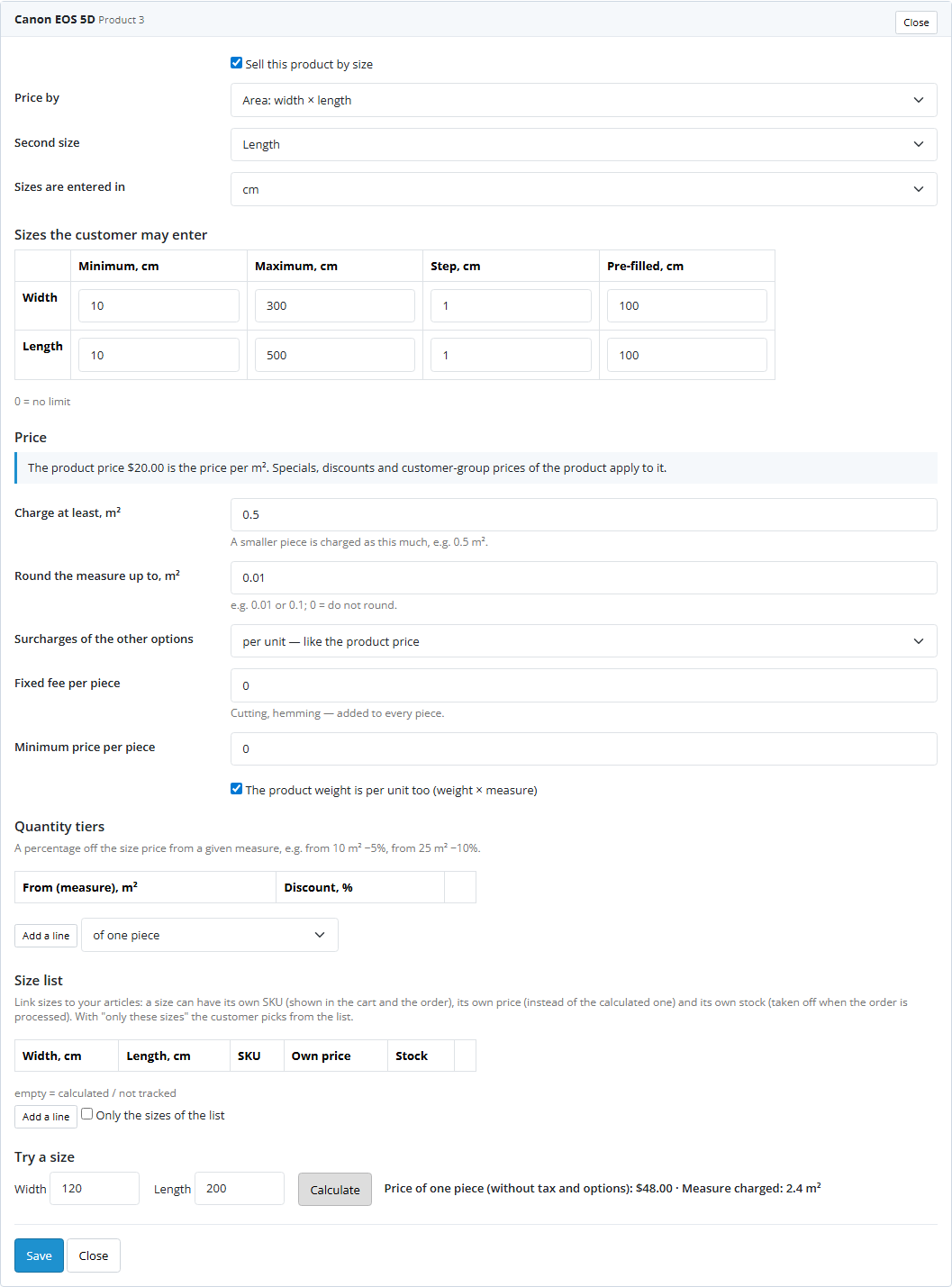
  • Products sold by size. Start typing a name or model, pick the product and the mode: area (width × length or width × height), length, perimeter, volume, and in Pro — a price table or a formula. The module puts the size options the product needs on it as required options.
  • Size rules: units, minimum, maximum, step and pre-filled value for each size.
  • Price rules: a minimum area charged (a 0.3 m² piece is charged as 0.5 m²), rounding of the measure, a fixed fee per piece (cutting, hemming), a minimum price per piece, surcharges of other options per unit or per piece, product weight × measure.
  • “Try a size” — the price and the measure of any size before saving.
  • A product list with mode, sizes and status; a product that needs Pro is marked “Needs Pro — not orderable”. “Clean up” removes the settings of deleted products.
  • Settings: the price per unit in the calculator, the unit next to the price in lists, the area line in the cart, the SKU of a listed size, the module styles, the add-to-cart button selector for a custom theme.

Pro: price tables, formulas, discounts, size lists

  • Width × height price table. Paste a grid from Excel: the first line holds the widths, the first column the heights. A size between two columns is charged at the next larger one; an empty cell means “not sold”.
  • Formula. Variables W, L, H (sizes), A (area), P (perimeter), V (volume), M (measure charged), RATE (product price), OPT (option surcharges); functions min, max, round, ceil, floor, abs, sqrt, if. For example max(RATE * A, 15) + OPT — at least €15 a piece.
  • Volume discounts: −5% from 10 m², −10% from 25 m² — from the area of one piece or of the whole cart line.
  • Size lists. A size → its own SKU (shown in the cart and the order), its own price instead of the calculated one and its own stock: taken off when the order is processed and given back on cancellation. “Only the listed sizes” replaces the size fields with a choice from the list.
  • No limit on the number of products sold by size.

How it works, step by step

  1. You pick a product and a mode. The module creates (once) three OpenCart text options — Width, Length, Height — and puts the ones needed on the product.
  2. On the product page the module adds hints under those fields and the calculator box; the box takes its price from the server, with the same calculation as the cart.
  3. When the product is added to the cart, the server checks the size and turns what was typed into a number (“120,5 cm” → 120.5). A wrong size comes back with a message under the field.
  4. OpenCart prices the cart line as always: the product price (with a special, a discount, a group price) plus option surcharges. The module takes that price as the rate per unit and replaces the line price with the price of the size. Sub-total, taxes and weight are summed exactly as the core sums them.
  5. Everything uses that cart: the cart page, the mini-cart, the checkout, One Page Checkout, order-total modules. The order is saved with the size price and the Width, Length and Area options.
  6. A size that became invalid (the rules changed, Pro ended) is marked in the cart line and not let through to payment — the module never sells such a product at the price of one metre.

How much it costs

Pro is UAH 990, one payment, a licence for good. No yearly payments. One licence per domain covers all three builds — OpenCart 4.x, 3.x and 2.3. Moving the shop to another domain — press “Detach” on the Licence tab of the old shop and activate the key on the new one.

Trial first, then pay. The 7-day free Pro trial starts with a button on the Licence tab, one trial per shop. After the trial the Pro data stays in the admin, and products that need Pro stop taking orders until Pro is back.

Under the hood

  • No core edits. OpenCart events and (on 4.x) a startup action. The module wraps the cart that is already in the shop — the standard one or one replaced by another extension — and changes only the price of the lines of products sold by size.
  • Sizes are ordinary OpenCart options. So they show up wherever OpenCart shows options, with no template edits, and stay in the orders for good.
  • One calculation for everything. The calculator on the page, the cart and the check on adding are the same server code. The price cannot be changed in the browser.
  • An invalid size is not sold at the rate. Such a line is marked out of stock, and while it is in the cart the checkout stops at the cart even in a shop that sells out-of-stock products.
  • OpenCart 2.3 has no event order. If Option Specials or Option Combinations were installed after the module, on the very first request the module lets them go first and moves its own event behind them — the order of installation does not matter.
  • Own tables: product settings, size lists, and a log of size stock taken per order line (so a cancellation gives stock back exactly once).
  • Removal. Uninstalling removes the events, the size options from the module’s products and the options themselves when no other product uses them. Product settings stay in case of a reinstall. OpenCart deletes the module settings together with the licence key — after a reinstall the key has to be activated again.

How to install

  1. OpenCart 4: Extensions → Installer → upload cc_sizeprice.ocmod.zip (do not rename the archive) and press Install. OpenCart 3: Extensions → Installer → cc_sizeprice-oc3.ocmod.zip. OpenCart 2.3: the 2.3 installer copies nothing without FTP set up, so copy the contents of the upload/ folder from cc_sizeprice-oc2.ocmod.zip to the shop root with your hosting file manager.
  2. Extensions → Extensions → Modules → Size Price Calculator → Install, then Edit.
  3. Settings tab: Status on. Save.
  4. Products tab: start typing a product name, pick it, set the mode, units and size limits, check the price with “Try a size” and save.
  5. Set the price per unit in the product form — say €24 per m² — and open the product in the shop: the calculator is already under the fields.
  6. For Pro: paste the licence key from the e-mail after payment, or start the 7-day trial on the Licence tab.

Questions
about the module

Didn't find the answer? Message us on Telegram and we'll reply within a business day.

@catcode_support Setup, compatibility, activation
Which price does the module take as the price per unit?

The product price OpenCart itself calculates: with a special, a quantity discount and a customer-group price when they apply. Put €24 on the product and it means €24 per m², so a 120 × 200 cm piece (2.4 m²) costs €57.60 plus option surcharges.

Where does the customer see the size after ordering?

Everywhere OpenCart shows options: the cart, the mini-cart, the checkout, the order in the admin, the invoice and the e-mail to the customer. The module creates three ordinary text options — Width, Length, Height — and puts the ones a mode needs on the product, plus an "Area: 2.4 m²" line. No theme template has to be edited.

Can the price be tricked by changing the size in the browser?

No. The server checks the size both when it is added to the cart and on every recalculation of the cart; the shop calculates the price, not the page. A wrong size is refused with a message under the field.

What happens if I change the rules of a product while a size is already in a customer's cart?

The line is marked "Attention: the size has to be entered again" and the checkout stops at the cart. Such a line never goes through at the bare catalogue price, not even in a shop that sells out-of-stock products — otherwise the customer would pay the price of one metre for the whole piece.

What happens when the Pro trial ends?

Price tables, formulas and size lists stay in the admin, nothing is erased. Products with a table or a formula stop taking orders and show "please contact us" — the module never sells them at the catalogue price. Buy a licence and everything is back.

Does it work with other cart modules?

The module wraps the cart that is already there, so it does not reset the prices of other modules — it multiplies them by the size. Together with our Option Specials (the special option surcharge × area), Product Bundles (the bundle discount from the size price) and One Page Checkout it was checked with real orders on OpenCart 4.1, 4.0, 3.0 and 2.3. On 2.3 the order in which it works with Option Specials does not depend on which one was installed first.

What about the price in categories and feeds?

In categories, search, specials and product modules the module adds the unit: "€24.00 per m²" instead of a bare "€24.00". Marketplace feeds and structured data take the product price as it is — the price per unit — so it is worth putting "per m²" into the product name or description for the feeds.

What happens to the sizes if the module is removed?

Sizes in placed orders always stay. The Width, Length and Height options are taken off the products that were sold by size; an option is deleted only when no other product uses it. If you put "Width" on other products by hand, it stays with them, and a reinstall picks it up instead of creating a second one. The module keeps the product settings in case of a reinstall.

How much is it, and is there a yearly fee?

The basic version is free. Pro is UAH 990 once, a licence for OpenCart for good, no yearly payments. One licence per domain covers all three builds.

Not quite what you are looking for?

We build custom modules for WordPress, WooCommerce, OpenCart and Shopify. Tell us about the task and we'll prepare an estimate.

Order a custom module