WordPress
Size Price Calculator for WooCommerce — price by size: metre, m², m³
Free + Pro
990 UAH/year
v1.0.0
Enter at least 2 characters
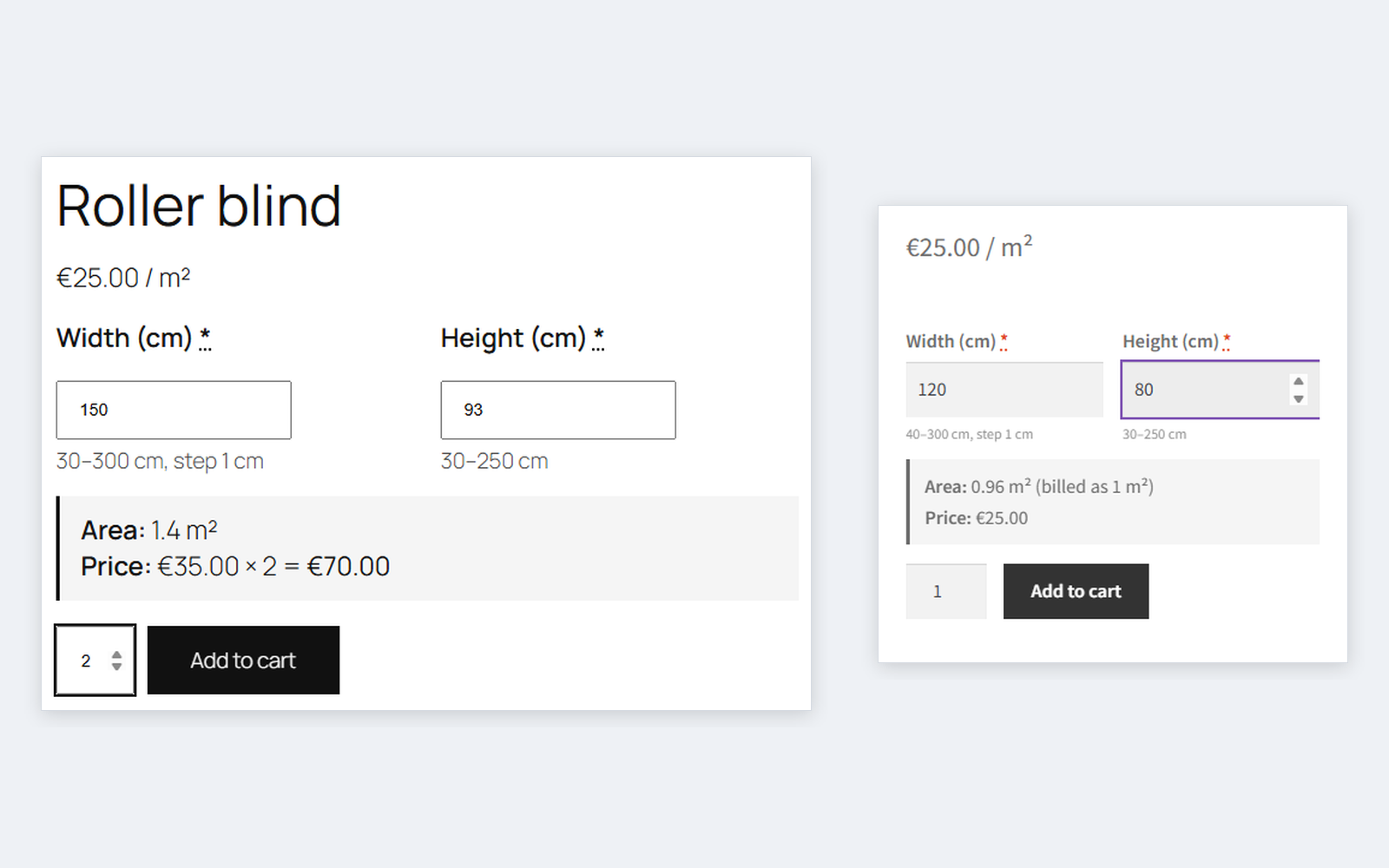
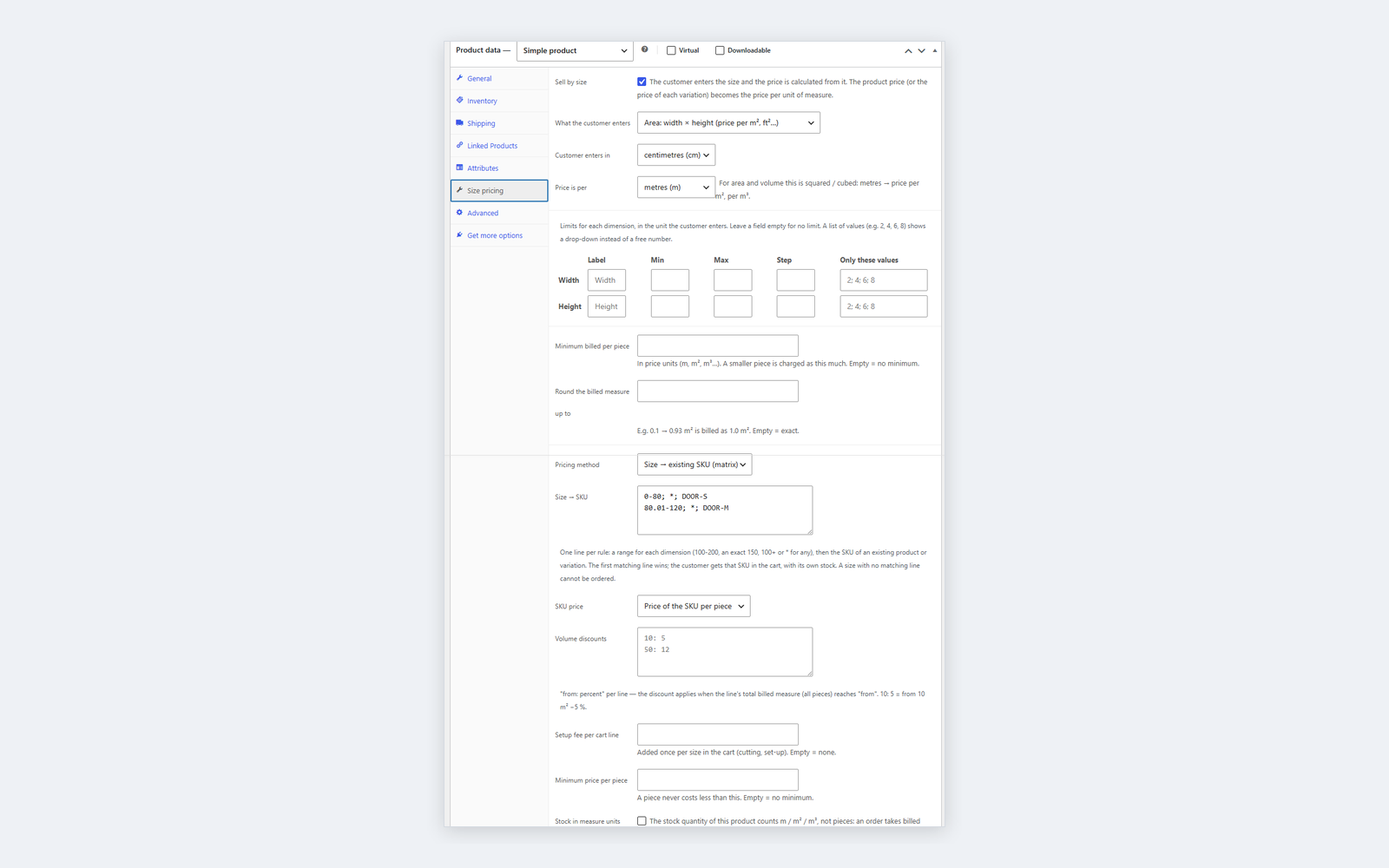
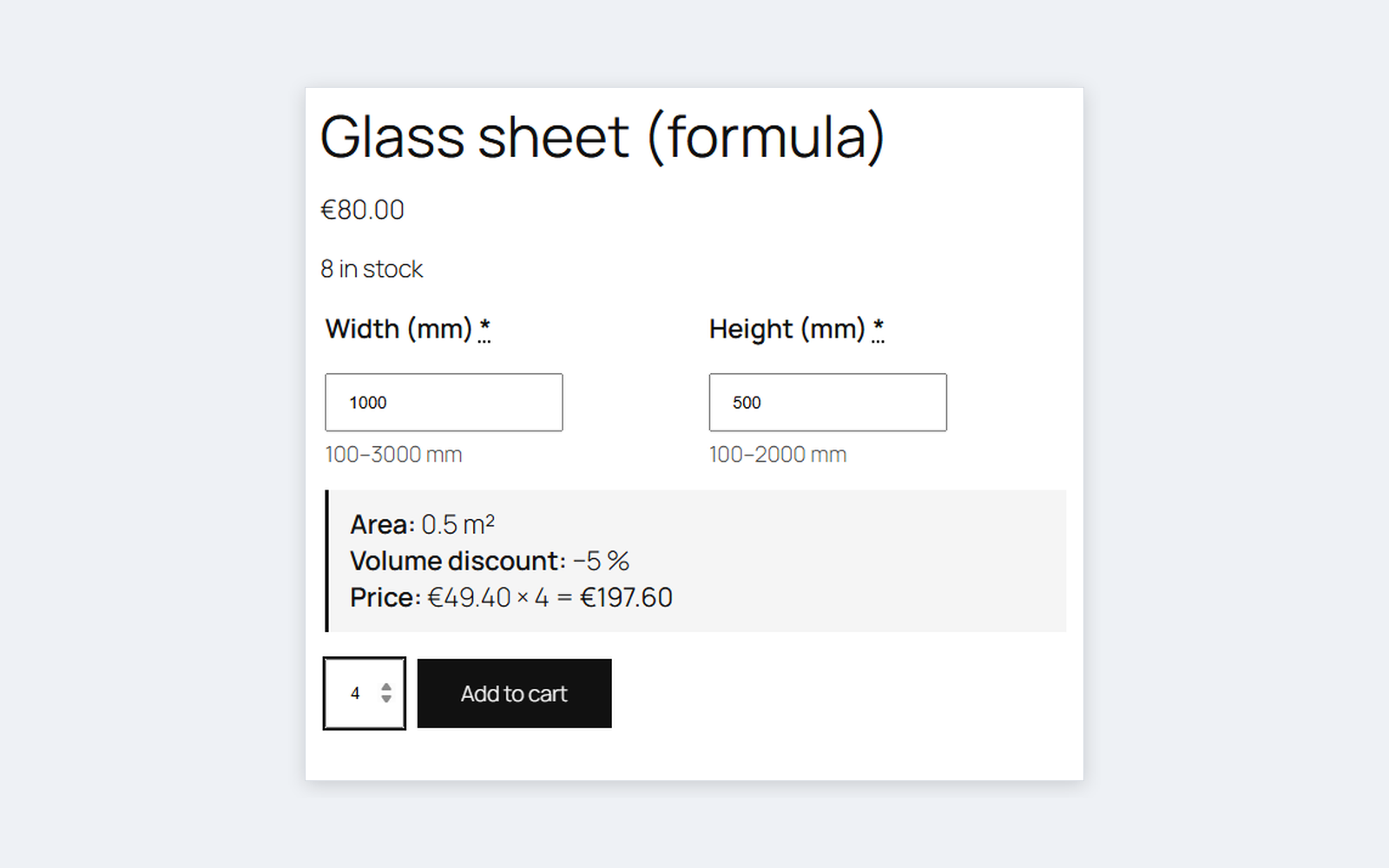
The customer enters a length, width × height or width × height × depth and sees the price for exactly that size. The product price becomes the price per metre, m² or m³ (or foot, yard), units are converted automatically. Minimum, maximum, step or a list of sizes, minimum billed area and rounding, sizes in the cart, checkout, order and e-mails. The base version is free; Pro adds a price formula, a width × height price table, a size → existing SKU matrix, volume discounts, a setup fee and stock in m².
The free version works with no time limit. Pro adds the rest of the features in the table.



A fresh install is the free version, nothing switches on by itself. The “Try Pro for 7 days” button → e-mail → the key right in the window and by e-mail.

Moving the store? Unbind the licence on the old domain and activate it on the new one yourself. If our server is unreachable, Pro keeps working for 14 more days. For studios — keys for 5 or 25 sites, or unlimited.
 WordPress 6.2+ and WooCommerce 7.0+. Live run on WordPress 7.1 and WooCommerce 11.1 with HPOS, on the classic and block cart and checkout.PHP 7.4+. Live runs on PHP 7.4 and PHP 8.3.Themes. The size fields are shown in WooCommerce’s standard add-to-cart form; tested with Storefront and Twenty Twenty-Five. Themes and page builders that replace the product form with their own were not tested.Currency switchers that convert product prices through WooCommerce filters work; tested with our Multi Currency.Other price and option plugins (Product Add-Ons, YITH) and page caching were not tested together with the module.
First public release: selling by length, area and volume, units mm/cm/m/in/ft/yd, limits and size lists, minimum measure and rounding, live price, sizes in the cart, checkout, order and…
4 modules in one order — 40% cheaper than separately



Size Price Calculator for WooCommerce sells products cut to size: blinds and roller shades, glass and mirrors, fabric, flooring, countertops, rods and cable, banners. The customer enters the size on the product page, sees the price for exactly that size right away, and the size travels with the order — to the cart, checkout, e-mail and admin.
The product price becomes the price per unit: enter 25 and “per m²” — a 120 × 80 cm blind costs 0.96 m² × 25. The customer types centimetres, millimetres, inches or feet, the price is per metre, m², m³, foot or yard, and the plugin converts between them. Variable products work the same way: each variation’s price is its price per unit.
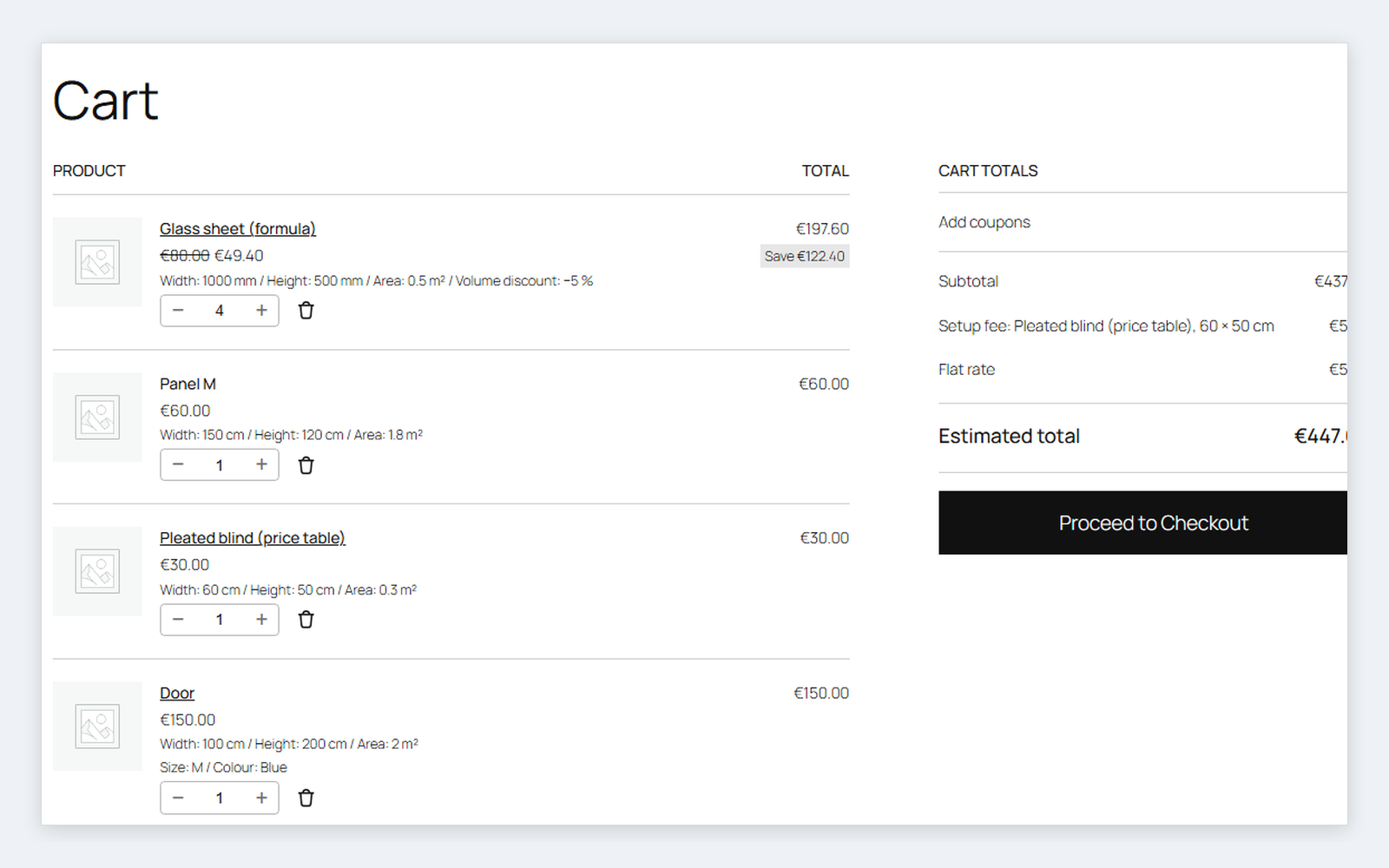
In the cart, mini-cart, checkout, order and e-mails, under the product: width, height, area and “billed as”. The same product in two sizes is two lines. The store always calculates the cart price: sizes from the browser are checked and recalculated on the server.
measure * price + perimeter * 4. Its own formula parser, no eval; a broken formula gets a hint on save.“Size → existing SKU” matrix. One line per rule: a range for each dimension, then the SKU — 0-100; 0-100; PANEL-S. The customer enters the size on the configurator, and your existing product or variation goes into the cart — with its price, stock and SKU in the order. If the SKU is a variation with “Any colour”, the colour comes from what the customer picked on the configurator.
_catcode_spc, the size on the order line (visible rows + hidden _catcode_spc), settings in one option catcode_spc_settings. No custom tables.catcode_spc_quote filter has the last word on price, fee and measure.catcode-size-price-calculator-for-woocommerce-1.0.0.zip with the button at the top of the page (or the Pro zip from your account after payment) and install it: Plugins → Add New → Upload Plugin.Didn't find the answer? Message us on Telegram and we'll reply within a business day.
 @catcode_support
Setup, compatibility, activation
@catcode_support
Setup, compatibility, activation
The product’s current price — the sale price while a sale is on. For variable products, the price of the chosen variation. Enter 25 and "per m²" — a 120 × 80 cm blind costs 0.96 m² × 25.
Yes. Enter the allowed values in "Only these values" (e.g. 2; 4; 6; 8) — the field becomes a drop-down.
Per piece: the real area first, then raised to the minimum, then rounded up to the step. The cart shows both — "0.96 m² (billed as 1 m²)".
No. The cart gets the price the store calculated: sizes are checked and recalculated on the server every time the cart is.
Tested: the Multi Currency switcher (price, table, formula, setup fee and matrix are converted into the customer’s currency exactly once), prices with and without tax, percent, product and cart coupons.
Pro. If you already sell panels S, M, L as separate products or variations, the configurator puts the matching SKU into the cart for the entered size — with its price and stock. A size with no matching SKU, or out of stock, cannot be ordered.
A size cannot tell the colour or material, so the value comes from the configurator product with the same attribute (the customer picks it on the page). If there is nowhere to take it from, the size is not sold, and the admin sees a hint when saving the product.
Pro. The product’s stock is metres or m²; an order takes "billed measure × pieces", rounded up, and a cancellation returns it. WooCommerce does not limit the number of pieces for such products — 20 pieces of 0.04 m² with 10 m² in stock can be bought, 12 m² cannot.
Sizes in orders always stay. The plugin’s settings are removed; the size rules of products only if "Delete data on uninstall" is ticked.
Upload the Pro zip under Plugins → Add New and agree to replace the current version — settings and products are kept. If the two copies ended up in different folders, there is no fatal error: Pro runs and the free copy pauses with a hint to remove it.
No reviews yet. Be the first.
No questions yet. Ask one — we answer within 24 hours.
We build custom modules for WordPress, WooCommerce, OpenCart and Shopify. Tell us about the task and we'll prepare an estimate.
Order a custom module
—

CatCode assistant
Just now


CatCode assistant
Online

I’ll help with your website task
Describe your website task — I’ll find a ready-made module or pass it to a developer for an estimate. Modules, custom features, layout, integrations, speed, migration, technical SEO.
