Get in touch
  • WordPress
  • Shipping
  • v1.0.4

Romania Couriers for WooCommerce — FAN Courier, Sameday and Cargus: home delivery and lockers

FAN Courier, Sameday and Cargus in one plugin for stores in Romania: delivery to the address and to pickup points (FANbox, easybox, Cargus Ship & Go), point picker on the classic and the block checkout, AWBs, labels, tracking and cash on delivery. Pro — live courier tariff, automatic and bulk AWBs.

Download Free
Pro · one-year licence The more sites, the less each one costs
Compatibility
WooCommerce 7.0+ · WordPress 6.2+ · PHP 7.4+ · HPOS · classic and block checkout
Licence
one site, annual
Trial
7 days, no card, one per site
Updated
25 September 2026
Or all 144 Pro modules with All Access — 4 990 ₴ / year

What Free has,
and what Pro adds

The free version works with no time limit. Pro adds the rest of the features in the table.

Feature Free Pro
Six shipping methods: FAN Courier and FANbox, Sameday and easybox, Cargus and Cargus Ship & Go — for Romanian addresses only ✔ ✔
Fixed price, free from an order amount, free-shipping coupons, weight limit per method ✔ ✔
Pickup point picker on the classic and the block checkout: search by city, street or point name ✔ ✔
The point panel appears only with its own method; the buyer's address fields are never rewritten ✔ ✔
An order without a point, or with a point closed since, is refused on the server — on any checkout ✔ ✔
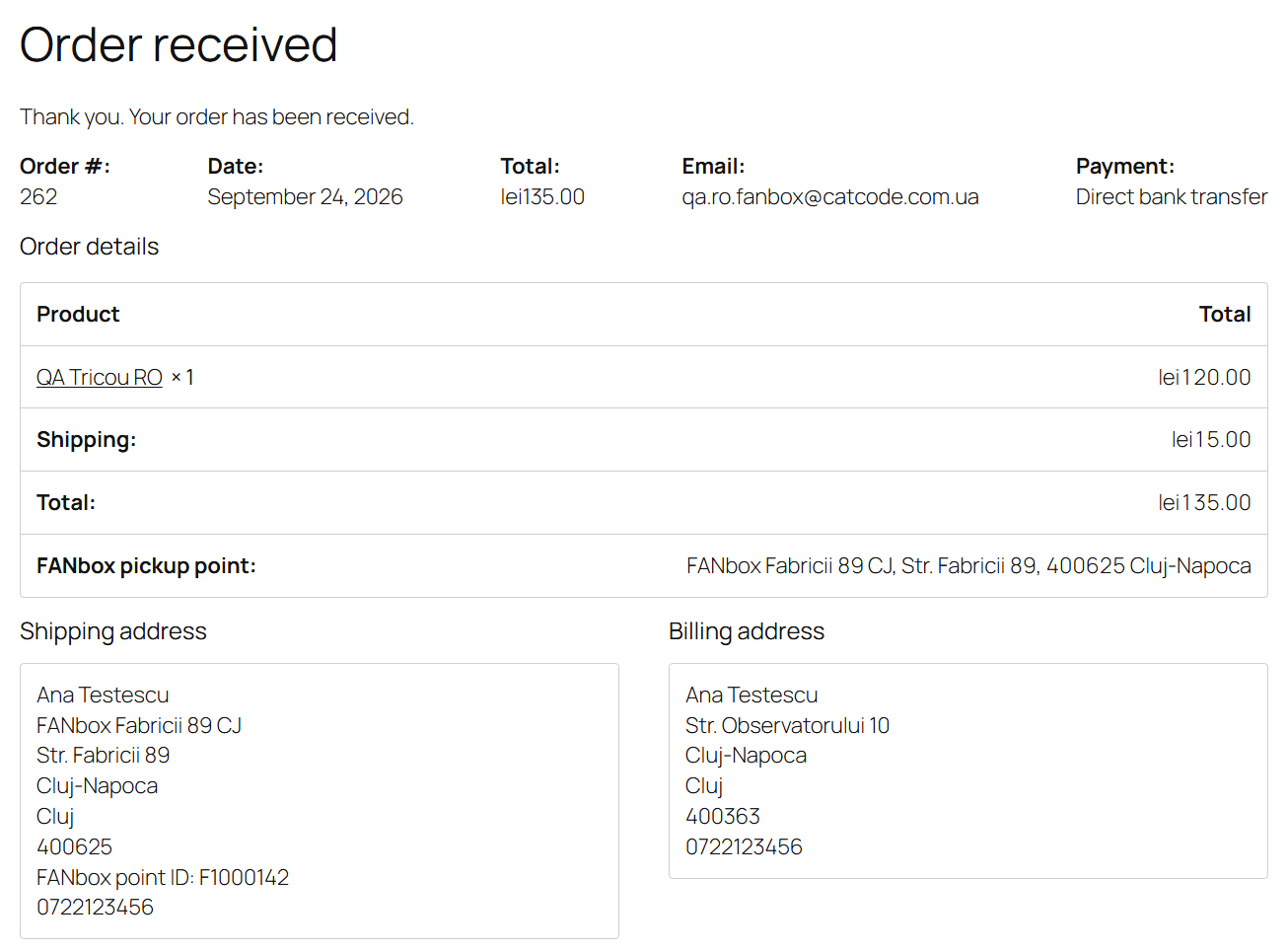
The point is stored on the order (HPOS) and shown on the thank-you page, in the account and in e-mails with a tracking link ✔ ✔
Couriers' points in the plugin's own table, refreshed daily — the checkout never waits for a courier API ✔ ✔
AWB from the order screen: weight, cash on delivery (ramburs) for the payment methods you choose, PDF label, status refresh, cancel ✔ ✔
AWBs for orders shipped with another method too — pick the courier in the box ✔ ✔
Cargus Ship & Go points without cash on delivery are marked; orders and AWBs with cash on delivery to them are refused ✔ ✔
Courier passwords and keys stored encrypted (AES-256) ✔ ✔
Plugin languages: English, română ✔ ✔
Parcels per AWB 1 up to 10
Live courier tariff at checkout with a % and fixed markup, rounding and the fixed price as a fallback — ✔
AWBs created automatically when an order reaches the status you choose — ✔
Bulk actions in the orders list: create AWBs and print all labels at once — ✔
Hourly AWB status sync with order notes and "Completed" once delivered — ✔

What it looks like

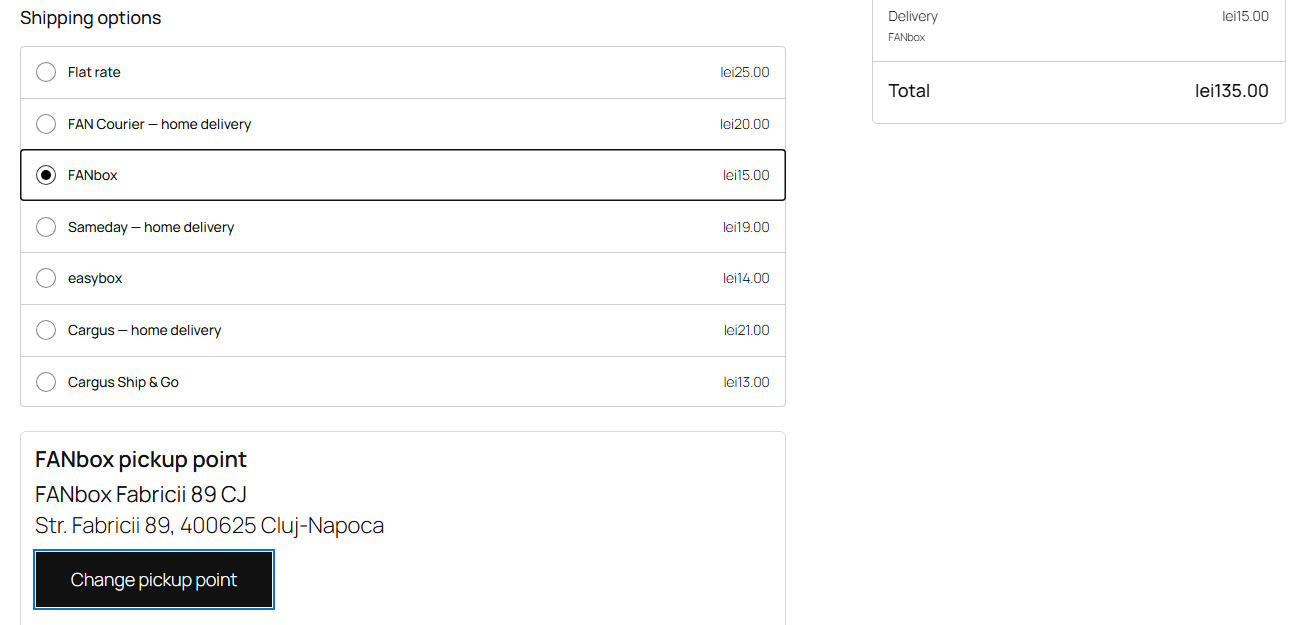
FAN Courier, FANbox, Sameday, easybox, Cargus and Cargus Ship & Go methods on the WooCommerce block checkout with a FANbox locker chosen
Block checkout: six methods of three couriers with prices in lei. FANbox is chosen — under the list, the chosen locker with a “Change pickup point” button. The buyer’s address above stays their own.
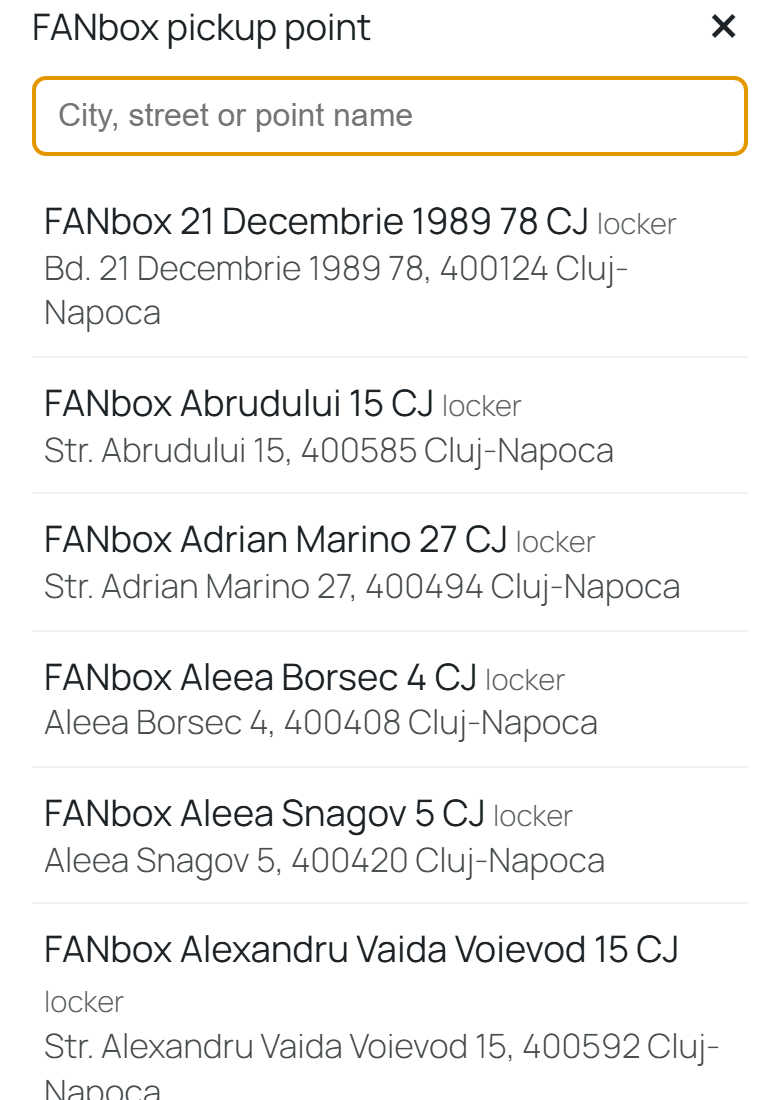
Choosing a FANbox locker from a phone: search by city, street or point name
On a phone (390 px) the point list opens full screen: search by city, street or name, the buyer’s city first.
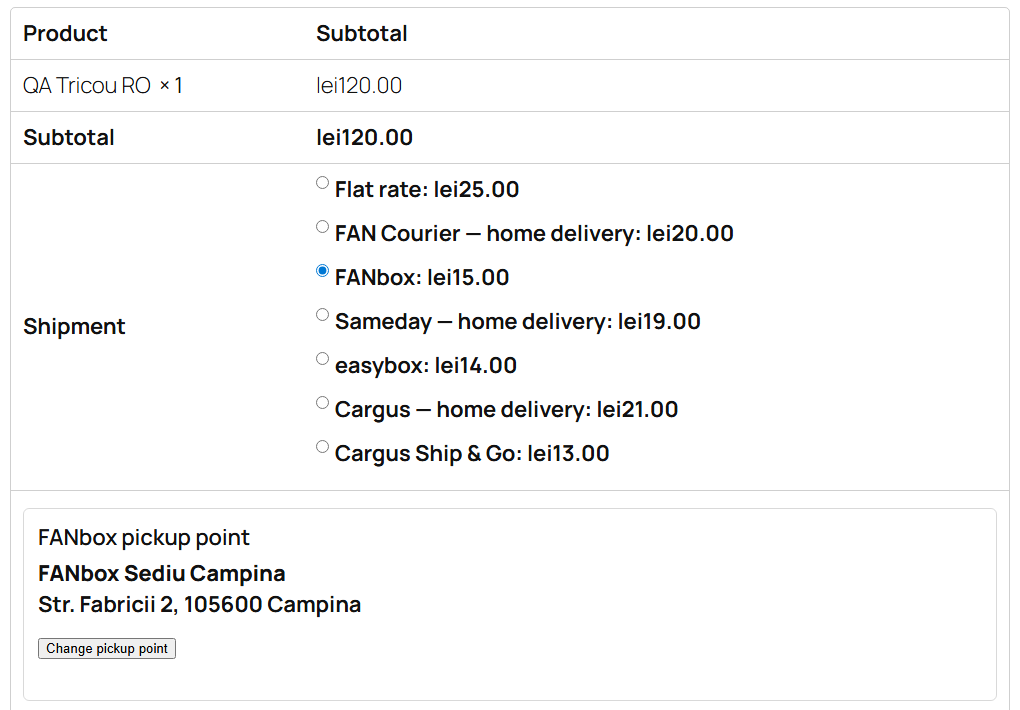
WooCommerce classic checkout: Romania Couriers methods and the chosen FANbox locker
Classic checkout: the same methods and the chosen point panel under the shipping table.

The trial starts when you ask

A fresh install is the free version, nothing switches on by itself. The “Try Pro for 7 days” button → e-mail → the key right in the window and by e-mail.

One key — one site

Moving the store? Unbind the licence on the old domain and activate it on the new one yourself. If our server is unreachable, Pro keeps working for 14 more days. For studios — keys for 5 or 25 sites, or unlimited.

Technical requirements

  • WooCommerce 7.0+ with the classic or the block checkout, HPOS compatible
  • WordPress 6.2+ · PHP 7.4+
  • A shipping zone covering Romania — the methods show for Romanian addresses only
  • Courier accounts: FAN Courier (selfAWB), Sameday (eAWB API), Cargus (UrgentOnlineAPI + WebExpress). Turn on one, two or all three.
  • Product weights and sizes — products without a weight use the default weight from the settings; the parcel size for lockers is set in the settings.
  • Plugin languages: English and Romanian.

Version history

v1.0.4 Current 25 September 2026

On a phone the pickup point window was 32 px taller than the screen, so its close button and the end of the list were cut off.

v1.0.3 25 September 2026

Pro: the hourly status sync on the legacy order storage (HPOS off) checks only the orders with an AWB in transit.

v1.0.2 24 September 2026

The Pro version activates next to an active free copy from WordPress.org without PHP warnings and no longer loads its code from the free copy’s folder.

All versions (5)
v1.0.1 September 2026

Block checkout: the pickup point address no longer overwrites the address saved in the buyer’s account.

v1.0.0 First release September 2026

FAN Courier + FANbox, Sameday + easybox, Cargus + Ship & Go; point picker on the classic and the block checkout; AWBs, labels, tracking, cash on delivery; English and Romanian.

Frequently bought with Romania Couriers for WooCommerce

4 modules in one order — 40% cheaper than separately

“Store starter” bundle Romania Couriers Nova Poshta Premium LiqPay Telegram notifications and Viber/SMS for customers Need more — all 144 modules in All Access for 4 990 ₴.
3 490 ₴ / year instead of 5 860 UAH bought separately
Buy the bundle →

Full module description

Romania Couriers for WooCommerce is a shipping plugin for stores in Romania. The country’s three largest couriers in one module: FAN Courier with FANbox lockers, Sameday with easybox lockers and PUDO shops, Cargus with the Ship & Go network. The buyer picks delivery to the address or to a pickup point right at checkout, and your team creates the AWB, prints the label and sees the parcel status without opening the couriers’ portals.

What you need. A business account with each courier you turn on: FAN Courier — client ID, selfAWB user name and password; Sameday — an eAWB API user; Cargus — an UrgentOnlineAPI subscription key and a WebExpress account. Honestly about testing: FAN Courier was tested live on FAN Courier’s public test account; Sameday and Cargus against the official specification of their APIs (Sameday SDK, Cargus OpenAPI) on a test server, because these couriers give test access to their customers only. Try it with your own accounts in the 7-day Pro trial — if a courier answers differently from its documentation, we fix it quickly.

What the buyer sees

The buyer sees the methods of every courier you added to the shipping zone, with prices. Choose a pickup-point method and the point panel appears under it: the list starts with points in the buyer’s city, search goes by city, street or point name. Switch to delivery to the address and the panel goes away, while the buyer’s own address stays as it was: the plugin never writes the locker address into the buyer’s fields, on the classic or the block checkout. Each courier keeps its own chosen point, so switching between FANbox and easybox mixes nothing up.

Try to place a pickup-point order without a point and the server refuses it with an explanation (“Please choose a Cargus Ship & Go pickup point.”), on any checkout. A point picked earlier never lands in an order shipped another way.

What the admin gets

  • Six methods in WooCommerce shipping zones: FAN Courier and FANbox, Sameday and easybox, Cargus and Cargus Ship & Go. Shown for Romanian addresses only.
  • Method price — fixed, free from an order amount (counted the way the cart shows it), free-shipping coupons, weight limit per method.
  • Couriers’ points in your database. The “Download … points” button fetches each courier’s points (FAN Courier — over 3,200 FANbox lockers), then they refresh daily. The buyer searches your database instead of waiting for a courier API.
  • “Check the connection” tests the account and, for Sameday and Cargus, fills in your pickup locations and services.
  • Passwords and keys are stored encrypted and never reach the HTML of the settings page.
  • AWB from the order screen: weight, parcel size, cash on delivery (ramburs) for the payment methods you mark, declared value if you want it.
  • PDF label in A4 or A6 / 10×14 cm (FAN Courier prints A6 only for ePOD AWBs), status refresh and cancel — buttons in the same box.
  • Change the point by hand if the buyer asks — by point ID; an unknown ID is refused.
  • AWB for any order: even when the buyer chose “Flat rate”, pick the courier in the box.
  • Tracking — the AWB number linking to the courier’s page in e-mails, on the thank-you page and in the buyer’s account.
  • A log of every courier call in the WooCommerce logs (source romania-couriers); errors are always logged.

How it works — step by step

  1. Settings. WooCommerce → Romania Couriers: the accounts of the couriers you need, “Check the connection”, downloading the points.
  2. Shipping zone. In your “Romania” zone add the methods marked “(Romania Couriers)” and set the price, the free-shipping threshold and the weight limit.
  3. Checkout. The buyer picks a courier and a delivery type, and for a pickup point — the point in the panel. With Pro the delivery price comes from the courier’s tariff for the buyer’s city and the cart weight.
  4. Server-side check. For a pickup-point method, an order without a point, or with a point no longer in the database, does not go through. For a Cargus Ship & Go point without cash on delivery, neither does an order paid on delivery.
  5. Order. The point is stored on the order and, optionally, in the shipping address so e-mails and other tools show it. The address saved in the buyer’s account stays the buyer’s own.
  6. AWB. Your team creates the AWB on the order screen (with Pro — automatically on the status you choose, or in bulk from the list) and prints the label.
  7. Status. “Refresh status” asks the courier; with Pro statuses sync every hour, changes go to the order notes, and a delivered order can turn “Completed” on its own.
  8. Cancelling. An AWB the courier has not picked up yet is cancelled from the order screen.

Under the hood

  • The point lives on the server only. The picker’s JavaScript never writes into the buyer’s address fields. The point goes into the session separately per courier, and into the order only when the shipping method is that courier’s pickup-point method; otherwise the link is wiped.
  • The buyer’s account stays intact. On the block checkout the point address is written to the order after WooCommerce has saved the customer data, so next time the buyer gets their own address, not the locker’s.
  • A live tariff without surprises (Pro). If the courier answers with zero, with an error, or not within a few seconds, the method shows your fixed price, never “Free”. A pickup-point method does not ask for a tariff before a point is chosen.
  • Cash on delivery in the tariff (Pro) on the classic checkout: changing the payment method recalculates the shipping price. On the block checkout WooCommerce does not send the payment method before the order is placed, so cash on delivery counts only if the payment method is already chosen.
  • Courier protocols: FAN Courier REST API (token, FANbox via pickupLocationId), Sameday API (easybox → lockerLastMile, PUDO → oohLastMile), Cargus UrgentOnlineAPI (Ship & Go — service 38 with DeliveryPudoPoint, cash on delivery to the bank account only). Tokens renew themselves on 401.
  • Passwords and keys — AES-256-CBC with HMAC, no XOR.
  • A Pro gate that never bricks the store: when the trial ends only the Pro features stop, shipping and AWBs keep working.
  • Deleting the plugin removes its points table, settings and cron jobs.

Installation

  1. Plugins → Add New → Upload Plugin: choose romania-couriers-for-woocommerce-1.0.4.zip and activate.
  2. WooCommerce → Romania Couriers: fill in the account of each courier you turn on and save.
  3. Click “Check the connection” (Sameday and Cargus then offer pickup locations and services) and “Download … points”.
  4. WooCommerce → Settings → Shipping → your “Romania” zone → Add shipping method → the methods marked “(Romania Couriers)”.
  5. Place a test order to a pickup point and create the AWB from the order screen.
  6. For Pro: paste the licence key from the e-mail after payment, or start the 7-day trial.

Questions
about the module

Didn't find the answer? Message us on Telegram and we'll reply within a business day.

@catcode_support Setup, compatibility, activation
Do I need contracts with the couriers?

Yes, a business account with each courier you turn on: FAN Courier — client ID, selfAWB user name and password; Sameday — an eAWB API user; Cargus — a subscription key from the UrgentOnlineAPI developer portal and a WebExpress account. You can turn couriers on one at a time.

Which accounts was the plugin tested with?

FAN Courier — live, on FAN Courier's public test account: points, tariff, AWBs to an address and to a FANbox, label, tracking, deleting. Sameday and Cargus were tested against their official API specification (Sameday SDK, Cargus OpenAPI) on a test server that answers like them; they have not yet run on production accounts of these two couriers. Courier errors are shown in the courier's own words.

The pickup-point method does not appear at checkout.

It appears once the courier's points are downloaded (settings page) and for Romanian addresses only. Check the weight limit of the method as well.

FAN Courier refuses a FANbox AWB with cash on delivery.

A FANbox takes cash on delivery only by card. FAN Courier has to enable card payment (mPOS) for your account; the plugin adds the option automatically.

What about Bucharest?

Sameday works with sectors: the sector typed in the address is used ("sector 3", "sect. 3"), otherwise Sector 1. FAN Courier and Cargus take "Bucuresti".

What if I do not want to pay for Pro?

Shipping methods, the point picker, AWBs, labels, tracking and cash on delivery stay free with no time limit.

Not quite what you are looking for?

We build custom modules for WordPress, WooCommerce, OpenCart and Shopify. Tell us about the task and we'll prepare an estimate.

Order a custom module