Get in touch
  • WordPress
  • Sales and conversion
  • v1.0.1

Profit & Cost Reports for WooCommerce — profit report and cost of goods

Cost price on products and variations, frozen into every order, and a report: net sales, cost of goods, gross profit and margin for any period.

Download Free
Pro · one-year licence The more sites, the less each one costs
Compatibility
WooCommerce 7.1+ · WordPress 6.2+ · PHP 7.4+ · HPOS
Licence
one site, annual
Trial
7 days, no card, one per site
Updated
September 2026
Or all 144 Pro modules with All Access — 4 990 ₴ / year

What Free has,
and what Pro adds

The free version works with no time limit. Pro adds the rest of the features in the table.

Feature Free Pro
Cost price field on simple products and every variation, Cost column in the product list ✔ ✔
Cost is frozen into the order line when the order is created — a new purchase price never rewrites past profit ✔ ✔
Profit report: net sales, cost of goods, gross profit, margin, orders for any period ✔ ✔
Refunds are subtracted from sales, returned items give their cost back ✔ ✔
Cost and profit box on the order screen (HPOS and legacy storage) ✔ ✔
Same numbers as WooCommerce Analytics: excluded statuses and date type from the Analytics settings ✔ ✔
Profit by product top 20 all products
Breakdowns by category, brand, customer and date with a chart — ✔
Net profit after payment method fees, shipping costs and monthly expenses — ✔
CSV export of any breakdown — ✔
Bulk: cost = % of price, save costs into past orders — ✔
Cost and Profit columns in WooCommerce → Analytics → Orders and its CSV — ✔

What it looks like

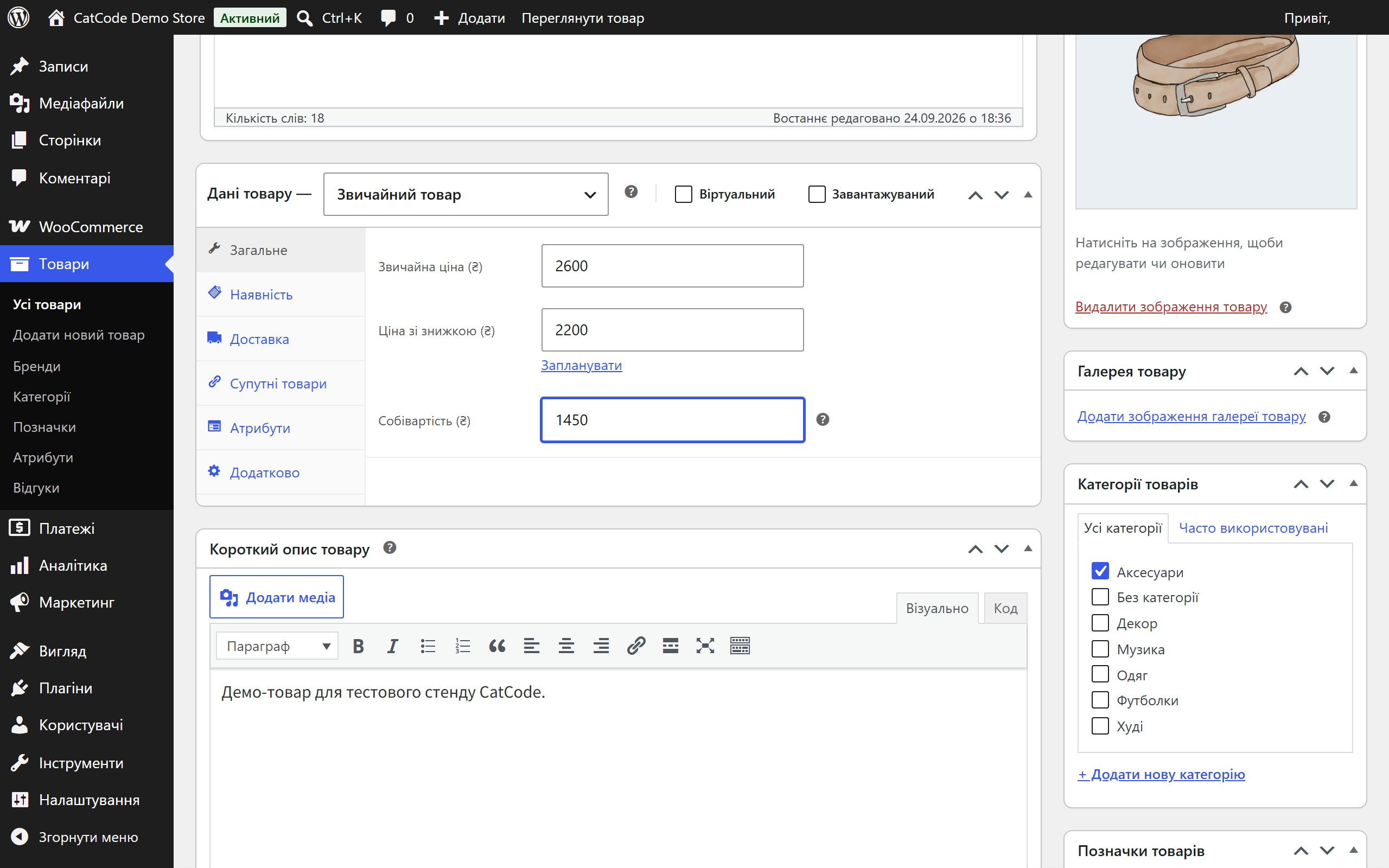
Cost price field in WooCommerce product data
Product data → General: “Cost price” under the price. Variable products have it on the parent and on every variation. (Admin in Ukrainian.)
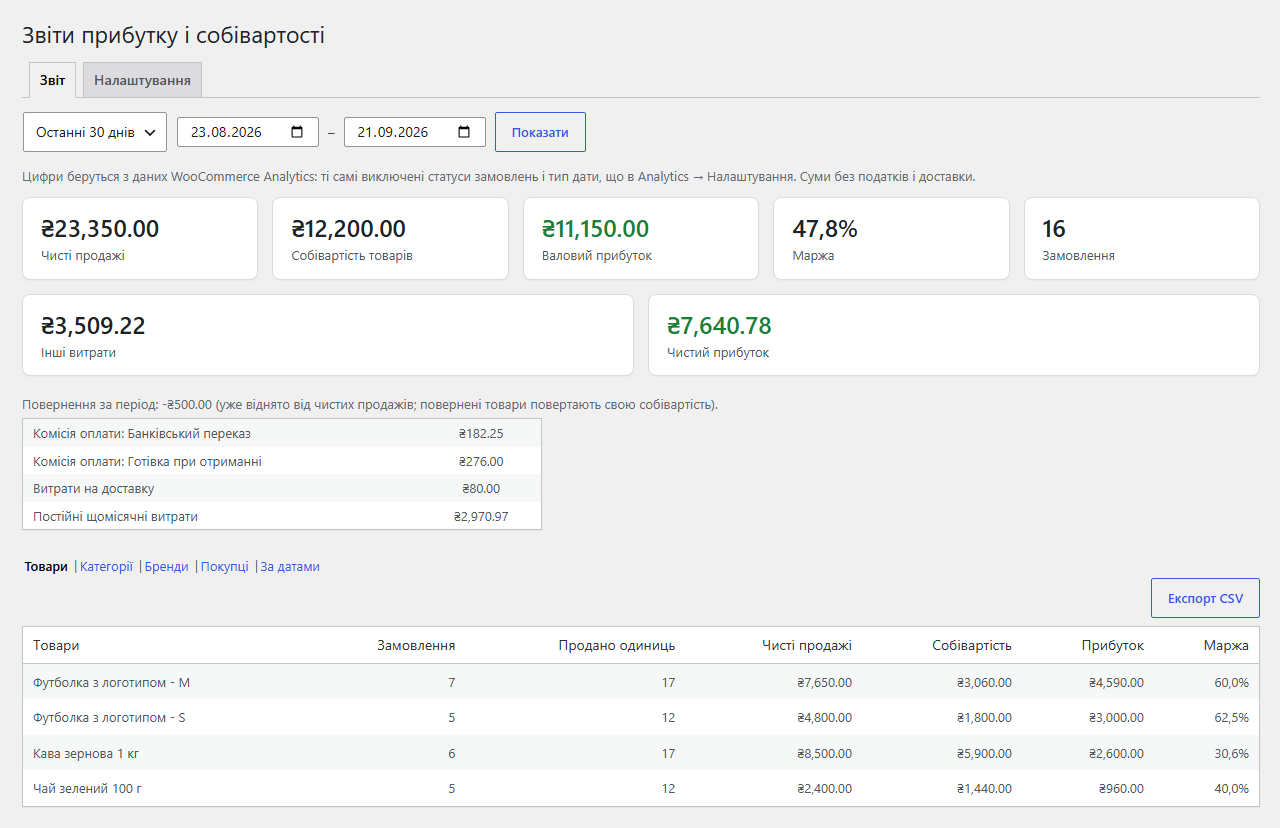
WooCommerce profit report: tiles and product table
WooCommerce → Profit Reports for 30 days: net sales, cost of goods, gross profit, margin, orders. With Pro — other costs and net profit, payment fees and shipping as separate rows, CSV export.
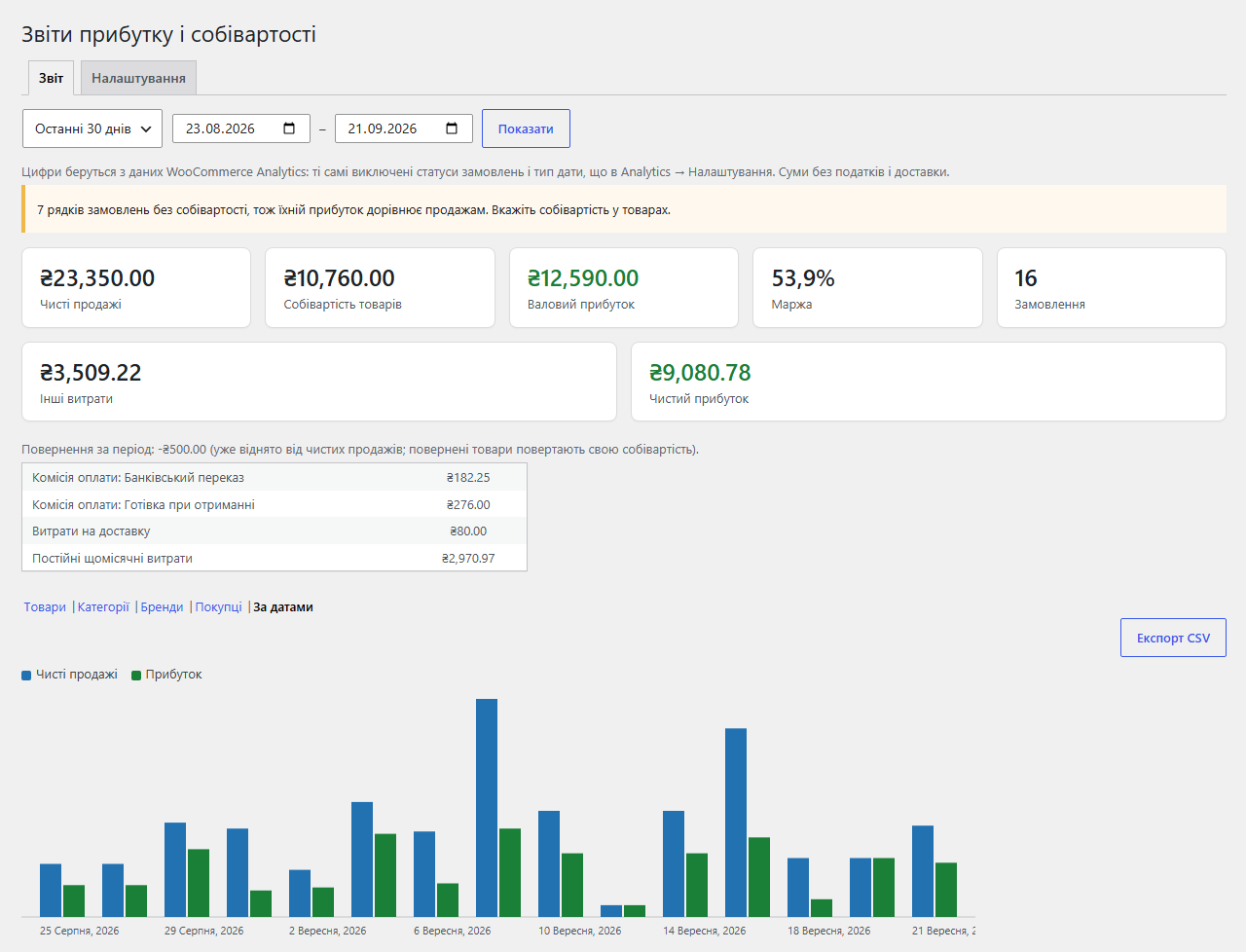
Profit report by date with a chart
Pro “By date” breakdown: net sales and profit chart plus a daily table. The notice on top tells how many order lines have no cost.

The trial starts when you ask

A fresh install is the free version, nothing switches on by itself. The “Try Pro for 7 days” button → e-mail → the key right in the window and by e-mail.

One key — one site

Moving the store? Unbind the licence on the old domain and activate it on the new one yourself. If our server is unreachable, Pro keeps working for 14 more days. For studios — keys for 5 or 25 sites, or unlimited.

Technical requirements

  • WooCommerce 7.1+ (tested on 11.1), HPOS and the Cart & Checkout blocks supported
  • WordPress 6.2+ · PHP 7.4+
  • WooCommerce Analytics — preferably on: the report reads its tables. Without it the plugin reads orders directly (up to 10,000 orders per period)
  • Languages: English, Ukrainian, Russian

Version history

v1.0.1 Current September 2026

Cost prices for products and variations, cost snapshots on order lines, a profit report for any period with the top 20 products, refund handling, order screen box, WooCommerce Analytics or…

Frequently bought with Profit & Cost Reports for WooCommerce

4 modules in one order — 40% cheaper than separately

“Store starter” bundle Profit & Cost Reports Nova Poshta Premium LiqPay Telegram notifications and Viber/SMS for customers Need more — all 144 modules in All Access for 4 990 ₴.
3 590 ₴ / year instead of 5 960 UAH bought separately
Buy the bundle →

Full module description

Profit & Cost Reports for WooCommerce shows how much you earned, not just how much you sold. WooCommerce counts revenue but knows nothing about what the goods cost you. The plugin adds a cost price to products and variations, freezes it into every order line at the moment of purchase and builds a report: net sales, cost of goods, gross profit and margin for any period.

What the customer sees

Nothing — on purpose. Costs are stored as hidden product and order-line data and never reach the storefront, e-mails or customer-facing REST responses. Checkout, cart and product pages stay exactly as they were, classic or block.

What the admin gets

  • Cost on the product. Product data → General → “Cost price”. On variable products — on every variation; a variation without its own cost uses the parent’s. The product list gets a Cost column.
  • Profit report under WooCommerce → Profit Reports: today, 7 or 30 days, this or last month, this year or any range. Tiles for net sales, cost of goods, gross profit, margin and orders, plus profit by product.

How it works — step by step

  1. You enter costs on products (or, in Pro, in one go: “cost = 60% of price” for every product without a cost, optionally in one category).
  2. A customer places an order — classic or block checkout — or you create one in the admin or via REST. The plugin copies the current cost into every order line.
  3. The purchase price changes and you update the product cost. The profit of orders already placed stays what it was at the moment of sale.
  4. A refund is subtracted from sales; if items were returned, their cost comes back too. Amount-only refunds leave the cost alone.
  5. The report reads the WooCommerce Analytics tables with the same excluded statuses and date type you set in Analytics, so its numbers match the rest of your store reports.

Under the hood

  • Snapshot on the order line — unit cost and line cost are written to the item meta when the order is saved, so past profit never depends on today’s prices.
  • Analytics tables as the source. Queries are aggregated and cached for 30 minutes, so the report does not load the store on every visit.
  • One currency at a time. Orders in different currencies are never mixed; the currency filter defaults to the store base currency.
  • Analytics columns (Pro) are added through the standard WooCommerce Admin filters — both to the table and to the downloadable CSV.
  • Nothing on the storefront — no scripts, styles or requests for customers.
  • Uninstall keeps costs and snapshots by default; full data removal is a setting.

Installation

  1. Plugins → Add New → Upload Plugin: choose the plugin archive and activate it.
  2. Open a product → Product data → General and fill in “Cost price” (on variable products — on each variation).
  3. Open WooCommerce → Profit Reports.
  4. For Pro: paste the licence key from the purchase e-mail or start the 7-day trial, add payment fees, shipping and monthly expenses — net profit appears in the tiles.

Questions
about the module

Didn't find the answer? Message us on Telegram and we'll reply within a business day.

@catcode_support Setup, compatibility, activation
Do customers see the cost price?

No. Costs are stored as hidden product and order-line data and appear only in the admin.

Why does my profit equal my sales?

The products sold have no cost price yet. The report shows how many order lines lack one.

Are tax and shipping part of net sales?

No. As in WooCommerce Analytics: order totals without tax and shipping, after discounts and refunds.

What about orders placed before the plugin was installed?

They have no saved cost. The report uses the current product cost and marks those lines as an estimate — or counts them at zero, as you choose in Settings. Pro can write costs into past orders from a chosen date in one click.

My store sells in several currencies.

The report shows one currency at a time and never mixes amounts. There is no conversion.

Not quite what you are looking for?

We build custom modules for WordPress, WooCommerce, OpenCart and Shopify. Tell us about the task and we'll prepare an estimate.

Order a custom module