
WordPress
Google Reviews on the site for WooCommerce
Free + Pro
890 UAH/year
v1.0.0
Enter at least 2 characters

Your business's Google rating and reviews on the site — as a block, a shortcode or on the product page. The plugin finds the business by name, so no Place ID hunting. The Google API key is your own.
The free version works with no time limit. Pro adds the rest of the features in the table.


Let us say this before you buy: the plugin works only with a Google API key that has “Places API (New)” enabled.

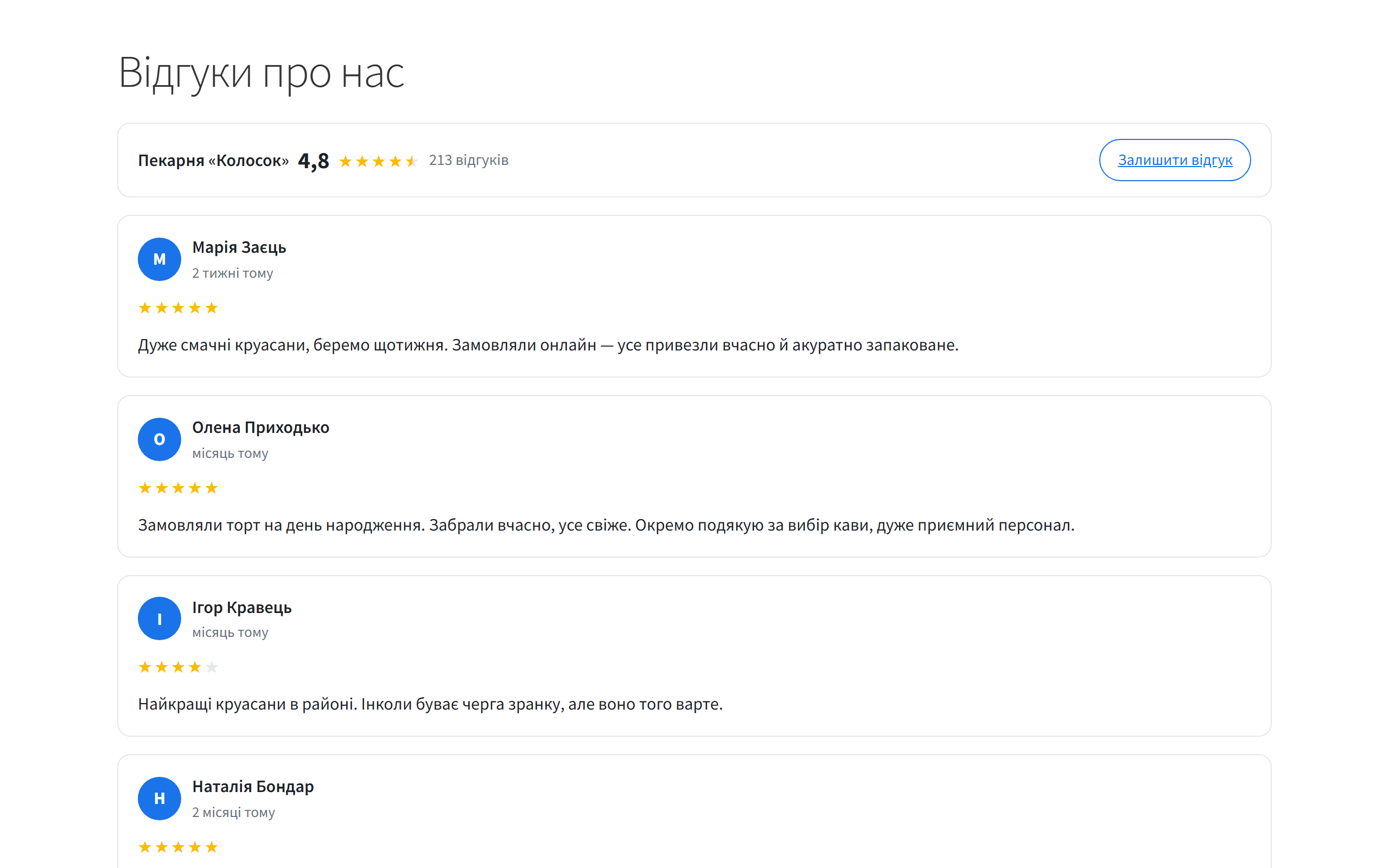
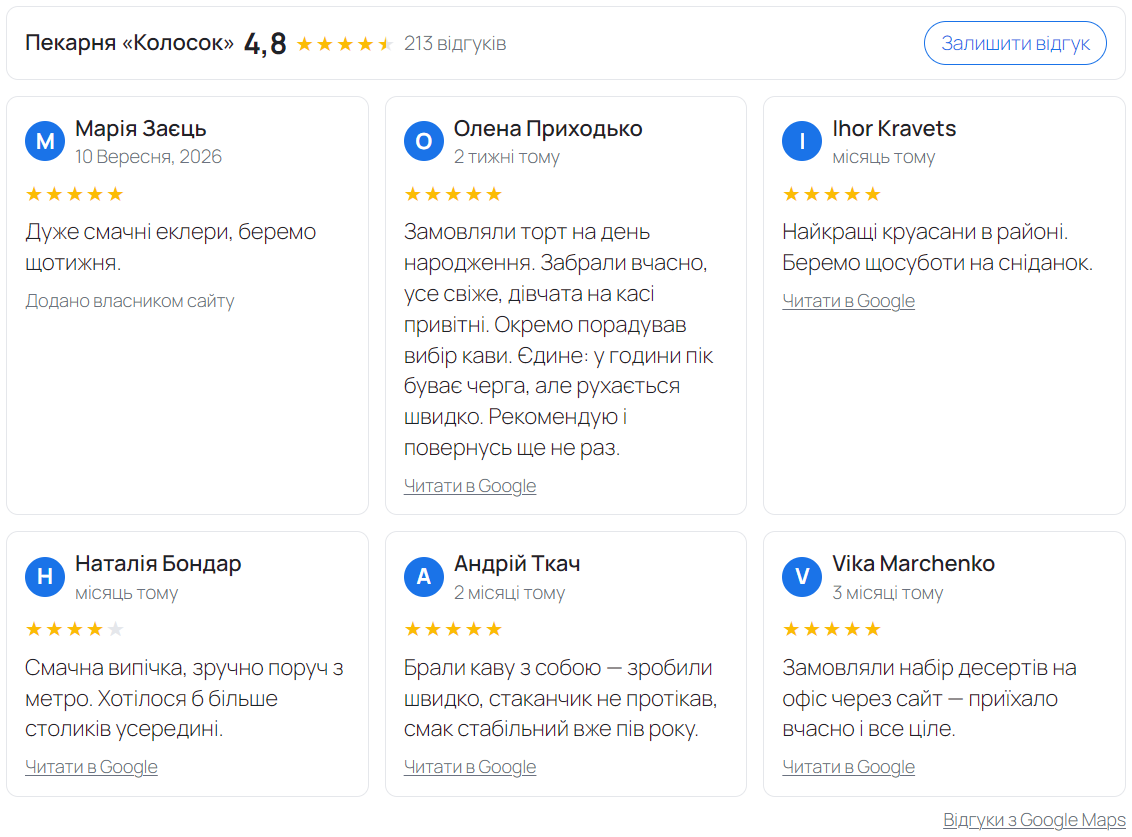
At the top, the rating line: the average, the stars (halves included), the number of ratings, and a “Write a review” button that opens the review form of your business on Google.

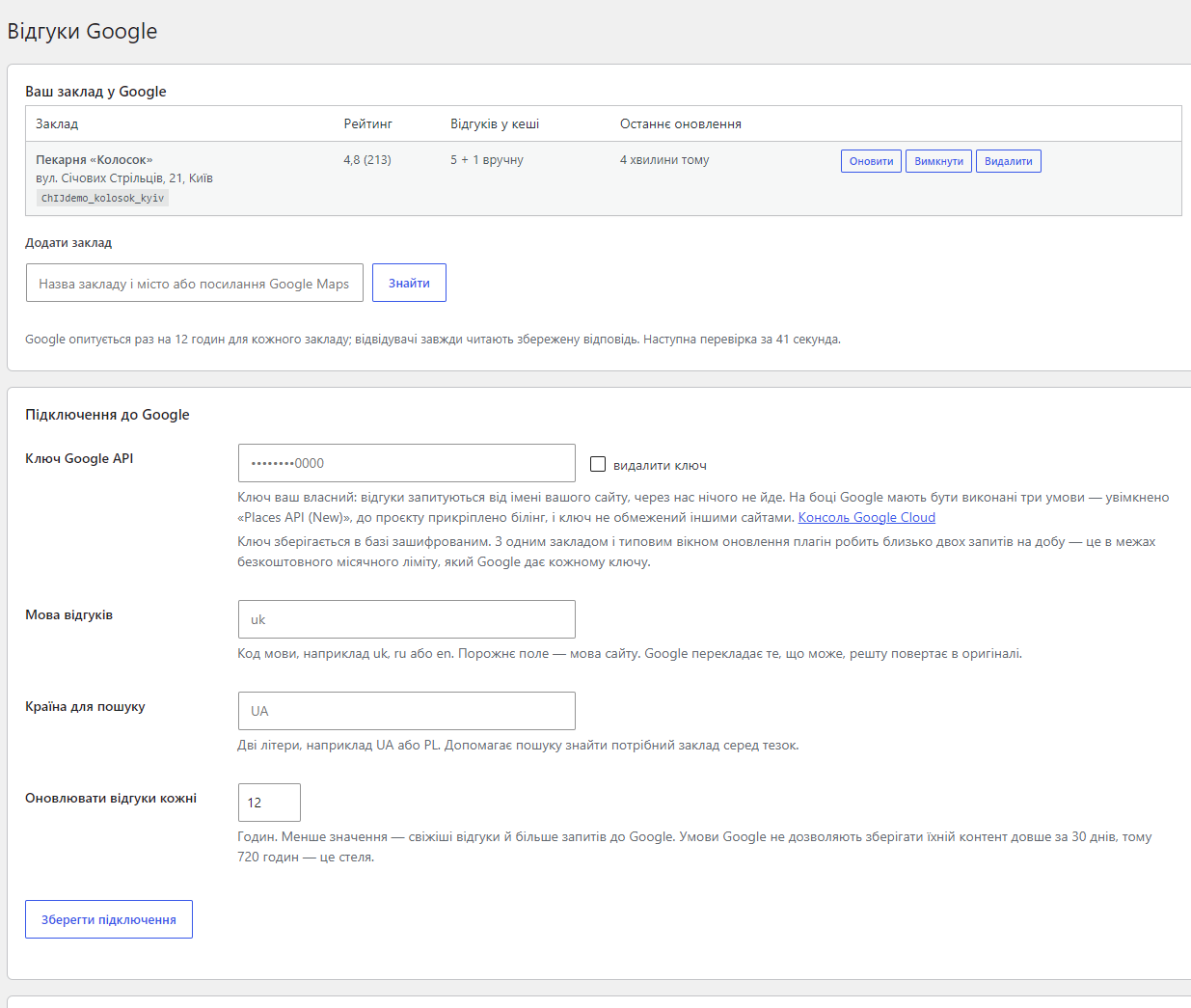
One screen: “Settings → Google reviews”. At the top, the table of places: name, address, Place ID, rating, how many reviews are cached, when the last refresh happened, and the “Refresh”, “Disable” and “Delete” buttons.

A fresh install is the free version, nothing switches on by itself. The “Try Pro for 7 days” button → e-mail → the key right in the window and by e-mail.

Moving the store? Unbind the licence on the old domain and activate it on the new one yourself. If our server is unreachable, Pro keeps working for 14 more days. For studios — keys for 5 or 25 sites, or unlimited.
 WordPress 6.2 or newer, PHP 7.4+. WooCommerce is only needed for the automatic placements on the product and thank-you pages — the widget itself works on any WordPress site. You also need a working WordPress cron (or a system cron) and a Google Cloud key with Places API (New) enabled and billing attached.
Place ID search by name or Google Maps link, cached Place Details, a Gutenberg block and a shortcode, manual reviews, light/dark/auto themes, “Read more”, a configurable cache window,…
4 modules in one order — 40% cheaper than separately



Google Reviews on the site is a plugin for WordPress and WooCommerce that shows your business’s Google rating and reviews on your own pages — as a block, as a shortcode, or automatically on the product page and the thank-you page. The plugin finds the business for you, by name or by a Google Maps link, so nobody has to hunt for a Place ID.
Reviews on Google are what a buyer reads before ordering, and they are exactly what the shop’s own site usually does not show. The plugin brings them onto the site the way Google’s policy requires: with the author’s name and avatar, with a link to the review on Google Maps, and with the Google Maps attribution next to the block.
Let us say this before you buy: the plugin works only with a Google API key that has “Places API (New)” enabled. You create that key in your own Google Cloud project, on your own billing account. We do not hand out keys, we do not proxy the traffic through us, and we never see your data — the request goes from your site straight to Google.
Without a key you cannot add a business at all: only Google can turn a name or a Maps link into a Place ID. Reviews typed in by hand are an addition to what Google returns for a business you have already added — not a way to run the plugin with no key. If you remove the key later, the widget keeps showing the stored cache and the manual reviews, but a new business can no longer be added.
The second thing worth knowing up front: Google returns at most five reviews per business. That is a limit of the Places API, not of the plugin — no plugin using the official API can show the sixth one. The only way past it is reviews you add by hand.
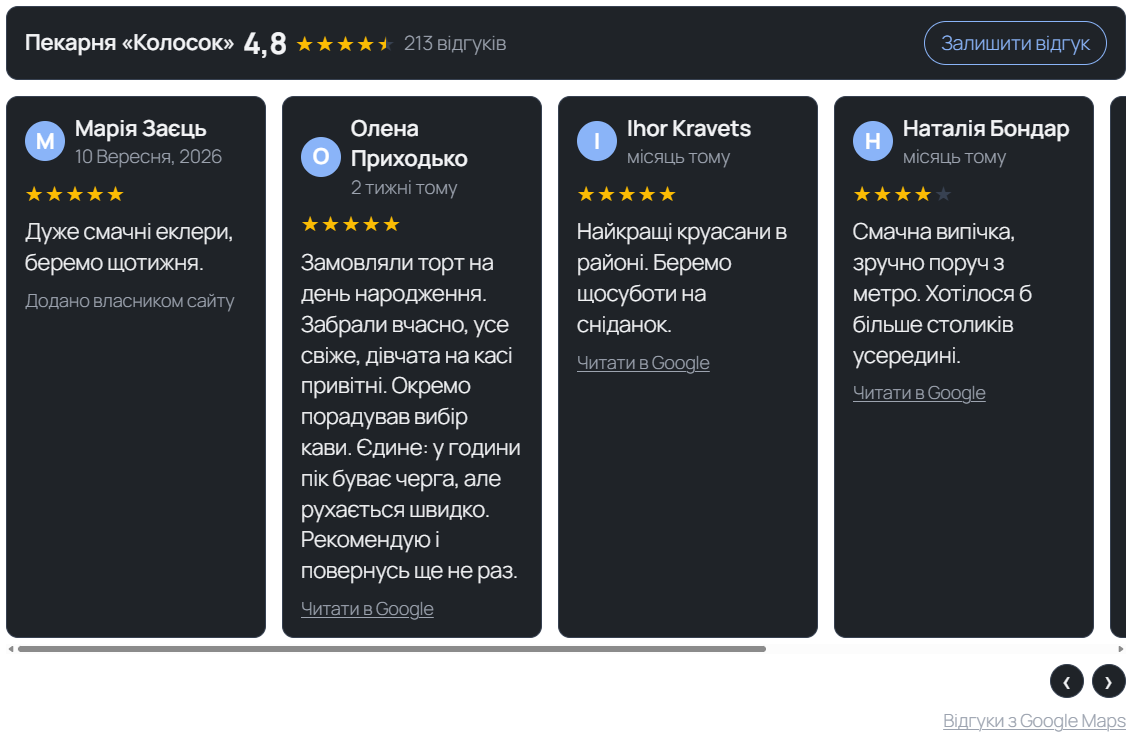
At the top, the rating line: the average, the stars (halves included), the number of ratings, and a “Write a review” button that opens the review form of your business on Google. Below it, the review cards: author, avatar, rating, date, text. A long review is folded to “Read more”, but the full text stays in the page HTML — nothing is cut off for good.
The layout follows the place it sits in: a list in a narrow column, a grid of two to four columns on a wide page, a slider where space is tight. The colour scheme is light, dark, or automatic from the visitor’s system setting.
One screen: “Settings → Google reviews”. At the top, the table of places: name, address, Place ID, rating, how many reviews are cached, when the last refresh happened, and the “Refresh”, “Disable” and “Delete” buttons. Below it: the Google connection, the look of the block, the filters, the WooCommerce placements, the manual reviews and the licence.
The key is stored encrypted in the database (AES-256-CBC with an HMAC), not as plain text, and the field only ever shows a mask. When Google refuses a request the plugin does not print “error 403” — it names the three things that actually cause it: Places API (New) is not enabled, no billing account is attached to the project, or the key is restricted to other sites.
1. You paste your own Google API key and save the connection.
2. In “Add a place” you type the name and the city (“Kolosok Bakery Kyiv”) or paste the Google Maps link to the business, and press “Find”. The plugin asks Google and shows the matches with address and rating — you just pick yours.
3. The plugin stores the Place ID and loads the reviews into the cache straight away.
4. You put the “Google reviews” block on the page you want, or the [catcode_google_reviews] shortcode into a template.
5. From there the cron does the work: once per cache window (12 hours by default) the plugin refreshes the answer. Visitors read the stored copy instead of poking Google on every page view.
The “Google reviews” block sits in the “Widgets” category and renders a live preview right in the editor: change the place, the layout, the number of reviews, the columns or the theme and you see the result without reloading. The same options are available in the shortcode: [catcode_google_reviews layout="grid" columns="3" limit="6" theme="dark"].
WooCommerce is not required for the plugin to run, but when it is there Pro turns on three automatic placements: a tab of its own on the product page, a block right under the product description, and a block on the thank-you page after an order — the moment when a buyer is most likely to leave a review themselves.
Competitors often sell “stars in the search results” — Review and AggregateRating markup for someone else’s reviews. We deliberately do not output it: Google’s structured data rules forbid marking up reviews collected on another platform, and what that earns is a manual action, not stars. The plugin shows reviews to people; it does not try to trick the search engine.
Reviews belong to the “Place Details Enterprise + Atmosphere” SKU, and Google gives every key a free monthly allowance per SKU. With one place and the default 12-hour window the plugin makes about two requests a day, comfortably inside that allowance. Set the window to one hour and connect a dozen places and the bill grows — and it is your bill, not ours. That is why the refresh window is a setting, and why it defaults to 12 hours.
Separately: Google’s terms allow keeping their content for 30 days at most. So the cache window is capped at 720 hours, and content past that window is not shown at all (only the manual reviews remain) instead of quietly breaking the rules.
The Pro licence is 890 UAH per year for one domain, with a discount for a longer term: 2 years 1690, 3 years 2350, 4 years 2920, 5 years 3340 UAH. There are no automatic charges: renewal is manual, with email reminders 14, 7, 3 and 1 day before the end.
Before buying there are 7 days of Pro for free — no card, straight from the settings screen. When the licence term ends the plugin does not switch off: the free and Pro features keep working; only updates and support stop.
Google’s answer is kept in a single settings row rather than a transient: object caches drop transients whenever they feel like it, and every such drop is another billable Places call. The cache is refreshed by a cron event, not by a visitor, so the page never waits on Google and does not break when Google is unreachable.
The key is encrypted before it is written to the database. Review texts are never edited — Google’s rules require a review to be shown as it came; the filters decide whether a review is shown, never how it reads. The rating line stays honest either way: it shows the average Google reports, even when a filter hides some of the reviews.
The plugin is HPOS compatible, creates no tables of its own, and on uninstall removes every option and cron event it created.
1. “Plugins → Add New → Upload Plugin”, pick the archive and activate it.
2. Open “Settings → Google reviews”.
3. Paste a Google API key with Places API (New) enabled and save the connection.
4. Find your business by name or by a Google Maps link and press “Choose this one”.
5. Put the “Google reviews” block on a page, or the [catcode_google_reviews] shortcode into a template.
Didn't find the answer? Message us on Telegram and we'll reply within a business day.
 @catcode_support
Setup, compatibility, activation
@catcode_support
Setup, compatibility, activation
A key is required, and it is your own: you create it in your own Google Cloud project with "Places API (New)" enabled and your own billing account. We do not issue keys and we do not proxy the traffic — the plugin calls Google from your site.
No. Without a key you cannot even add a business: only Google turns a name or a Maps link into a Place ID. Manual reviews are an addition to a business you already added, not a replacement for the key.
As many as Google returns, which is at most five per place. That is a Places API limit no plugin using the official API can get around. The only way past it is reviews you add by hand.
With one place and the default 12-hour window it is about two requests a day, inside the free monthly allowance Google gives every key. A short cache window and many places will grow the bill — and the bill is yours, which is why the window is a setting.
No, and that is deliberate. Google's structured data rules forbid marking up reviews collected on another platform, so the plugin does not output Review or AggregateRating markup — that avoids a manual action on your site.
No. The block and the shortcode work on any WordPress site. WooCommerce is only needed for the automatic placements: the product tab, the block under the description and the block on the thank-you page.
The plugin keeps working. The free features stay — one place, the list layout, the block, the shortcode, manual reviews. The Pro features keep working and the saved settings are not lost; only updates and support stop.
Pro lets you add any number of places and show them together: the rating line is weighted by the number of ratings, and every review is labelled with the place it belongs to.
Yes — release the key with "Release the licence" on the settings screen and activate it on the new domain.
No reviews yet. Be the first.
No questions yet. Ask one — we answer within 24 hours.
We build custom modules for WordPress, WooCommerce, OpenCart and Shopify. Tell us about the task and we'll prepare an estimate.
Order a custom module
—

CatCode assistant
Just now


CatCode assistant
Online

I’ll help with your website task
Describe your website task — I’ll find a ready-made module or pass it to a developer for an estimate. Modules, custom features, layout, integrations, speed, migration, technical SEO.
