
















OpenCart
1 290 UAH839 UAH≈ €17
Black November: −35% on all modules until 30 November Black November: −35% until 30 November Choose a module
 Website auditA PDF report by email in 3 minutesCheck a website
Everyday tasks
Image compressorSize, quality and WebP in bulkQR generatorLink, Wi-Fi, payment to IBANVAT calculator20, 14, 7% and amount in wordsTransliterationOfficial Ukrainian standardWebsite checks
PHP and pluginsPHP version, WordPress, pluginsGoogle Merchant feedFields, prices, GTIN, imagesDomain emailSPF, DKIM, DMARC, blacklistsAI search readinessllms.txt, bots, markupAll 9 toolsEnter at least 2 characters

Finvalda for OpenCart 4.x, 3.x, 2.3 (Lithuania): orders as sales operations free; Pro adds status rules, clients, stock and prices. A licence for life.
The free version works with no time limit. Pro adds the rest of the features in the table.


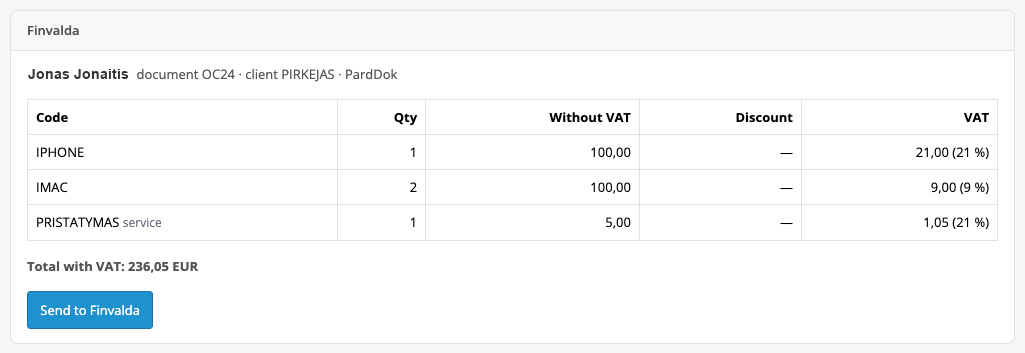
The order page gets a “Finvalda” box: the buyer line, the document, the client and the operation type, a table of lines with code, quantity, amount without VAT, discount and VAT, the total with VAT and a “Send to Finvalda” button.

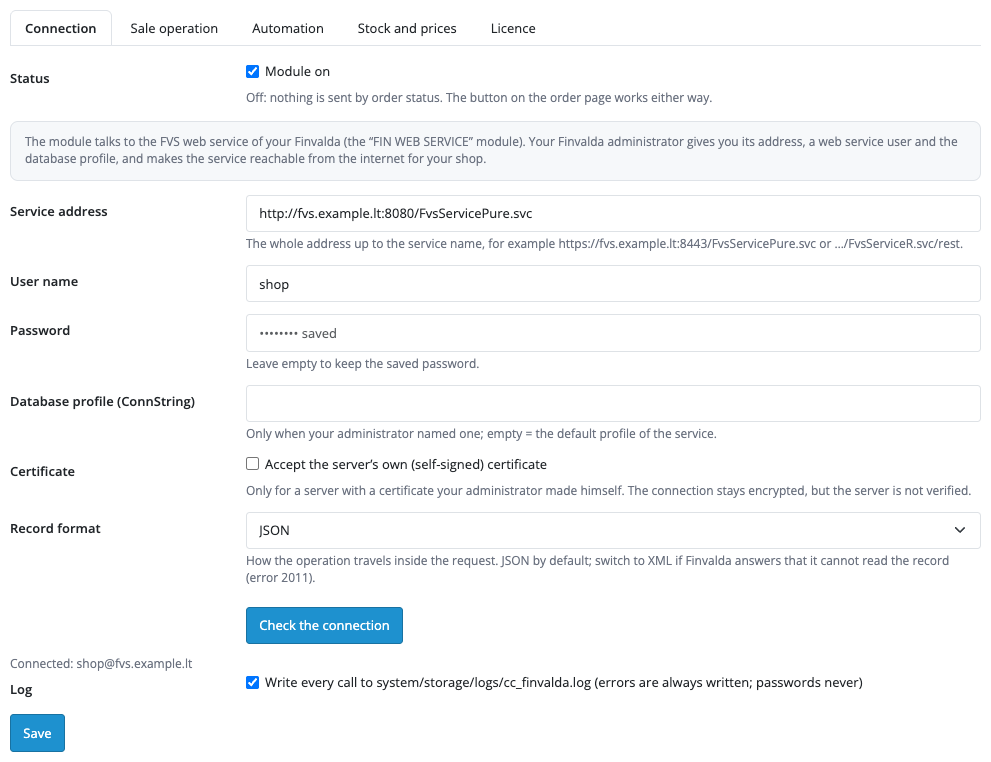
Extensions → Extensions → Modules → Finvalda Sales Sync: the tabs “Connection”, “Sale operation”, “Automation”, “Stock and prices” and “Licence”.

A fresh install is the free version, nothing switches on by itself. The “Try Pro for 7 days” button → e-mail → the key right in the window and by e-mail.

Moving the site? Unlink the licence on the old domain and activate it on the new one yourself. A staging copy (staging., dev.) works with the same key and does not take a site slot. For studios — keys for 5 or 25 sites, or unlimited.
 OpenCart 4.0.2.x–4.1.x, 3.0.x or 2.3.0.2; the cURL extension; PHP 7.0 and newer.An FVS web service with the FIN WEB SERVICE module from Finvalda, a web service user and a database profile. Finvalda provides the module on request.The Finvalda server is often in the company office: it must be reachable from the shop hosting over http or https. Over http the password travels unencrypted, so the module warns about it; the server’s own certificate can be allowed with a separate switch.The product code in Finvalda must equal the model or SKU of the product in the shop. New codes that Pro creates use only capital letters A–Z and digits, up to 20 characters; existing codes with dots are sent unchanged.The accounting fields of the operation, the client and the product in Finvalda are filled by the import parameter set up by your Finvalda partner; without it Finvalda refuses with an error code (for example 2000 or 1036), and the module shows the reason in words.Amounts go in euro. An order in another currency is sent when the shop default currency is EUR (the amount in the order currency and in euro).Several Finvalda companies in one connection are not supported: ConnString values depend on your installation and are entered as a single profile.Background work without a server cron runs after page views (PHP-FPM is needed) and hourly through the OpenCart 4 scheduler; stock and prices on a schedule run reliably through the cron address on the “Automation” tab (every 5–15 minutes).“Finvalda” is a trademark of its owner; the module is not an official Finvalda product.
For OpenCart 4.x, 3.x and 2.3: sales operations to Finvalda from the order page with a preview, client by e-mail, shipping services, discounts, code check, duplicate protection, English and…


Finvalda Sales Sync for OpenCart 4.x, 3.x and 2.3 sends store orders to the Lithuanian accounting system Finvalda as sales operations through its FVS web service: a button on the order page builds one PardDok operation (or a PardRezDok reservation) with goods and service lines, and the total must match the order total. Pro also pulls stock and prices from Finvalda.
What you need from Finvalda. The FIN WEB SERVICE module, which Finvalda provides on request, the address of the FVS web service, a web service user and an import parameter for shop operations, set up by your Finvalda administrator or partner. The service must be reachable from the shop hosting.
The order page gets a “Finvalda” box: the buyer line, the document, the client and the operation type, a table of lines with code, quantity, amount without VAT, discount and VAT, the total with VAT and a “Send to Finvalda” button. Product lines carry the code from the product model or SKU, shipping and fees go as service lines, the coupon discount is written as amounts, and orders that cannot be split into lines (for example a gift voucher) stop with an explanation before sending.
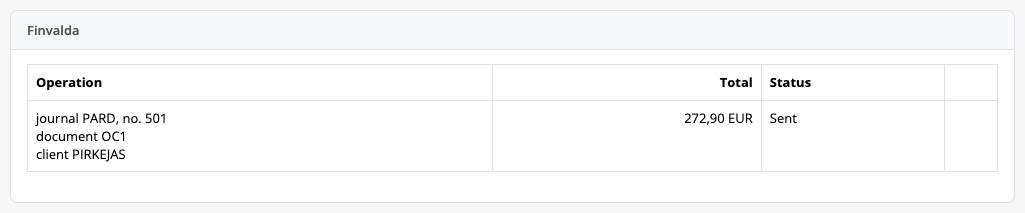
After sending, the box shows the journal entry, the document number, the client and the amount with the status “Sent”. An order goes to Finvalda once: every order has one record that is claimed before the call, and a lost answer is recognised on retry as an operation already created and the order is simply marked sent. Refusals from Finvalda are shown in words with its code and text, with “Retry” and “Remove” buttons and a note in the order history.
The module finds the client by the buyer’s e-mail or uses the default code. In Pro it can create a missing buyer (code OC plus the customer number, OCG plus the order number for a guest) with address, phone, e-mail, company code and VAT number, and also products Finvalda does not have yet.
Extensions → Extensions → Modules → Finvalda Sales Sync: the tabs “Connection”, “Sale operation”, “Automation”, “Stock and prices” and “Licence”. On the first one you enter the service address, user and password and press “Check the connection”: the module says whether the service accepted the user, whether the address belongs to a foreign page, or whether the service does not answer. The password is stored encrypted and never shown; an http:// address comes with a warning.
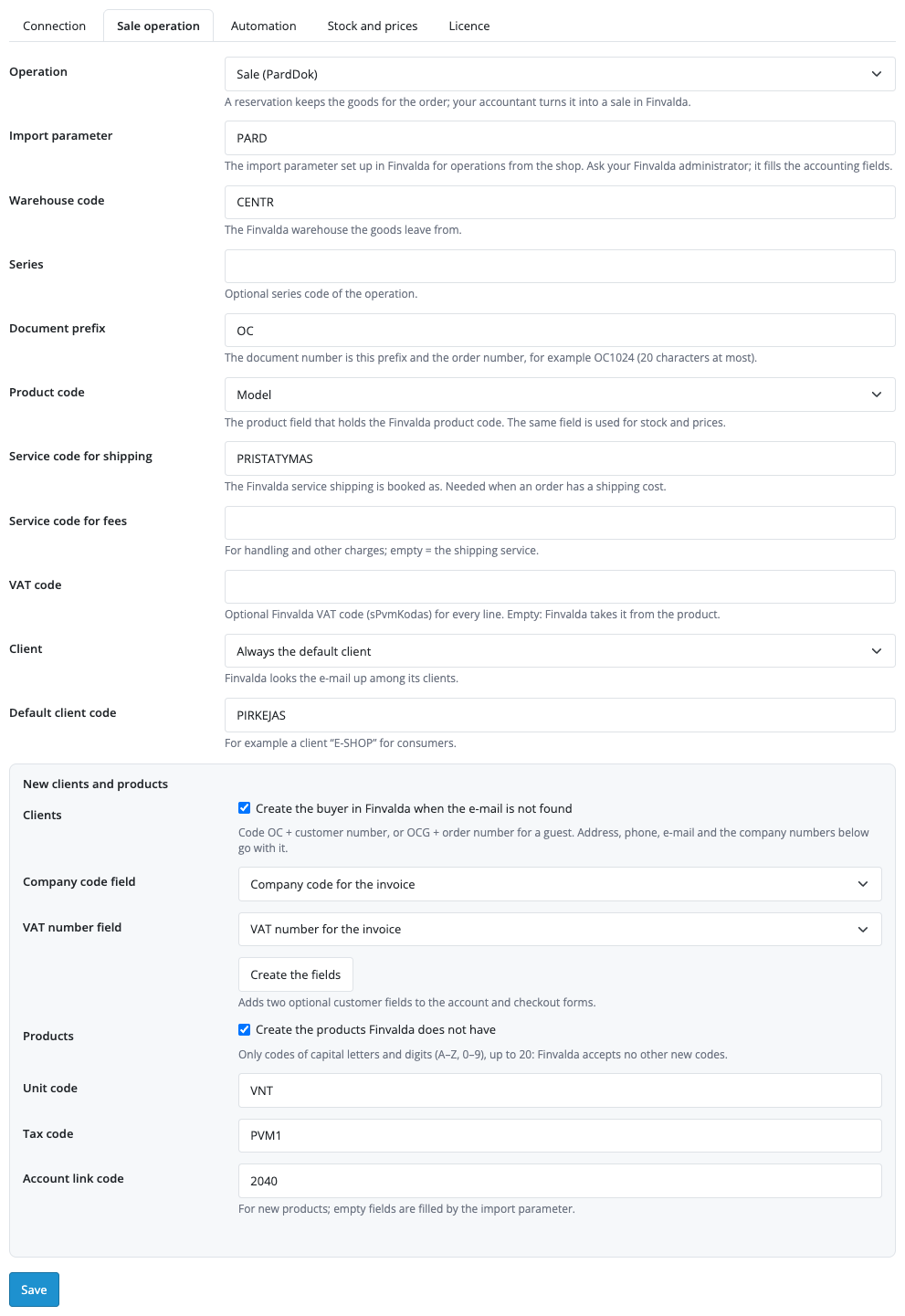
The “Sale operation” tab sets the operation type (a PardDok sale or a PardRezDok reservation), the import parameter, the warehouse code, the series, the document prefix (the prefix and the order number, up to 20 characters), the product field that holds the code, service codes for shipping and fees, the VAT code, how the client is chosen and the default client code. The “New clients and products” block belongs to Pro: the company code and VAT number fields (the “Create the fields” button adds two optional fields to the account and checkout forms) and the unit, tax and account codes for new products.
Pro fields without a key are disabled and empty with an explanation; stored Pro values are not shown.
Pro sends orders when they reach the chosen statuses: none is ticked by default, and sending runs in the background, never during checkout. Bulk sending takes order numbers and ranges such as 1001-1020, 1025, and “Retry all stopped” repeats the stopped ones. If Pro switches off, rows queued by status stop with the reason, while manual sending by the button keeps working.
Stock and prices are read from Finvalda every 15 minutes in portions of 50 products by code, with a cursor by product id and a 20-second budget per pass. Stock is written to the product quantity (or the quantity with reservations, by the chosen warehouse), the price is taken from the sell_price1–sell_price6 column, and VAT is taken off at the rate you enter if needed. Products Finvalda does not know are left alone, and an empty answer zeroes nothing. The journal in the Sales menu lists orders and sync lines, and “Sync now” starts a pass at once.
Selling on WooCommerce? There is a separate plugin for it: Finvalda Sales Sync for WooCommerce.
Didn't find the answer? Message us on Telegram and we'll reply within a business day.
 @catcode_support
Setup, compatibility, activation
No, it is an independent integration with Finvalda by CatCode. Finvalda is a trademark of its owner.
The FIN WEB SERVICE module from Finvalda (provided on request), the address of the FVS web service, a user and the import parameter for shop operations.
The Finvalda server is often in an office, so the administrator has to open it to the internet. The "Check the connection" button shows whether the service answers and accepted the user.
The product model or SKU in OpenCart equals the product code in Finvalda. The module spots an unknown code before sending and shows which one.
Connection failures and 5xx answers are retried in the background. If an answer was lost, the retry recognises the operation already created and marks the order as sent, with no duplicate.
In Pro: a missing client and product are created in Finvalda when switched on. In the free version the client is taken by e-mail or the default code.
In euro. An order in another currency is sent when the shop default currency is EUR.
Every 15 minutes in portions of 50 products with a cursor; the next pass continues where the previous one stopped.
OpenCart 4.0.2.x–4.1.x, 3.0.x and 2.3.0.2: three separate archives in one product.
Yes, for OpenCart one payment and a licence for life, for two sites.
Pro switches off, rows queued by status stop with the reason, and the free part keeps working.
No reviews yet. Be the first.
No questions yet. Ask one — we answer within 24 hours.
We build custom modules for WordPress, WooCommerce, OpenCart and Shopify. Tell us about the task and we'll prepare an estimate.
Order a custom module
—
Charged in UAH; your bank converts it to your currency. EUR price is approximate.

CatCode assistant
Just now


CatCode assistant
Online

I’ll help with your website task
Describe your website task — I’ll find a ready-made module or pass it to a developer for an estimate. Modules, custom features, layout, integrations, speed, migration, technical SEO.