















OpenCart
Abandoned Cart Recovery for OpenCart 2.3, 3.x and 4.x
Free + Pro
1 290 UAH≈ €26
v1.2.4
 Website auditA PDF report by email in 3 minutesCheck a website
Everyday tasks
Image compressorSize, quality and WebP in bulkQR generatorLink, Wi-Fi, payment to IBANVAT calculator20, 14, 7% and amount in wordsTransliterationOfficial Ukrainian standardWebsite checks
PHP and pluginsPHP version, WordPress, pluginsGoogle Merchant feedFields, prices, GTIN, imagesDomain emailSPF, DKIM, DMARC, blacklistsAI search readinessllms.txt, bots, markupAll 9 toolsEnter at least 2 characters
Subscription with consent to Dotdigital from OpenCart 4.x, 3.x, 2.3; Pro adds orders in Insight data, abandoned carts, SMS, segment fields, a journal. Lifetime licence.
The free version works with no time limit. Pro adds the rest of the features in the table.


Nothing extra. The buyer registers, turns on “Subscribe” on the newsletter page, or ticks an optional box with the consent text when checking out as a guest.

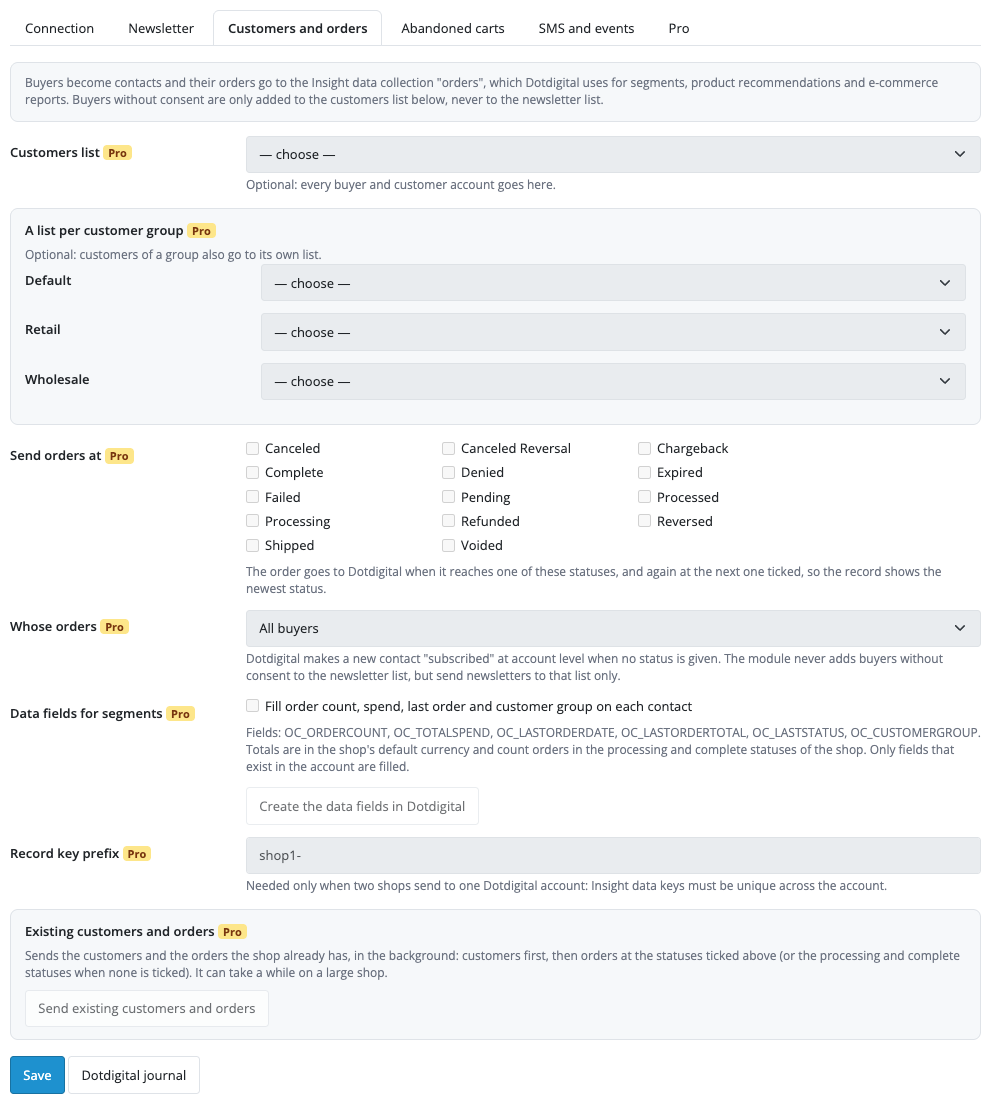
Extensions → Modules → Dotdigital Sync: tabs “Connection”, “Newsletter”, “Customers and orders”, “Abandoned carts”, “SMS and events” and “Pro”.

The base version is free. Pro costs 1 290 UAH, a one-time payment for a lifetime licence.

A fresh install is the free version, nothing switches on by itself. The “Try Pro for 7 days” button → e-mail → the key right in the window and by e-mail.

Moving the site? Unlink the licence on the old domain and activate it on the new one yourself. A staging copy (staging., dev.) works with the same key and does not take a site slot. For studios — keys for 5 or 25 sites, or unlimited.
 OpenCart 4.0.2.0–4.1.x, 3.0.x or 2.3.0.2; PHP 7.0+ for 2.3, the cURL extension.A Dotdigital account and an API user (Settings → Access → API users).For abandoned carts: an active program in the account; for events: the CXDP package; for SMS: SMS credits.For an even rhythm of sending, a server cron calling the address shown on the “Abandoned carts” tab every 5–15 minutes; without it the module works after the pages are served and through the OpenCart scheduler.
For OpenCart 4.x, 3.x and 2.3: the connection, subscription with a consent record, unsubscribe, the Dotdigital block on the order page.


Dotdigital Sync for OpenCart 4.x, 3.x and 2.3 adds the buyers who agreed to marketing e-mails to a list in your Dotdigital account, with a record of their consent. It is made for shops that send their e-mail through Dotdigital, UK shops in particular.
How it works. The buyer agrees at registration, on the newsletter page of the account, or with a checkbox when checking out as a guest. The module then sends the contact to Dotdigital in the background, after the buyer has already got the page: first name, last name, the newsletter list and a consent record with the text, the time, the page, the IP address and the browser. Buyers who did not agree never reach the newsletter list.
Nothing extra. The buyer registers, turns on “Subscribe” on the newsletter page, or ticks an optional box with the consent text when checking out as a guest. The page answers at once: the sending to Dotdigital runs in the background after the answer, so a slow Dotdigital never slows the shop down. A buyer without the tick is not sent anywhere. If the buyer unsubscribed in Dotdigital earlier, Dotdigital sends a confirmation e-mail, and only after it is confirmed is the contact subscribed again. Contacts with a hard bounce status are left alone.
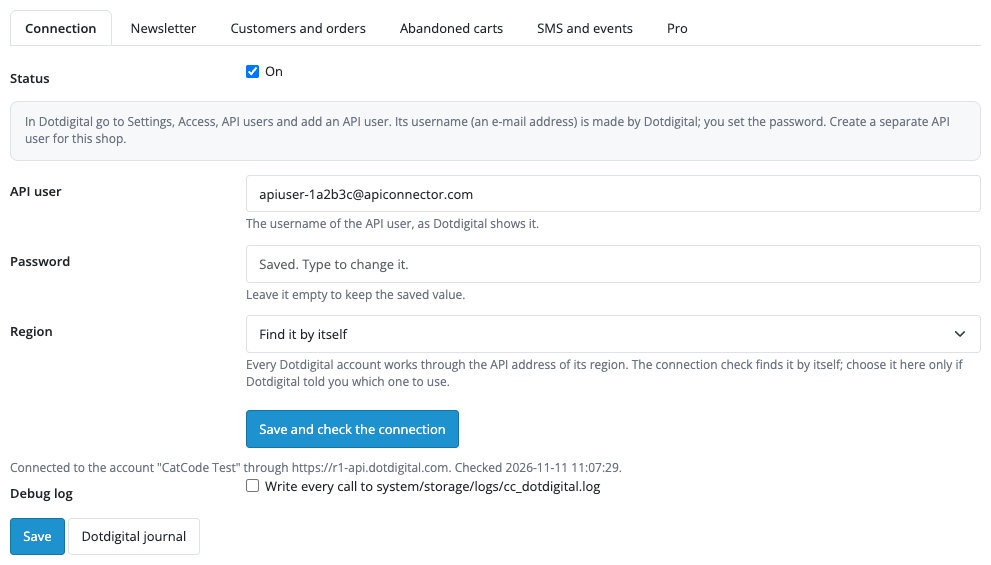
Extensions → Modules → Dotdigital Sync: tabs “Connection”, “Newsletter”, “Customers and orders”, “Abandoned carts”, “SMS and events” and “Pro”. Create an API user in Dotdigital (Settings → Access → API users), paste its address and password, and the “Save and check the connection” button shows the account name and the lists it found. The module finds the account region (r1, r2 or r3) by itself; you choose one by hand only if Dotdigital told you to. The password is stored encrypted and is never shown back in the form.
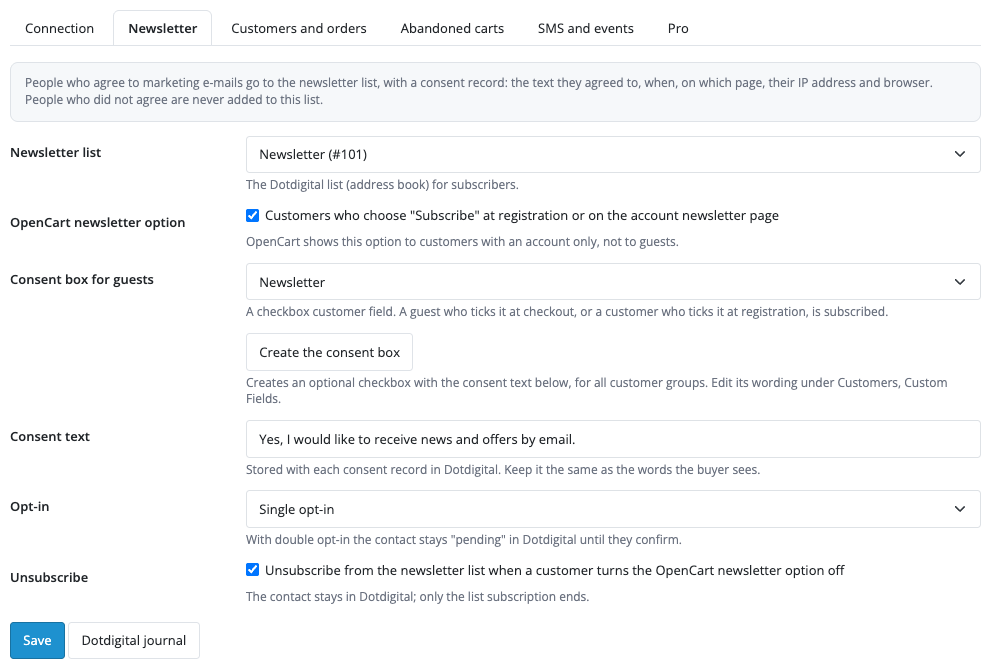
The “Newsletter” tab: pick the Dotdigital list, turn on the OpenCart newsletter option and press “Create the consent box” to make the optional checkbox for guests and registration. The consent text is stored with every subscription, so keep it the same as the words the buyer sees. Opt-in is single or double (with double opt-in the contact stays pending until it confirms through the Dotdigital e-mail). When a buyer turns the newsletter off in the account, the module unsubscribes them from the list; the contact itself stays in Dotdigital.
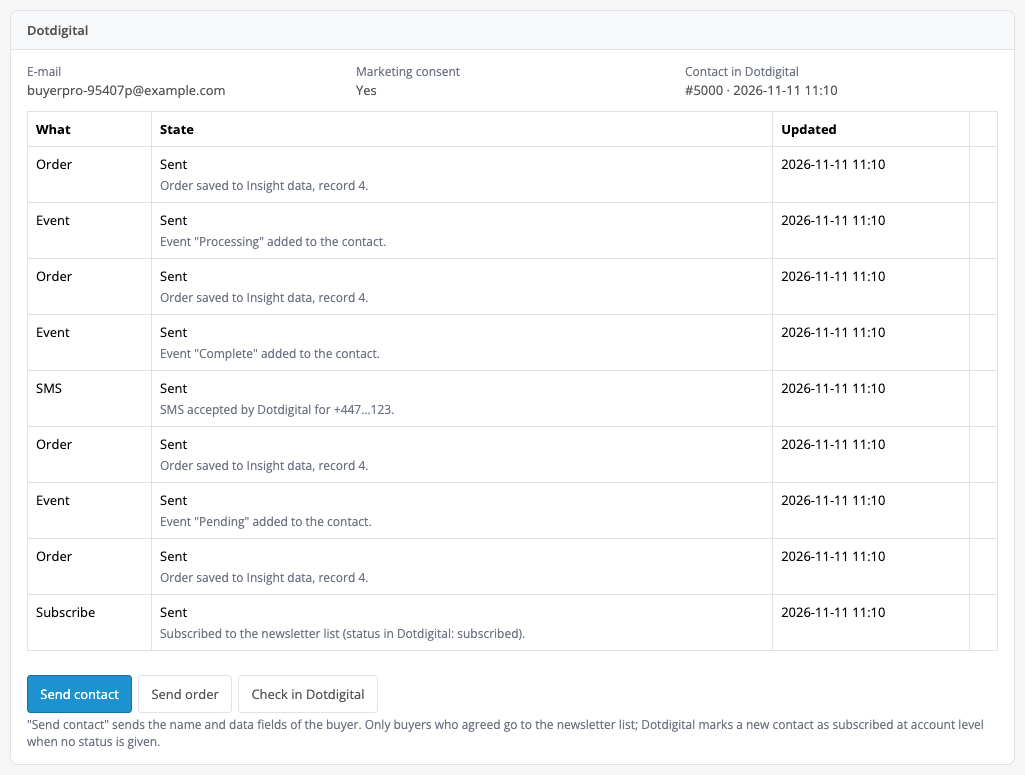
The order page gets a Dotdigital block: the e-mail, the marketing consent, the contact number in Dotdigital and a table of what was sent with the state of each item. “Send contact” sends the name and data fields of the buyer without changing the subscription, “Check in Dotdigital” shows the state of the contact and its lists, and “Retry” appears next to a failure. Everything the module sends goes through a queue: it retries when Dotdigital refuses, and on a rate limit it pauses until the time Dotdigital gave.
Pro sends orders to Insight data, into the “orders” collection, at the statuses you choose: order currency, total, coupon and discount, products. It also keeps a customers list and a list for every customer group, and fills data fields for segments: order count, total spend, date and total of the last order, last status, group (OC_ORDERCOUNT, OC_TOTALSPEND, OC_LASTORDERDATE, OC_LASTORDERTOTAL, OC_LASTSTATUS, OC_CUSTOMERGROUP). A button creates these fields in Dotdigital, and the orders can be limited to buyers who agreed to marketing.
Abandoned carts (Pro): when a signed-in customer leaves products in the cart, after your delay (15 minutes to 7 days) the module saves the cart to the “cartinsight” collection and enrols the contact in the active Dotdigital program you chose, which sends the reminder. When the customer buys, the record is marked as bought. Guests are not tracked: the shop does not know a guest’s e-mail address before the order. SMS (Pro) goes through the SMS channel of your Dotdigital account at an order status, from a template with {firstname}, {order_id}, {status}, {store}, {total}; a number typed without a country code gets the default one (07700 900123 becomes +447700900123 for code 44). Status events (Pro) are added to the contact timeline when the account offers event import on the CXDP package.
Existing customers and orders (Pro) go in one background run: the contacts first in a bulk import, then the orders in a bulk Insight data import, with progress on the tab and in the journal and a Stop button. Only buyers who agreed to the newsletter are imported, and the module does not force a subscription status in the batch.
Didn't find the answer? Message us on Telegram and we'll reply within a business day.
 @catcode_support
Setup, compatibility, activation
No, it is an independent integration through the public Dotdigital API. Dotdigital is a trademark of its owner.
An account and an API user (Settings → Access → API users). The address and password of that user go on the "Connection" tab.
None: the "Save and check the connection" button finds the region of the account (r1, r2 or r3) by itself. You choose one by hand only if Dotdigital told you to.
Not the newsletter list. The free version sends only buyers who agreed. Pro can put buyers into a customers list and group lists, but never into the newsletter list; sending of orders can be limited to buyers who agreed.
If a buyer unsubscribed in Dotdigital earlier and ticks consent again, Dotdigital sends a confirmation e-mail, and only after it is confirmed is the contact subscribed. Contacts with a hard bounce are left alone.
No. The shop does not know a guest's e-mail before the order, so only signed-in customers are tracked.
The Dotdigital block on the order page (and the journal in Pro) shows the reason from Dotdigital and a "Retry" button. Server failures and rate limits are retried by the module itself.
OpenCart 4.0.2.0–4.1.x, 3.0.x and 2.3.0.2 — three separate archives in one product.
Pro switches off and the free part keeps working.
Yes, for OpenCart it is one payment and a lifetime licence, for two sites.
No reviews yet. Be the first.
No questions yet. Ask one — we answer within 24 hours.
We build custom modules for WordPress, WooCommerce, OpenCart and Shopify. Tell us about the task and we'll prepare an estimate.
Order a custom module
—
Charged in UAH; your bank converts it to your currency. EUR price is approximate.

CatCode assistant
Just now


CatCode assistant
Online

I’ll help with your website task
Describe your website task — I’ll find a ready-made module or pass it to a developer for an estimate. Modules, custom features, layout, integrations, speed, migration, technical SEO.
