
















WooCommerce
990 UAH644 UAH/year≈ €14
Black November: −35% on all modules until 30 November Black November: −35% until 30 November Choose a module
 Website auditA PDF report by email in 3 minutesCheck a website
Everyday tasks
Image compressorSize, quality and WebP in bulkQR generatorLink, Wi-Fi, payment to IBANVAT calculator20, 14, 7% and amount in wordsTransliterationOfficial Ukrainian standardWebsite checks
PHP and pluginsPHP version, WordPress, pluginsGoogle Merchant feedFields, prices, GTIN, imagesDomain emailSPF, DKIM, DMARC, blacklistsAI search readinessllms.txt, bots, markupAll 9 toolsEnter at least 2 characters

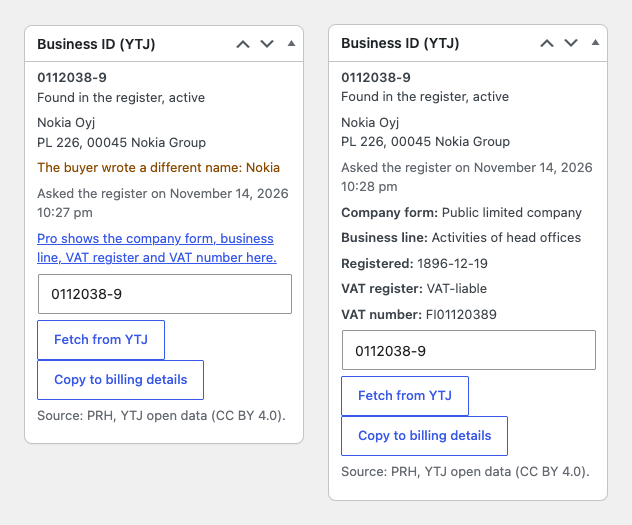
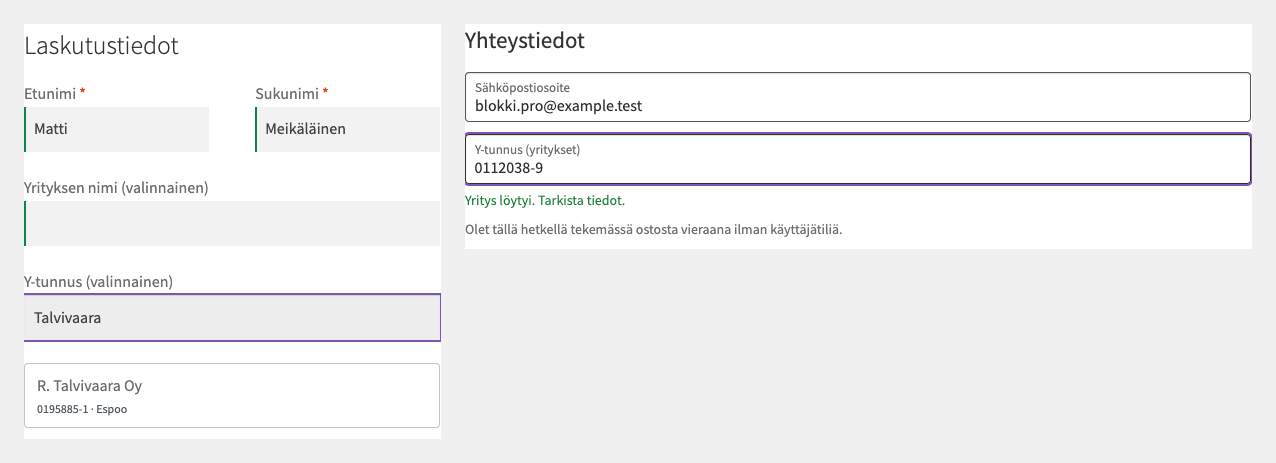
A Y-tunnus field at the WooCommerce checkout: check digit, the ID on the order, company name and address from the open PRH register; Pro adds lookup at the checkout, VAT, bulk checks.
The free version works with no time limit. Pro adds the rest of the features in the table.


The order gets a “Business ID (YTJ)” box: the ID, the status of the company (active, in liquidation, bankrupt, ceased), its name, the postal or visiting address and the date of the request. “Fetch from YTJ” asks the register about that one order, and “Copy to billing details” moves the name and address into the billing details.

The field appears on classic and block checkout (through the Additional Checkout Fields API) and by default only for the billing country Finland; it can be shown for every country.

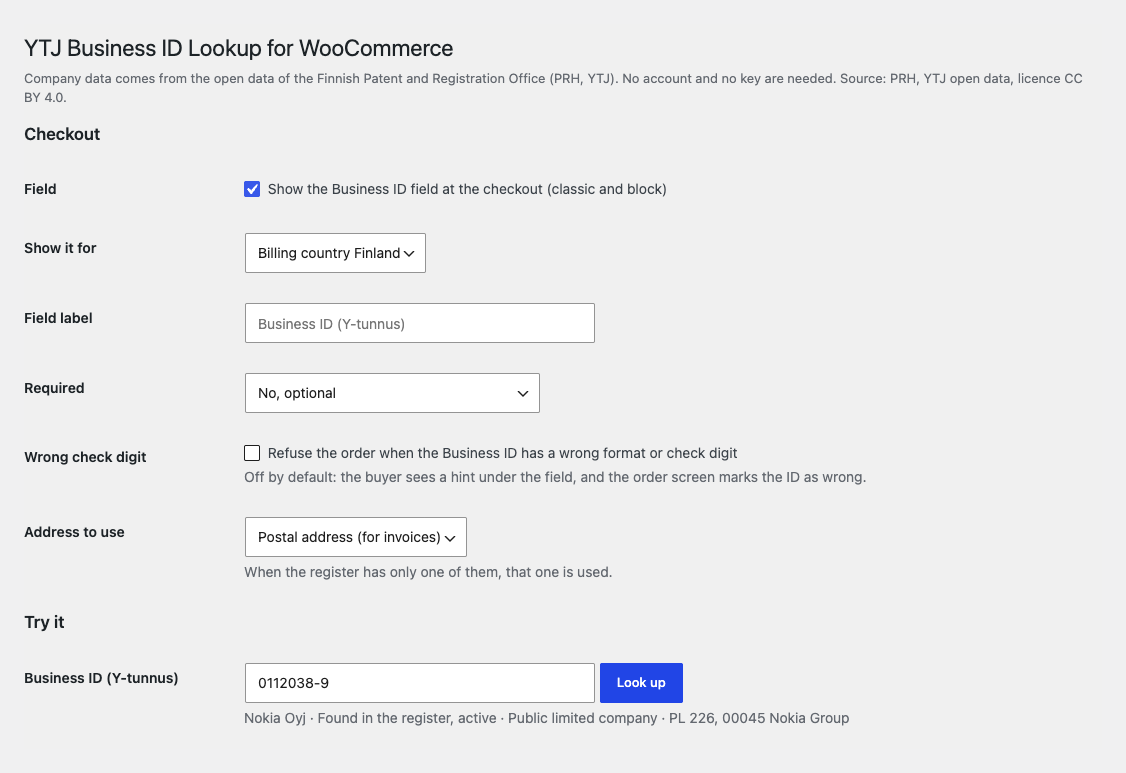
WooCommerce → YTJ Business ID. Switch the field on, show it for Finland or for every country, the label, how it is required, refusing a wrong check digit and which register address to use (postal or visiting).

A fresh install is the free version, nothing switches on by itself. The “Try Pro for 7 days” button → e-mail → the key right in the window and by e-mail.

Moving the site? Unlink the licence on the old domain and activate it on the new one yourself. A staging copy (staging., dev.) works with the same key and does not take a site slot. For studios — keys for 5 or 25 sites, or unlimited.
 WordPress 6.4+, WooCommerce 9.9+ (HPOS, block checkout), PHP 7.4+.Access from the shop server to avoindata.prh.fi (HTTPS); no account or key is needed.Interface languages: English, suomi (the Finnish translation is part of Pro).
The Business ID (Y-tunnus) field on classic and block checkout, format and check digit verification, saving on the order, “Fetch from YTJ” and “Copy to billing details”, “Try it”, HPOS, English.


YTJ Business ID Lookup for WooCommerce adds a “Business ID (Y-tunnus)” field to the checkout for Finnish companies and takes the company data from the open data API of the Finnish Patent and Registration Office, PRH (the YTJ register). The ID is kept on the order and shown in e-mails and on the thank-you page; the check digit is verified while the buyer types, and the company name and address can be pulled from the register.
What you need. Nothing: no account, no key, no contract. The YTJ register is open, and PRH publishes the data under the Creative Commons Attribution 4.0 licence; the plugin shows the source in the settings and in the order box.
The order gets a “Business ID (YTJ)” box: the ID, the status of the company (active, in liquidation, bankrupt, ceased), its name, the postal or visiting address and the date of the request. “Fetch from YTJ” asks the register about that one order, and “Copy to billing details” moves the name and address into the billing details. If the buyer wrote a different company name, the box warns about it. In Pro the box also shows the company form, business line, registration date, the VAT register entry and the VAT number as FI + eight digits.
The address can be the postal one (the default, as it goes onto invoices) or the visiting one; when the register has only one of them, that one is used. Companies with an address abroad get only their name. When the register does not answer, the order still goes through, and the box says the company could not be checked and can be fetched later.
The field appears on classic and block checkout (through the Additional Checkout Fields API) and by default only for the billing country Finland; it can be shown for every country. It accepts 1234567-8, 12345678, an old six-digit ID and the VAT form FI12345678, writes the ID the official way and says right away when the check digit is wrong. Nothing is sent anywhere for this. You change the label yourself.
The field can be optional (private buyers skip it), required when a company name is filled in, or always required for a business-only shop. Refusing an order for a wrong check digit is off by default: the buyer sees a hint under the field. In Pro, when the buyer has typed a complete ID the plugin asks the register, fills in the company name and address and keeps the status on the order; the buyer can also start typing a company name and pick the company from a list.
WooCommerce → YTJ Business ID. Switch the field on, show it for Finland or for every country, the label, how it is required, refusing a wrong check digit and which register address to use (postal or visiting). Below is the “Try it” box: enter any ID and see the name, status, company form and address at once. A separate “Licence” section holds the Pro key or the trial.
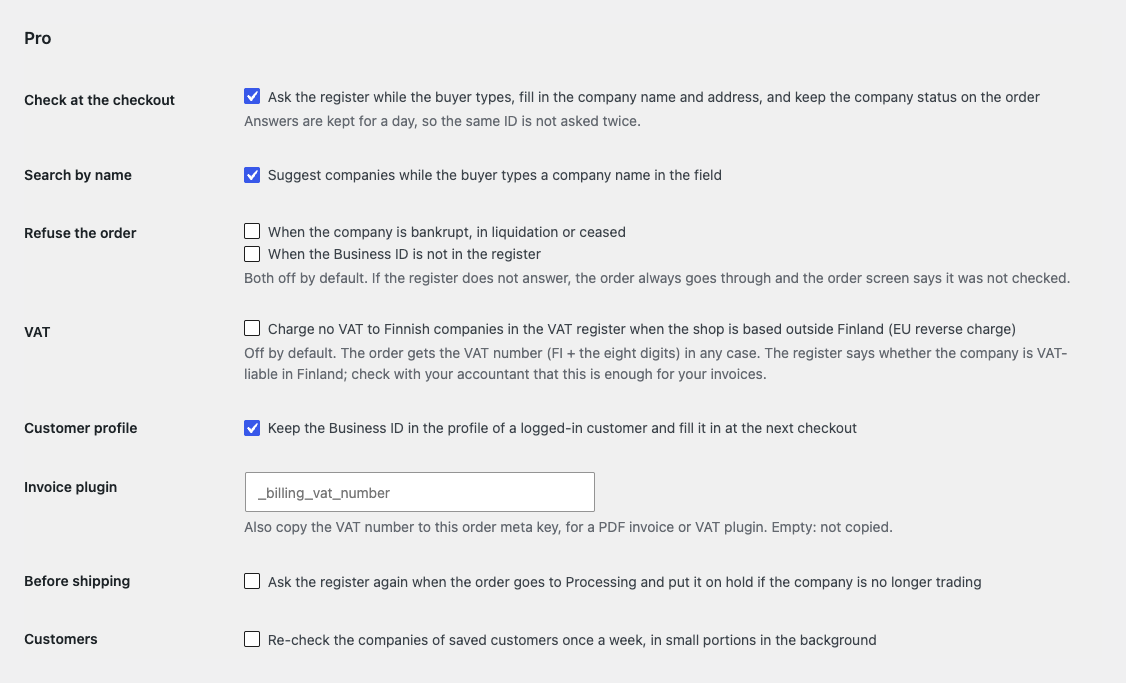
Lookup at the checkout: as soon as the buyer has typed a complete ID, the plugin asks the register, fills in the company name and address (on classic and block checkout) and keeps the status on the order. Answers are kept for a day (a not-found for an hour), so the same ID is not asked twice. Search by name shows a list of up to eight companies.
Refusals: optionally the order does not go through when the company is bankrupt, in liquidation or ceased, or when the ID is not in the register. Both options are off by default, and when the register does not answer the order is never stopped.
VAT: the order gets the VAT number (FI and eight digits), optionally copied to an order meta key of your invoice plugin. A separate option for shops based outside Finland: no VAT is charged to companies in the Finnish VAT register (reverse charge). It is off by default, and the settings remind you to check it with your accountant.
Customer profile: the ID and status are kept in the profile of a logged-in customer and filled in at the next checkout, and the Users list has a column with the ID and the company status. Bulk actions: “Check Business ID in YTJ” in the order list and a “Check all saved customers now” button, in the background at ten requests a minute; optionally every week.
Before shipping: when an order goes to Processing, the register is asked again, and the order is put on hold if the company stopped trading. An e-mail alert comes when an order is from a company that is not trading or not in the register. There is also a Finnish translation of the interface and updates from catcode.com.ua.
Didn't find the answer? Message us on Telegram and we'll reply within a business day.
 @catcode_support
Setup, compatibility, activation
No, it is an independent plugin from CatCode. The data comes from the PRH open API, but the plugin is not affiliated with PRH and not endorsed by it.
No. The PRH open API is public and free.
The order goes through. The order box says the company could not be checked, and you can ask again later with "Fetch from YTJ".
The postal one by default, because it goes onto invoices; you can switch to the visiting address. When there is only one, that one is used. Companies with an address abroad give only a name.
Not by default: the buyer sees a hint under the field, and the order marks the ID as wrong. You can switch on refusing such orders.
In Pro, for shops based outside Finland, there is an option "no VAT for Finnish companies in the VAT register". It is off by default, and whether it is enough for your invoices is for your accountant to decide: an entry in the PRH VAT register is not a VIES validation.
Yes, with HPOS order storage and the legacy one, and with block and classic checkout.
Not in the free version: nothing is requested at the checkout. In Pro the register is asked when the buyer has typed a complete ID, with a 6-second timeout, and answers are cached.
Pro switches off and waiting checks are not run, which leaves a note on the order. The free part keeps working.
No reviews yet. Be the first.
No questions yet. Ask one — we answer within 24 hours.
We build custom modules for WordPress, WooCommerce, OpenCart and Shopify. Tell us about the task and we'll prepare an estimate.
Order a custom module
—
Charged in UAH; your bank converts it to your currency. EUR price is approximate.

CatCode assistant
Just now


CatCode assistant
Online

I’ll help with your website task
Describe your website task — I’ll find a ready-made module or pass it to a developer for an estimate. Modules, custom features, layout, integrations, speed, migration, technical SEO.