
















WooCommerce
1 290 UAH839 UAH/year≈ €17
Black November: −35% on all modules until 30 November Black November: −35% until 30 November Choose a module
 Website auditA PDF report by email in 3 minutesCheck a website
Everyday tasks
Image compressorSize, quality and WebP in bulkQR generatorLink, Wi-Fi, payment to IBANVAT calculator20, 14, 7% and amount in wordsTransliterationOfficial Ukrainian standardWebsite checks
PHP and pluginsPHP version, WordPress, pluginsGoogle Merchant feedFields, prices, GTIN, imagesDomain emailSPF, DKIM, DMARC, blacklistsAI search readinessllms.txt, bots, markupAll 9 toolsEnter at least 2 characters

WooCommerce buyers and orders in Yespo (eSputnik); in Pro — automatic sync, cart events, SMS, Viber and emails by status, history import.
The free version works with no time limit. Pro adds the rest of the features in the table.


Every order reaches Yespo as two records. First the contact: first and last name, email, phone in the international form (a Ukrainian number 0XX… gets the 380 code), city, region, address and language.

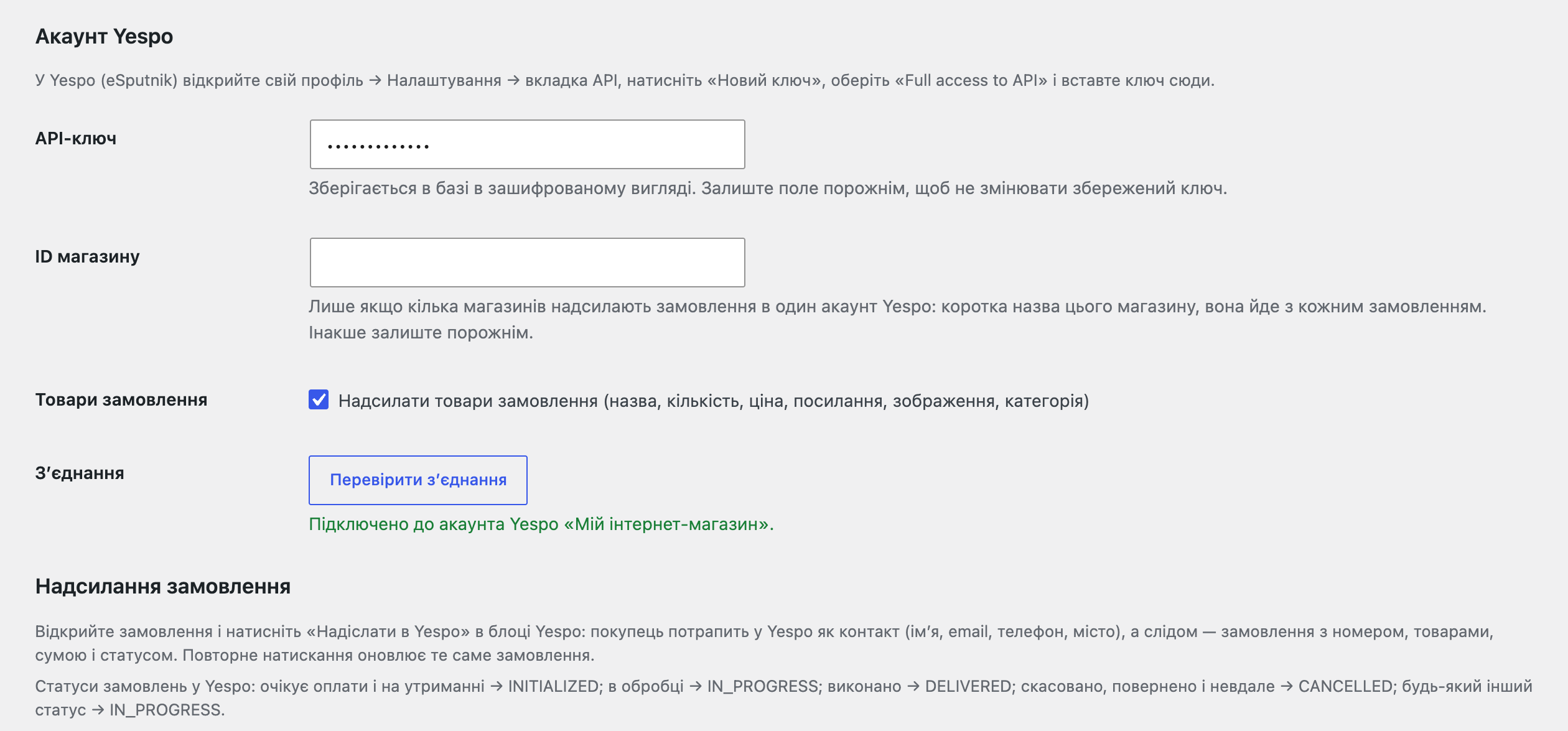
WooCommerce → Yespo: paste the API key, enter a store ID if several stores send orders to one account (it goes with every order), press “Check connection” — the module shows the name of your Yespo account — and save.

A fresh install is the free version, nothing switches on by itself. The “Try Pro for 7 days” button → e-mail → the key right in the window and by e-mail.

Moving the site? Unlink the licence on the old domain and activate it on the new one yourself. A staging copy (staging., dev.) works with the same key and does not take a site slot. For studios — keys for 5 or 25 sites, or unlimited.
 WordPress 6.2+, WooCommerce 7.0+, PHP 7.4+.A Yespo (eSputnik) account and an API key with full access (Full access to API).Background sync, retries, events and messages in Pro run on WooCommerce Action Scheduler.Currencies UAH, USD and EUR; Yespo may refuse other currencies, and the reason is then shown in the order.
The contact and the order in Yespo with one button, connection check, result and error in the order.


Yespo Sync for WooCommerce sends the buyers and orders of your store to your Yespo (eSputnik) account: a contact with the name, email and phone, then the order with its number, items, total and status. That data then works in your Yespo campaigns, scenarios and segments, and nothing is typed twice.
What you need from Yespo. Your own Yespo (eSputnik) account and an API key with full access: profile → Settings → API tab → “New key” → “Full access to API”. SMS, Viber and emails are sent and charged by Yespo on your plan. The key is stored encrypted and is never shown back on the page.
Every order reaches Yespo as two records. First the contact: first and last name, email, phone in the international form (a Ukrainian number 0XX… gets the 380 code), city, region, address and language. Then the order: number (externalOrderId), date, total, currency, shipping, discount, delivery and payment method, address and the items with name, quantity, price after discount, link, picture and category; the items can be left out.
WooCommerce statuses become Yespo statuses: pending payment and on hold — INITIALIZED, processing — IN_PROGRESS, completed — DELIVERED, cancelled, refunded and failed — CANCELLED. Yespo keeps one order per number, so sending it again updates it instead of creating a second one. An order with no email and no usable phone is not sent; a clear note stays in the order.
WooCommerce → Yespo: paste the API key, enter a store ID if several stores send orders to one account (it goes with every order), press “Check connection” — the module shows the name of your Yespo account — and save.
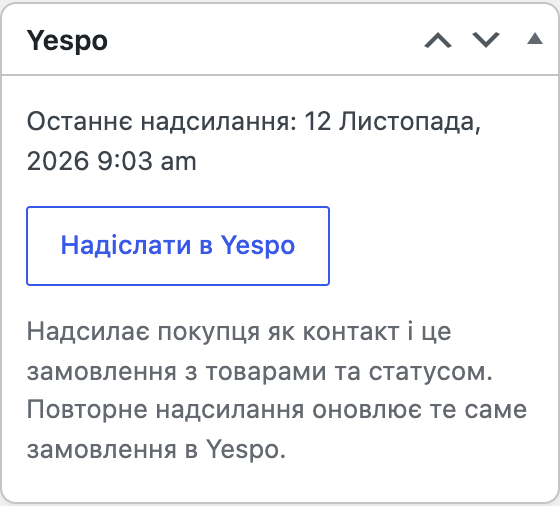
The order screen (HPOS and the classic storage alike) gets a Yespo box with a “Send to Yespo” button. The box shows when the order was last sent and, if Yespo refused the request, why; the same goes to an order note. If Yespo does not answer, the order in your store is not affected and the sending can be repeated.
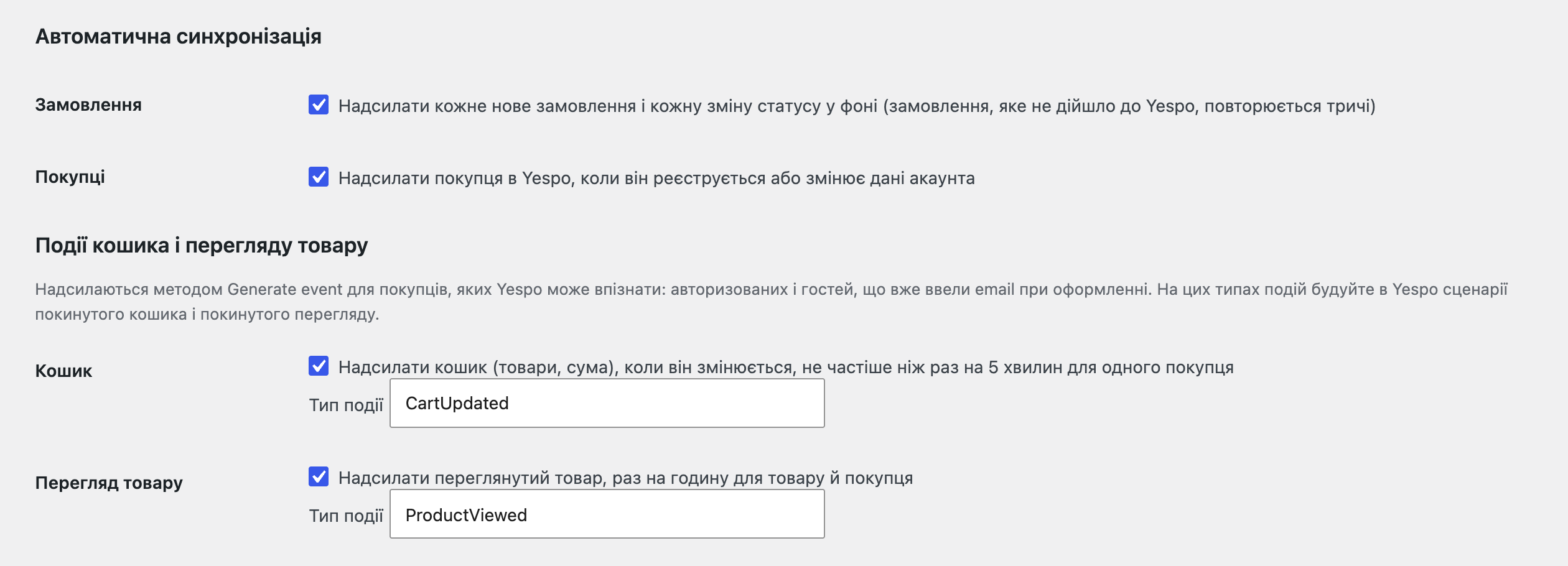
In Pro you tick “Orders”: every new order and every status change goes to Yespo in the background through WooCommerce Action Scheduler, so the buyer does not wait for Yespo at checkout. An unchanged order is not sent twice, and if Yespo answers with a server error the module tries twice more, after 5 and 10 minutes. Buyers also go to Yespo on their own: on registration and when they change their account data.
Cart and product view events (Generate event v3) work for logged-in buyers and for guests who have already typed their email at checkout: a cart change at most once in 5 minutes per buyer, a product view once an hour per product and buyer. The event type names are yours (CartUpdated and ProductViewed by default); abandoned cart and returning-to-a-viewed-product scenarios in Yespo are built on them.
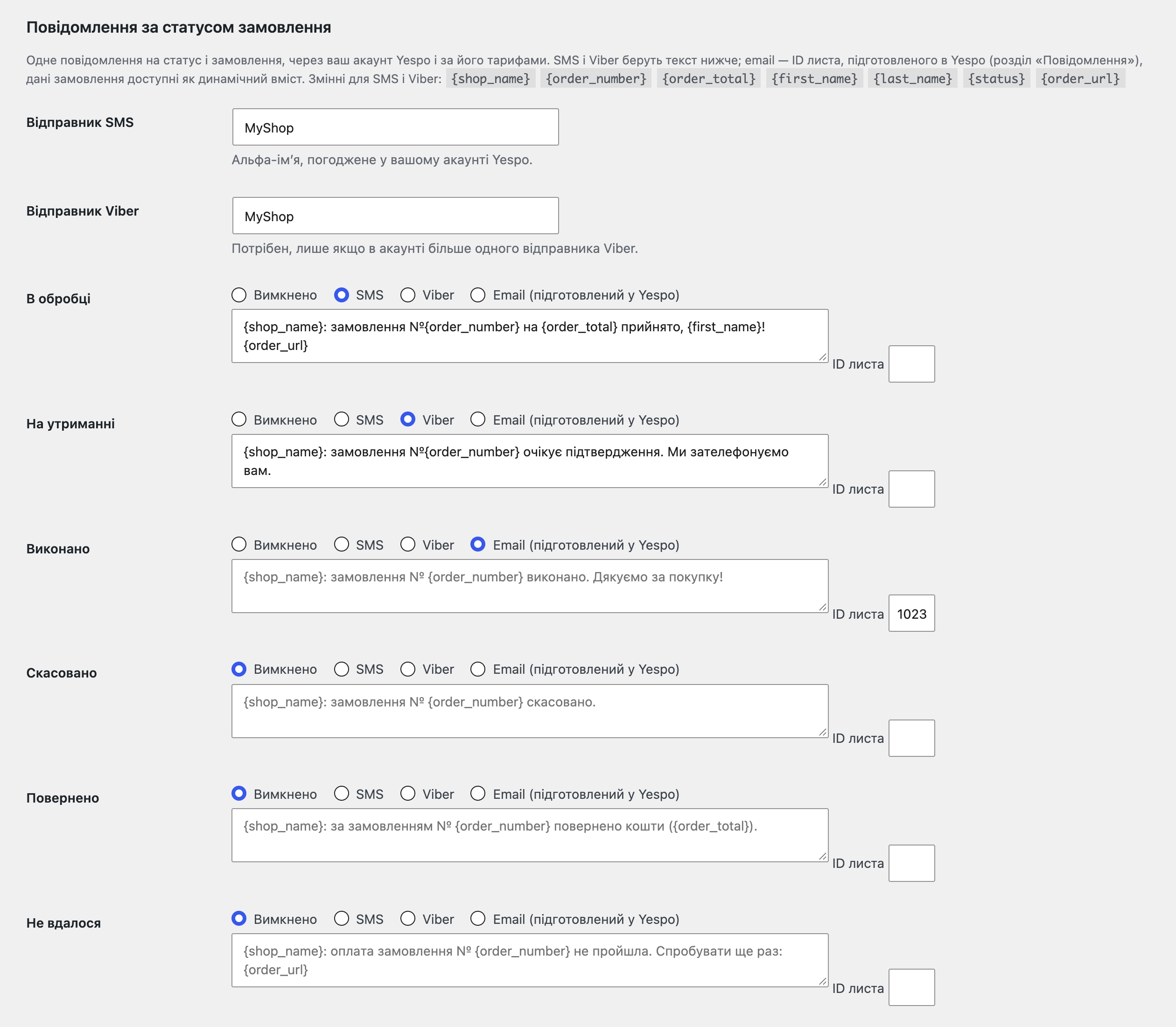
Messages by order status: for every status you choose Off, SMS, Viber or email. For SMS and Viber you write the text with the variables {shop_name}, {order_number}, {order_total}, {first_name}, {last_name}, {status} and {order_url}; for email you give the ID of the email prepared in Yespo, and the order data goes into it as dynamic content. One message is sent per status and order, even if the status goes back and forth. With no phone or email, or when Yespo returns an error, a note with the reason stays in the order.
The “Import and journal” page: import of past orders for a chosen period (days) together with the buyers, oldest first, in batches of 50 orders, and all registered customers separately in batches of 200; the progress is shown, there is a “Stop” button, and orders refused by Yespo are listed with the reason. Orders already in Yespo are updated, not duplicated; messages are not sent for imported orders. The journal shows every API call: time, order, what was sent, how (manual, automatic, import) and the result.
A store that sells in several currencies with a separate Yespo account per market adds up to three extra accounts: orders in the currency of the row also go to that account.
Didn't find the answer? Message us on Telegram and we'll reply within a business day.
 @catcode_support
Setup, compatibility, activation
No, it is an independent integration with Yespo (eSputnik) made by CatCode. Yespo and eSputnik are trademarks of their owner.
Yes, it is one platform with one API; it works with an account under either name.
Yespo first accepts the data and processes it in the background, so it can take a minute. If a record is refused, the reason is in the order box and notes.
Yespo disables API keys that have not been used for 90 days. Enable the key again in Yespo (profile → Settings → API) or create a new one.
Yespo, from your account and on your plan. The module only passes the order status and the text or the ID of the prepared email.
The order in your store is placed normally. In Pro the module repeats the sending twice more, after 5 and 10 minutes, and leaves a note; you can always send by hand.
Pro switches off and the free part keeps working: the “Send to Yespo” button in the order stays.
One key covers two sites: the store and its test copy.
No reviews yet. Be the first.
No questions yet. Ask one — we answer within 24 hours.
We build custom modules for WordPress, WooCommerce, OpenCart and Shopify. Tell us about the task and we'll prepare an estimate.
Order a custom module
—
Charged in UAH; your bank converts it to your currency. EUR price is approximate.

CatCode assistant
Just now


CatCode assistant
Online

I’ll help with your website task
Describe your website task — I’ll find a ready-made module or pass it to a developer for an estimate. Modules, custom features, layout, integrations, speed, migration, technical SEO.