
















WooCommerce
990 UAH644 UAH/year≈ €14
Black November: −35% on all modules until 30 November Black November: −35% until 30 November Choose a module
 Website auditA PDF report by email in 3 minutesCheck a website
Everyday tasks
Image compressorSize, quality and WebP in bulkQR generatorLink, Wi-Fi, payment to IBANVAT calculator20, 14, 7% and amount in wordsTransliterationOfficial Ukrainian standardWebsite checks
PHP and pluginsPHP version, WordPress, pluginsGoogle Merchant feedFields, prices, GTIN, imagesDomain emailSPF, DKIM, DMARC, blacklistsAI search readinessllms.txt, bots, markupAll 9 toolsEnter at least 2 characters

Sales invoices from WooCommerce orders in Merit Aktiva: the buyer, the VAT of every row, a total as on the order, the PDF; Pro adds automatic invoices, payments, credit invoices and stock.
The free version works with no time limit. Pro adds the rest of the features in the table.


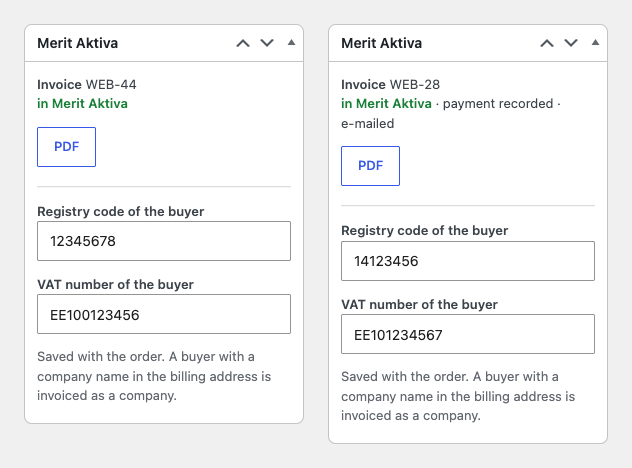
The order gets a “Merit Aktiva” box.

Every row gets a VAT rate of your company in Merit: the plugin reads the active rates with “Check connection” and picks the rate by its percentage.

By default a buyer with a company name in the billing address is invoiced as a company and the others as private persons, each under their own name or all under one customer, “Online shop customer”, as you choose.

A fresh install is the free version, nothing switches on by itself. The “Try Pro for 7 days” button → e-mail → the key right in the window and by e-mail.

Moving the site? Unlink the licence on the old domain and activate it on the new one yourself. A staging copy (staging., dev.) works with the same key and does not take a site slot. For studios — keys for 5 or 25 sites, or unlimited.
 WordPress 6.4+, WooCommerce 8.6+ (HPOS, block checkout), PHP 7.4+.A company in Merit Aktiva with an ApiID and key (PRO or PREMIUM package); access of the shop server to aktiva.merit.ee (HTTPS).Interface languages: English, eesti (the Estonian translation is part of Pro).
The Merit Aktiva connection (Estonia, Poland), a sales invoice from the order with a button, company and private buyers, VAT per row with a check of the sums, safe retries, the PDF, a list…


Merit Aktiva for WooCommerce sends the orders of your shop to the Estonian accounting software Merit Aktiva as sales invoices: the buyer, the rows with products, shipping and fees, the VAT of every row and a total exactly as on the order. The plugin works through the Merit Aktiva API with your own ApiID and key, so there is no middleman between your shop and your books.
What you need. A company in Merit Aktiva with API access: Merit opens the API on its PRO and PREMIUM packages. In Merit Aktiva open Settings → API settings and create the ApiID and key (an administrator of the company can do it). The key is stored encrypted in the database.
The order gets a “Merit Aktiva” box. The button makes one sales invoice: the buyer (a company with its name, registry code and VAT number, or a private person), products by SKU (or by a WC code with the product ID when there is no SKU or it is too long) as items or services, shipping and fees as services, and a negative fee as a row with quantity −1. The invoice number is your prefix plus the order number, and the invoice PDF downloads straight from the order.
When an answer from Merit is lost, the next try first looks the invoice number up in Merit itself and links the invoice it finds to the order, so a second invoice is never made. When Merit answers with a server error or a rate limit, the plugin queues the try with a growing pause; the order has “Try again” and “Forget it” buttons. The checkout does not wait for Merit: no request to Merit is made while the buyer places the order.
Every row gets a VAT rate of your company in Merit: the plugin reads the active rates with “Check connection” and picks the rate by its percentage. For a buyer from another EU country the rate of that country (OSS) is used when Merit has it. The VAT amount is grouped by rate, and the total of the invoice matches the order to the cent: a gap of up to one cent per row goes into the rounding of the invoice.
When a VAT rate is missing in Merit, or the sums differ by more than a cent per row, the invoice stops before it is sent, with a plain explanation on the order, instead of reaching the books with a wrong sum. For rows without VAT you choose which of the 0% kinds of Merit to use: exempt, 0% or outside the scope. In Pro any WooCommerce tax rate can be mapped to any VAT of Merit.
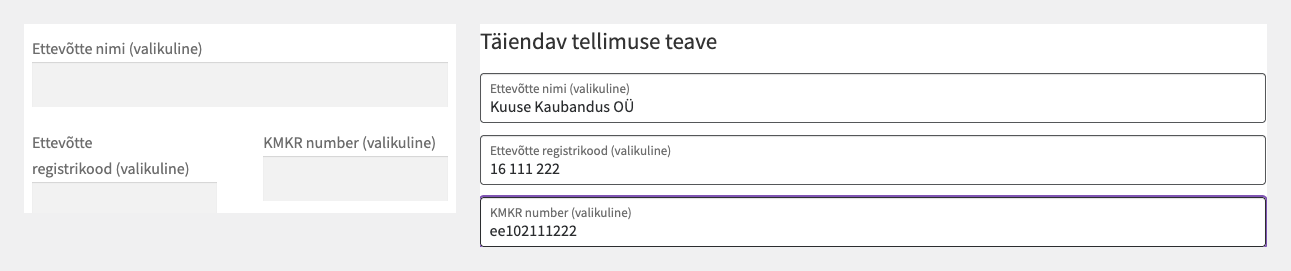
By default a buyer with a company name in the billing address is invoiced as a company and the others as private persons, each under their own name or all under one customer, “Online shop customer”, as you choose. The registry code and VAT number can be set on the order itself or asked from the buyer with two optional fields at the checkout (classic and block checkout, off by default); the plugin also reads the meta keys of plugins that already collect them.
Merit finds an existing customer by its name, so two private persons with the same name would share one card; the “all under one customer” mode and the Pro lookup of companies by registry code or VAT number avoid this. A company from Estonia is invoiced as a company customer with its code and VAT number, and a buyer outside Estonia needs a city.
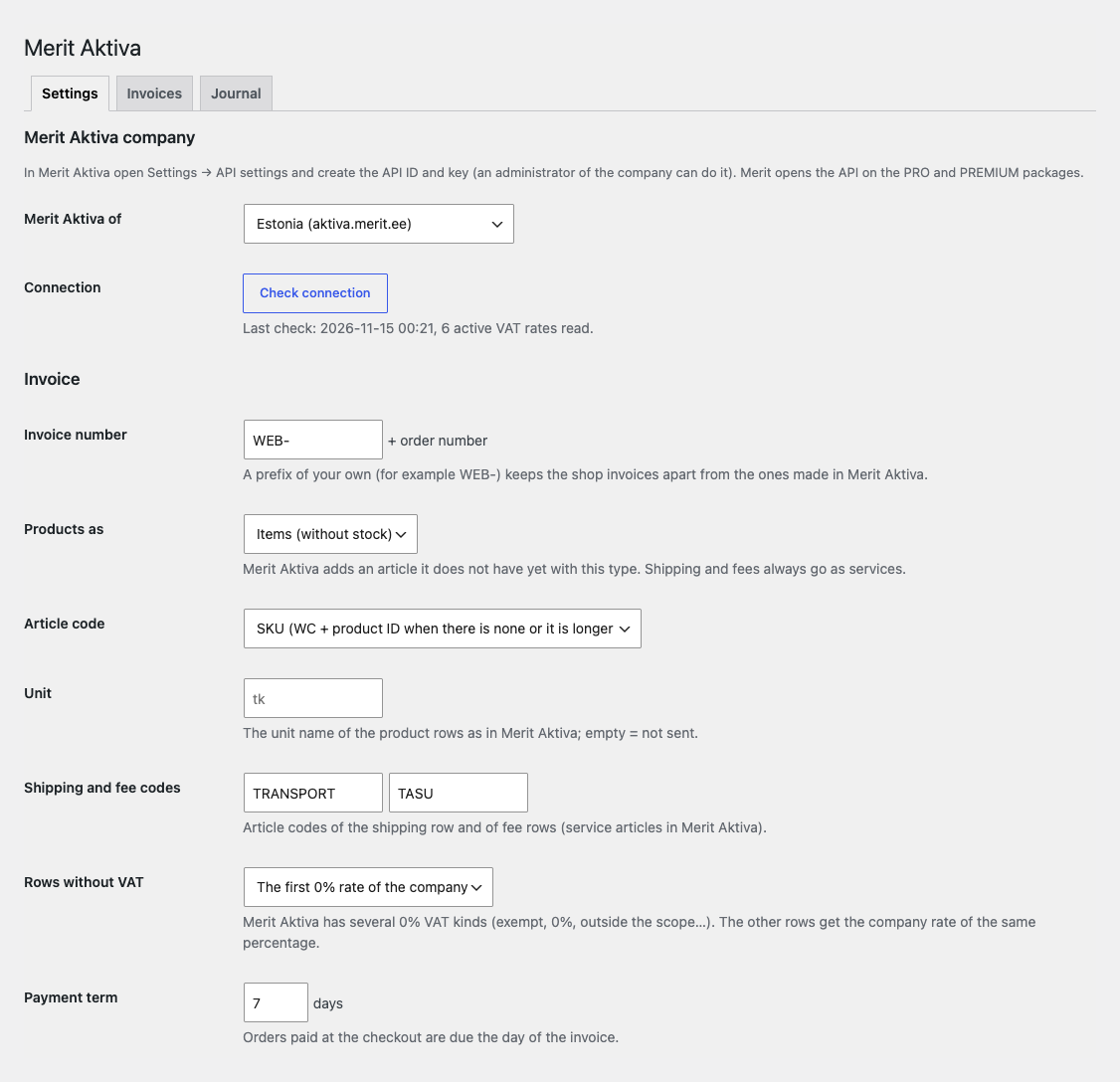
WooCommerce → Merit Aktiva. The Merit country (aktiva.merit.ee or the Polish program), ApiID, key and “Check connection”, the invoice prefix, products as items or services, where the article code comes from, the unit, shipping and fee codes, the kind of 0% VAT, the payment term, the text on the invoice with {order}, the invoice language, private buyers and the gateways that are paid later. The debug log writes every request to the WooCommerce log; the key never reaches it.
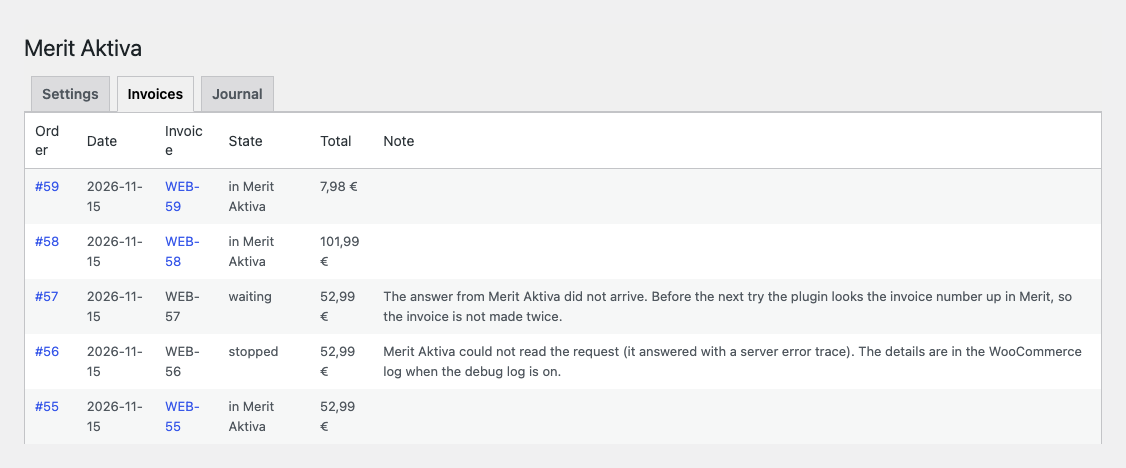
The “Invoices” tab shows every order with its invoice: the state (in Merit Aktiva, waiting, stopped), the number with a link to the PDF, the total and the reason when something stopped. A case where Merit made the invoice but the answer did not arrive is shown as “waiting” and resolved by the next pass.
Automatic invoices: when an order reaches the statuses you choose (for example “Processing”), the invoice is made in the background through Action Scheduler. The bulk action “Send invoices to Merit Aktiva” in the orders list adds older orders two seconds apart.
Payments: an order paid at the checkout goes to Merit as a paid invoice; a later payment (cash on delivery, bank transfer) is recorded when the order reaches a status or with a button. Each payment method of the shop is tied to a bank or cash account of Merit.
Credit invoices from WooCommerce refunds, automatic or by button: the refunded rows go into the credit invoice, a full refund without rows credits all rows, and stock items take their cost from the original invoice. A partial refund by amount only, without rows, leaves a note for manual handling.
Customers: companies are found in Merit by registry code or VAT number (not by name), created when missing and remembered for the next orders. Products go to Merit as articles in batches of 25, existing articles are not duplicated; there is a mode for stock items with a choice of stock.
Stock from Merit into WooCommerce by SKU: every hour, every 6 hours or daily and by button, in portions of 50; the quantity reserved in Merit can be subtracted. Merit itself can send the invoice to the buyer: nothing, e-mail, e-invoice with an e-mail fallback, or e-invoice to companies and e-mail to private buyers. The journal keeps the last 300 events.
Didn't find the answer? Message us on Telegram and we'll reply within a business day.
 @catcode_support
Setup, compatibility, activation
Merit opens the API on the PRO and PREMIUM packages. On a lower package the connection will not work.
Copy the ApiID and key again without spaces. If they are right, check the clock of your server: Merit refuses requests whose time is wrong.
Merit rounds the VAT of every row, while WooCommerce may round the tax of the whole order. Up to a cent per row the plugin puts into the rounding of the invoice; a bigger gap usually means a tax typed by hand on the order or a VAT rate your company in Merit does not have.
The next try first looks the invoice number up in Merit. If the invoice is there, it is linked to the order and a second one is never made.
In Pro yes: a WooCommerce refund makes the credit invoice in Merit automatically or with a button. A partial refund by amount only, without rows, leaves a note for manual handling.
Yes, with HPOS order storage and the legacy one, and with block and classic checkout.
No: no request to Merit is made while the order is placed. The invoice is made by the button or, in Pro, in the background.
Pro switches off: automatic invoices, payments, credit invoices and stock stop. The free part keeps working.
No, it is an independent plugin from CatCode. Merit Aktiva is a trademark of Merit Tarkvara AS; the plugin is not affiliated with it and not endorsed by it.
No reviews yet. Be the first.
No questions yet. Ask one — we answer within 24 hours.
We build custom modules for WordPress, WooCommerce, OpenCart and Shopify. Tell us about the task and we'll prepare an estimate.
Order a custom module
—
Charged in UAH; your bank converts it to your currency. EUR price is approximate.

CatCode assistant
Just now


CatCode assistant
Online

I’ll help with your website task
Describe your website task — I’ll find a ready-made module or pass it to a developer for an estimate. Modules, custom features, layout, integrations, speed, migration, technical SEO.