Black November: −35% on all modules until 30 November Black November: −35% until 30 November Choose a module

Get in touch
WooCommerce

Express One for WooCommerce — shipments, labels and parcel shops (Slovenia)

Express One (Slovenia) in WooCommerce: parcel shops and lockers on a map, a shipment and a label from the order; Pro adds automatic shipments, tracking and courier pickup.

Download Free
Pro · one-year licence Staging copies are included. The more sites, the cheaper each one
Compatibility
WordPress 6.4+ · WooCommerce 8.6+ · PHP 7.4+ · HPOS, block checkout · an Express One contract and API key required · interface language: English (Pro also slovenščina)
Licence
a site + a staging copy, annual
Trial
7 days, no card, one per site
Updated
15.11.2026
Or all 509 Pro modules with All Access — 3 244 UAH / year ≈ €66

What Free has,
and what Pro adds

The free version works with no time limit. Pro adds the rest of the features in the table.

Feature Free Pro
Two methods for the Slovenia zone: a parcel shop or locker and a courier to the address, a fixed price, free from an amount and with a coupon, a weight limit ✔ ✔
Choosing a point from a list and an OpenStreetMap map: search by city, post code, street, name; points near the buyer’s post code first ✔ ✔
Server-side validation: no order without a point; a point without cash on delivery is refused for the cash-on-delivery method ✔ ✔
The point is written into the order shipping address, the buyer’s saved address is not changed ✔ ✔
Optional post code and country check for delivery to the address ✔ ✔
A shipment and a PDF label from the order by one button: parcels, weight, sender, order number ✔ ✔
The label again, cancelling before printing, changing the point by its code ✔ ✔
Cash on delivery for the payment methods you tick, IBAN and BIC if needed ✔ ✔
Sender address and label layout from the account, the carrier’s e-mail or SMS notification to the buyer ✔ ✔
A retried shipment is never made twice ✔ ✔
The point list is kept in the shop and read once a day ✔ ✔
Block and classic checkout, HPOS ✔ ✔
Automatic shipment with a label by order status — ✔
Bulk creation of shipments for up to 20 orders and one PDF of labels — ✔
Status sync every hour, scans in the order notes, Completed on delivery — ✔
Tracking for the buyer: number, link, last status — ✔
Cash on delivery check: a note and a list of cash still to collect — ✔
Courier pickup with the pickup list PDF — ✔
Another sender per order — ✔
Price bands by weight and order amount — ✔
A note for the courier — ✔
Journal of the last 200 calls — ✔
Slovenian interface — ✔
Updates from catcode.com.ua — ✔

What it looks like

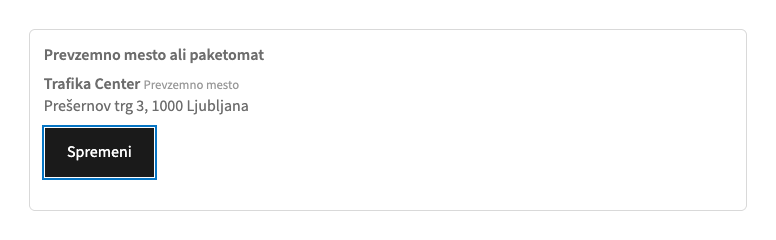
Express One parcel shop at the checkout
WooCommerce checkout in Slovenian: the Express One parcel shop method is chosen, below it the selected point with its address and a “Spremeni” (change) button.
Tracking in My account
The order page in Slovenian: “Dostava z Express One”, the shipment number and the “Sledite paketu” link.
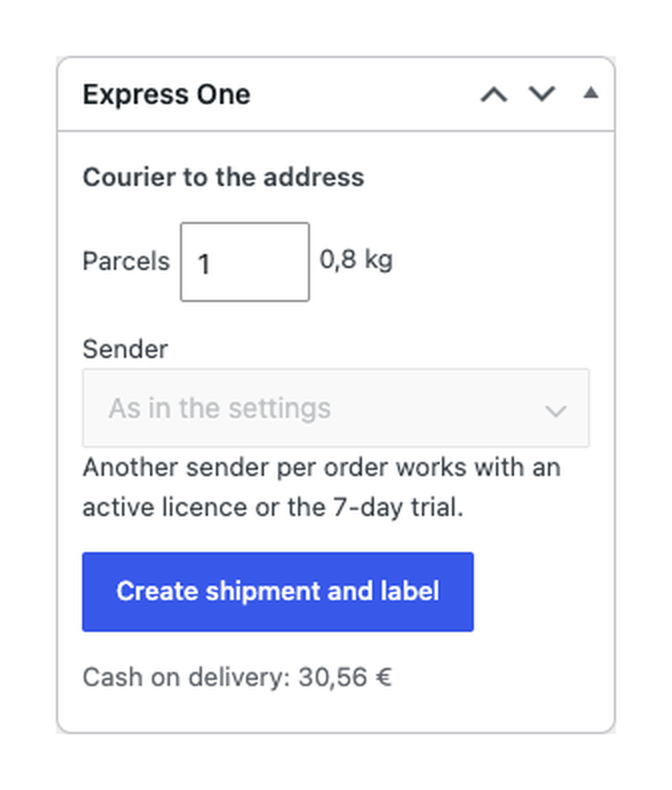
The Express One box in the order
In the order: number of parcels and weight, sender, the “Create shipment and label” button and the cash on delivery amount.

Key points

What the buyer gets

At the checkout, for a Slovenian address, the buyer sees two methods. “Parcel shop or locker” opens a list and a map: the points near the buyer’s post code and city come first, with search by city, post code, street or name.

What the admin gets

WooCommerce → Express One: the API key (stored encrypted), the sender address and label layout from the account, the payment methods that mean cash on delivery, an IBAN for cash on delivery, a weight for products without one, the carrier’s e-mail or SMS notification to the buyer, the map on or off, writing the point into the order address, the post code check.

The trial starts when you ask

A fresh install is the free version, nothing switches on by itself. The “Try Pro for 7 days” button → e-mail → the key right in the window and by e-mail.

One key — a site and a staging copy

Moving the site? Unlink the licence on the old domain and activate it on the new one yourself. A staging copy (staging., dev.) works with the same key and does not take a site slot. For studios — keys for 5 or 25 sites, or unlimited.

Technical requirements

  • WordPress 6.4+, WooCommerce 8.6+ (HPOS and the block checkout are supported), PHP 7.4+.
  • A contract with Express One and an API key.
  • Interface language: English; Slovenian is in the Pro build.

Version history

v1.0.0 Current 15.11.2026

The “parcel shop or locker” and “courier to the address” methods, choosing a point on the map, a shipment and a label from the order, cash on delivery, the post code check, HPOS, classic…

Frequently bought with Express One

All Access Need more? All modules (509) under one licence, new ones are added automatically. 3 244 UAH≈ €66 Learn more →

Full module description

Express One for WooCommerce connects WooCommerce to your contract with Express One (Slovenia). Your Slovenia shipping zone gets two methods: a parcel shop or locker on a map, and a courier to the address. In the order one button creates the shipment with the address or the point, phone, e-mail, cash on delivery and weight, and opens the label PDF.

What you need. A contract with Express One and an API key: the carrier issues it for your contract. Paste the key in WooCommerce → Express One, press “Check connection”, choose the sender address and the payment methods that mean cash on delivery, then add both methods to your Slovenia shipping zone.

What the buyer gets

At the checkout, for a Slovenian address, the buyer sees two methods. “Parcel shop or locker” opens a list and a map: the points near the buyer’s post code and city come first, with search by city, post code, street or name. The chosen point stays under the shipping methods. The order is not placed without a point, and a point that does not take cash on delivery is refused for the cash-on-delivery payment method; the server checks this as well. “Courier to the address” delivers to the buyer’s address.

The point is written into the order’s shipping address (a setting), so it shows on the thank-you page, in the e-mails and in the order; the buyer’s saved account address is never replaced by the point. In Pro the buyer sees the shipment number, the tracking link and the last status in My account and in the order e-mails.

What the admin gets

WooCommerce → Express One: the API key (stored encrypted), the sender address and label layout from the account, the payment methods that mean cash on delivery, an IBAN for cash on delivery, a weight for products without one, the carrier’s e-mail or SMS notification to the buyer, the map on or off, writing the point into the order address, the post code check. The point list is kept in the shop and read again once a day (or by a button), so the checkout never waits for the carrier. You set the prices of the methods yourself in the shipping zone.

In the order the Express One box takes the buyer’s shipping method, the number of parcels and the weight; for a parcel shop the point can be changed by its code. “Create shipment and label” creates the shipment on your contract; when the order is paid with a cash-on-delivery method, the order total goes as the cash on delivery amount.

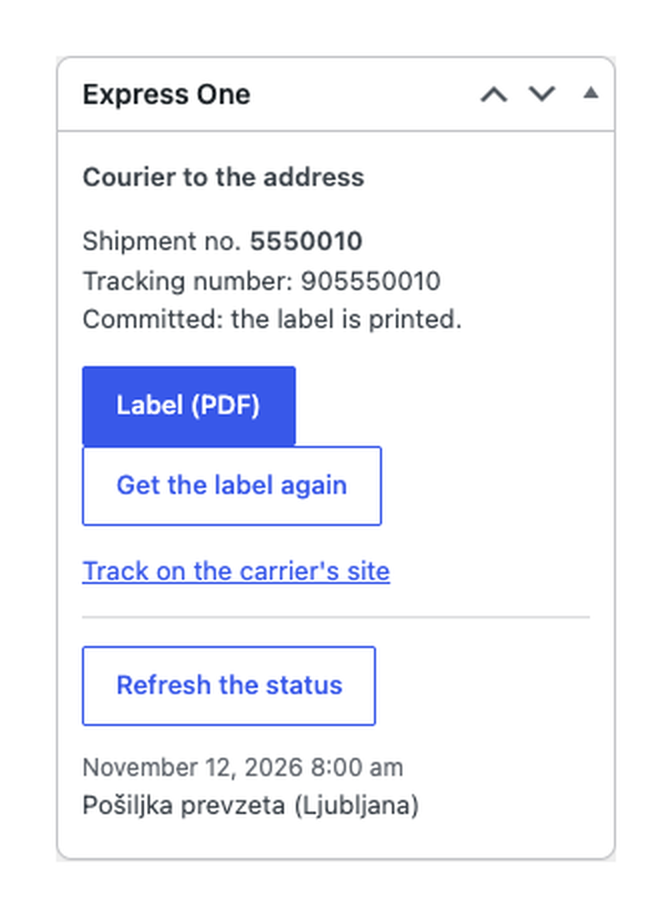
The label opens as a PDF and can be fetched again. While the label is not printed, the shipment can be cancelled. If the carrier’s answer did not arrive, the next attempt first looks the order number up at the carrier, so a shipment is never made twice.

What Pro adds

  • Automatically by status. A shipment and a label for every Express One order that goes to Processing (or Completed).
  • Bulk. Shipments with labels for up to 20 orders from the list, the labels of many orders printed as one PDF.
  • Status sync every hour: each new scan in the order notes, the history on the order screen, the order can be marked Completed on delivery.
  • Tracking for the buyer: the shipment number, the link and the last status in My account and in the e-mails.
  • Cash on delivery check. A note when the carrier has collected the cash, and a list of delivered orders whose cash is still to be collected.
  • Courier pickup: one button for all shipments with a printed label, and the pickup list as a PDF.
  • Another sender for a single order.
  • Price bands by weight and amount: “up to 5 kg = 4.50”, bands by order amount.
  • A note for the courier at pickup.
  • The journal of the last 200 calls to the carrier, without the key and addresses.
  • The Slovenian interface and updates from catcode.com.ua.

Limits

  • Whether you can ship abroad or only inside Slovenia depends on the type of your Express One account; the plugin shows the service’s own text when it refuses.
  • You need your own contract with Express One and an API key: shipments are made on your contract, and the carrier prices depend on it.
  • The price at the checkout is the one you set for the method in the shipping zone (and the Pro bands); the plugin does not read the carrier’s tariffs.
  • Once the label is printed the shipment is with the carrier, and the API cannot cancel it: cancelling after printing goes through Express One.
  • The methods work for Slovenian addresses; the parcel shops appear after the key is saved and the point list has been read once.
  • The plugin opens the label as a PDF; if the carrier account is set to another label format, the button says that no PDF came back.
  • “Completed on delivery” is off by default: delivery is recognised by a scan with a receiver or by “delivered” in the status text.
  • The map loads its tiles from tile.openstreetmap.org in the buyer’s browser (the buyer’s IP goes to OpenStreetMap); you can turn the map off in the settings and keep the list.
  • Bulk creation takes up to 20 orders at a time; the labels of many orders are printed as one PDF.

How it works, step by step

  1. Install the plugin and activate it (WooCommerce must be active).
  2. In WooCommerce → Express One paste the API key, save and press “Check connection”.
  3. Choose the sender address and the cash-on-delivery payment methods, press “Read the point list now”.
  4. In WooCommerce → Settings → Shipping, in the Slovenia zone, add both Express One methods and set the prices.
  5. In the order press “Create shipment and label”: the label PDF opens.
  6. The shipment number appears in the order; in Pro the statuses update by themselves and the buyer sees the tracking.

Under the hood

  • The tracking link leads to inet.expressone.si with the shipment number.
  • The Express One client API (api.expressone.si): the point list, the account data, shipments, labels, tracking, courier pickup.
  • Every call comes from your server with the key in a request parameter; the buyer’s browser never sees the key, and it is stored encrypted.
  • Only the data for the shipment goes to the carrier: name, address or point, phone, e-mail, the order note (if kept on), the order number, a short contents line, the weight, the number of parcels, the cash on delivery amount.
  • The buyer’s browser loads the point map from OpenStreetMap (the Leaflet library is bundled in the plugin).

Installation

  1. Plugins → Add New → Upload Plugin: choose the zip and activate.
  2. WooCommerce → Express One: paste the API key, save, press “Check connection”.
  3. Add both methods to your Slovenia shipping zone.
  4. For Pro: paste the licence key or start the trial in the “Licence” section of the same page.

Questions
about the module

Didn't find the answer? Message us on Telegram and we'll reply within a business day.

@catcode_support Setup, compatibility, activation
Is this the official Express One plugin?

No, it is an independent integration made by CatCode. The Express One name belongs to its owner; the plugin is not affiliated with or endorsed by Express One.

Do I need a contract with Express One?

Yes. Shipments are made on your own contract, and the carrier issues the API key.

Why is the parcel shop method missing at the checkout?

It shows for Slovenian addresses once the key is saved and the point list has been read (settings, “Read the point list now”).

Can I cancel a shipment?

Before its label is printed, yes. Printing hands the shipment to the carrier and the API cannot cancel a committed shipment, so ask Express One.

Are the prices from Express One?

No. The price at the checkout is the one you set for the method; the carrier tariffs depend on your contract. Pro adds bands by weight and amount.

Is the point map in the free version?

Yes, choosing a point from the list and the map is part of the free version.

What happens after the trial?

Pro switches off and the free part keeps working: both methods, a shipment and a label from the order.

How many sites does the key cover?

One key works on two sites: the shop and its test copy.

Not quite what you are looking for?

We build custom modules for WordPress, WooCommerce, OpenCart and Shopify. Tell us about the task and we'll prepare an estimate.

Order a custom module