
















WooCommerce
990 UAH644 UAH/year≈ €14
Black November: −35% on all modules until 30 November Black November: −35% until 30 November Choose a module
 Website auditA PDF report by email in 3 minutesCheck a website
Everyday tasks
Image compressorSize, quality and WebP in bulkQR generatorLink, Wi-Fi, payment to IBANVAT calculator20, 14, 7% and amount in wordsTransliterationOfficial Ukrainian standardWebsite checks
PHP and pluginsPHP version, WordPress, pluginsGoogle Merchant feedFields, prices, GTIN, imagesDomain emailSPF, DKIM, DMARC, blacklistsAI search readinessllms.txt, bots, markupAll 9 toolsEnter at least 2 characters

Buildium vacancies on your WordPress site: a list and a rental page with an Apply online button for free; Pro adds filters, own rental pages, enquiry and request forms.
The free version works with no time limit. Pro adds the rest of the features in the table.


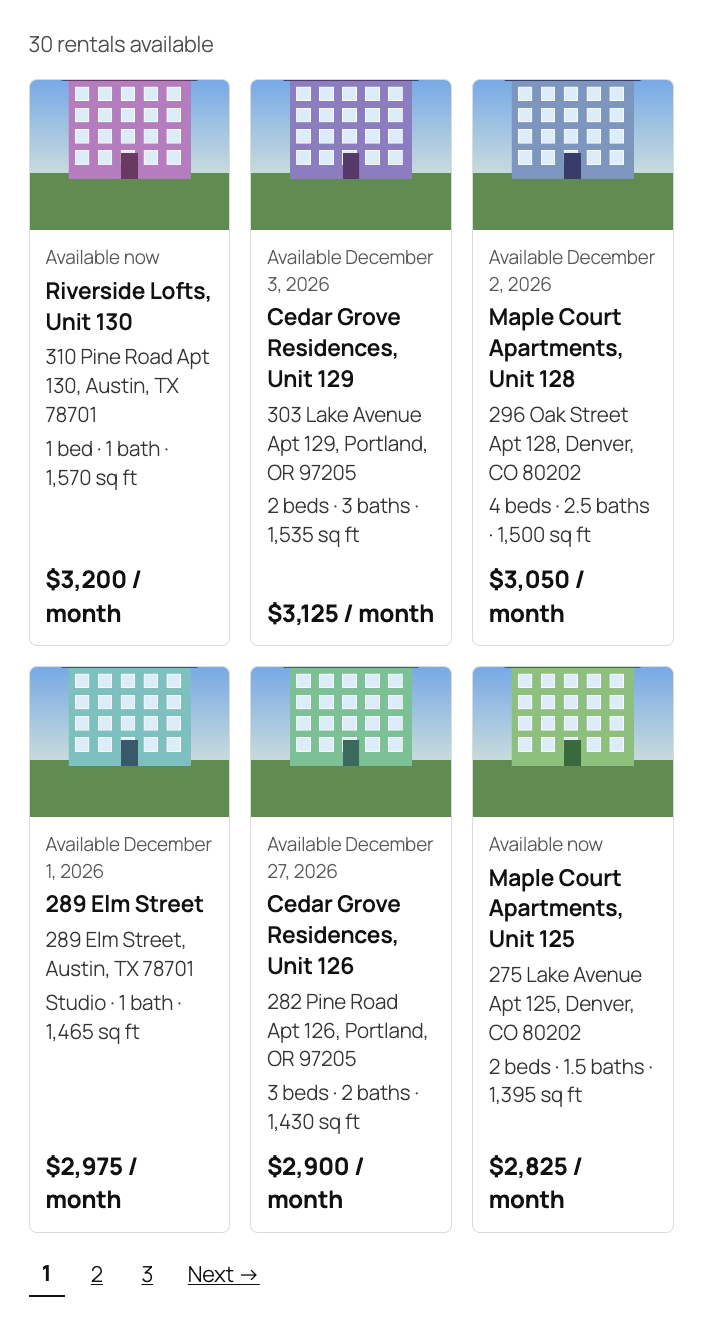
The rental list. The “Buildium Listings” block or the [catcode_buildium_listings per_page="6" columns="2"] shortcode shows cards: a photo, when the unit is available, the title, the address, bedrooms, bathrooms, size and the rent.

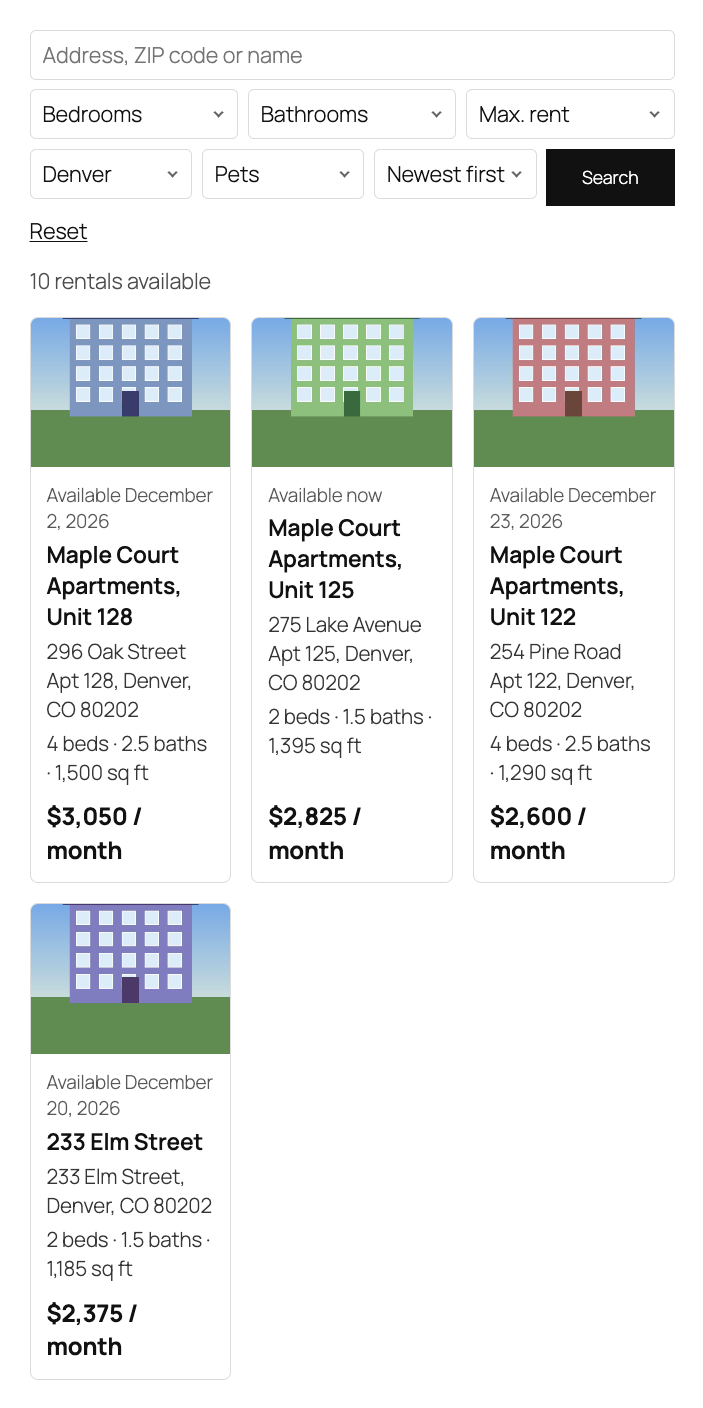
Filters and search. Above the list appear a search box for address, ZIP code or name, filters for bedrooms (Studio included), bathrooms, maximum rent, city and pets, and sorting by newest, rent, available date and size.

A fresh install is the free version, nothing switches on by itself. The “Try Pro for 7 days” button → e-mail → the key right in the window and by e-mail.

Moving the site? Unlink the licence on the old domain and activate it on the new one yourself. A staging copy (staging., dev.) works with the same key and does not take a site slot. For studios — keys for 5 or 25 sites, or unlimited.
 WordPress 6.4+, PHP 7.4+. WooCommerce is not needed.A Buildium account with the Open API (Premium plan), a client ID and a secret.The site connects to api.buildium.com; Pro also contacts catcode.com.ua for the licence and updates and nominatim.openstreetmap.org for map addresses, and the OpenStreetMap map loads after the visitor clicks.
The rental list (block and shortcode), the rental page with photos and terms, the “Apply online” button, an encrypted connection to the Buildium Open API, a cache and a fallback list.


Rental Listings for Buildium shows the vacant units of your Buildium account on your WordPress site: a list of cards and a page for every rental with photos, rent, size, lease terms and an “Apply online” button. The data comes from the official Buildium Open API, not from a copy of your public listings page, and the look is inherited from your theme, with no iframe. List a unit in Buildium and it appears on the site; take it off the market and it is gone.
You need a Buildium account with the Open API, which is part of the Premium plan. An administrator creates the API key (client ID and secret) in Settings → Developer Tools → Create API Key. The plugin interface is in English, for the US and Canadian market.
The rental list. The “Buildium Listings” block or the [catcode_buildium_listings per_page="6" columns="2"] shortcode shows cards: a photo, when the unit is available, the title, the address, bedrooms, bathrooms, size and the rent. Cards in a row have equal height, the newest come first, with page numbers; fonts and colours come from your theme. The settings hold the number per page and the currency (USD or CAD), and the full address with the unit can be replaced by city, state and ZIP code.
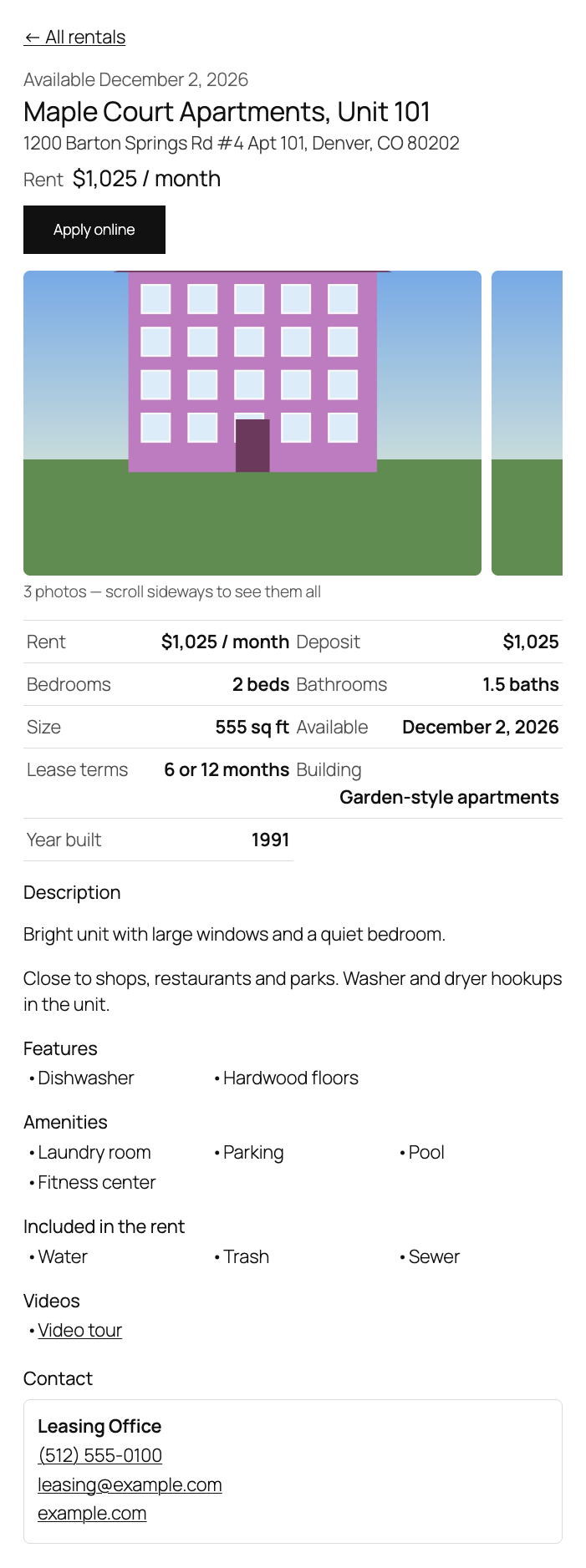
The rental page. The unit opens on the same page (?bd_id=) and shows all photos of the unit and the building, the rent, deposit, bedrooms, bathrooms, size, available date, lease terms, pet rules, the building and its year, the description, unit features, building amenities, what is included in the rent, videos and the listing contact. “Apply online” leads to Buildium’s online rental application of that unit, so applications land in Buildium as usual. The deposit, the contact and the button can be hidden in the settings.
Fast and safe. The list is kept for 15 minutes and “Refresh listings now” fetches it again at once. The site waits for Buildium up to 8 seconds; when Buildium is down, visitors see the last saved list and the administrator gets an explanation. The client ID and secret are stored encrypted and never reach the browser, and “Check connection” shows how many listings the key sees.
Filters and search. Above the list appear a search box for address, ZIP code or name, filters for bedrooms (Studio included), bathrooms, maximum rent, city and pets, and sorting by newest, rent, available date and size. Filtering runs on the saved list, so it does not load Buildium. The property="12,34" and city="Austin" attributes keep only the right buildings or the city on a page.
An own page for every rental. Every unit gets an address on your site (/rentals/…), appears in the sitemap and has its own title and canonical address. The schema.org RealEstateListing markup holds the rent, bedrooms, bathrooms, size, available date and address. The pages are synced on a schedule (you set the interval in minutes), and units taken off the market are removed only after the whole list has been read. The page can show an OpenStreetMap map that loads after the visitor clicks; with the street hidden, the map shows the ZIP code area.
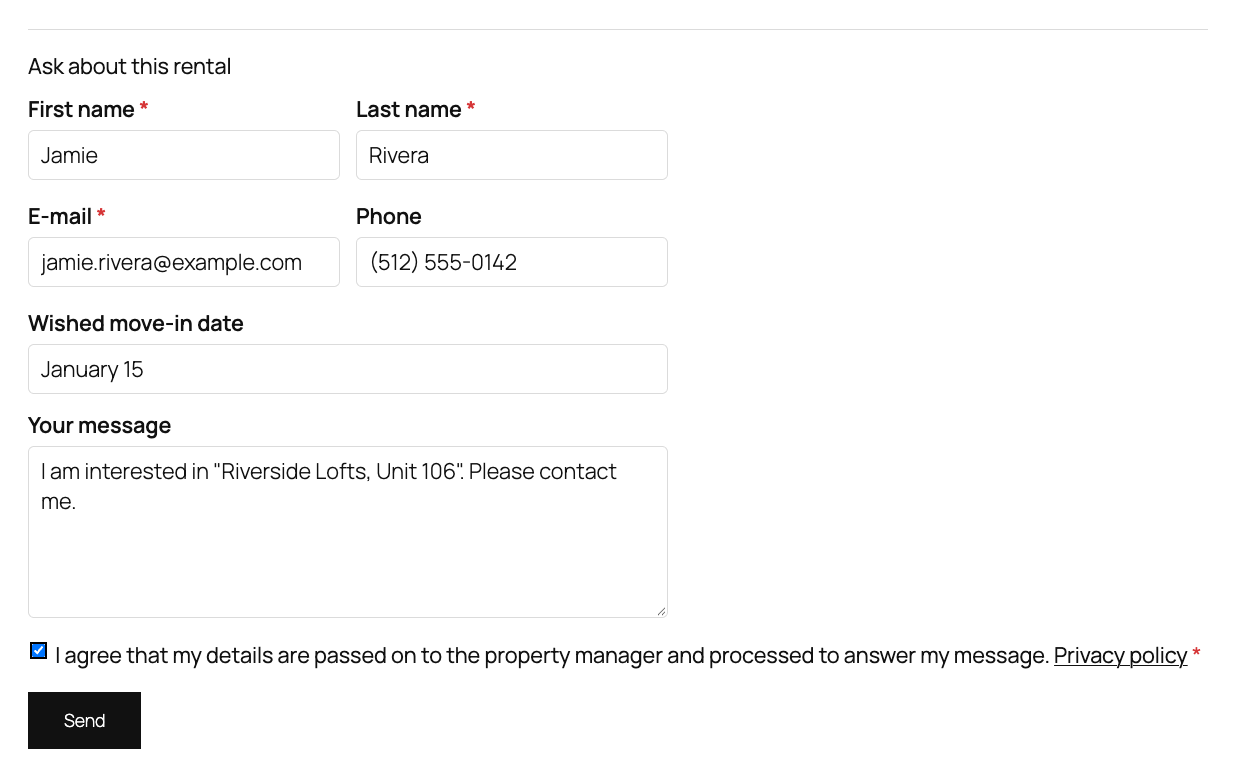
The enquiry form. The “Ask about this rental” form on a rental page creates an applicant on that unit in Buildium and records the message, the move-in date and the page as a note. If you wish, Buildium e-mails the applicant a link to the online rental application. When Buildium does not answer, the enquiry arrives by e-mail at the address you set, with the visitor in Reply-To, so the lead is not lost. Protection: a hidden field, a minimum filling time and a limit of 5 enquiries an hour per address.
Maintenance requests. The [catcode_buildium_request] shortcode shows a request form (property address, topic, description) that creates a “contact request” task in Buildium. You choose the staff member the requests are assigned to and the topics from the task categories of your account; after “Check connection” the staff users and categories are loaded from Buildium.
More accounts, a webhook and a journal. Up to five Buildium accounts (for example other companies you manage) are shown with the account="2" attribute. A signed Buildium webhook (address /wp-json/catcode-buildium/v1/hook) makes the site read the listings again: a change in Buildium appears within a minute; repeats and outdated calls are ignored, and the call itself carries no data. The journal shows refreshes, enquiries and errors without personal data.
[catcode_buildium_listings] shortcode to a page.Didn't find the answer? Message us on Telegram and we'll reply within a business day.
 @catcode_support
Setup, compatibility, activation
No, it is an independent integration made by CatCode. Buildium is a trademark of its owner; the plugin is not affiliated with Buildium or RealPage and not endorsed by them.
Yes. The Buildium Open API is part of the Premium plan, and the key is created by an administrator of the account.
Every unit you list in Buildium (Rentals → Listings). A unit taken off the market disappears from the site with the next refresh.
Yes, with the unit number, as in Buildium's own listings. Switch off the street and unit in the settings and only city, state and ZIP code remain.
Visitors see the last saved list, and a rental opened before shows its last saved copy. The administrator sees the reason on the page.
Pro switches off: filters, forms, the map and the own rental pages stop working, and the page addresses redirect with a 301 to the list. The list, the rental page and "Apply online" stay, and the saved Pro settings are not lost.
One key works on two sites: the live one and its development copy.
No reviews yet. Be the first.
No questions yet. Ask one — we answer within 24 hours.
We build custom modules for WordPress, WooCommerce, OpenCart and Shopify. Tell us about the task and we'll prepare an estimate.
Order a custom module
—
Charged in UAH; your bank converts it to your currency. EUR price is approximate.

CatCode assistant
Just now


CatCode assistant
Online

I’ll help with your website task
Describe your website task — I’ll find a ready-made module or pass it to a developer for an estimate. Modules, custom features, layout, integrations, speed, migration, technical SEO.