
















WooCommerce
990 UAH644 UAH/year≈ €13
Black November: −35% on all modules until 30 November Black November: −35% until 30 November Choose a module
 Website auditA PDF report by email in 3 minutesCheck a website
Everyday tasks
Image compressorSize, quality and WebP in bulkQR generatorLink, Wi-Fi, payment to IBANVAT calculator20, 14, 7% and amount in wordsTransliterationOfficial Ukrainian standardWebsite checks
PHP and pluginsPHP version, WordPress, pluginsGoogle Merchant feedFields, prices, GTIN, imagesDomain emailSPF, DKIM, DMARC, blacklistsAI search readinessllms.txt, bots, markupAll 9 toolsEnter at least 2 characters
Shows where your sales are getting close to a US state economic threshold: 50 states, DC and Puerto Rico, each on its own window. Runs inside your site with no subscription. This is information, not tax advice.
The free version works with no time limit. Pro adds the rest of the features in the table.


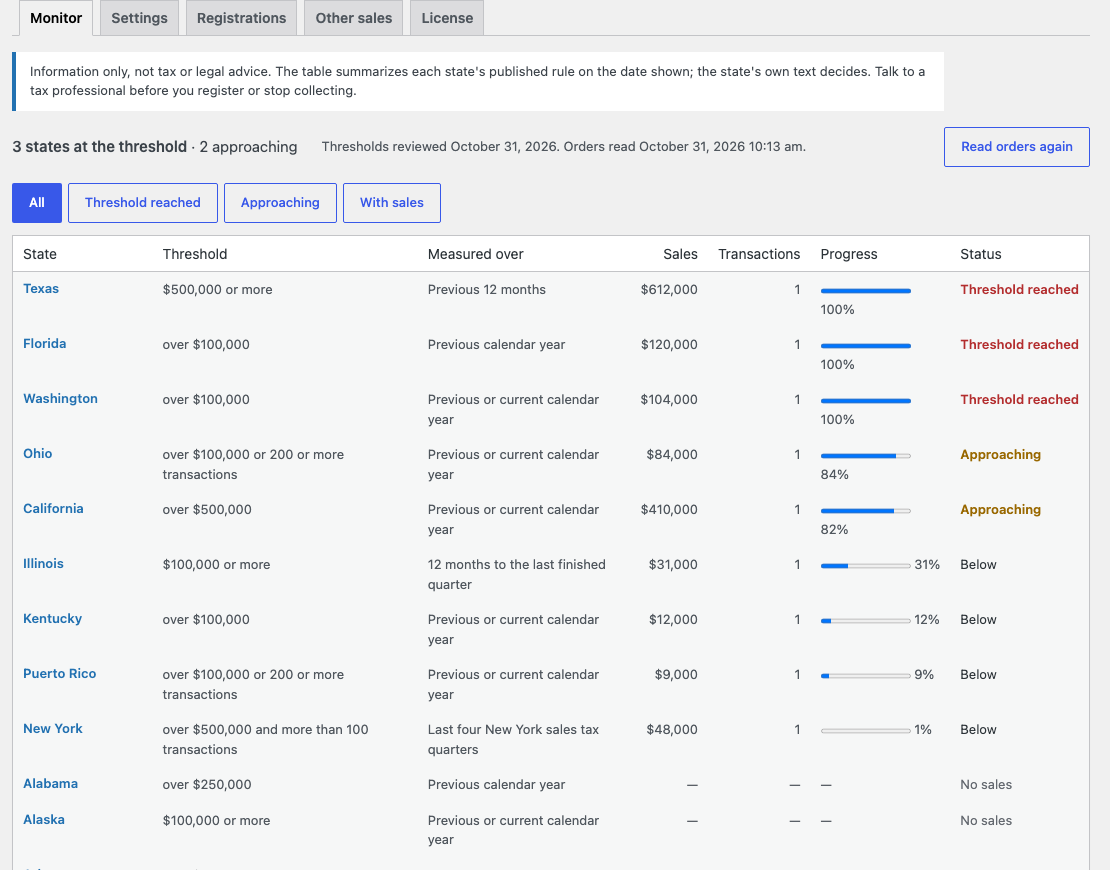
The monitor is a table of all states: threshold, measuring period, your sales, transactions, progress and status.

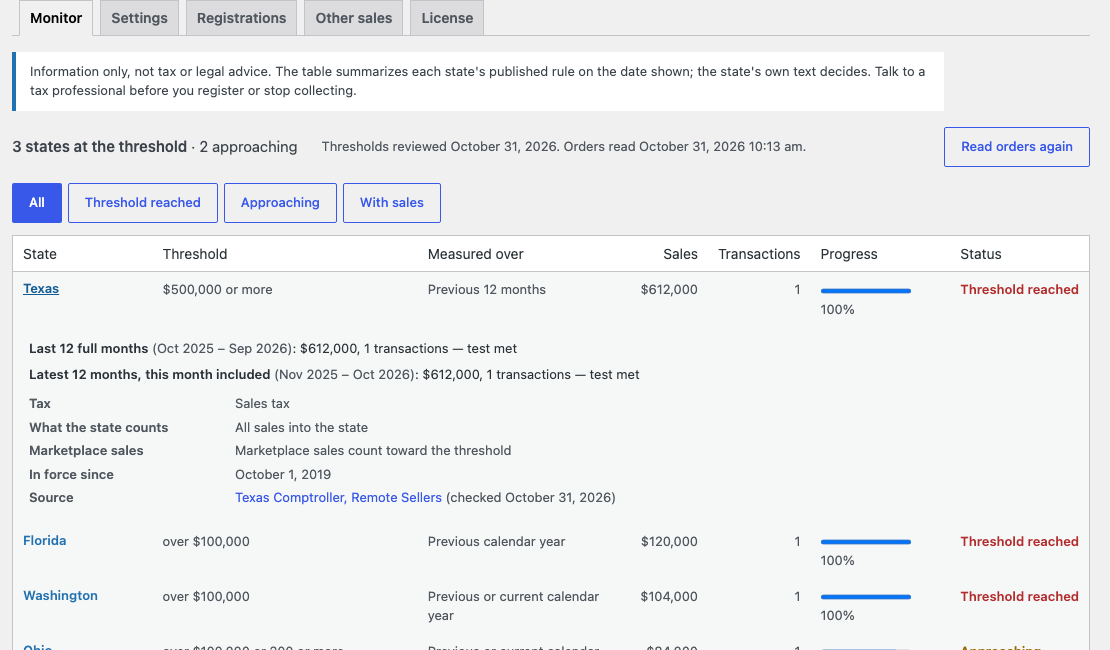
A click on a state opens the details: the figures of every period, what the state counts, how it treats marketplace sales, the date the rule took effect, a link to the source and the check date.

The base version is free. Pro costs 990 UAH for a one-year licence. A year of updates, technical support and all Pro features.

A fresh install is the free version, nothing switches on by itself. The “Try Pro for 7 days” button → e-mail → the key right in the window and by e-mail.

Moving the site? Unlink the licence on the old domain and activate it on the new one yourself. A staging copy (staging., dev.) works with the same key and does not take a site slot. For studios — keys for 5 or 25 sites, or unlimited.
 WordPress 6.2+, WooCommerce 8.0+, PHP 7.4+.Orders with US state addresses.Orders in other currencies count at the rate you enter. Without a rate they are left out, and the screen says so.
Fixed the licence status shown after the trial period: it now says plainly that the trial has ended.
State monitor, own windows, sources, notices.

Since South Dakota v. Wayfair, a US state can ask an out-of-state seller to collect its sales tax once sales into that state pass a set level. The level, the period and what counts differ from state to state. Sales Tax Nexus Monitor holds your orders against those thresholds and shows where you stand.
This is information, not tax or legal advice. The table summarizes each state published rule on the date shown next to it, and the state text decides. Talk to a tax professional before you register.
The monitor is a table of all states: threshold, measuring period, your sales, transactions, progress and status. The top line shows how many states reached the threshold and how many are approaching. Filters leave only what you need. Shoppers see nothing: the module works only in the admin.
A click on a state opens the details: the figures of every period, what the state counts, how it treats marketplace sales, the date the rule took effect, a link to the source and the check date.
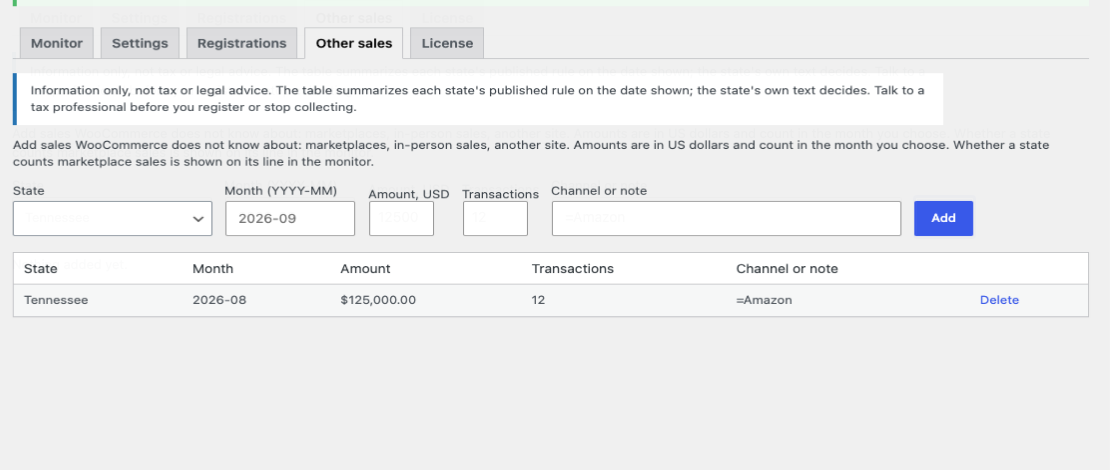
In Pro you can add sales outside WooCommerce by hand: marketplaces, in person, another site. They count in the month and state you enter.
The module is not on wordpress.org yet: the free version and Pro are one archive from this page. Without a key it works as the free version.
Didn't find the answer? Message us on Telegram and we'll reply within a business day.
 @catcode_support
Setup, compatibility, activation
No. It only shows figures. You decide with a tax professional.
No, they are not in WooCommerce. In Pro you can add them by hand.
With new releases. Each row shows its check date.
Nowhere. Everything is counted on your site.
Yes, it is a separate module.
No reviews yet. Be the first.
No questions yet. Ask one — we answer within 24 hours.
We build custom modules for WordPress, WooCommerce, OpenCart and Shopify. Tell us about the task and we'll prepare an estimate.
Order a custom module
—
Charged in UAH; your bank converts it to your currency. EUR price is approximate.

CatCode assistant
Just now


CatCode assistant
Online

I’ll help with your website task
Describe your website task — I’ll find a ready-made module or pass it to a developer for an estimate. Modules, custom features, layout, integrations, speed, migration, technical SEO.
