
















WooCommerce
1 290 UAH839 UAH/year≈ €17
Black November: −35% on all modules until 30 November Black November: −35% until 30 November Choose a module
 Website auditA PDF report by email in 3 minutesCheck a website
Everyday tasks
Image compressorSize, quality and WebP in bulkQR generatorLink, Wi-Fi, payment to IBANVAT calculator20, 14, 7% and amount in wordsTransliterationOfficial Ukrainian standardWebsite checks
PHP and pluginsPHP version, WordPress, pluginsGoogle Merchant feedFields, prices, GTIN, imagesDomain emailSPF, DKIM, DMARC, blacklistsAI search readinessllms.txt, bots, markupAll 9 toolsEnter at least 2 characters



Quatro (VÚB banka) instalments and loans at the WooCommerce checkout; Pro adds the calculator, hiding rules and an application log.
The free version works with no time limit. Pro adds the rest of the features in the table.


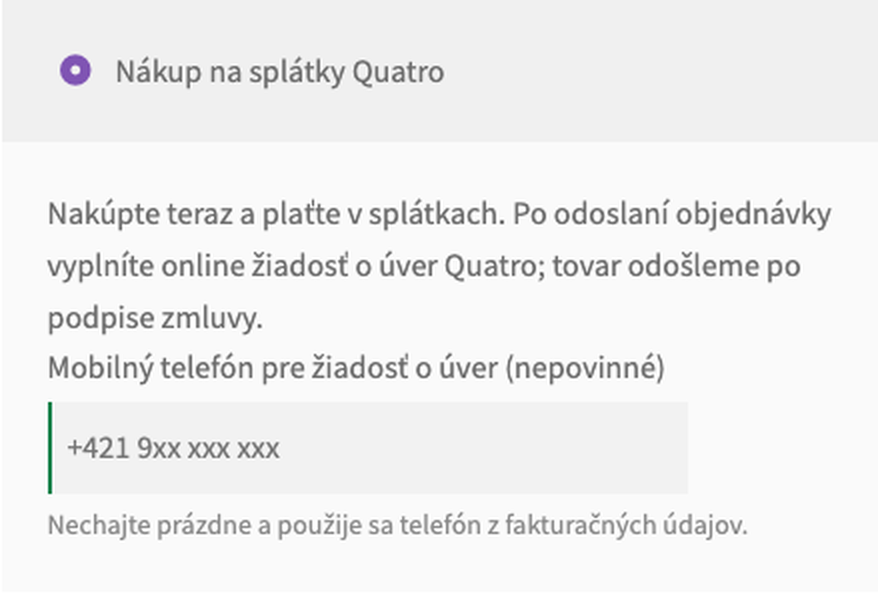
At the checkout the buyer sees “Nákup na splátky Quatro” with your name and description.

WooCommerce → Quatro: enter the store code and the security key from Quatro and save; the key is stored encrypted in the database.

Instalment calculator. A “Vypočítať splátky Quatro” button on the product page (the price follows the chosen variation) and in the cart opens the Quatro calculator of your store with the price.

A fresh install is the free version, nothing switches on by itself. The “Try Pro for 7 days” button → e-mail → the key right in the window and by e-mail.

Moving the site? Unlink the licence on the old domain and activate it on the new one yourself. A staging copy (staging., dev.) works with the same key and does not take a site slot. For studios — keys for 5 or 25 sites, or unlimited.
 WordPress 6.4+, WooCommerce 8.6+ (HPOS and the block checkout are supported), PHP 7.4+.A contract with Quatro (VÚB banka): the store code and the security key.Shop currency: euro.
The “Nákup na splátky Quatro” method on the classic and block checkout, the signed application, the loan subject “category.


Quatro Instalments for WooCommerce adds the “Nákup na splátky Quatro” payment method to WooCommerce: the instalment sales and consumer loan of VÚB banka. After the order is placed the buyer is sent to the Quatro application, the order waits for the bank and changes state when Quatro reports approval, a signed contract or a cancellation. The module works with your own Quatro store code and security key.
What you need from Quatro. The module is for shops that work with Quatro: Quatro gives partners the store code and the security key after the contract with VÚB banka. The shop currency is the euro.
At the checkout the buyer sees “Nákup na splátky Quatro” with your name and description. It is offered for carts from 100 to 10,000 euro in euros, as Quatro requires. The method has an optional mobile phone field: Quatro needs a number in the +421 form, and when the field is empty the billing phone is used.
The same on the block checkout: the method works there without extra settings, and HPOS is supported.
Before sending the buyer away the module checks the name, e-mail, mobile number and full address and shows a plain message, while the cart stays. Then the application is built: the order number, the buyer data, the total, the loan subject “category – manufacturer – type” (product category, WooCommerce brand, name, at most 250 characters) and the notification address of the shop. It goes to Quatro as a JSON Web Token signed with your security key, not as an open form.
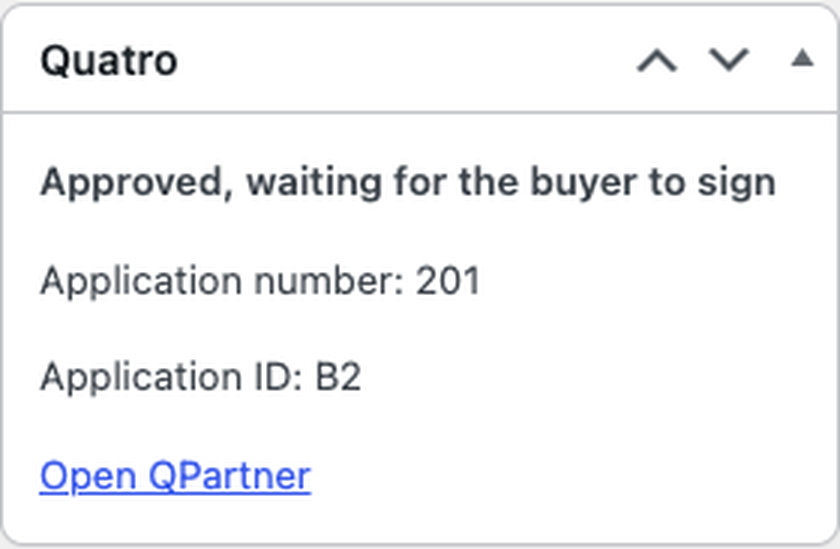
The order waits on hold. When Quatro reports that the application is approved the order gets a note; after the contract is signed the order moves to Processing and the goods can be shipped. A declined, expired or cancelled application cancels the order and returns the stock. A repeated or late message changes nothing twice and a signed order is never moved back. If the buyer closed the Quatro page, the order page and the “order on hold” e-mail have a “Pokračovať v žiadosti Quatro” button.
WooCommerce → Quatro: enter the store code and the security key from Quatro and save; the key is stored encrypted in the database. The “Open the Quatro calculator” button opens the calculator of your store code. The module sends the address where Quatro reports the application state with every application, so nothing has to be set up at Quatro. Then enable the method in WooCommerce → Settings → Payments. The interface is in English and Slovak (Slovak is in the Pro build).
Instalment calculator. A “Vypočítať splátky Quatro” button on the product page (the price follows the chosen variation) and in the cart opens the Quatro calculator of your store with the price. Quatro asks partner shops to show it on the product page.
Loan subject your way. The manufacturer from any product attribute, the type from the SKU or from the name and SKU, and a subject text of its own for a single product.
Completed after signing. The order can go straight to Completed when the buyer signs the contract.
Hiding rules. Quatro can be hidden for product categories (with their subcategories), for customer roles and outside a narrower cart total. Nothing is hidden by default.
Application log. Every application sent and every state Quatro reported, with a filter by state.
Didn't find the answer? Message us on Telegram and we'll reply within a business day.
 @catcode_support
Setup, compatibility, activation
No, it is an independent integration by CatCode. Quatro is a product of Všeobecná úverová banka, a.s.; the plugin is not affiliated with or endorsed by Quatro or VÚB banka.
Yes. Quatro (VÚB banka) approves the partner shop and sends the store code and the security key. The module does not do that step.
When the order moves to Processing: Quatro reports that the buyer signed the contract. "Approved" means the buyer still has to sign. After shipping, confirm the delivery in the Quatro partner portal: Quatro pays the shop after that.
The order stays on hold. The order page and the "order on hold" e-mail have a "Pokračovať v žiadosti Quatro" button, and the order screen has a link you can send to the buyer.
That runs through the Quatro partner portal and VÚB banka. The module only writes a note on the order when Quatro reports a cancellation.
The method is available only in euros and for carts from 100 to 10,000 euro; in Pro it can also be hidden by category, role or a narrower range.
One key works on two sites: the shop and a development copy.
No reviews yet. Be the first.
No questions yet. Ask one — we answer within 24 hours.
We build custom modules for WordPress, WooCommerce, OpenCart and Shopify. Tell us about the task and we'll prepare an estimate.
Order a custom module
—
Charged in UAH; your bank converts it to your currency. EUR price is approximate.

CatCode assistant
Just now


CatCode assistant
Online

I’ll help with your website task
Describe your website task — I’ll find a ready-made module or pass it to a developer for an estimate. Modules, custom features, layout, integrations, speed, migration, technical SEO.