
















WooCommerce
1 290 UAH839 UAH/year≈ €17
Black November: −35% on all modules until 30 November Black November: −35% until 30 November Choose a module
 Website auditA PDF report by email in 3 minutesCheck a website
Everyday tasks
Image compressorSize, quality and WebP in bulkQR generatorLink, Wi-Fi, payment to IBANVAT calculator20, 14, 7% and amount in wordsTransliterationOfficial Ukrainian standardWebsite checks
PHP and pluginsPHP version, WordPress, pluginsGoogle Merchant feedFields, prices, GTIN, imagesDomain emailSPF, DKIM, DMARC, blacklistsAI search readinessllms.txt, bots, markupAll 9 toolsEnter at least 2 characters


Neoship (SPS, GLS, Packeta, DPD, Slovenská pošta, SDS) in WooCommerce: a package and a label from the order, tracking; Pro adds pickup points on the map, bulk packages and acceptance protocols.
The free version works with no time limit. Pro adds the rest of the features in the table.


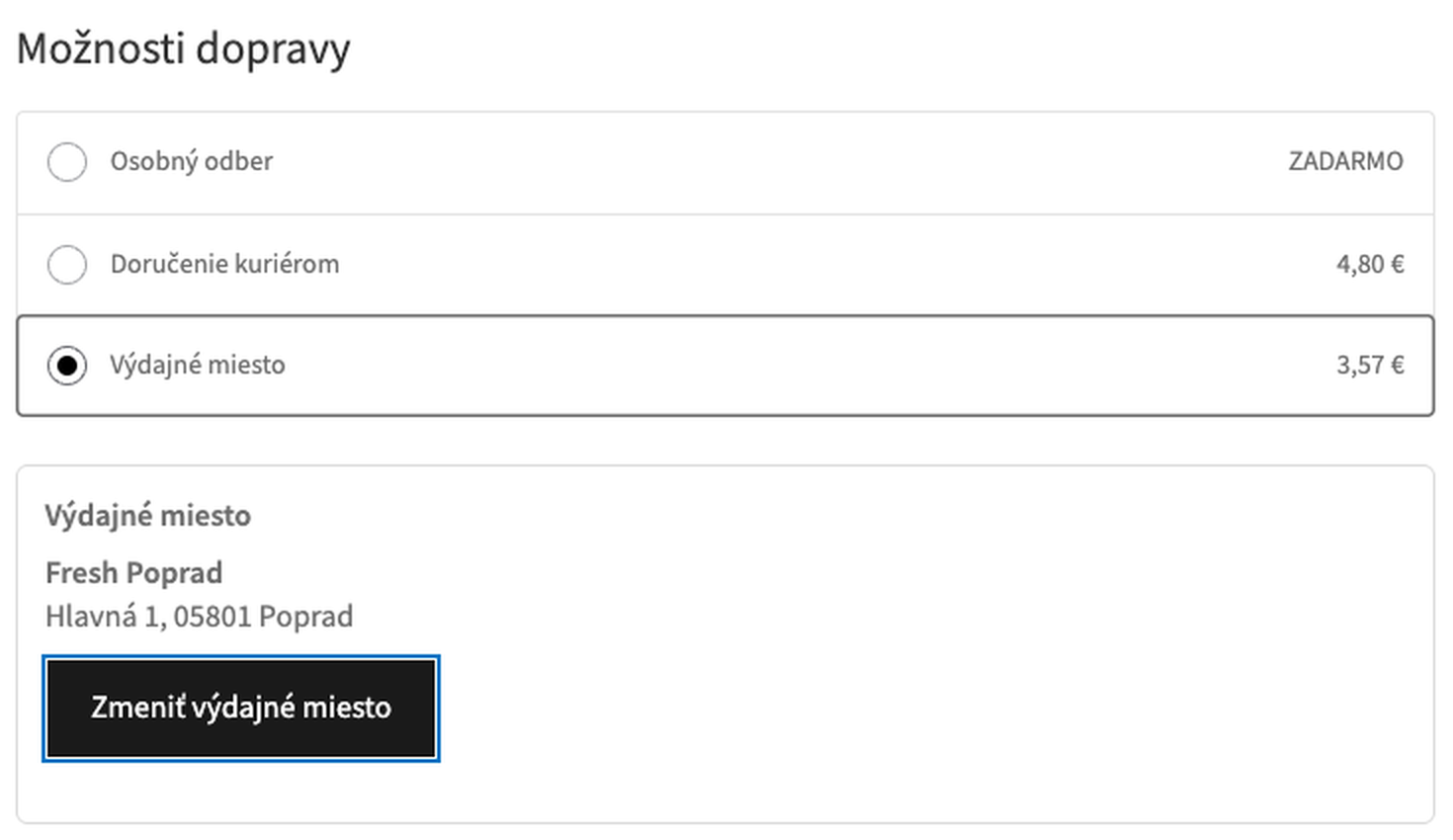
At the checkout the buyer sees the shipping methods in Slovak, Czech or English (by the site language). “Neoship courier” delivers to the buyer’s address by the carrier you picked for the zone.

WooCommerce → Neoship: choose Live or the test environment, enter the user name and the password (the password is stored encrypted), your sender details, the default carrier, the reference prefix, the weight of a product without weight and the Packeta carrier ID for delivery to an address. “Check connection” shows your account, credit and active carriers.

A fresh install is the free version, nothing switches on by itself. The “Try Pro for 7 days” button → e-mail → the key right in the window and by e-mail.

Moving the site? Unlink the licence on the old domain and activate it on the new one yourself. A staging copy (staging., dev.) works with the same key and does not take a site slot. For studios — keys for 5 or 25 sites, or unlimited.
 WordPress 6.4+, WooCommerce 8.6+ (HPOS and the block checkout are supported), PHP 7.4+.A Neoship account with active carriers, credit and a confirmed SK/CZ phone number.Interface language: English; Slovak and Czech are in the Pro build.
The “Neoship courier” method, a package and a label from the order, cash on delivery, deleting a package, the tracking number on the order, in My account and in e-mails, “Check connection”…


Neoship Shipping for WooCommerce connects WooCommerce to your Neoship account, the Slovak shipping platform for SPS, GLS, Packeta, DPD, Slovenská pošta and SDS. The “Neoship courier” shipping method goes into your zones, and a button on the order creates the package with the delivery address, phone, e-mail, cash on delivery and your sender details, prints the label and saves the tracking number the buyer sees.
What you need. Your own Neoship account (aplikacia.neoship.sk) with active carriers. Packages are created on that account and paid from its credit; to create packages Neoship requires a confirmed SK/CZ phone number and credit on the account. Enter the account’s user name and password in the plugin settings, press “Check connection” and add the method to your shipping zones.
At the checkout the buyer sees the shipping methods in Slovak, Czech or English (by the site language). “Neoship courier” delivers to the buyer’s address by the carrier you picked for the zone. In Pro there is also a “Neoship pickup point” method: the buyer opens the Neoship pickup point map, picks a parcelshop or a parcel locker of SPS, Packeta, GLS, DPD, Slovenská pošta or SDS, and the chosen point with its address stays under the shipping options. Without a valid point the order is not placed; this is checked on the server too.
After the order the buyer finds the tracking number and a link to the Neoship tracking page on the order page in My account and in the order e-mails. In Pro every new carrier status is added to the history on the order page.
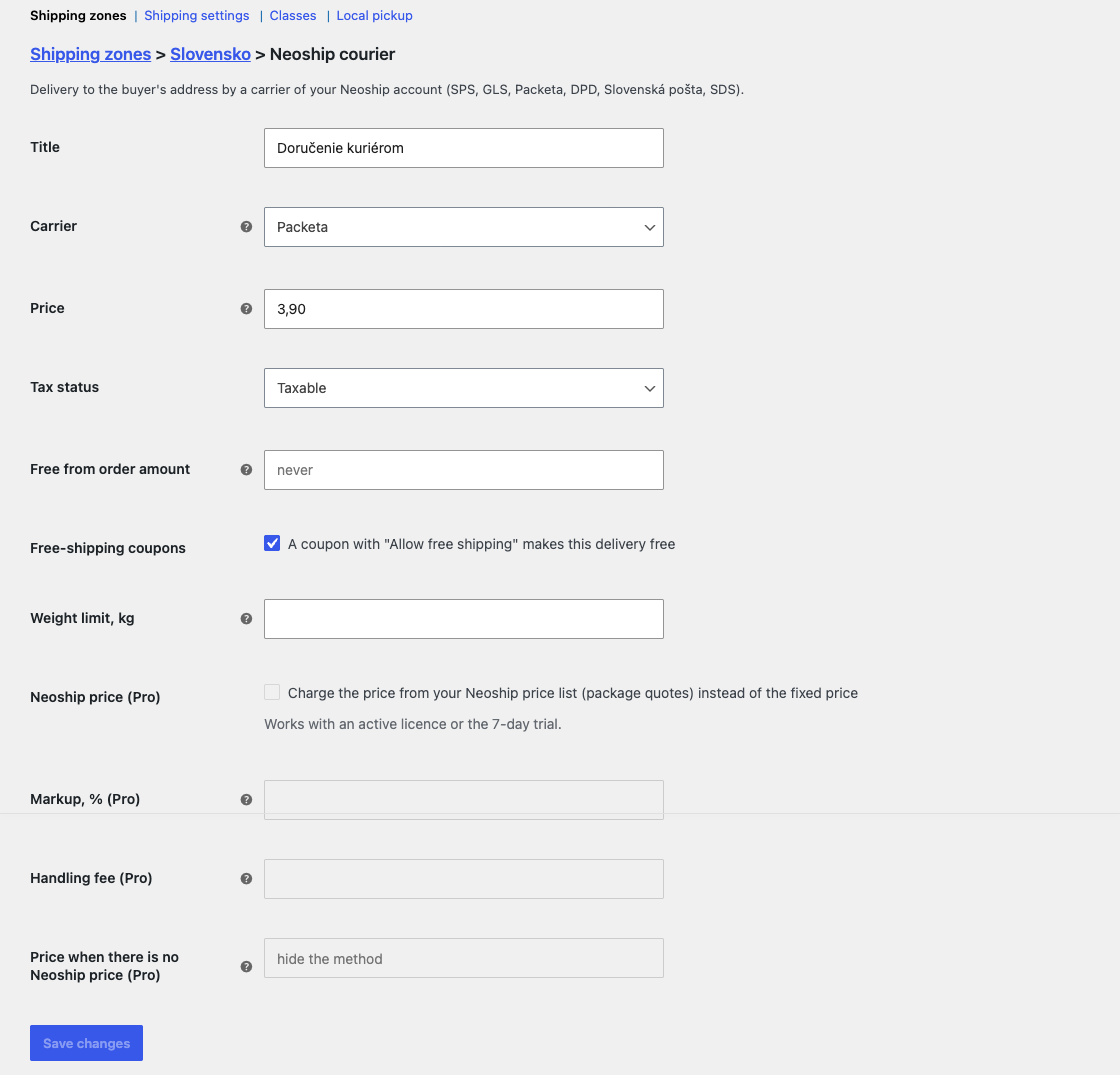
WooCommerce → Neoship: choose Live or the test environment, enter the user name and the password (the password is stored encrypted), your sender details, the default carrier, the reference prefix, the weight of a product without weight and the Packeta carrier ID for delivery to an address. “Check connection” shows your account, credit and active carriers. Then add “Neoship courier” to a zone in WooCommerce → Settings → Shipping: the title for the buyer, carrier, price, free from an amount, free-shipping coupons and a weight limit.
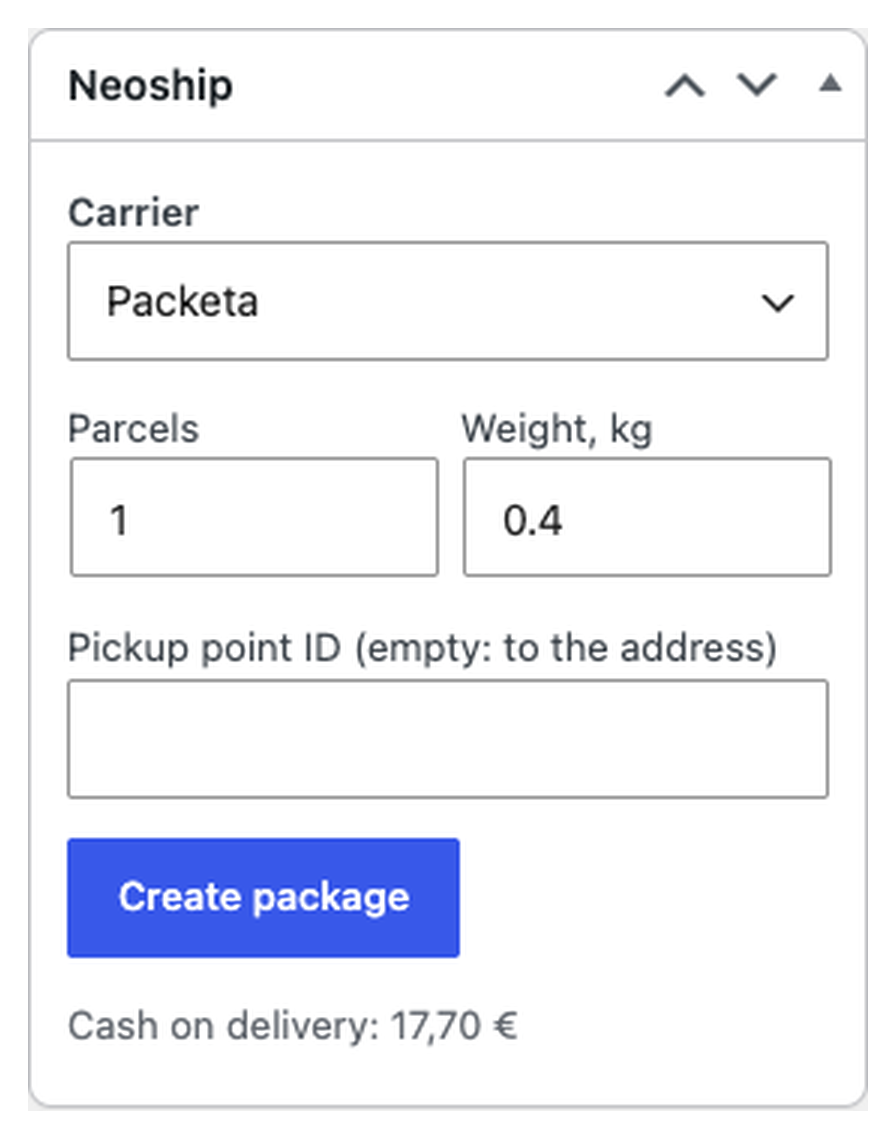
On the order, the Neoship box takes the carrier (already chosen for orders with a Neoship method), the number of parcels, the weight and a pickup point ID when the package goes to a point. “Create package” creates the package on your account; for orders paid with “Cash on delivery” the COD amount goes to Neoship.
“Print label” hands the package to the carrier and keeps the label PDF privately; you can get it again from the order, and the label format is set per carrier. The tracking number is saved on the order. Before export a package can be deleted and created again.
_parcelshop_id.Didn't find the answer? Message us on Telegram and we'll reply within a business day.
 @catcode_support
Setup, compatibility, activation
No, it is an independent integration by CatCode. The Neoship name belongs to its owner; the plugin is not affiliated with or endorsed by Neoship.
Yes. Packages are created on your account and paid from its credit, with the carriers active on it. Creating packages needs a confirmed SK/CZ phone number.
The ones Neoship offers: SPS, GLS, Packeta, DPD, Slovenská pošta and SDS, as far as they are active on your account. “Check connection” lists them.
No. Printing the label exports the package to the carrier; before that it can be deleted and created again. In Pro a package can be cancelled after printing.
No, the “Neoship pickup point” method with the map is Pro. In the free version you can type a pickup point ID on the order by hand.
Packeta delivers to addresses through partner carriers. Enter the carrier ID Neoship gives you for your destination in “Packeta home delivery: carrier ID”.
Pro switches off and the free part keeps working: the “Neoship courier” method, creating a package from the order, the label and the tracking number.
One key works on two sites: the shop and a development copy.
No reviews yet. Be the first.
No questions yet. Ask one — we answer within 24 hours.
We build custom modules for WordPress, WooCommerce, OpenCart and Shopify. Tell us about the task and we'll prepare an estimate.
Order a custom module
—
Charged in UAH; your bank converts it to your currency. EUR price is approximate.

CatCode assistant
Just now


CatCode assistant
Online

I’ll help with your website task
Describe your website task — I’ll find a ready-made module or pass it to a developer for an estimate. Modules, custom features, layout, integrations, speed, migration, technical SEO.