
















WooCommerce
990 UAH644 UAH/year≈ €14
Black November: −35% on all modules until 30 November Black November: −35% until 30 November Choose a module
 Website auditA PDF report by email in 3 minutesCheck a website
Everyday tasks
Image compressorSize, quality and WebP in bulkQR generatorLink, Wi-Fi, payment to IBANVAT calculator20, 14, 7% and amount in wordsTransliterationOfficial Ukrainian standardWebsite checks
PHP and pluginsPHP version, WordPress, pluginsGoogle Merchant feedFields, prices, GTIN, imagesDomain emailSPF, DKIM, DMARC, blacklistsAI search readinessllms.txt, bots, markupAll 9 toolsEnter at least 2 characters

The ready2order register with WooCommerce: product and stock by button, a bill from an order; Pro adds automatic bills, storno, stock sync and a journal.
The free version works with no time limit. Pro adds the rest of the features in the table.


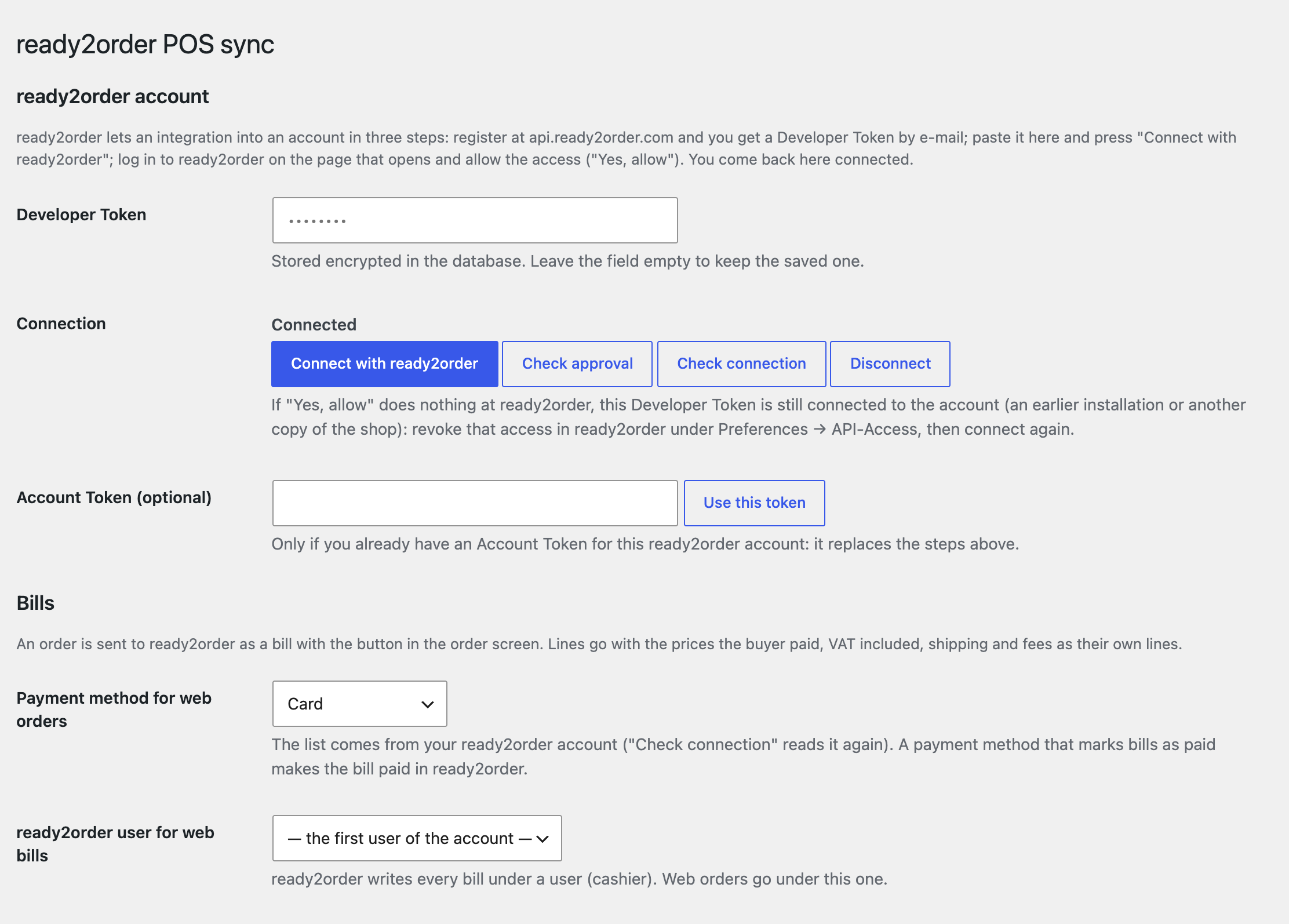
One settings page: the connection (Developer Token, “Connect with ready2order”, “Check approval”, “Check connection”, “Disconnect”, and an Account Token field if you already have one), the payment method and the ready2order user for web orders, a training mode, the product group for new products and a VAT rate for when WooCommerce taxes are off.

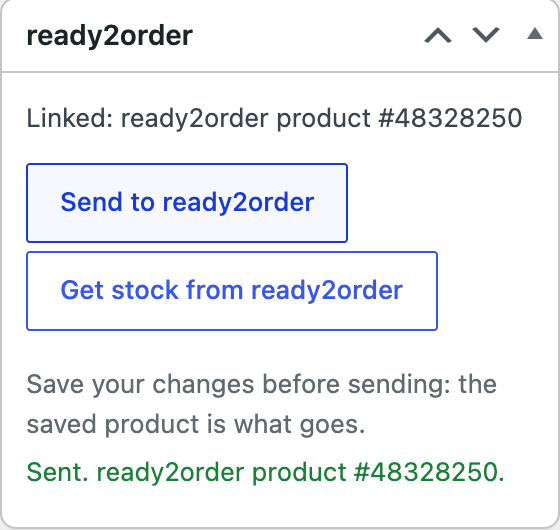
The product screen has a “ready2order” box: “Send to ready2order” creates the product in the POS with its name, price, VAT rate, SKU (it becomes the item number in ready2order) and stock when WooCommerce manages stock.

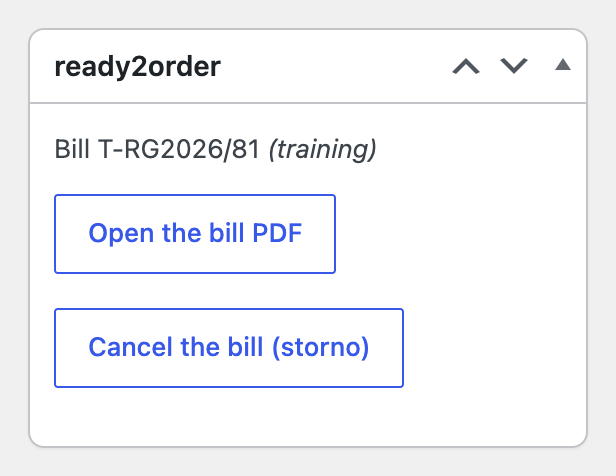
The order screen has a “ready2order” box: the button creates the bill in ready2order.

A fresh install is the free version, nothing switches on by itself. The “Try Pro for 7 days” button → e-mail → the key right in the window and by e-mail.

Moving the site? Unlink the licence on the old domain and activate it on the new one yourself. A staging copy (staging., dev.) works with the same key and does not take a site slot. For studios — keys for 5 or 25 sites, or unlimited.
 WordPress 6.2+, WooCommerce 7.0+, PHP 7.4+.A ready2order account and a Developer Token from api.ready2order.com.Compatible with HPOS and the block checkout. Plugin languages: English; German (Austria) in Pro, also used for de_DE and de_CH.One connection per Developer Token and ready2order account; one ready2order account per shop.
Ready2order account connection, product to the POS and stock from the POS, a bill from an order with its PDF, training mode.


POS Sync with ready2order connects a WooCommerce shop with the ready2order cash register, the cloud POS from Vienna. A product goes from the shop to the POS with its price, VAT rate and item number, the stock is read back from the POS, and a web order becomes a bill in ready2order for the same amount.
What you need from ready2order. A ready2order account and a Developer Token from api.ready2order.com. You paste the token on WooCommerce → ready2order, press “Connect with ready2order”, log in to ready2order and allow the access. The plugin then brings you back to the site already connected and reads the payment methods, VAT rates, storno reasons and product groups of the account. The account token is kept encrypted in the database.
One settings page: the connection (Developer Token, “Connect with ready2order”, “Check approval”, “Check connection”, “Disconnect”, and an Account Token field if you already have one), the payment method and the ready2order user for web orders, a training mode, the product group for new products and a VAT rate for when WooCommerce taxes are off.
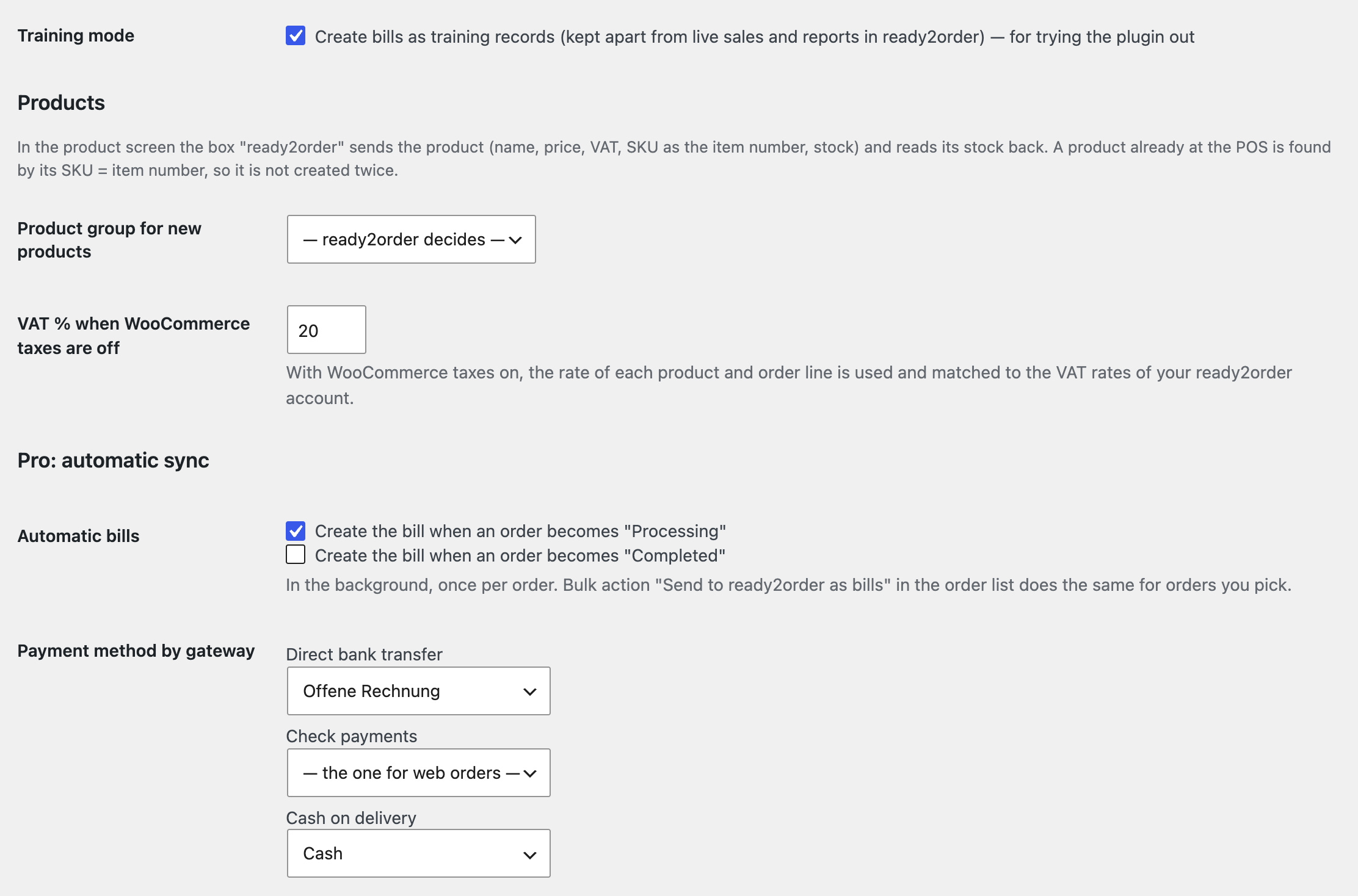
The VAT rates of products and order lines are matched to the VAT rates of your ready2order account (20 %, 13 %, 10 % and so on); with WooCommerce taxes off, the rate from the settings is used. The training mode writes bills as training records, kept apart from live sales and reports in ready2order.
The product screen has a “ready2order” box: “Send to ready2order” creates the product in the POS with its name, price, VAT rate, SKU (it becomes the item number in ready2order) and stock when WooCommerce manages stock. A product that already exists at the POS with the same item number is linked instead of created twice. “Get stock from ready2order” reads the POS stock into WooCommerce.
The order screen has a “ready2order” box: the button creates the bill in ready2order. Every line goes with the price the buyer paid (VAT included, after coupons), shipping and fees as their own lines, plus the billing address and the order number as the external reference. The bill total equals the order total. “Open the bill PDF” opens the PDF, and a second click does not create a second bill.
Automatic bills. The bill is created in the background when an order becomes “Processing” or “Completed”, once per order, with two retries when ready2order is busy. For each WooCommerce payment method (bank transfer, cheque, cash on delivery, card…) you pick its ready2order payment method, so a cash order lands as “Cash” and a bank transfer as an open bill.
Storno. When an order is cancelled or fully refunded, the bill is cancelled in ready2order with the reason you choose: the storno bill carries a minus amount and a reference to the original. The “Cancel the bill (storno)” button in the order does the same. A partial refund is written as a note.
Stock. “ready2order is the master” reads the POS stock every 15, 30, 60 or 180 minutes, and web sales come off the POS stock at once (a cancelled order puts them back). “WooCommerce is the master” sends every stock change in WooCommerce to the POS as an absolute figure. “Read all stock now” starts a read at once.
Webhook. The plugin registers an address with a secret key in ready2order, and a product change at the POS (events product.created and product.updated) starts the stock read right away. If another app already uses the account webhook, the plugin shows its address and replaces it only after you confirm: ready2order keeps one address per account.
Products. Each variation of a variable product becomes its own POS product with its own SKU and stock. New products go into the ready2order product group named like their WooCommerce category (created when missing). Saving a linked product sends its new name, price and VAT. The bulk actions “Send to ready2order” in the product list and “Send to ready2order as bills” in the order list, and “Send all products now”, run inside the API limit.
Sync journal. Every exchange with ready2order (product, stock, bill, storno) is written with the answer of ready2order; the journal keeps the last 500 rows and has a “Failed only” filter.
Didn't find the answer? Message us on Telegram and we'll reply within a business day.
 @catcode_support
Setup, compatibility, activation
No. It is an independent integration with ready2order made by CatCode. ready2order is a trademark of ready2order GmbH; the module is not a ready2order product and is not endorsed by it.
Your own ready2order account and a Developer Token, issued after you register at api.ready2order.com. You paste the token into the settings, press "Connect with ready2order" and allow the access on the ready2order page ("Yes, allow"). No ready2order passwords are stored, and the account token is kept encrypted in the database.
ready2order keeps one connection per Developer Token and account. While the main shop is connected, a second copy cannot connect: disconnect the first one with "Disconnect" or in ready2order (Preferences → API-Access) first. Deleting the plugin revokes the access by itself.
ready2order wants a product on every bill line. For lines the POS does not have (shipping, fees, products without a link) the plugin creates one inactive product "Online shop" (item number ONLINE-SHOP) with no stock and a free price. It does not show on your counter, and no stock is counted on it.
The bill is created through the ready2order API. Whether and how web orders must appear in your register under Austrian rules is for you and your tax adviser to decide; the module gives no legal or tax advice.
The ready2order API cancels a whole bill only. A full refund or a cancelled order makes a storno; a partial refund is written to the order notes and not sent to ready2order.
ready2order allows up to 60 requests a minute. The plugin stays inside it: "Send all products now" sends about 25 products a minute, so a big catalogue is slow but runs without 429 errors.
Pro switches off and the free part keeps working: the connection, product to the POS and stock from the POS by button, a bill from an order by button. Automatic bills, storno, background stock sync and the journal stay off until you buy a licence.
One key covers two sites: the shop and its test copy.
No reviews yet. Be the first.
No questions yet. Ask one — we answer within 24 hours.
We build custom modules for WordPress, WooCommerce, OpenCart and Shopify. Tell us about the task and we'll prepare an estimate.
Order a custom module
—
Charged in UAH; your bank converts it to your currency. EUR price is approximate.

CatCode assistant
Just now


CatCode assistant
Online

I’ll help with your website task
Describe your website task — I’ll find a ready-made module or pass it to a developer for an estimate. Modules, custom features, layout, integrations, speed, migration, technical SEO.