
















WooCommerce
1 290 UAH839 UAH/year≈ €17
Black November: −35% on all modules until 30 November Black November: −35% until 30 November Choose a module
 Website auditA PDF report by email in 3 minutesCheck a website
Everyday tasks
Image compressorSize, quality and WebP in bulkQR generatorLink, Wi-Fi, payment to IBANVAT calculator20, 14, 7% and amount in wordsTransliterationOfficial Ukrainian standardWebsite checks
PHP and pluginsPHP version, WordPress, pluginsGoogle Merchant feedFields, prices, GTIN, imagesDomain emailSPF, DKIM, DMARC, blacklistsAI search readinessllms.txt, bots, markupAll 9 toolsEnter at least 2 characters



Skip Pay deferred payment and pay in three at the WooCommerce checkout; Pro adds notifications, refunds, limits and a widget.
The free version works with no time limit. Pro adds the rest of the features in the table.


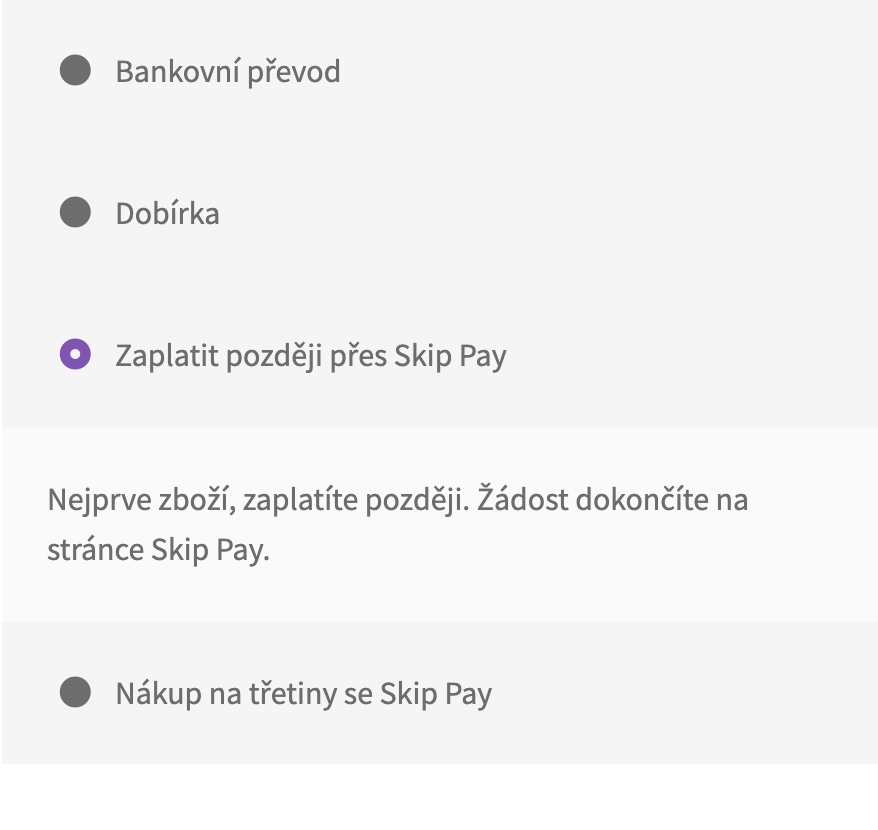
At the checkout the buyer sees “Skip Pay – odložená platba” and “Skip Pay – nákup na třetiny” with your name and description.

WooCommerce → Skip Pay: choose the environment, enter the API user name and password, the e-shop ID if one login manages several e-shops (merchantId) and press “Check connection”: the module logs in to Skip Pay and shows which environment answers.

Notifications from Skip Pay. Approval, rejection, cancellation, sent, delivered and paid out arrive by themselves, without the buyer returning to the shop.

A fresh install is the free version, nothing switches on by itself. The “Try Pro for 7 days” button → e-mail → the key right in the window and by e-mail.

Moving the site? Unlink the licence on the old domain and activate it on the new one yourself. A staging copy (staging., dev.) works with the same key and does not take a site slot. For studios — keys for 5 or 25 sites, or unlimited.
 WordPress 6.4+, WooCommerce 8.6+ (HPOS and the block checkout are supported), PHP 7.4+.A Skip Pay partner account with an API user.Shop currency: CZK or EUR.
The “Skip Pay – odložená platba” and “Skip Pay.


Pay Later with Skip Pay for WooCommerce adds two Skip Pay payment methods to WooCommerce: deferred payment (odložená platba: the buyer gets the goods first and pays Skip Pay later) and pay in three (platba na třetiny: the first payment at the purchase, the others after 30 and 60 days). Skip Pay takes the risk of the buyer not paying and pays the shop the full amount. The module works with your own Skip Pay partner account.
What you need from Skip Pay. The module is for shops that have a partnership with Skip Pay: Skip Pay gives the API user name and password after it approves the partnership (first for the connection environment, then for the live one). The shop currency is CZK or EUR.
At the checkout the buyer sees “Skip Pay – odložená platba” and “Skip Pay – nákup na třetiny” with your name and description. The names, descriptions and the lowest and highest order total of each method are set in WooCommerce → Settings → Payments. When the currency is not CZK or EUR, the methods are hidden and the admin shows a warning.
The same on the block checkout: the payment methods are there with no extra setup, and HPOS is supported.
When the buyer places the order, the module creates the application at Skip Pay: items with VAT split by rate, shipping, fees, the total in minor units with the rounding balanced, the billing and delivery addresses, the phone in +420/+421 form and the fraud-prevention data from the buyer’s earlier paid orders. The buyer is sent to the Skip Pay page and finishes the request there.
The state of the application is always read from Skip Pay, never taken from the return address: approved = the order is Processing (Skip Pay has committed to finance it, the goods can be shipped), being checked = On hold, rejected = Failed with the cart kept and a message, cancelled = Cancelled. The order has a box with the payment type, the application ID, the state in words and the “Check status” button.
WooCommerce → Skip Pay: choose the environment, enter the API user name and password, the e-shop ID if one login manages several e-shops (merchantId) and press “Check connection”: the module logs in to Skip Pay and shows which environment answers. The password is stored encrypted in the database.
The notification and return addresses go with every application, nothing has to be set in the Skip Pay portal. The module works on the classic and the block checkout and with HPOS; the interface is in English, Czech and Slovak (the translations come with the Pro build).
Notifications from Skip Pay. Approval, rejection, cancellation, sent, delivered and paid out arrive by themselves, without the buyer returning to the shop. The state is always read again through the Skip Pay API before the order changes; payment notifications land as order notes.
Sent and delivered. The order is marked at Skip Pay on the statuses you choose (by default “sent” = Completed), with the tracking number, or with the buttons on the order screen. Skip Pay then pays the shop as agreed in your contract.
Cancellation and refunds from WooCommerce. A cancelled order cancels the application; a refund after shipping creates a Skip Pay refund for the amount; a full refund before shipping cancels the application and a partial one before shipping gets a plain refusal.
Pay in three limits. The module reads the limits of your account from Skip Pay (daily and when the settings are saved) and hides this method for totals outside them.
Precheck. The Skip Pay precheck can run before the application and its ID goes along; optionally the buyer is asked to choose another method when Skip Pay does not recommend the purchase.
Skip Pay widget. On the product page (variations update the amount) and in the cart, or anywhere with the [catcode_skippay_widget] shortcode.
Hourly check and journal. Once an hour the module reads again the orders still waiting for Skip Pay. The journal of the calls and notifications holds no passwords and no customer data.
Selling on OpenCart? There is a separate module for it: Skip Pay for OpenCart.
Didn't find the answer? Message us on Telegram and we'll reply within a business day.
 @catcode_support
Setup, compatibility, activation
No, it is an independent integration by CatCode. Skip Pay is a trademark of its owner; the plugin is not affiliated with or endorsed by Skip Pay.
Yes, a partner account: after the partnership is approved Skip Pay gives the API user name and password. The applications, the financing decisions and the payouts are done by Skip Pay itself under your contract.
When Skip Pay approves the application, the order moves to Processing: Skip Pay has committed to finance it and the goods can be shipped. The money reaches your account from Skip Pay as agreed in your contract.
The order is marked as Failed, the buyer is sent back to the checkout with the cart kept and can choose another payment method.
Skip Pay is still checking the application. Press "Check status" on the order to ask again; in Pro the state arrives as a notification.
The module does not do that: any country allowed in the shop sees the method. Skip Pay may not accept foreign buyers.
One key works on two sites: the shop and its development copy.
No reviews yet. Be the first.
No questions yet. Ask one — we answer within 24 hours.
We build custom modules for WordPress, WooCommerce, OpenCart and Shopify. Tell us about the task and we'll prepare an estimate.
Order a custom module
—
Charged in UAH; your bank converts it to your currency. EUR price is approximate.

CatCode assistant
Just now


CatCode assistant
Online

I’ll help with your website task
Describe your website task — I’ll find a ready-made module or pass it to a developer for an estimate. Modules, custom features, layout, integrations, speed, migration, technical SEO.