
















WooCommerce
1 290 UAH839 UAH/year≈ €17
Black November: −35% on all modules until 30 November Black November: −35% until 30 November Choose a module
 Website auditA PDF report by email in 3 minutesCheck a website
Everyday tasks
Image compressorSize, quality and WebP in bulkQR generatorLink, Wi-Fi, payment to IBANVAT calculator20, 14, 7% and amount in wordsTransliterationOfficial Ukrainian standardWebsite checks
PHP and pluginsPHP version, WordPress, pluginsGoogle Merchant feedFields, prices, GTIN, imagesDomain emailSPF, DKIM, DMARC, blacklistsAI search readinessllms.txt, bots, markupAll 9 toolsEnter at least 2 characters


Mainfreight rates at the WooCommerce checkout for New Zealand and consignment tracking; Pro adds shipments and labels from the order, automatic tracking, several service levels and warehouse stock.
The free version works with no time limit. Pro adds the rest of the features in the table.


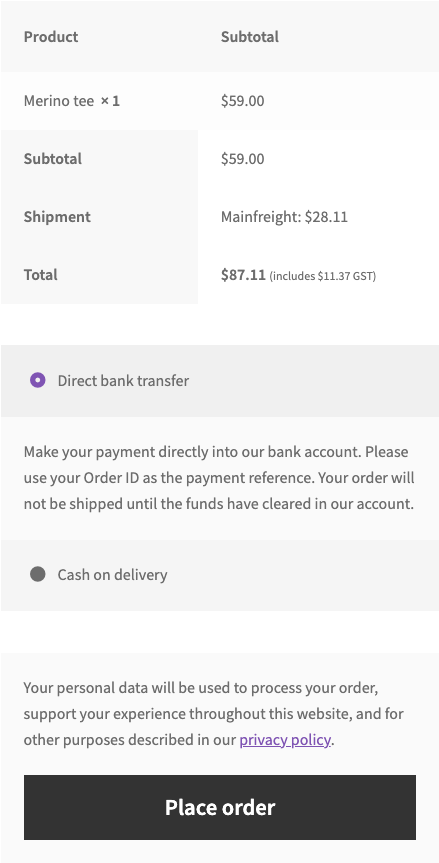
At the checkout, the buyer with a New Zealand address sees the “Mainfreight” rate in the shipping line (classic and block checkout).

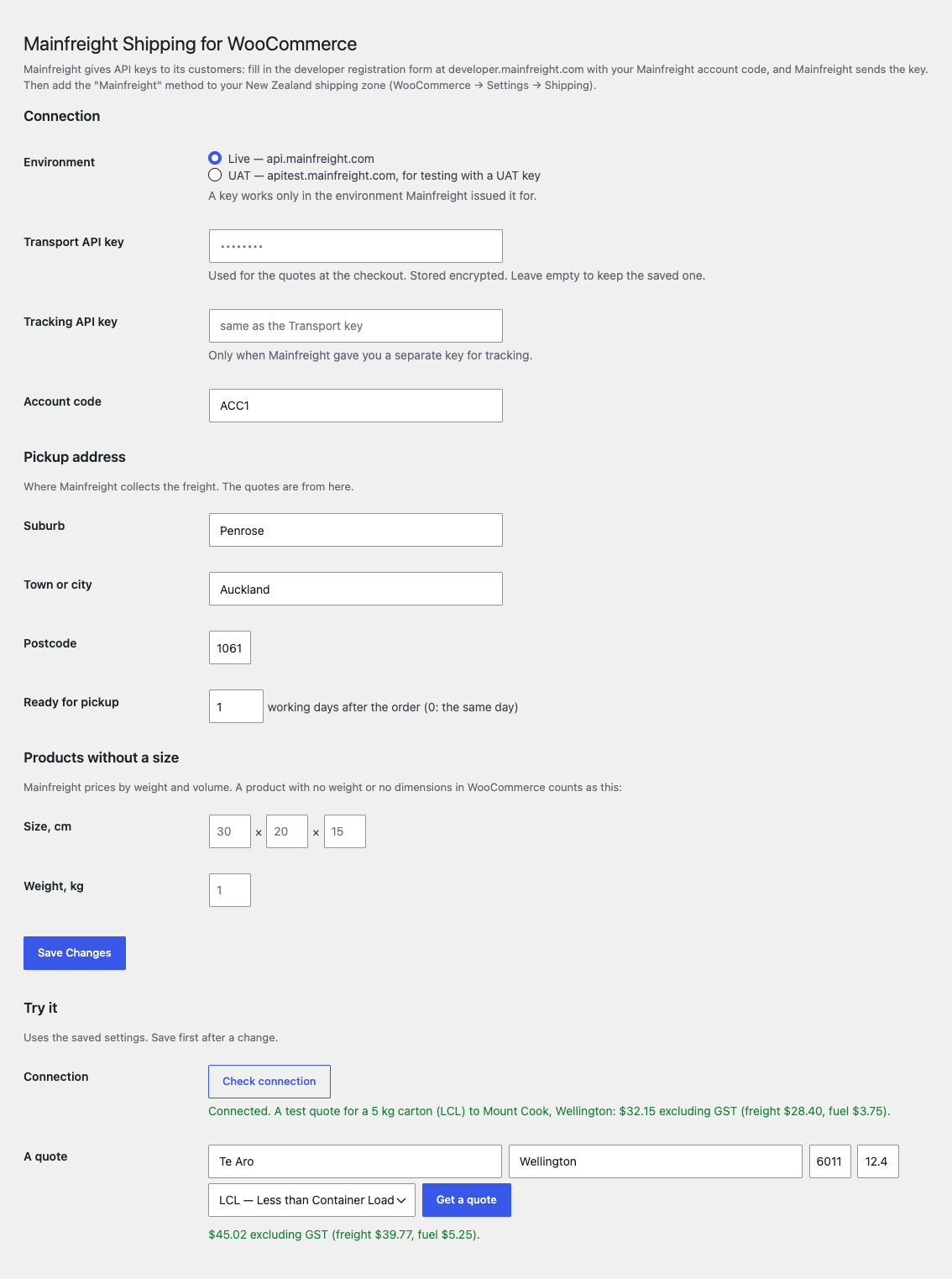
WooCommerce → Mainfreight: choose Live (api.mainfreight.com) or UAT (apitest.mainfreight.com, for a UAT key), paste the Transport API key, an optional Tracking API key and your account code, fill in the pickup address and the default size and weight for products without dimensions, press “Check connection” and “Get a quote”.

Shipment and label from the order. One click creates the shipment in Mainfreight from the order and shows the housebill and Mainfreight numbers; the NZ label PDF (A4 or 4×6) is kept privately and can be downloaded again.

A fresh install is the free version, nothing switches on by itself. The “Try Pro for 7 days” button → e-mail → the key right in the window and by e-mail.

Moving the site? Unlink the licence on the old domain and activate it on the new one yourself. A staging copy (staging., dev.) works with the same key and does not take a site slot. For studios — keys for 5 or 25 sites, or unlimited.
 WordPress 6.4+, WooCommerce 8.6+, PHP 7.4+.A Mainfreight customer account code and the API key Mainfreight issues for it (Live, or UAT for testing).Compatible with HPOS and the classic and block checkout. Interface language: English.
The Mainfreight shipping method with live quotes for New Zealand, mark-up, handling fee, free shipping, fallback, tracking by consignment number in the order, My account and e-mails, HPOS…


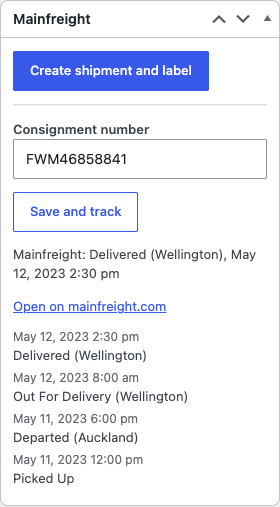
Mainfreight Shipping for WooCommerce shows a live Mainfreight freight quote at the checkout for New Zealand addresses and lets the shop and the buyer follow the consignment. The quote comes from the Mainfreight Transport Rate API for the weight and volume of the cart and is shown as the shipping price (excluding GST; WooCommerce adds GST when the method is taxable). In the order you type the consignment number, press “Save and track” and the status goes into the order notes and the buyer’s My account page.
What you need. Every shop uses its own Mainfreight API key. Mainfreight issues keys to its customers: fill in the registration form on developer.mainfreight.com with your Mainfreight customer account code, and Mainfreight sends the key. Without a Mainfreight customer account code the plugin cannot get quotes. Paste the key and the account code into the plugin settings, then add the “Mainfreight” method to your New Zealand shipping zone.
At the checkout, the buyer with a New Zealand address sees the “Mainfreight” rate in the shipping line (classic and block checkout). The price is the Mainfreight quote for the cart’s weight (whole kilograms) and volume plus your mark-up and handling fee. The suburb is taken from address line 2; flat, unit and PO box lines are ignored, and if Mainfreight refuses the suburb the plugin asks again with the city. Addresses outside New Zealand do not get the method.
After the order the buyer finds the consignment number and a link to the Mainfreight tracking page on the order page in My account and in the order e-mails, together with the latest status. In Pro every new status is added to the history on the order page.
Free shipping from an amount, free-shipping coupons and the weight limit work as in other WooCommerce shipping methods. If Mainfreight does not answer, the method is hidden or a fixed fallback price is shown, whichever you chose; a failed answer is remembered for two minutes and a good quote for thirty, so the checkout does not wait on a slow API.
WooCommerce → Mainfreight: choose Live (api.mainfreight.com) or UAT (apitest.mainfreight.com, for a UAT key), paste the Transport API key, an optional Tracking API key and your account code, fill in the pickup address and the default size and weight for products without dimensions, press “Check connection” and “Get a quote”. Keys are stored encrypted and are never sent back to the browser. Then add the “Mainfreight” method to a New Zealand shipping zone and choose the service level (LCL, M2H, B2B, PRM, PLA, EXP, MSD, FTL, MOV or WHF), pack type, mark-up, handling fee, free-from amount, weight limit and tax status.
In the order, the Mainfreight box takes the consignment number. “Save and track” asks Mainfreight once and writes a note with the status, for example “Picked Up (Auckland)”; pressing it again does not duplicate the note. Failures are written to the WooCommerce log under the source catcode-mainfreight.
Shipment and label from the order. One click creates the shipment in Mainfreight from the order and shows the housebill and Mainfreight numbers; the NZ label PDF (A4 or 4×6) is kept privately and can be downloaded again. A shipment that Mainfreight has not processed yet can be deleted; if it is already processed, the reason from Mainfreight is shown. Sender details, freight terms, routing and the pickup window are set once in the settings.
Automatic and bulk. Shipments can be created automatically when the order becomes Processing or Completed, only for orders shipped with the Mainfreight method. In the orders list you create shipments and download a zip of labels for the selected orders (HPOS and the classic list).
Automatic tracking. Open consignments are checked every two hours (20 per hourly run); each new status becomes an order note and a line in the history shown on the order and to the buyer. The plugin can also receive Mainfreight’s subscription webhook at your site address with a secret token. “Completed on delivery” moves the order to Completed when Mainfreight reports it delivered.
Mainfreight e-mails to the buyer. The shipment asks Mainfreight to e-mail the buyer when the freight is picked up, out for delivery and delivered.
Rates your way. Offer several service levels at the checkout as separate rates, use a different account code per shipping zone, or set fixed prices by weight band that are used without calling the API.
Warehouse stock. For shops whose stock sits in a Mainfreight warehouse, the stock on hand of products with a SKU and stock management is written to WooCommerce every hour (30 SKUs per call); “Sync now” runs it on demand. It needs the Warehousing API key and your warehouse code.
Journal. The last 200 calls to Mainfreight with time, call and outcome, without keys and addresses.
Updates from catcode.com.ua.
Didn't find the answer? Message us on Telegram and we'll reply within a business day.
 @catcode_support
Setup, compatibility, activation
No. It is an independent integration by CatCode. Mainfreight is a trademark of its owner; the plugin is not affiliated with or endorsed by Mainfreight.
Yes. Mainfreight issues API keys to its customers: the registration form on developer.mainfreight.com asks for your Mainfreight customer account code. Without it there is no key and no quotes.
The quote is excluding GST. With the tax status Taxable (the default), WooCommerce adds GST at the checkout.
On the weight (whole kilograms) and volume of the cart; products without dimensions use the default size from the settings. Mainfreight Transport Rate returns freight rates, so for very small parcels the quote can be higher than a courier price; use the fallback price or, in Pro, fixed prices by weight band if you prefer.
The method is hidden, or a fixed fallback price is shown, as you chose. The checkout is not blocked.
Yes: enter the consignment number in the order, press “Save and track”, and the buyer sees the number and a tracking link. Automatic tracking every two hours, the webhook and “Completed on delivery” are Pro.
In Pro: the NZ label PDF (A4 or 4×6) from the order, one at a time or as a zip for selected orders.
Pro switches off and the free part keeps working: quotes at the checkout and tracking by consignment number.
One Pro licence key works on two sites: the shop and a test copy.
No reviews yet. Be the first.
No questions yet. Ask one — we answer within 24 hours.
We build custom modules for WordPress, WooCommerce, OpenCart and Shopify. Tell us about the task and we'll prepare an estimate.
Order a custom module
—
Charged in UAH; your bank converts it to your currency. EUR price is approximate.

CatCode assistant
Just now


CatCode assistant
Online

I’ll help with your website task
Describe your website task — I’ll find a ready-made module or pass it to a developer for an estimate. Modules, custom features, layout, integrations, speed, migration, technical SEO.