
















WooCommerce
1 290 UAH839 UAH/year≈ €17
Black November: −35% on all modules until 30 November Black November: −35% until 30 November Choose a module
 Website auditA PDF report by email in 3 minutesCheck a website
Everyday tasks
Image compressorSize, quality and WebP in bulkQR generatorLink, Wi-Fi, payment to IBANVAT calculator20, 14, 7% and amount in wordsTransliterationOfficial Ukrainian standardWebsite checks
PHP and pluginsPHP version, WordPress, pluginsGoogle Merchant feedFields, prices, GTIN, imagesDomain emailSPF, DKIM, DMARC, blacklistsAI search readinessllms.txt, bots, markupAll 9 toolsEnter at least 2 characters

SMS through Kudosity for WooCommerce (Australia): an SMS to the buyer on an order status; Pro adds every status, team alerts, replies, bulk SMS and a log.
The free version works with no time limit. Pro adds the rest of the features in the table.


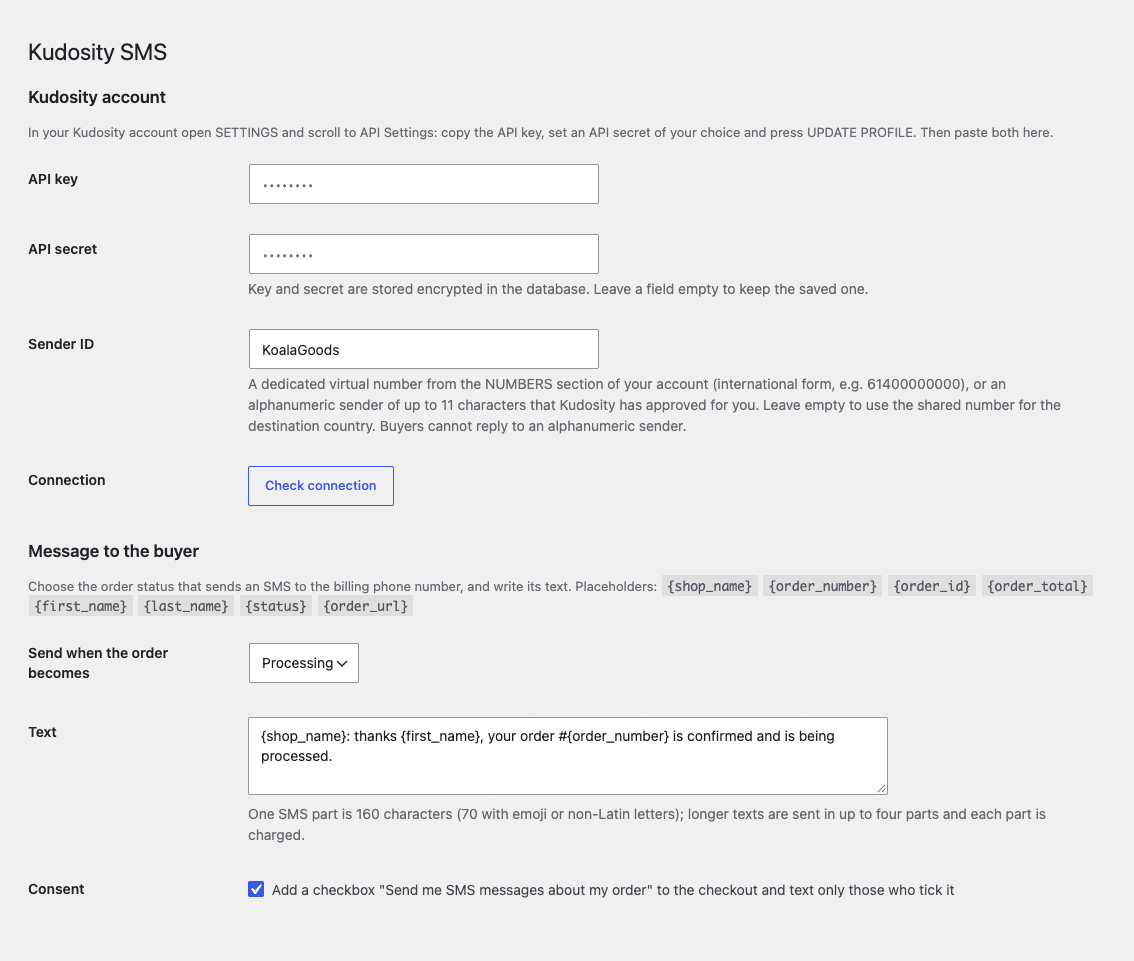
One settings page: key and secret, Sender ID, the “Check connection” button, the order status with the text of the SMS, the consent checkbox and a test SMS to your own number.

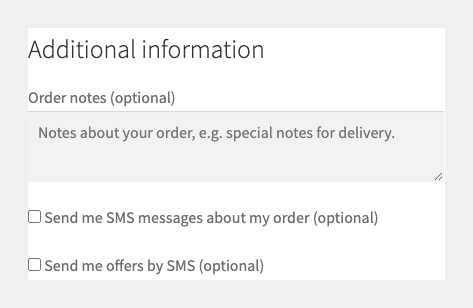
The buyer gets an SMS when the order reaches the status you chose. With consent switched on, the checkout (classic and block) shows a checkbox “Send me SMS messages about my order” and only buyers who tick it are texted.

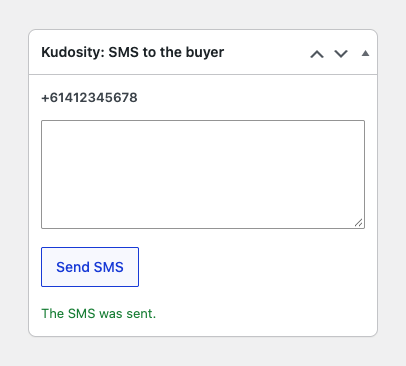
In Pro the order screen has a box “Kudosity: SMS to the buyer”: the buyer’s number and a field for a free text, for example to clarify a delivery.

A fresh install is the free version, nothing switches on by itself. The “Try Pro for 7 days” button → e-mail → the key right in the window and by e-mail.

Moving the site? Unlink the licence on the old domain and activate it on the new one yourself. A staging copy (staging., dev.) works with the same key and does not take a site slot. For studios — keys for 5 or 25 sites, or unlimited.
 WordPress 6.2+, WooCommerce 7.0+, PHP 7.4+.A Kudosity account with balance, the API key and API secret.Compatible with HPOS and with the classic and block checkout. Plugin texts: English; English (Australia) in Pro.For messages in Australia follow Kudosity’s Sender ID rules and the Spam Act: marketing SMS only with consent and a way to opt out.
Connecting the Kudosity account, an SMS to the buyer on the chosen status, a test message, the consent checkbox, order notes.


Kudosity SMS for WooCommerce sends SMS messages from your shop through the Australian service Kudosity (formerly Burst SMS): to the buyer about the order, to the shop team about a new order, and in Pro also bulk messages with consent and the buyer’s replies in the order notes. The checkout does not wait for the SMS: messages go out in the background.
What you need from Kudosity. A Kudosity account with balance, the API key and API secret from SETTINGS → API Settings, and a sender: a dedicated virtual number or an approved alphanumeric Sender ID. Paste them on WooCommerce → Kudosity SMS, press “Check connection” and the plugin shows the account balance.
One settings page: key and secret, Sender ID, the “Check connection” button, the order status with the text of the SMS, the consent checkbox and a test SMS to your own number. The text supports {shop_name}, {order_number}, {order_id}, {order_total}, {first_name}, {last_name}, {status} and {order_url}.
The number is taken from the billing address and turned into the international form by the buyer’s country. Each status sends one message; the order notes say what was sent, to which number, or why the SMS was not sent.
The buyer gets an SMS when the order reaches the status you chose. With consent switched on, the checkout (classic and block) shows a checkbox “Send me SMS messages about my order” and only buyers who tick it are texted. Pro adds a second checkbox for bulk messages: “Send me offers by SMS”.
In Pro the order screen has a box “Kudosity: SMS to the buyer”: the buyer’s number and a field for a free text, for example to clarify a delivery.
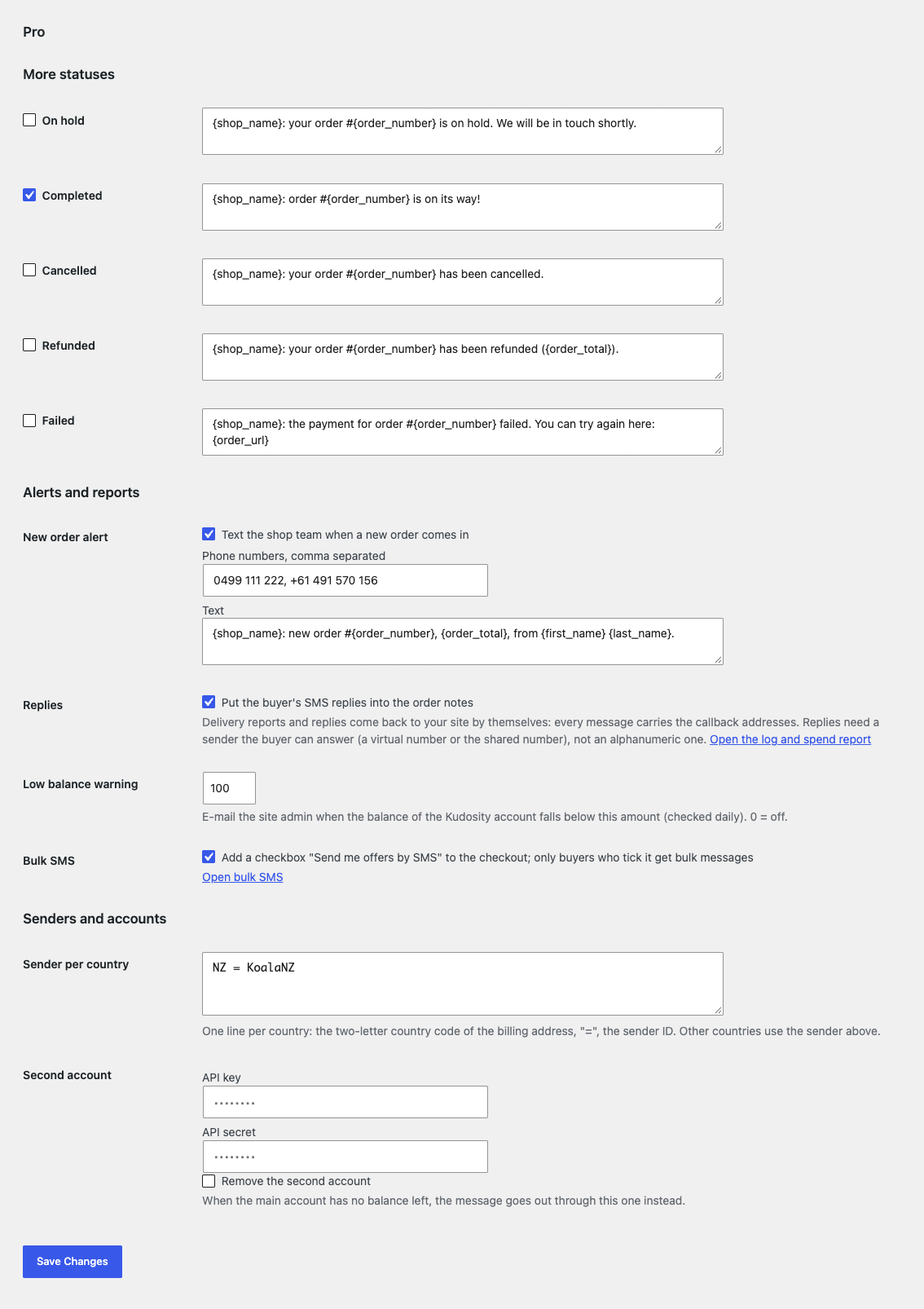
Every status. On hold, Completed, Cancelled, Refunded, Failed and your own statuses, each with its own text. Automatic messages are switched on one by one.
Team alerts. An SMS to one or more phones when a new order comes in, with its own text.
Delivery reports and replies. Every message carries the addresses for the delivery report and for the buyer’s reply. The log and the order notes show delivered, soft bounce or hard bounce; the buyer’s reply lands in the order notes and an opt-out reply takes the number out of bulk SMS. Replies need a sender the buyer can answer (a virtual number or the shared number), not an alphanumeric one.
Bulk SMS. The audience is built by the checkout checkbox. Segments: ordered within the last N days, at least N orders, billing country. Messages go out in batches of 500 in the background with the opt-out link [unsub-reply-link] at the end. Kudosity charges every part to every recipient.
Log and spend. Every message with the order, number, text and state, the spend for this month and the last 30 days (messages, parts, cost) and the account balance.
Balance and senders. An e-mail to the site admin when the balance falls below the amount you set (checked daily). A separate Sender ID for the billing country, for example New Zealand, and a second Kudosity account that takes over when the main one has no balance left.
Didn't find the answer? Message us on Telegram and we'll reply within a business day.
 @catcode_support
Setup, compatibility, activation
No, it is an independent integration with Kudosity made by CatCode. Kudosity and Burst SMS are trademarks of their owner; the module is not a Kudosity product and is not endorsed by Kudosity.
Your own Kudosity account with balance. In your account open SETTINGS → API Settings, copy the API key, set an API secret and press UPDATE PROFILE, then paste both into the plugin settings. The key and secret are stored encrypted in the database. Kudosity sends and charges the messages through your account; the plugin does not sell SMS.
A dedicated virtual number from the NUMBERS section of your account, or an alphanumeric sender of up to 11 characters that Kudosity approved for you. With the field empty Kudosity uses its shared number for the destination country. Buyers cannot reply to an alphanumeric sender.
The number comes from the billing address of the order and is turned into the international form by the billing country: "0412 345 678", "412 345 678" and "+61 412 345 678" give the same number.
One. Even if the status changes twice in a row or two requests overlap, the buyer gets one message per status. If the message could not reach Kudosity (network, rate limit), the plugin retries it once after 5 minutes. If Kudosity refuses it (bad number, sender, no balance) there is no retry and the reason goes into the order notes.
One part is 160 characters, or 70 when the text has emoji or non-Latin letters. Longer texts go in several parts (up to four) and Kudosity charges each part.
No: commercial messages need the recipient's consent and a way to opt out. The plugin adds a separate checkbox "Send me offers by SMS" to the checkout and appends the opt-out link [unsub-reply-link] to bulk messages. The shop is responsible for complying with the law; the module gives no legal advice.
Pro switches off and the free part keeps working: the connection, an SMS to the buyer on one chosen status, the test message, the consent checkbox and the order notes. A Pro bulk campaign that is still running is stopped with a reason in the log.
One key covers two sites: the shop and its test copy.
No reviews yet. Be the first.
No questions yet. Ask one — we answer within 24 hours.
We build custom modules for WordPress, WooCommerce, OpenCart and Shopify. Tell us about the task and we'll prepare an estimate.
Order a custom module
—
Charged in UAH; your bank converts it to your currency. EUR price is approximate.

CatCode assistant
Just now


CatCode assistant
Online

I’ll help with your website task
Describe your website task — I’ll find a ready-made module or pass it to a developer for an estimate. Modules, custom features, layout, integrations, speed, migration, technical SEO.