















WooCommerce
Square Two-way Sync for WooCommerce — two-way stock, products and orders
Free + Pro
990 UAH/year≈ €20
v1.0.0
 Website auditA PDF report by email in 3 minutesCheck a website
Everyday tasks
Image compressorSize, quality and WebP in bulkQR generatorLink, Wi-Fi, payment to IBANVAT calculator20, 14, 7% and amount in wordsTransliterationOfficial Ukrainian standardWebsite checks
PHP and pluginsPHP version, WordPress, pluginsGoogle Merchant feedFields, prices, GTIN, imagesDomain emailSPF, DKIM, DMARC, blacklistsAI search readinessllms.txt, bots, markupAll 9 toolsEnter at least 2 characters
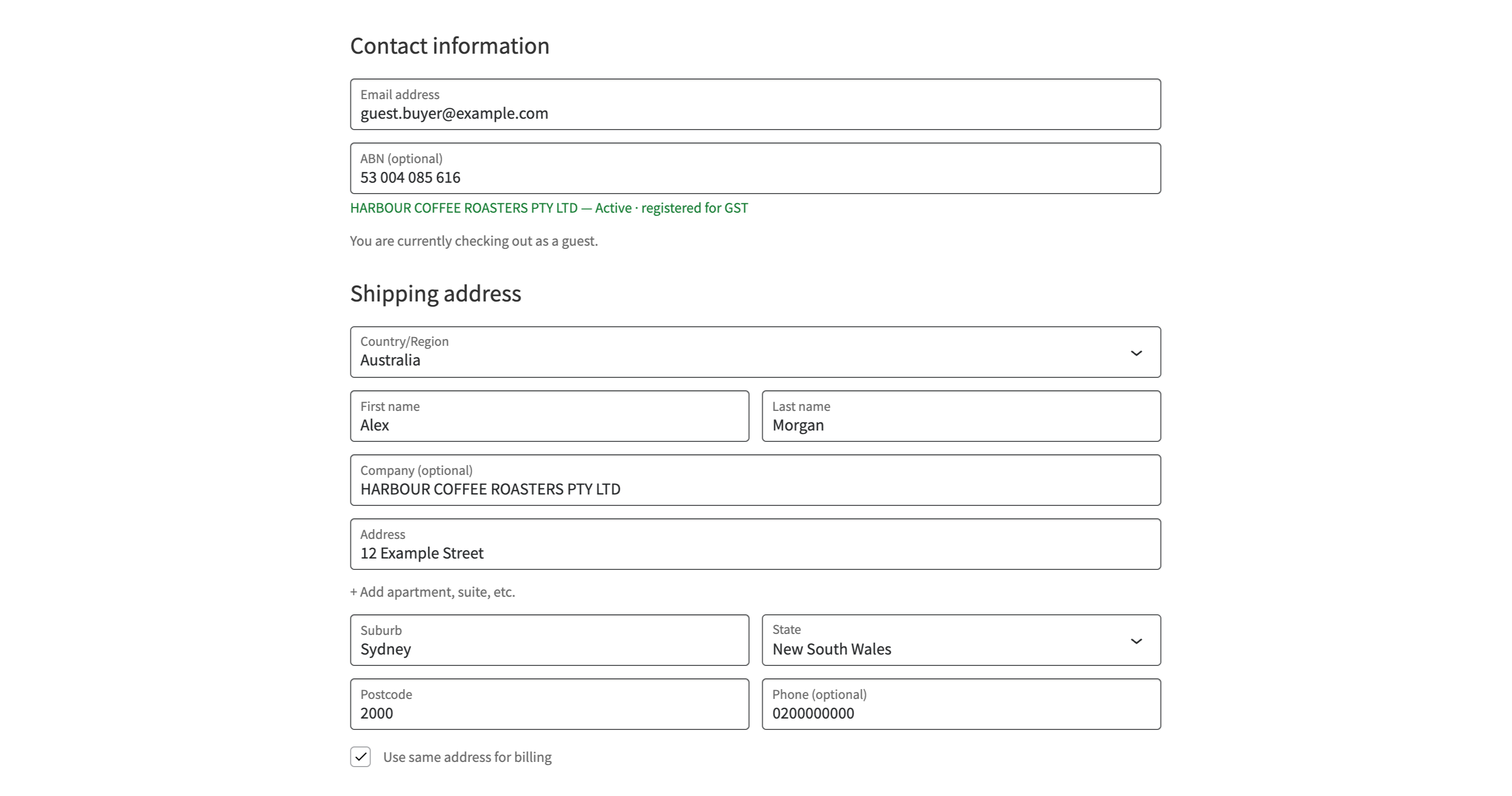
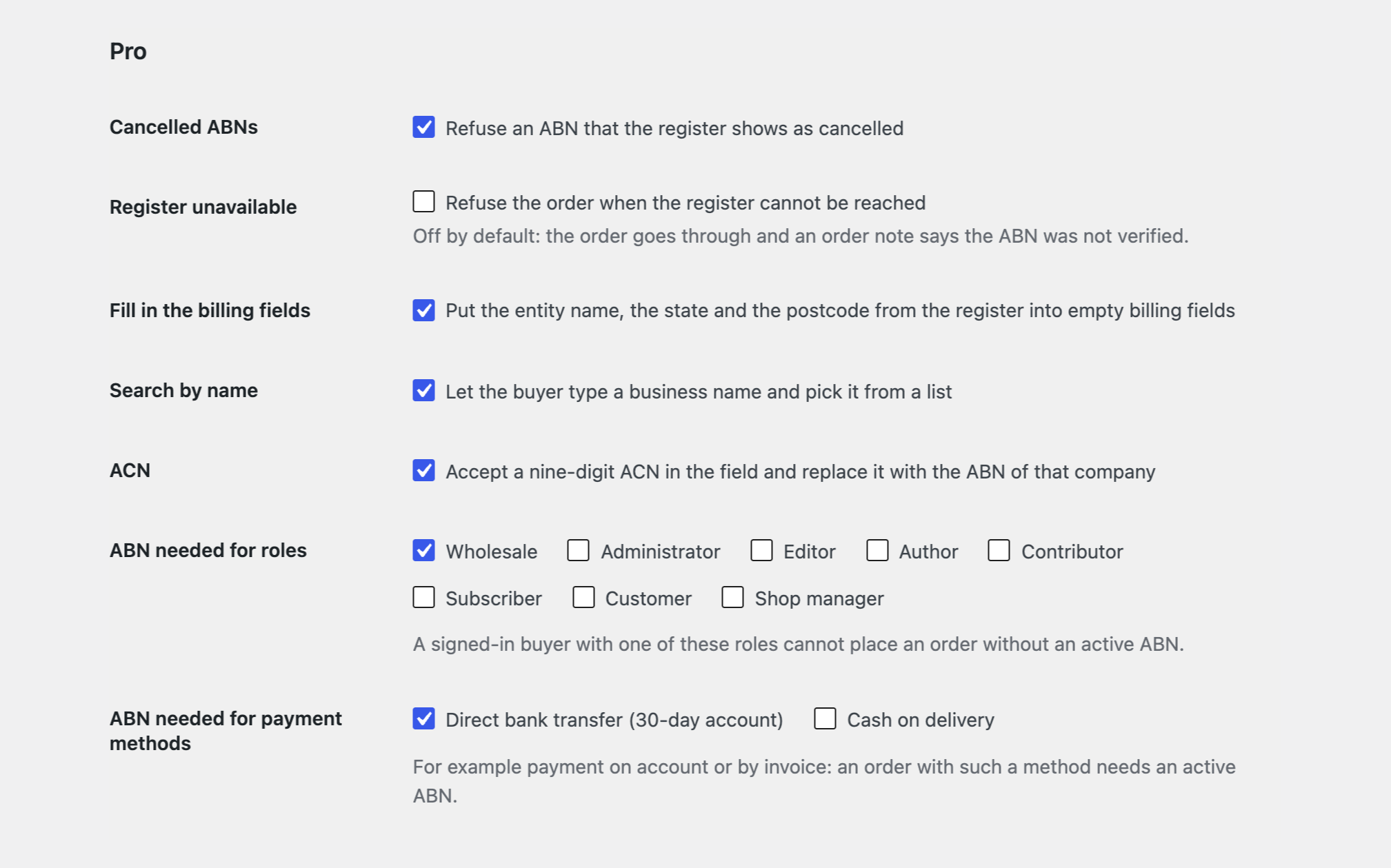
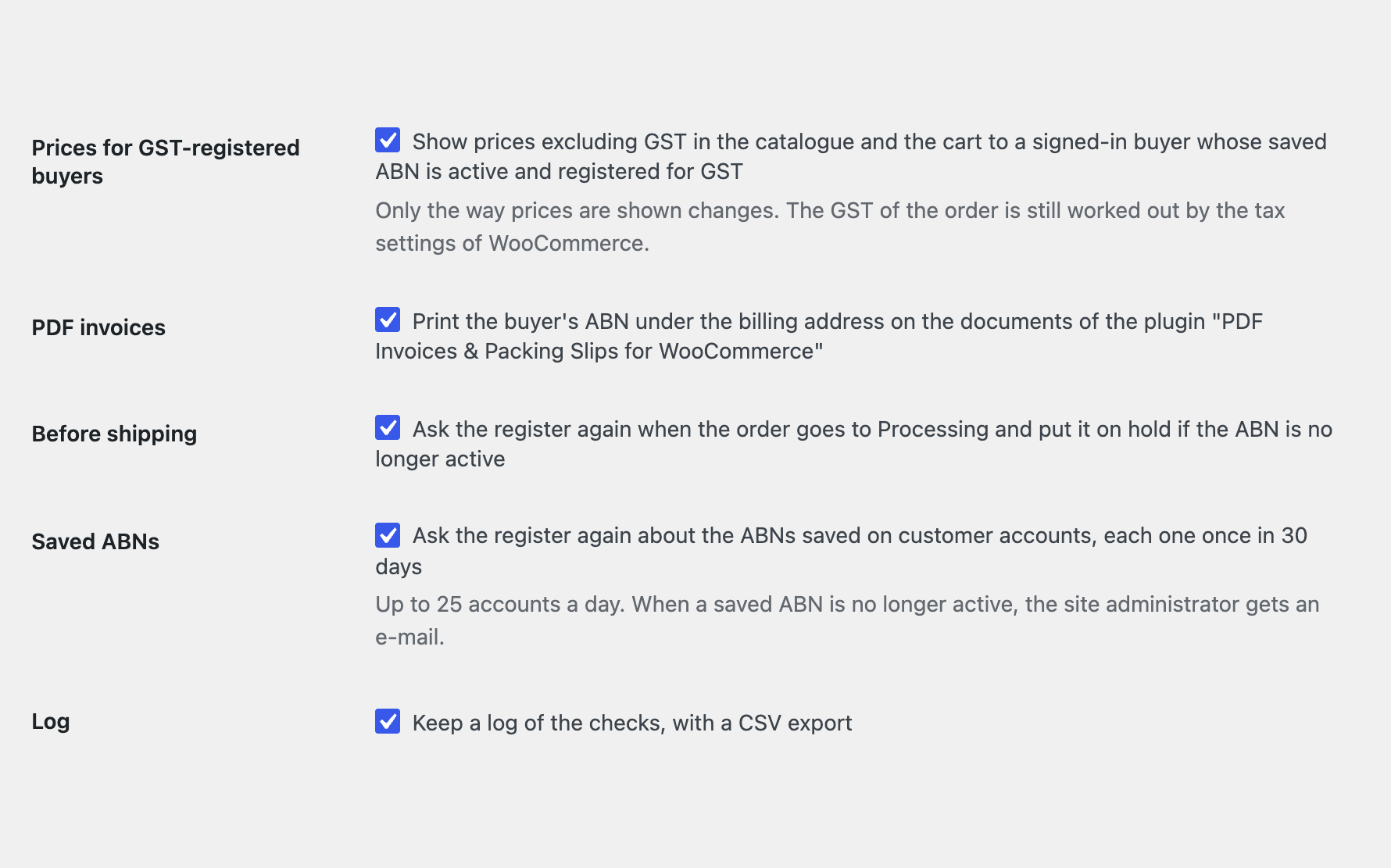
An ABN field at the WooCommerce checkout, looked up in the Australian Business Register: entity name, status and GST registration.
The free version works with no time limit. Pro adds the rest of the features in the table.


Every ABN first goes through the official check-digit rule (modulus 89) in the shop itself, so a typing mistake shows at once, before anything is sent to the register.

Search by name: the buyer types a business name, picks the entity from a list and the ABN is filled in.

The base version is free. Pro costs 990 UAH for a one-year licence. A year of updates, technical support and all Pro features.

A fresh install is the free version, nothing switches on by itself. The “Try Pro for 7 days” button → e-mail → the key right in the window and by e-mail.

Moving the site? Unlink the licence on the old domain and activate it on the new one yourself. A staging copy (staging., dev.) works with the same key and does not take a site slot. For studios — keys for 5 or 25 sites, or unlimited.
 WordPress 6.4+, WooCommerce 8.9+, PHP 7.4+.Your own free GUID for the ABN Lookup web services (without it only the check digits work).For the ABN on PDF invoices: the plugin “PDF Invoices & Packing Slips for WooCommerce”.
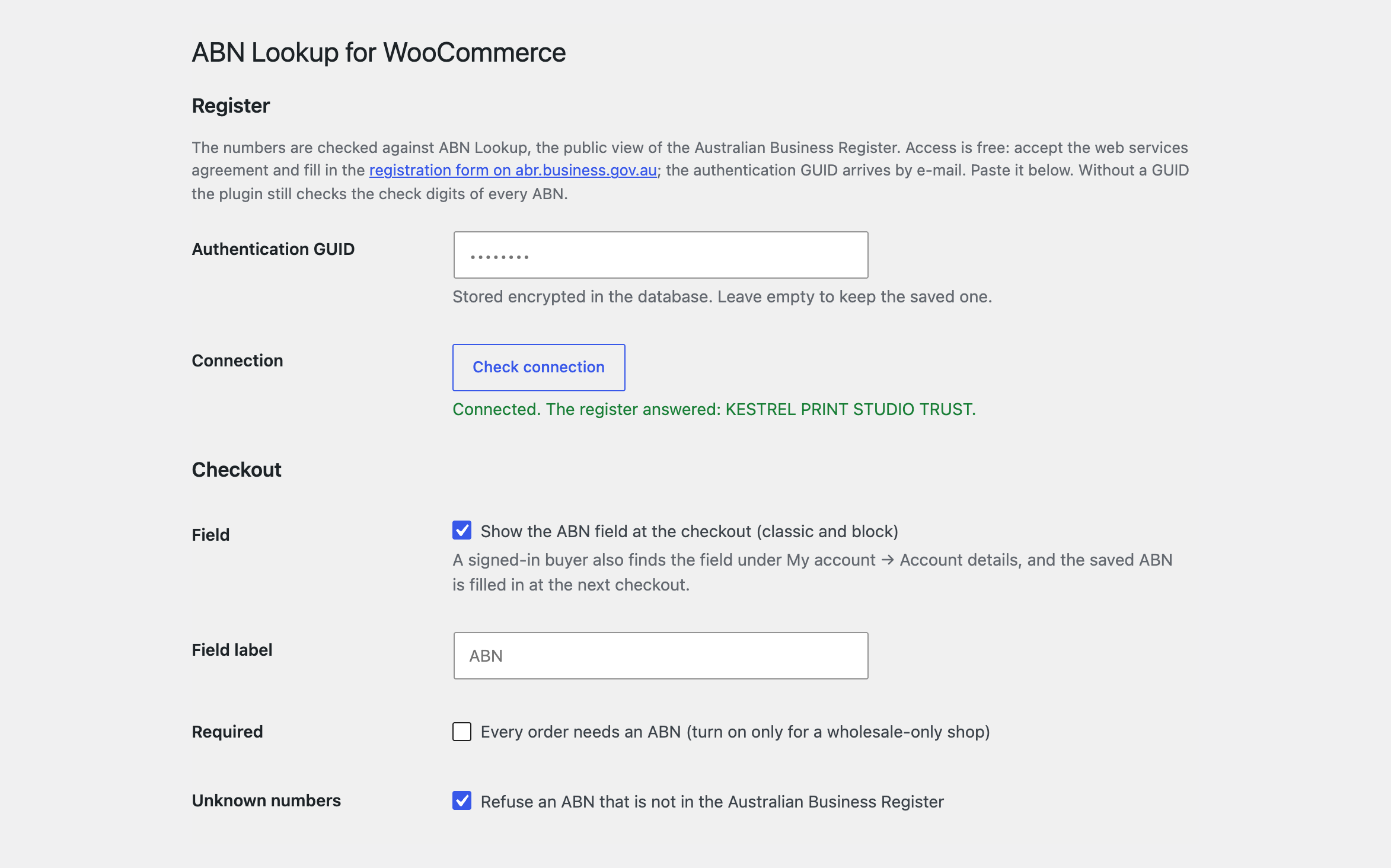
The ABN field on the classic and the block checkout and in My account, check digits, the register lookup, the data on the order and in e-mails.



ABN Lookup for WooCommerce adds an “ABN” field to the WooCommerce checkout (classic and block) and looks up what the buyer types in ABN Lookup, the public view of the Australian Business Register. The entity name, the ABN status and the GST registration appear under the field at once, and a mistyped number or one the register does not know stops the order. It is made for shops that sell to Australian businesses: wholesale, B2B, invoices that carry the buyer’s ABN.
Every ABN first goes through the official check-digit rule (modulus 89) in the shop itself, so a typing mistake shows at once, before anything is sent to the register. When the buyer leaves the field, a line such as “Acme Trading Pty Ltd — Active · registered for GST” appears under it, or a message that the number is not in the register. When the order is placed the number is looked up again on the server: an ABN with wrong check digits, or one the register does not know, stops the order with a plain message (you can switch that off). The ABN, entity name, status, entity type, GST registration, state and postcode are saved on the order with a note and shown in a box on the order screen; the ABN is printed in the order e-mails and on the buyer’s order page. A signed-in buyer finds the field under My account → Account details, and the saved ABN is filled in at the next checkout. The field can be optional (private buyers skip it) or required, and the label is yours to change. If the register is down, the order goes through and a note says the ABN could not be verified.
Search by name: the buyer types a business name, picks the entity from a list and the ABN is filled in. A nine-digit ACN typed into the field is replaced with the ABN of that company. The entity name, state and postcode from the register go into empty billing fields. An ABN the register shows as cancelled cannot be used for an order. For the roles you choose (wholesale customers, for example) and payment methods (payment on account, for example) an order is not placed without an active ABN. A signed-in buyer whose ABN is active and registered for GST sees prices excluding GST in the catalogue and the cart. The buyer’s ABN is printed under the billing address on the documents of “PDF Invoices & Packing Slips for WooCommerce”. A “Check again” button on the order screen asks the register once more; when an order goes to Processing the register can be asked again and the order put on hold if the ABN is no longer active. ABNs saved on customer accounts are looked up again every 30 days, and the administrator gets an e-mail when one is no longer active. A log of lookups with a CSV export. A separate switch: whether to refuse an order when the register cannot be reached.
The module is not on wordpress.org yet: the free version and Pro are one archive from this page. Without a key it works as the free version.
Didn't find the answer? Message us on Telegram and we'll reply within a business day.
 @catcode_support
Setup, compatibility, activation
No. It is an independent integration made by us. ABN Lookup is a service of the Australian Government; the module is not affiliated with it and not endorsed by the government.
Yes, once and free of charge: the GUID belongs to you. Until you have it the module looks only at the check digits of every ABN.
No. It shows whether the buyer is registered for GST, keeps that with the order, and in Pro shows such a buyer prices excluding GST. Tax is worked out by the WooCommerce settings.
ABN Lookup publishes only the state and postcode of the main business location, not a street address.
Yes. Leave “Required” off and the field is optional.
The order goes through and a note says the ABN could not be verified. In Pro you can choose to refuse instead.
Pro switches off, the free part keeps working.
No reviews yet. Be the first.
No questions yet. Ask one — we answer within 24 hours.
We build custom modules for WordPress, WooCommerce, OpenCart and Shopify. Tell us about the task and we'll prepare an estimate.
Order a custom module
—
Charged in UAH; your bank converts it to your currency. EUR price is approximate.

CatCode assistant
Just now


CatCode assistant
Online

I’ll help with your website task
Describe your website task — I’ll find a ready-made module or pass it to a developer for an estimate. Modules, custom features, layout, integrations, speed, migration, technical SEO.
