
















WooCommerce
990 UAH644 UAH/year≈ €14
Black November: −35% on all modules until 30 November Black November: −35% until 30 November Choose a module
 Website auditA PDF report by email in 3 minutesCheck a website
Everyday tasks
Image compressorSize, quality and WebP in bulkQR generatorLink, Wi-Fi, payment to IBANVAT calculator20, 14, 7% and amount in wordsTransliterationOfficial Ukrainian standardWebsite checks
PHP and pluginsPHP version, WordPress, pluginsGoogle Merchant feedFields, prices, GTIN, imagesDomain emailSPF, DKIM, DMARC, blacklistsAI search readinessllms.txt, bots, markupAll 9 toolsEnter at least 2 characters


An e-conomic customer and invoice from every WooCommerce order: prices without VAT, VAT zones, CVR; Pro adds automatic sending, booking, payments, credit notes, products and stock.
The free version works with no time limit. Pro adds the rest of the features in the table.


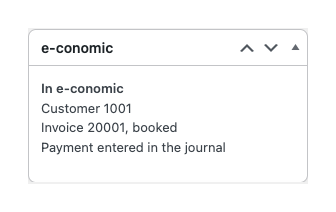
An “e-conomic” box appears in the order. The “Send to e-conomic” button (or the order action of the same name) finds the customer, creates a draft invoice and writes their numbers into the order.

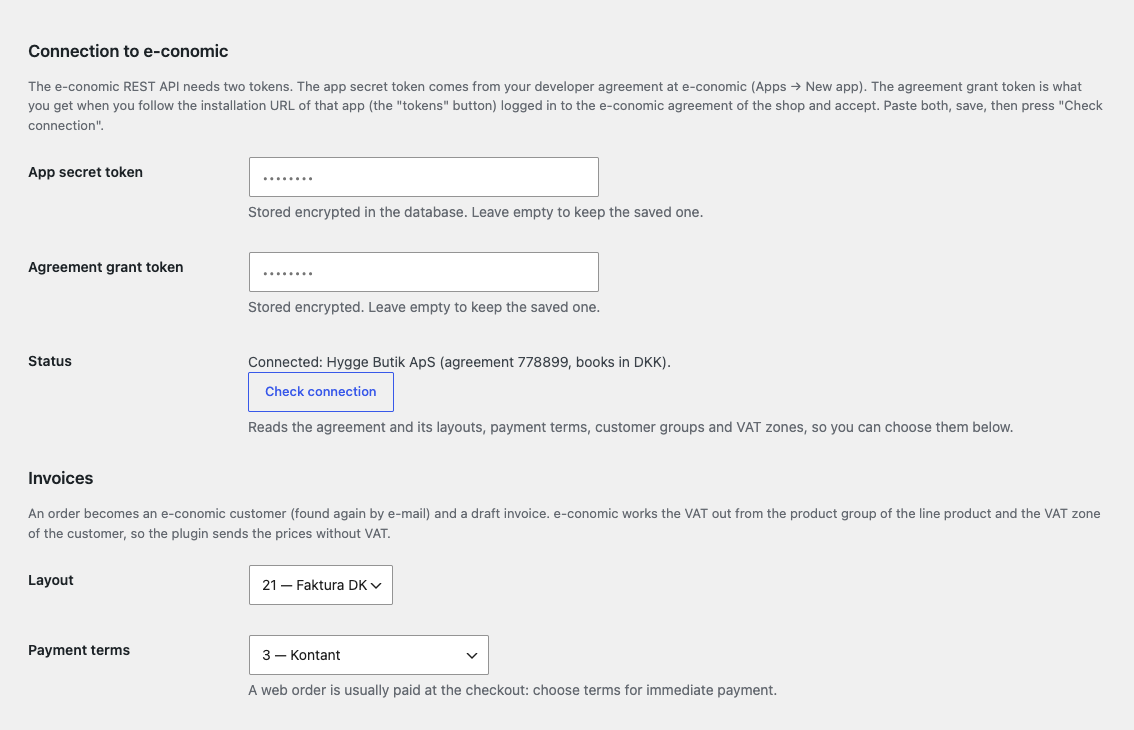
WooCommerce → e-conomic: paste both tokens, save and press “Check connection”: the module reads the agreement and its layouts, payment terms, customer groups and VAT zones, and you choose the ones you need from lists.

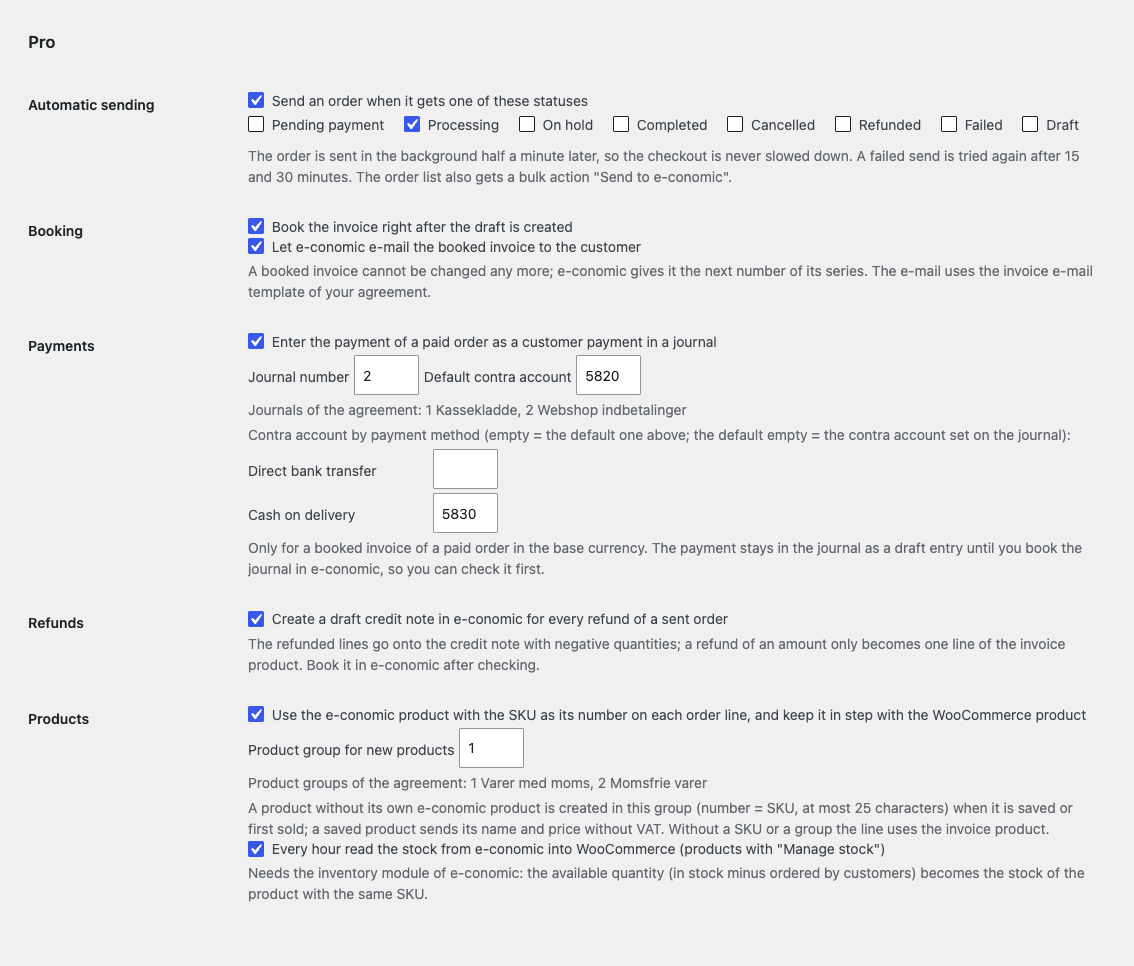
Automatic sending. An order goes to e-conomic in the background half a minute after it gets one of the statuses you choose, so the checkout is never slowed down.

A fresh install is the free version, nothing switches on by itself. The “Try Pro for 7 days” button → e-mail → the key right in the window and by e-mail.

Moving the site? Unlink the licence on the old domain and activate it on the new one yourself. A staging copy (staging., dev.) works with the same key and does not take a site slot. For studios — keys for 5 or 25 sites, or unlimited.
 WordPress 6.4+, WooCommerce (HPOS and the block checkout are supported), PHP 7.4+.An e-conomic agreement with access to the REST API: the app secret token and the agreement grant token.The module adds nothing to the checkout: no request goes to e-conomic while a customer pays.
Connection with two tokens, a customer and a draft invoice from the order, VAT zones, notes on errors and refunds, HPOS, English and dansk.


Invoicing with e-conomic for WooCommerce sends orders to Visma e-conomic as a customer and a draft invoice. The module finds the customer in e-conomic by e-mail or creates one, carries over the lines, shipping and fees with prices without VAT, and keeps the customer and invoice numbers in the order. It works through the public e-conomic REST API and is made for Danish shops that keep their books in e-conomic.
What you need in e-conomic. Your own e-conomic agreement and two tokens: the app secret token from your developer agreement (Apps → New app) and the agreement grant token that the shop’s agreement issues when you open the installation URL of that app and accept the access. e-conomic gives production API access to businesses with a CVR number; the tokens are stored encrypted in the database and never reach the browser.
An “e-conomic” box appears in the order. The “Send to e-conomic” button (or the order action of the same name) finds the customer, creates a draft invoice and writes their numbers into the order. Every request carries an idempotency key: a send that stopped halfway goes on from where it stopped and never creates a second customer or invoice, even with several parallel clicks.
The customer is searched by e-mail and created only when nothing matches: name or company, address, e-mail, phone and, if you want, the CVR or VAT number from an order meta field. The lines go with the real product name, quantity and price without VAT; shipping goes as a product of its own, free shipping adds no line. The prices are without VAT because e-conomic works the VAT out itself from the product group of the line and the VAT zone of the customer: domestic, EU or rest of the world, seen from the base country of the shop. An EU buyer with a VAT number always gets the EU zone; for EU consumers you choose the zone.
You check the draft and book it in e-conomic. When the VAT that e-conomic works out differs from the VAT of the order (another rate, or a product group without VAT), the invoice total differs from the order total: the module says so in a note. An e-conomic error goes into the order box and a note in one line, in plain words, with a “Try again” button; a refund leaves the note “Create a credit note in e-conomic”.
WooCommerce → e-conomic: paste both tokens, save and press “Check connection”: the module reads the agreement and its layouts, payment terms, customer groups and VAT zones, and you choose the ones you need from lists. The status shows the company name, the agreement number and the currency of the books.
Then set the e-conomic product for the order lines (for example “Web sales”: its product group gives the account and the VAT), a separate product for shipping, the meta key that holds the CVR or VAT number of the buyer, and whether “Order N” is the invoice heading. Interface and notes: English and dansk, taken from the site language.
Automatic sending. An order goes to e-conomic in the background half a minute after it gets one of the statuses you choose, so the checkout is never slowed down. A failed send is tried again after 15 and 30 minutes; then the error stays on the order and in the report. The bulk action “Send to e-conomic” in the order list sends up to 50 orders.
Booking. The invoice is booked right after the draft is created, and e-conomic can e-mail the booked invoice to the buyer with the template of your agreement. A booked invoice cannot be changed any more: e-conomic gives it the next number of its series.
Payments. The payment of a paid order goes into the journal you choose as a customer payment against the booked invoice, with a contra account per payment method. The entry stays a draft of the journal until you book the journal in e-conomic, so you can check it first. This works for invoices in the base currency of the agreement; otherwise a note explains why.
Credit notes. Each refund of a sent order becomes a draft credit note in e-conomic: the refunded lines with negative quantities, and a refund of an amount as one line of the invoice product with the reason.
Products and stock. An order line is tied to the e-conomic product whose number equals the SKU; a product that is not there is created in the group you choose when it is saved in WooCommerce or first sold, and a saved product updates its name and price without VAT. Every hour the available quantity from the e-conomic inventory module is written to the WooCommerce stock of products with stock management.
“Orders to look at” report. A list of the orders whose send failed and of the orders whose invoice total in e-conomic differs from the order total.
Didn't find the answer? Message us on Telegram and we'll reply within a business day.
 @catcode_support
Setup, compatibility, activation
No, it is an independent integration by CatCode. e-conomic is a trademark of Visma; the module is not affiliated with or endorsed by Visma e-conomic.
The app secret token belongs to an app created under a developer agreement at e-conomic (Apps → New app). The agreement grant token is what the shop's agreement issues when someone with access to it follows the installation URL of that app and accepts. Both are pasted into the plugin.
The free version creates drafts that you check and book in e-conomic. Pro can book them right away and have e-conomic e-mail them.
No. Every request carries an idempotency key and the customer and invoice numbers are kept in the order: a retry or several quick clicks never create a second customer or invoice.
e-conomic works the VAT out from the product group of the line and the VAT zone of the customer. When that VAT differs from the VAT of the order the totals differ; the module says so in a note and in the Pro report. Choose a product for the lines whose group has the VAT you charge.
An EU buyer with a VAT number (an order meta field) gets the EU zone and the CVR on the customer card. For EU consumers without a number you choose the zone yourself, the domestic one by default.
The payment of a paid order is written to the journal you choose as a customer payment against the booked invoice, with a contra account per payment method. The journal stays a draft until you book it in e-conomic.
Pro switches off, the free part keeps working: the connection, sending an order, the customer and the draft invoice.
One key covers two sites: the shop and its test copy.
No reviews yet. Be the first.
No questions yet. Ask one — we answer within 24 hours.
We build custom modules for WordPress, WooCommerce, OpenCart and Shopify. Tell us about the task and we'll prepare an estimate.
Order a custom module
—
Charged in UAH; your bank converts it to your currency. EUR price is approximate.

CatCode assistant
Just now


CatCode assistant
Online

I’ll help with your website task
Describe your website task — I’ll find a ready-made module or pass it to a developer for an estimate. Modules, custom features, layout, integrations, speed, migration, technical SEO.