
















WooCommerce
990 UAH644 UAH/year≈ €14
Black November: −35% on all modules until 30 November Black November: −35% until 30 November Choose a module
 Website auditA PDF report by email in 3 minutesCheck a website
Everyday tasks
Image compressorSize, quality and WebP in bulkQR generatorLink, Wi-Fi, payment to IBANVAT calculator20, 14, 7% and amount in wordsTransliterationOfficial Ukrainian standardWebsite checks
PHP and pluginsPHP version, WordPress, pluginsGoogle Merchant feedFields, prices, GTIN, imagesDomain emailSPF, DKIM, DMARC, blacklistsAI search readinessllms.txt, bots, markupAll 9 toolsEnter at least 2 characters

Guesty listings on your WordPress site: cards with photos and prices and a Book button for free; Pro adds search by dates, a calendar, booking requests and listing pages.
The free version works with no time limit. Pro adds the rest of the features in the table.


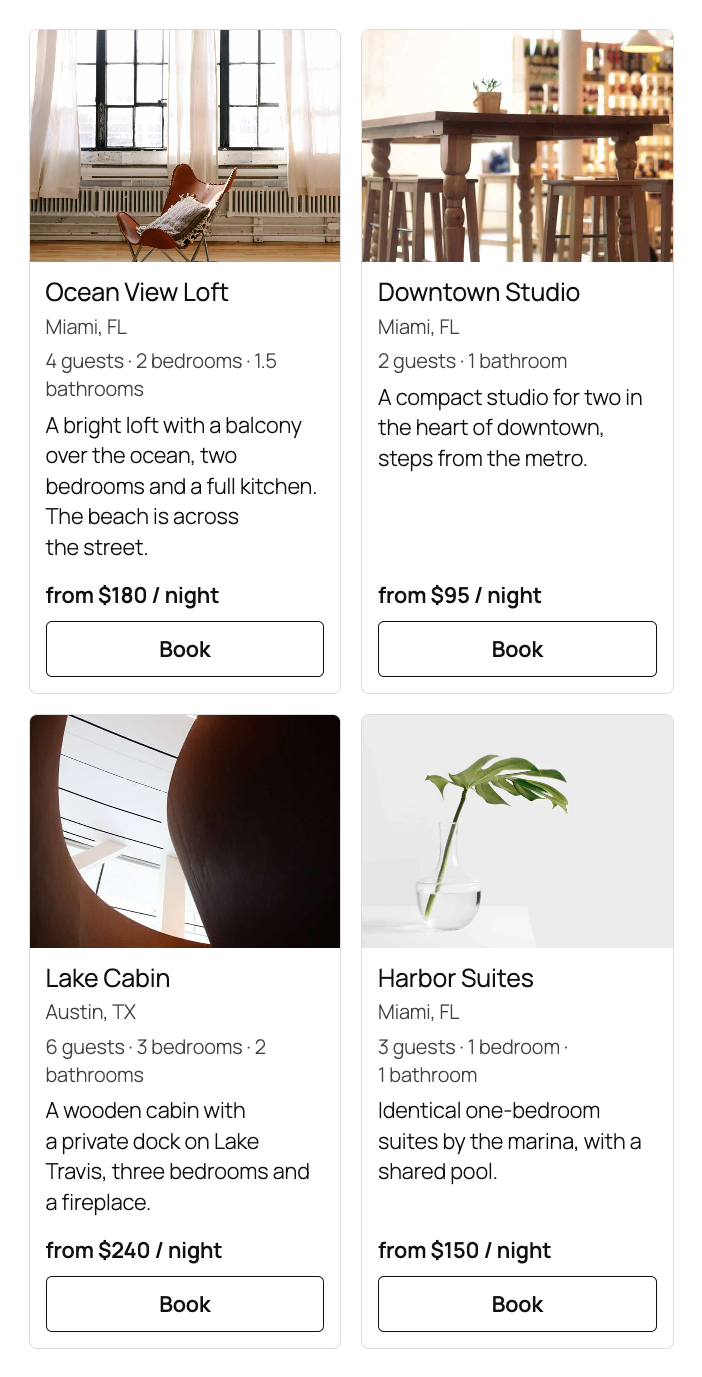
Listing cards.

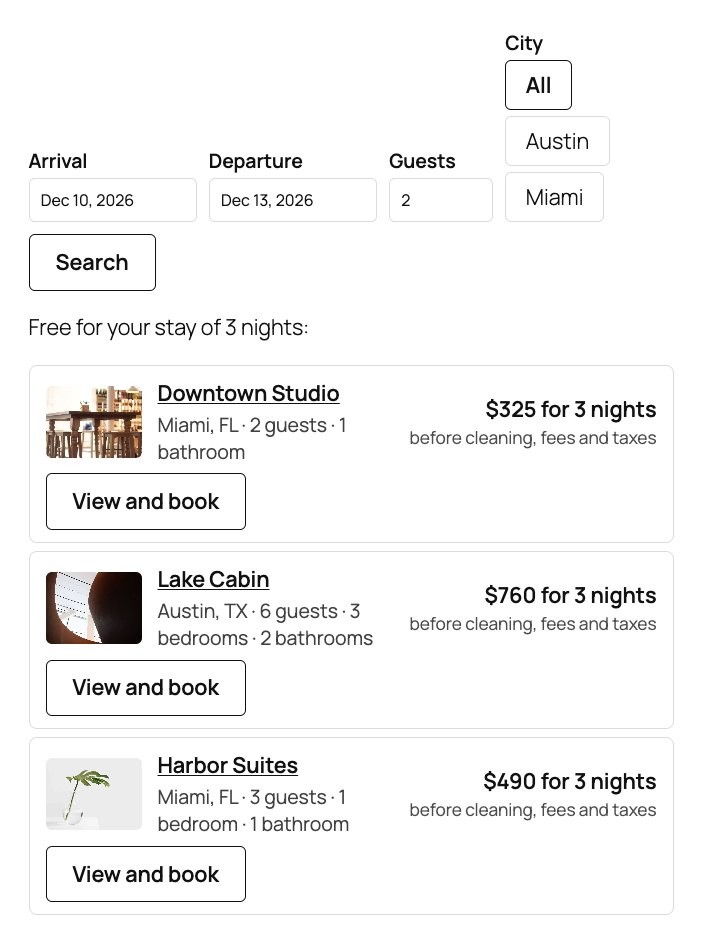
Search by dates. The [guesty_search] shortcode or the “Guesty search” block: arrival and departure (a flatpickr calendar), guests and a city picked with buttons.

A fresh install is the free version, nothing switches on by itself. The “Try Pro for 7 days” button → e-mail → the key right in the window and by e-mail.

Moving the site? Unlink the licence on the old domain and activate it on the new one yourself. A staging copy (staging., dev.) works with the same key and does not take a site slot. For studios — keys for 5 or 25 sites, or unlimited.
 WordPress 6.4+, PHP 7.4+. WooCommerce is not needed.A Guesty account with the Booking Engine API, a Client ID and a Client secret.The site connects to booking.guesty.com; Pro also contacts catcode.com.ua for the licence and updates and, if you set it up, api.telegram.org.
Listing cards (shortcode and block), a Book button with your own address, a Listings tab, an encrypted Booking Engine API connection, a cache and a fallback list.


Direct Booking for Guesty shows the listings of your Guesty account on your WordPress site: photos, guests, bedrooms and prices from the Guesty Booking Engine API, in your theme’s design and as normal page content, not an iframe. The “Book” button leads the guest to your booking website, and Pro adds search by dates, a calendar, the exact price and booking requests right on your site.
You need a Guesty account with the Booking Engine API and a key (Client ID and Client secret) from Growth → Distribution → Booking Engine API. The plugin interface is in English; Pro adds Spanish, French, German and Portuguese.
Listing cards. The [guesty_listings] shortcode or the “Guesty listings” block shows every listing of your key: a photo with its caption, title, city, number of guests, bedrooms and bathrooms, a short description and the price “from $X / night”. The ids, columns and limit attributes choose what to show. Cards in a row have the same height, and the price and the button sit on one line at the bottom. The Guesty list is read with a cursor, up to 500 listings.
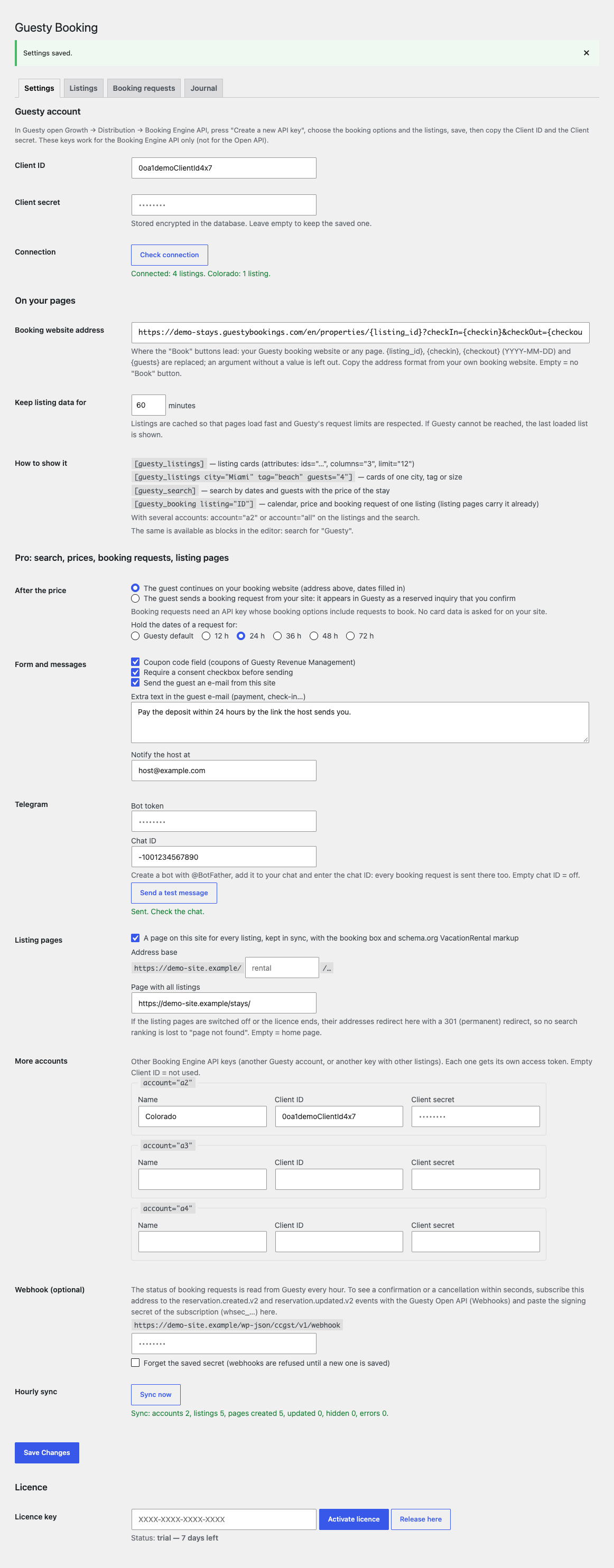
The “Book” button. You set the address of your booking website once, with the placeholders {listing_id}, {checkin}, {checkout} and {guests}; an argument without a value is left out of the address, and only http(s) addresses are allowed. The Listings tab shows every listing with its ID for the ids attribute.
Everything from your server. The client secret and the access token are stored encrypted, and the visitor’s browser never talks to Guesty. The token lives 24 hours and is renewed 5 minutes before the end under a lock, at most 3 times a day, and a refusal is remembered. The list is cached for the time you set, a request waits at most 8 seconds, and if Guesty cannot be reached the last loaded list is shown. The plugin keeps its own ceiling of 120 calls a minute.
Search by dates. The [guesty_search] shortcode or the “Guesty search” block: arrival and departure (a flatpickr calendar), guests and a city picked with buttons. The result: listings free for those dates, with the price of the nights from Guesty’s nightly rates and the note “before cleaning, fees and taxes”. Listings with a booked night are left out. Limit: 15 searches a minute per address.
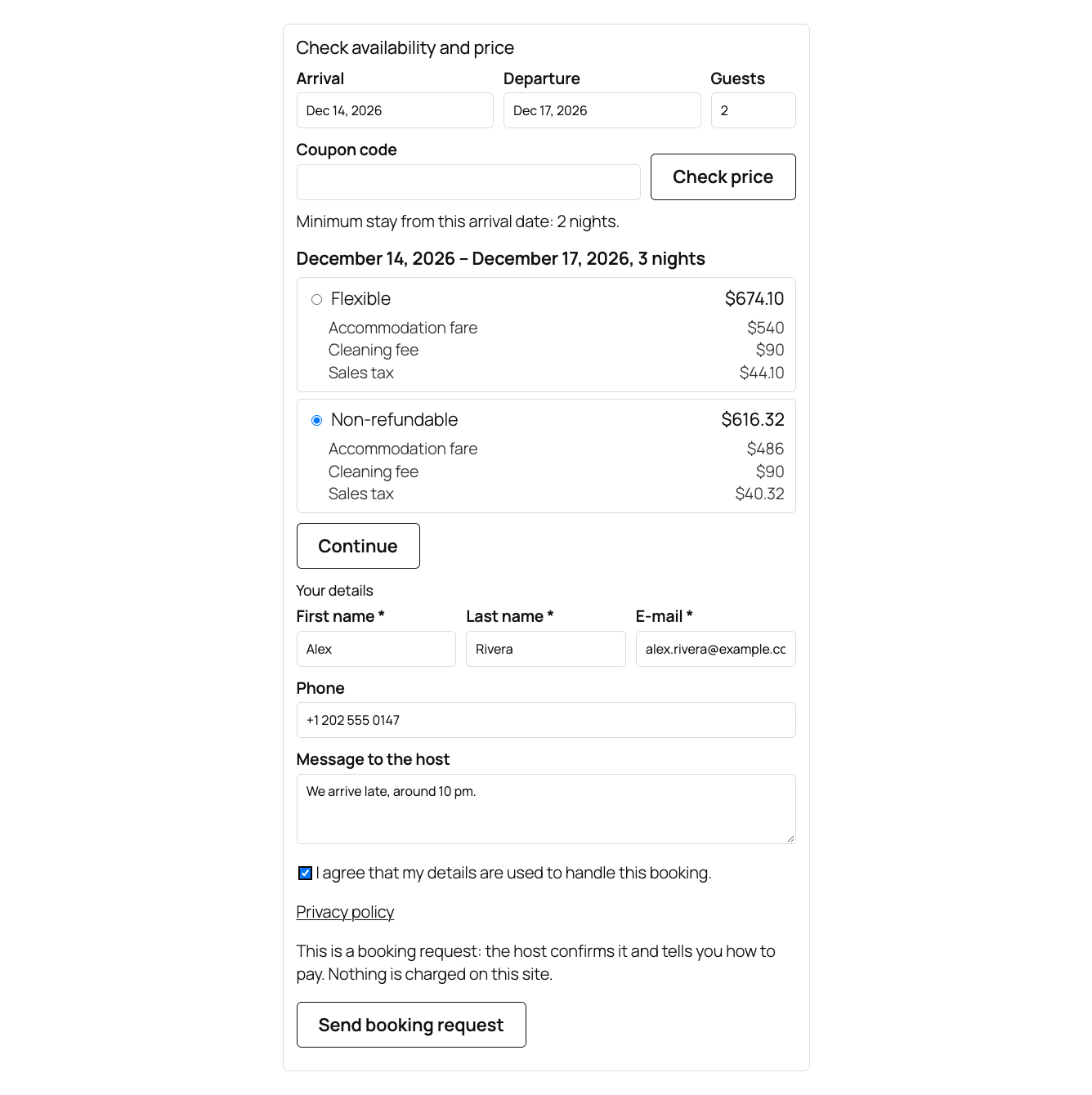
Calendar and exact price. The [guesty_booking listing="…"] shortcode, a block and a box under every listing page: taken nights and dates closed to arrival are grey in the calendar, and the minimum stay is shown. The “Check price” button asks Guesty for a quote and shows every rate plan with its total and the lines of the invoice (accommodation, cleaning, fees, taxes). There is a coupon field for Guesty Revenue Management; limit: 20 price requests per 10 minutes per address.
Booking requests into Guesty. The guest picks a rate plan and sends a request from the form: in Guesty it appears as a reserved inquiry that you confirm, and you set how long the dates are held (Guesty default, 12 to 72 hours). No card data is asked for on your site. Or keep the mode that sends guests to your booking website with the dates filled in. Protection: a hidden field, 5 requests an hour per address, and a price offer works once.
Requests, e-mails and Telegram. Every request is recorded in the “Booking requests” tab with its status from Guesty (waiting, confirmed, declined, cancelled): the status is read back every hour, or within seconds with the optional Guesty webhook. The guest gets an e-mail confirming the request with your own text, the host gets an e-mail and, if you like, a Telegram message. WordPress personal data export and erase cover the requests. The journal shows requests, refusals, status changes, syncs and errors.
Listing pages and several accounts. For every listing the plugin creates a page on your site (/rental/…) and keeps it in sync every hour: photos, descriptions, amenities, house rules, the booking box and schema.org VacationRental markup. If the licence ends, the pages are switched off or a listing is removed from Guesty, its address answers with a 301 redirect to your listings page, not a 404. Up to three more Booking Engine API keys are shown with account="a2" or account="all"; the cards have filters by city, tag and number of guests.
[guesty_listings] shortcode or the “Guesty listings” block to a page.Didn't find the answer? Message us on Telegram and we'll reply within a business day.
 @catcode_support
Setup, compatibility, activation
No, it is an independent integration made by CatCode. Guesty is a trademark of its owner; the plugin is not affiliated with or endorsed by Guesty.
Yes. The Client ID and secret are created in your own Guesty account (Growth → Distribution → Booking Engine API). Open API keys do not work here.
No. The guest sends a request that you confirm in Guesty, or goes to your booking website with the dates filled in. No card data is entered on your site.
It is the nightly base price from Guesty. Cleaning, fees and taxes are shown by "Check price" in Pro or by your booking website.
Pro switches off: search, calendar, requests and listing pages stop working (the page addresses redirect 301 to your listings page), and the cards and the Book button stay. The saved Pro settings are kept.
One key works on two sites: the live one and its development copy.
In private records on your site; you can export or erase it with the WordPress tools, and it is removed with the plugin.
No reviews yet. Be the first.
No questions yet. Ask one — we answer within 24 hours.
We build custom modules for WordPress, WooCommerce, OpenCart and Shopify. Tell us about the task and we'll prepare an estimate.
Order a custom module
—
Charged in UAH; your bank converts it to your currency. EUR price is approximate.

CatCode assistant
Just now


CatCode assistant
Online

I’ll help with your website task
Describe your website task — I’ll find a ready-made module or pass it to a developer for an estimate. Modules, custom features, layout, integrations, speed, migration, technical SEO.