
















WooCommerce
990 UAH644 UAH/year≈ €14
Black November: −35% on all modules until 30 November Black November: −35% until 30 November Choose a module
 Website auditA PDF report by email in 3 minutesCheck a website
Everyday tasks
Image compressorSize, quality and WebP in bulkQR generatorLink, Wi-Fi, payment to IBANVAT calculator20, 14, 7% and amount in wordsTransliterationOfficial Ukrainian standardWebsite checks
PHP and pluginsPHP version, WordPress, pluginsGoogle Merchant feedFields, prices, GTIN, imagesDomain emailSPF, DKIM, DMARC, blacklistsAI search readinessllms.txt, bots, markupAll 9 toolsEnter at least 2 characters


Check a Canadian federal corporation by number or BN at the WooCommerce checkout: name and status from the Corporations Canada register, data on the order, no key; Pro adds address autofill, a B2B role and active-only.
The free version works with no time limit. Pro adds the rest of the features in the table.


The checkout shows a “Corporation number or BN” field (the label is yours to change).

WooCommerce → Corporations Canada: choose the public address of Corporations Canada (no key) or the ISED API Store with your own key (Public Plan: 60 calls a minute), press “Check connection”, and decide whether the number is required and what happens to unknown numbers.

Address autofill. The corporation name and the address of its registered office go into empty billing fields while the buyer types the number, with the province when the billing country is Canada.

A fresh install is the free version, nothing switches on by itself. The “Try Pro for 7 days” button → e-mail → the key right in the window and by e-mail.

Moving the site? Unlink the licence on the old domain and activate it on the new one yourself. A staging copy (staging., dev.) works with the same key and does not take a site slot. For studios — keys for 5 or 25 sites, or unlimited.
 WordPress 6.4+, WooCommerce 8.6+, PHP 7.4+.No key and no account: by default the plugin uses the public address of Corporations Canada. Your own ISED API Store key is optional (needed for directors in Pro).Compatible with HPOS and with the classic and the block checkout. Languages: English, français (Canada; in Pro).
“Refuse unknown numbers” is now off by default (settings you have already saved are not changed).
The corporation number or BN field at the classic and the block checkout and in the account, the check against Corporations Canada (public address or ISED API Store), the corporation data…


Corporations Canada Lookup for WooCommerce adds a “Corporation number or BN” field to the checkout and to My account and checks what the buyer types against the register of federal corporations of Canada (Corporations Canada, Innovation, Science and Economic Development Canada). The buyer types a corporation number (400100-1, with or without the dash) or a 9-digit business number (BN), or a full BN with its program account such as 861606333RC0001. The shop sees the corporation name and status at once, and the order keeps them. No key and no account are needed.
What the register covers. Corporations Canada holds federal corporations only (Canada Business Corporations Act, Canada Not-for-profit Corporations Act, Boards of Trade Act and other federal acts). A business incorporated only in a province (for example under the Ontario or Quebec laws) and a sole proprietorship are not in it. If such buyers order from your shop, switch “Unknown numbers” off so their orders are not refused. The check confirms that a corporation with this number exists and what its status is; it does not check GST/HST registration.
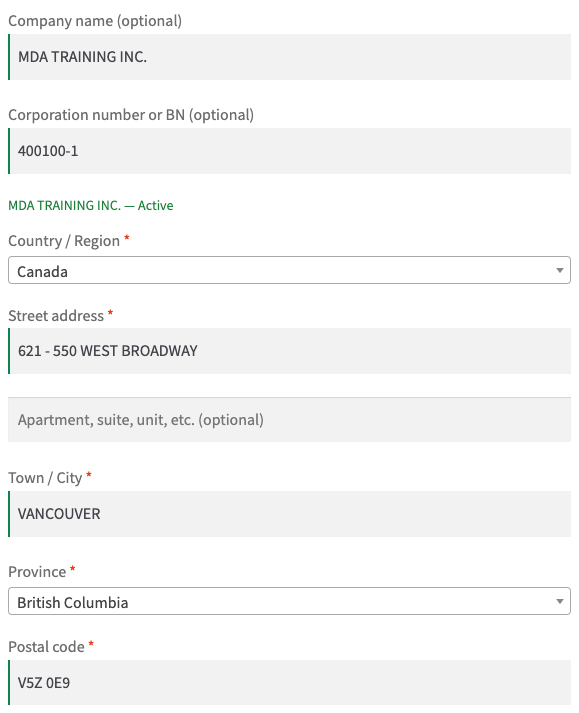
The checkout shows a “Corporation number or BN” field (the label is yours to change). When the buyer leaves the field, the corporation name and status appear under it (“MDA TRAINING INC. — Active”), or a message says that the number is not in the register. If the company field is empty, the name from the register is put there. Private buyers can skip the field: it is optional, and it is worth making it required only for a wholesale-only shop.
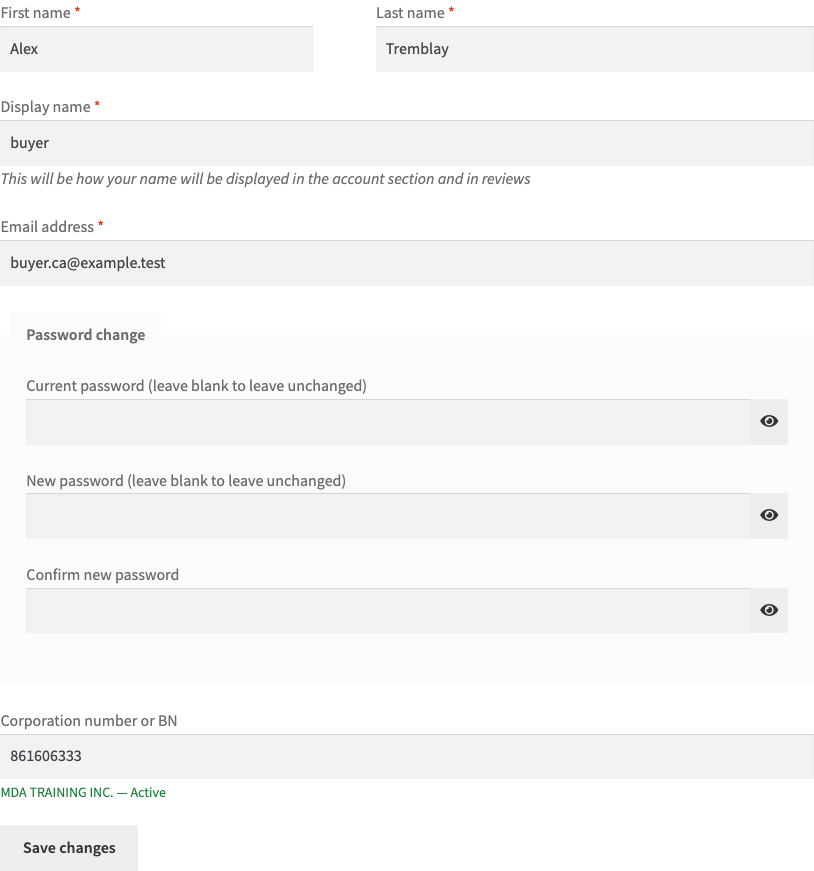
My account → Account details has the same field. The number the buyer typed at the checkout or here is saved on the customer, and the next checkout starts with it. The block checkout and Account details use the same saved value.
A number with a wrong format, or one the register does not know, stops the order with a plain message (you can switch that off). If the register is down, the order goes through and a note says that the number was not verified, so a government service never blocks your sales. On a French site the status and the act are shown in French.
WooCommerce → Corporations Canada: choose the public address of Corporations Canada (no key) or the ISED API Store with your own key (Public Plan: 60 calls a minute), press “Check connection”, and decide whether the number is required and what happens to unknown numbers. The key is stored encrypted and never reaches the browser. The “Look up” button checks any number right in the settings. Register answers are kept for six hours and the calls come from your server, not from the buyer’s browser.
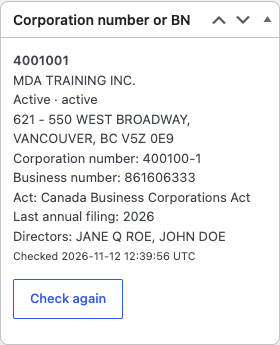
The order gets a box with the number, name, status, corporation number, BN, federal act, last annual filing year and registered office address. The same goes into an order note. For an order whose corporation is no longer active in the register, Pro can refuse the order or put it on hold.
Address autofill. The corporation name and the address of its registered office go into empty billing fields while the buyer types the number, with the province when the billing country is Canada. Works on the classic and the block checkout.
Only active corporations. A corporation the register shows as dissolved, amalgamated or discontinued cannot be used for an order; the buyer sees the reason.
Register unavailable. Optionally the order is refused when the register cannot be reached (by default it goes through with a note).
B2B customer role. A customer with a verified, active corporation gets the role you choose (the one your trade-price or tax plugin works with); it is taken back when the corporation is no longer active. Shop managers and administrators are never changed. This is a customer role, not a tax exemption: whether other tax rules apply to that customer is up to your tax plugin.
Customers re-checked on a schedule. The numbers saved on customer accounts are asked again every few days; changes of name or status go to a journal and to the shop e-mail. “Check all customers now” runs the same check over every customer in batches.
Directors on the order. With an ISED API Store key, the names of the corporation’s directors from the register are kept with the order (the public address does not give the directors).
Remember answers up to 30 days instead of 6 hours: fewer calls to the register and a faster checkout for returning buyers.
Check again and check before shipping. A button on the order asks the register again and writes the change to the notes; optionally the register is asked once more when the order goes to Processing, and if the corporation is no longer active the order is put on hold.
French (Canada) translation and updates from catcode.com.ua.
Didn't find the answer? Message us on Telegram and we'll reply within a business day.
 @catcode_support
Setup, compatibility, activation
No, it is an independent integration by CatCode. The register data belongs to Corporations Canada (Innovation, Science and Economic Development Canada, Government of Canada); the module is not affiliated with them and not endorsed by them.
No. By default the plugin uses the public address of Corporations Canada, which needs neither a key nor an account. An ISED API Store key is optional; it is needed for directors in Pro.
Only federal corporations are in the Corporations Canada data. A business incorporated only in a province (for example under the Ontario or Quebec laws) and a sole proprietorship are not there. If such buyers order from you, switch "Unknown numbers" off.
No. It checks that a federal corporation with this number exists and what its status is. A business number in the register does not tell whether the corporation is registered for GST/HST.
Yes. Leave "Required" off and the field is optional.
The order goes through, and a note says that the number was not verified. In Pro you can choose the opposite and refuse the order.
A corporation number (400100-1, 4001001), a 9-digit business number and a full BN with its program account (861606333RC0001).
Pro switches off and the free part keeps working: the field, the register check, the data on the order and the field in the account.
One key works on two sites: the shop and its test copy.
No reviews yet. Be the first.
No questions yet. Ask one — we answer within 24 hours.
We build custom modules for WordPress, WooCommerce, OpenCart and Shopify. Tell us about the task and we'll prepare an estimate.
Order a custom module
—
Charged in UAH; your bank converts it to your currency. EUR price is approximate.

CatCode assistant
Just now


CatCode assistant
Online

I’ll help with your website task
Describe your website task — I’ll find a ready-made module or pass it to a developer for an estimate. Modules, custom features, layout, integrations, speed, migration, technical SEO.