















WooCommerce
Clover Payments for WooCommerce — cards in Clover fields, refunds, Apple Pay and Google Pay
Free + Pro
990 UAH/year≈ €20
v1.0.0
 Website auditA PDF report by email in 3 minutesCheck a website
Everyday tasks
Image compressorSize, quality and WebP in bulkQR generatorLink, Wi-Fi, payment to IBANVAT calculator20, 14, 7% and amount in wordsTransliterationOfficial Ukrainian standardWebsite checks
PHP and pluginsPHP version, WordPress, pluginsGoogle Merchant feedFields, prices, GTIN, imagesDomain emailSPF, DKIM, DMARC, blacklistsAI search readinessllms.txt, bots, markupAll 9 toolsEnter at least 2 characters

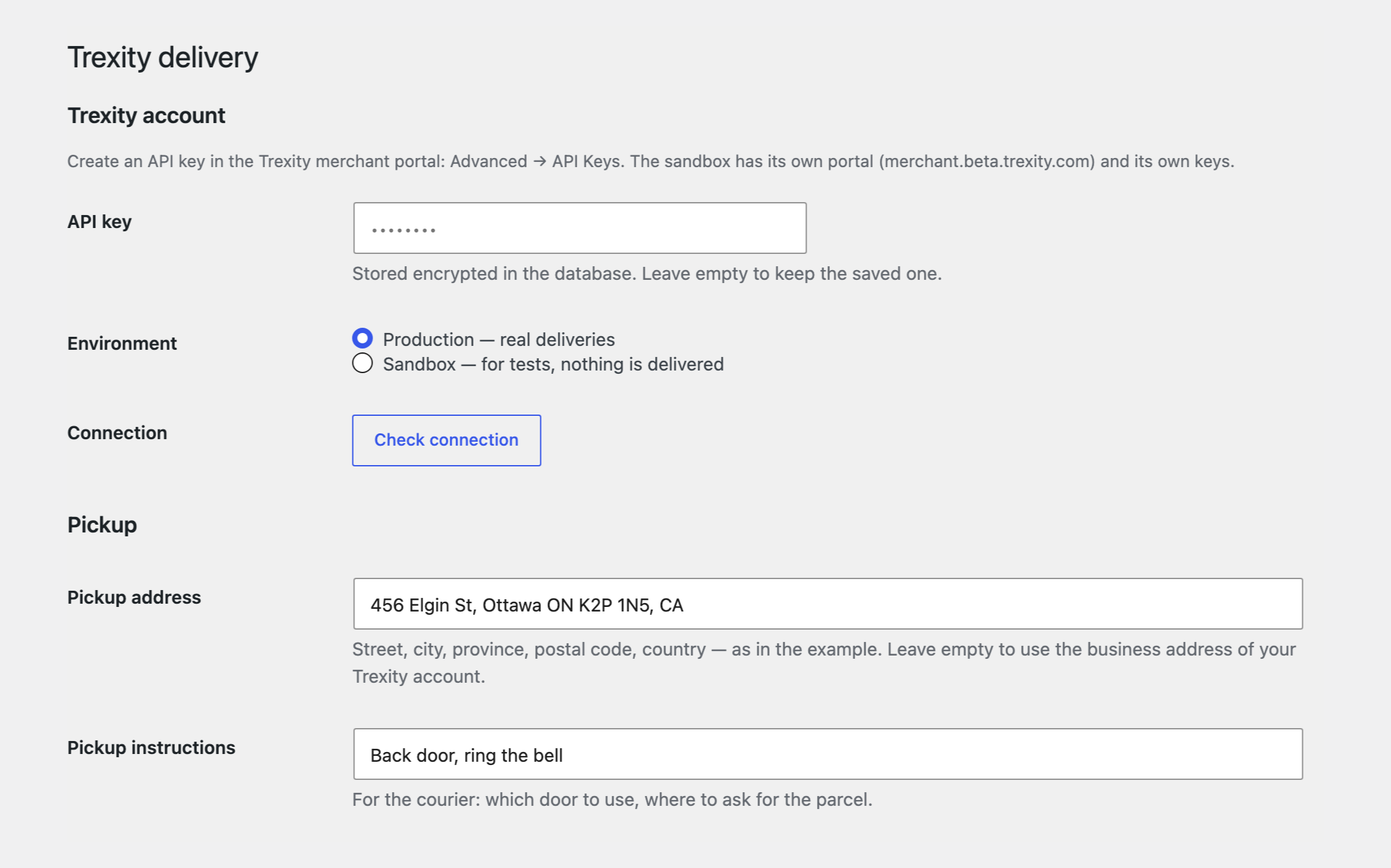
Trexity same-day and next-day delivery: live rates at checkout, shipments from the order and tracking for the buyer.
The free version works with no time limit. Pro adds the rest of the features in the table.


A “Trexity” shipping method appears at checkout. The module first asks Trexity whether the buyer’s address is inside its delivery zones and only then gets the rates.

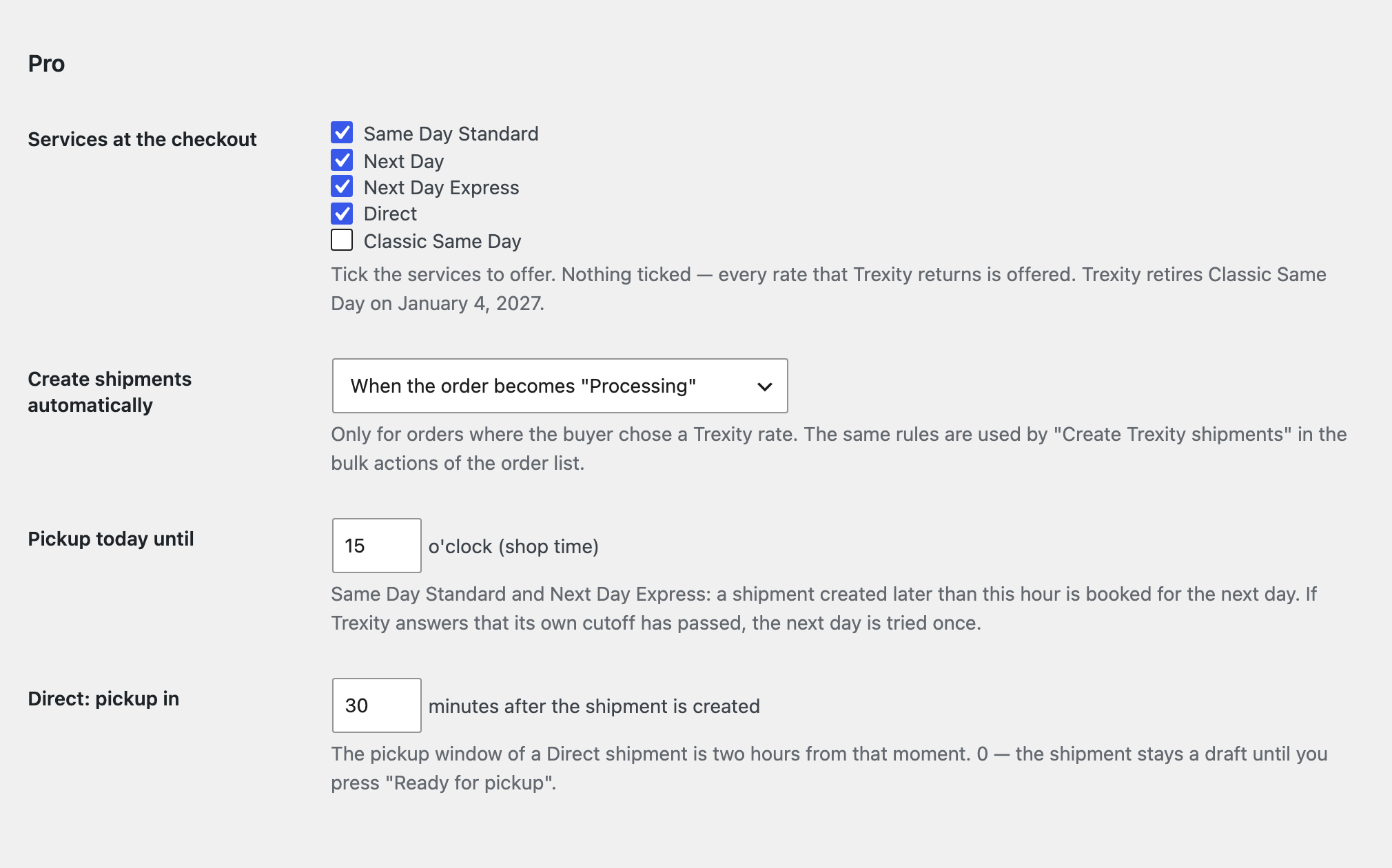
A shipment is created by itself when the order reaches the status you choose; the pickup day follows your cutoff hour, and after it the shipment is booked for the next day.

The base version is free. Pro costs 890 UAH for a one-year licence. A year of updates, technical support and all Pro features.

A fresh install is the free version, nothing switches on by itself. The “Try Pro for 7 days” button → e-mail → the key right in the window and by e-mail.

Moving the site? Unlink the licence on the old domain and activate it on the new one yourself. A staging copy (staging., dev.) works with the same key and does not take a site slot. For studios — keys for 5 or 25 sites, or unlimited.
 WordPress 6.4+, WooCommerce 8.6+, PHP 7.4+.A Trexity merchant account and an API key. Deliveries are billed by Trexity on your account.A pickup address in one of the Trexity cities.For status webhooks (Pro): an https site.
Trexity rates on the classic and the block checkout, address zone check, shipments from the order, tracking for the buyer.

Delivery with Trexity for WooCommerce connects Trexity, the Canadian local delivery service, to a WooCommerce store. The buyer types an address and sees the Trexity rates for it: same-day, next-day or a dedicated courier. You create the shipment from the order screen, and the buyer gets a link to follow the courier. The module works with your own Trexity merchant account and API key. The interface is in English and French (Canada).
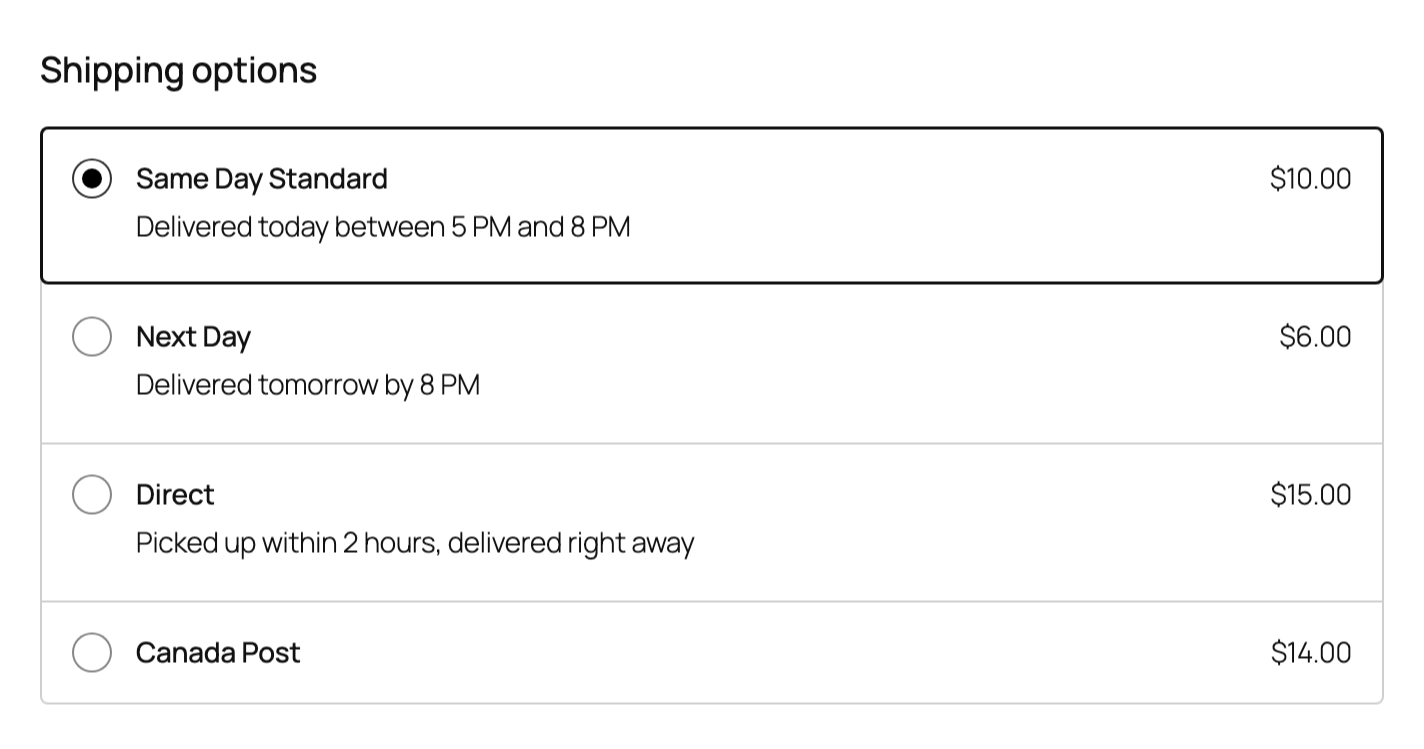
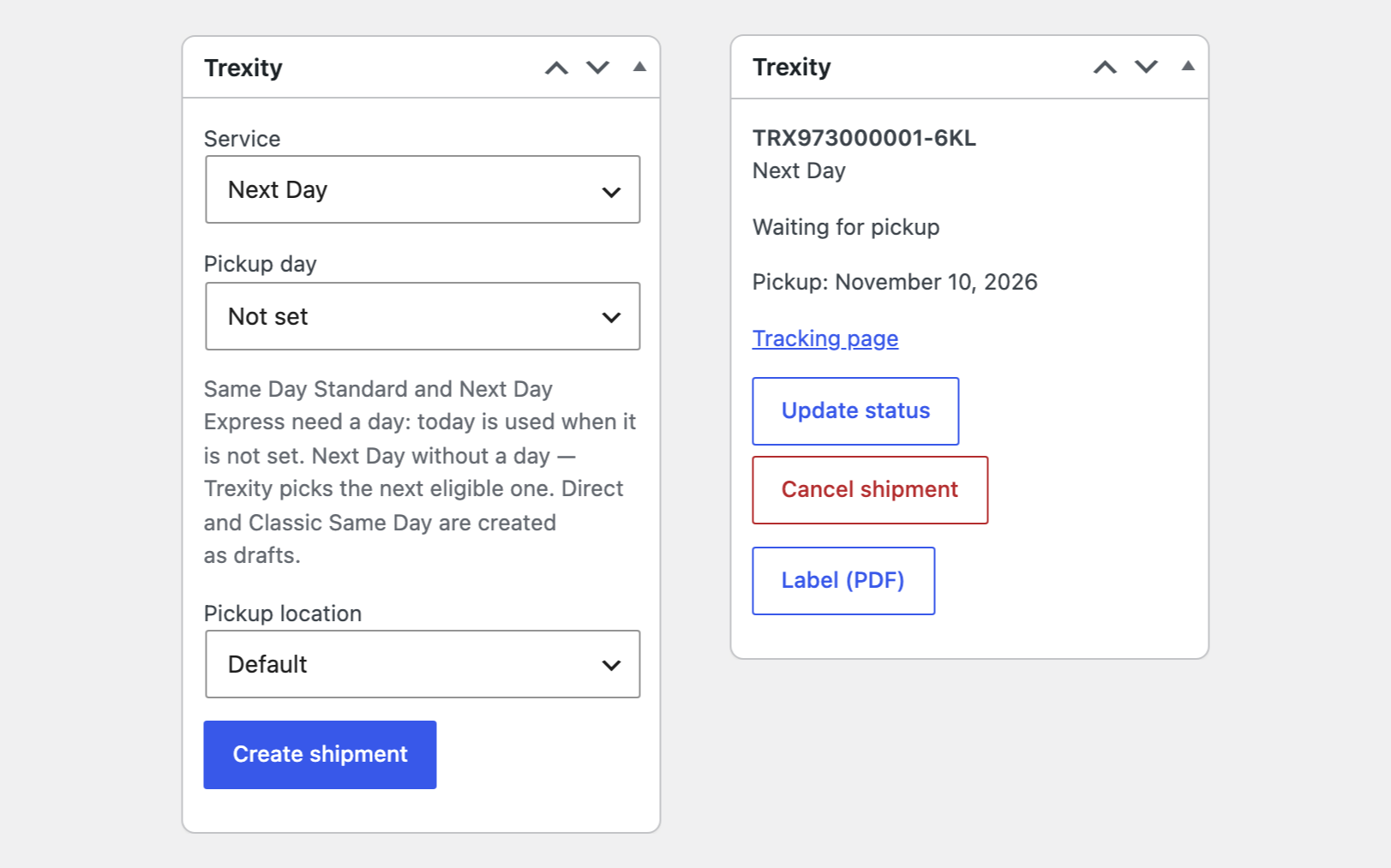
A “Trexity” shipping method appears at checkout. The module first asks Trexity whether the buyer’s address is inside its delivery zones and only then gets the rates. Each rate is shown with the name and the price Trexity returns, and the delivery window below it: “today between 5 PM and 8 PM” or “tomorrow by 8 PM”. On the block checkout the window is visible under every rate, not just the chosen one. For an address outside the zones the method is simply not offered, and the other shipping methods stay. You choose the price for the buyer: the Trexity rate without taxes, with WooCommerce adding its own shipping tax, or the rate with the Trexity taxes included. The order screen has a Trexity box: choose the service and the pickup day and press Create shipment. Trexity receives the buyer’s name, address, phone and e-mail, the order number and value, and the buyer’s note for the courier. A Direct shipment is created as a draft, and Ready for pickup sends it to the first available courier. The tracking link is kept on the order, shown on the buyer’s order page, added to the order e-mails and, if you wish, e-mailed to the buyer as soon as the shipment is created. Update status reads the delivery status from Trexity, Cancel shipment cancels it there. The settings screen has a connection check and an address check: does Trexity deliver there?
A shipment is created by itself when the order reaches the status you choose; the pickup day follows your cutoff hour, and after it the shipment is booked for the next day. For Direct you set how many minutes after creation the courier should come. Shipments are created in bulk from the orders list, up to 30 per run. The parcel label opens from the order screen as a PDF, and so does the proof-of-delivery photo. You choose which services to offer at checkout: Same Day Standard, Next Day, Next Day Express, Direct. Trexity reports pickups, deliveries and cancellations to the store by webhooks; every call is verified by its signature, and after delivery the order moves to the status you set. If your Trexity account has several pickup locations, you set the default one and can pick another for a single order.
The module is not on wordpress.org yet: the free version and Pro are one archive from this page. Without a key it works as the free version.
Didn't find the answer? Message us on Telegram and we'll reply within a business day.
 @catcode_support
Setup, compatibility, activation
Yes. The module works with your merchant account and the API key you create in the Trexity portal. Deliveries are billed by Trexity.
The buyer has to type the street, the city and the postal code. The method is not offered when the address is outside the Trexity zones, when Trexity returns no rate for it (for example outside delivery hours) or when the rate is in another currency. The last problem of a rate request is shown at the top of the settings screen.
Checkout shows the rate at the moment of the request. The shipment is created later with the same service, and Trexity prices it again, so the amounts can differ.
No. Trexity’s usage policy requires the rate name to be shown unchanged.
No. It is an independent integration made by us; Trexity is a trademark of its owner.
Pro switches off, the free part keeps working.
No reviews yet. Be the first.
No questions yet. Ask one — we answer within 24 hours.
We build custom modules for WordPress, WooCommerce, OpenCart and Shopify. Tell us about the task and we'll prepare an estimate.
Order a custom module
—
Charged in UAH; your bank converts it to your currency. EUR price is approximate.

CatCode assistant
Just now


CatCode assistant
Online

I’ll help with your website task
Describe your website task — I’ll find a ready-made module or pass it to a developer for an estimate. Modules, custom features, layout, integrations, speed, migration, technical SEO.
