
















WooCommerce
1 290 UAH839 UAH/year≈ €17
Black November: −35% on all modules until 30 November Black November: −35% until 30 November Choose a module
 Website auditA PDF report by email in 3 minutesCheck a website
Everyday tasks
Image compressorSize, quality and WebP in bulkQR generatorLink, Wi-Fi, payment to IBANVAT calculator20, 14, 7% and amount in wordsTransliterationOfficial Ukrainian standardWebsite checks
PHP and pluginsPHP version, WordPress, pluginsGoogle Merchant feedFields, prices, GTIN, imagesDomain emailSPF, DKIM, DMARC, blacklistsAI search readinessllms.txt, bots, markupAll 9 toolsEnter at least 2 characters

WordPress forms into Systeme.io: a contact with a tag, a subscribe form and one connected form for free; Pro adds up to 30 forms, user roles, a webhook and bookings from the calendar.
The free version works with no time limit. Pro adds the rest of the features in the table.


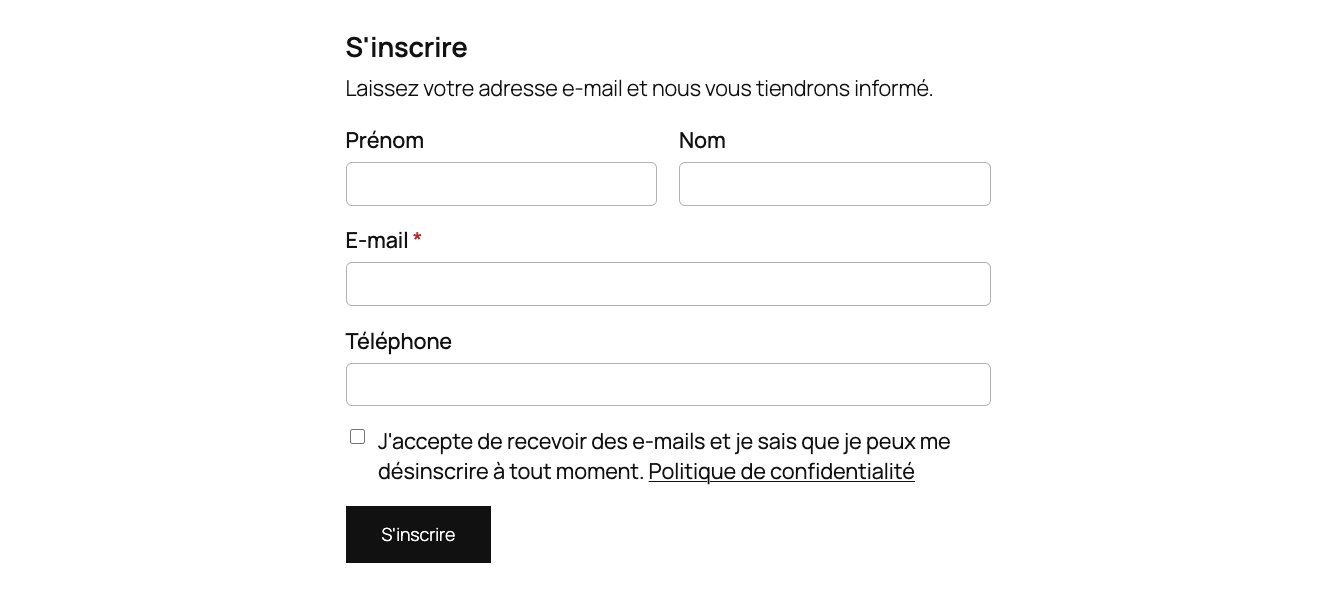
A subscribe form of its own.

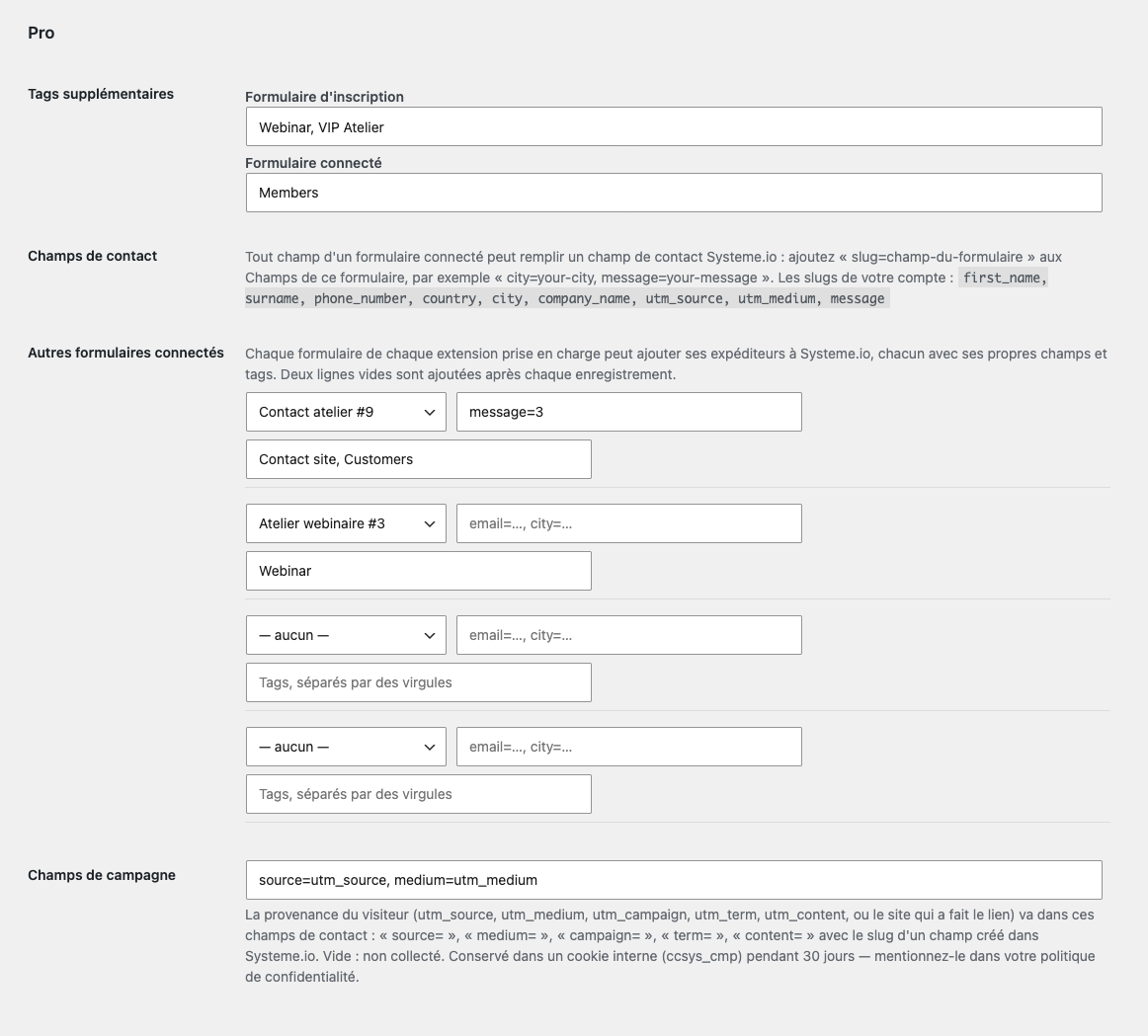
Many forms and tags. Up to 30 more connected forms, each with its own fields and several tags, plus extra tags for the subscribe form and the first connected form.

A fresh install is the free version, nothing switches on by itself. The “Try Pro for 7 days” button → e-mail → the key right in the window and by e-mail.

Moving the site? Unlink the licence on the old domain and activate it on the new one yourself. A staging copy (staging., dev.) works with the same key and does not take a site slot. For studios — keys for 5 or 25 sites, or unlimited.
 WordPress 6.4+, PHP 7.4+. WooCommerce is not needed.A Systeme.io account and a Public API key.Contact Form 7, WPForms, Gravity Forms, Fluent Forms or Elementor Pro (optional) for connected forms.The site talks to api.systeme.io; Pro also talks to catcode.com.ua for the licence and updates.
A subscribe form of its own (block and shortcode), one connected form of Contact Form 7, WPForms, Gravity Forms, Fluent Forms or Elementor Pro, a tag per form (created when missing)…


Contact Forms for Systeme.io adds the people who fill in the forms on your WordPress site to Systeme.io as contacts with the tag you choose. The tag starts your Systeme.io automation rules: a welcome e-mail, an e-mail campaign, a course or community access. Without Zapier and without moving your forms to Systeme.io. The plugin speaks English and French, which suits sites for the French market.
You need a Systeme.io account and a Public API key (profile settings → Public API keys). The plugin interface is in English and French.
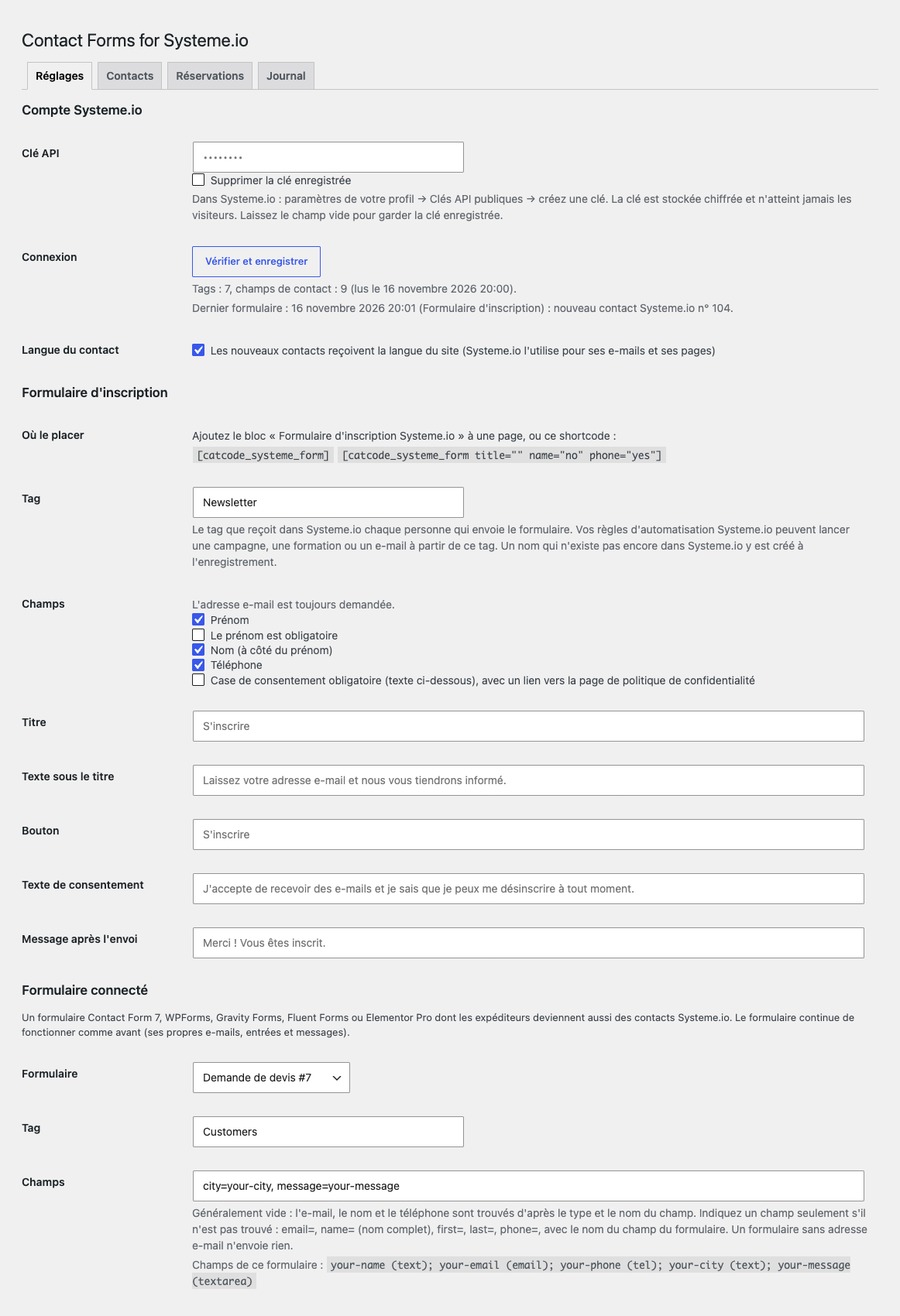
A subscribe form of its own. Add the block or the [catcode_systeme_form title="" name="no" phone="yes"] shortcode: e-mail, first name (optional or required), last name, phone and a consent checkbox with a link to the privacy policy. Fonts and colours come from your theme. The form works without JavaScript and on cached pages, and spam is stopped by a hidden field, a signed fill-in time of at least 3 seconds and a limit of 6 submissions per hour from one address.
Your existing form. Connect one form of Contact Form 7, WPForms, Gravity Forms, Fluent Forms or Elementor Pro, and everyone who sends it becomes a Systeme.io contact. The plugin finds the e-mail, name and phone by field type and name, or you name them yourself (email=, name=, first=, last=, phone=). The form keeps sending its own e-mails and keeps its own entries. Pick a tag of your account or type a new name: it is created in Systeme.io when you save.
A person who is already a contact is not added twice: the plugin updates a changed name or phone and adds the tag the contact does not have yet. New contacts get the language of your site, so Systeme.io writes to them in it. The site waits for Systeme.io at most 8 seconds per call. If Systeme.io does not take a contact (no answer, a wrong key), the form reaches you by e-mail, the visitor is still thanked, and the settings show how the last form went.
Many forms and tags. Up to 30 more connected forms, each with its own fields and several tags, plus extra tags for the subscribe form and the first connected form. Any form field into a contact field. Pairs slug=form-field (including message) fill the Systeme.io contact fields, and the slugs are checked against the field list of your account. Campaigns. The utm_* parameters and the referring site are kept in an internal ccsys_cmp cookie for 30 days and go into the contact fields you choose; the source shows in the list and the report.
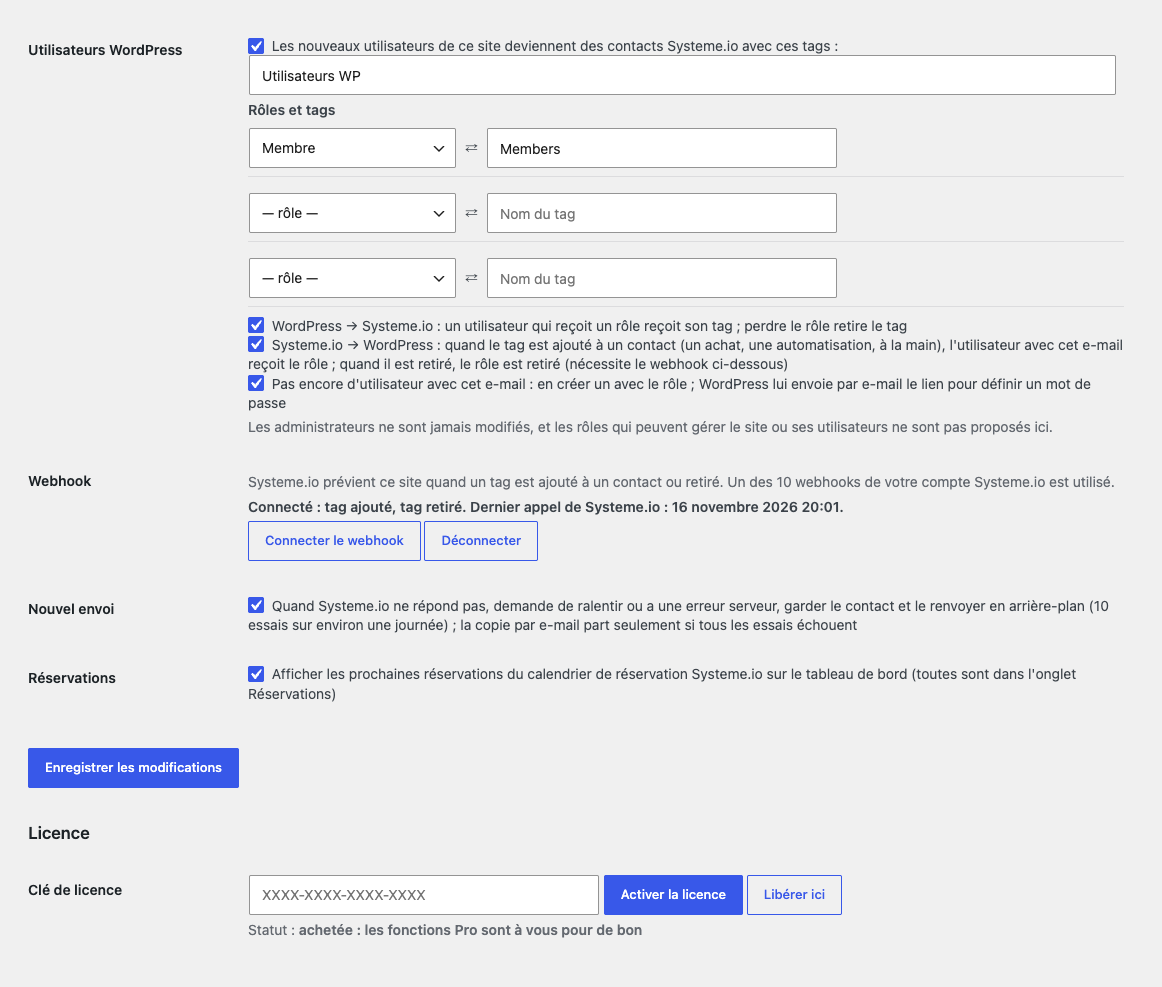
WordPress users. New users of the site become contacts with tags, and a “role ⇄ tag” table syncs roles both ways: a role in WordPress adds or removes the tag, and a tag in Systeme.io (a purchase, an automation, by hand) gives or takes the role through the webhook; the plugin can also create the user, and WordPress e-mails the link to set a password. Administrators are never touched, and roles that can manage the site, plugins or users are never offered or given. Webhook. The plugin creates the webhook in Systeme.io itself (the “tag added” and “tag removed” events) with a random secret and checks the HMAC signature, duplicate messages are skipped, and an older event never undoes a newer one.
Background re-sending. When Systeme.io does not answer, asks to slow down (429, the Retry-After header) or returns a server error, the contact stays in a queue and is sent again: WP-Cron every 5 minutes, batches of 10, a delay of 1 to 360 minutes, 10 tries, and only then an e-mail to you; there is also a “Send again” button. Reports and journal. The contact list and the reports by form and campaign (forms sent, new contacts, sent, waiting, not delivered) hold no names, e-mails or phones, only the contact number in Systeme.io; the journal keeps 200 entries.
Bookings. The “Bookings” tab and a dashboard widget show the next events of the Systeme.io calendar: time, attendees, state and payment; the list is cached for 5 minutes.
Didn't find the answer? Message us on Telegram and we'll reply within a business day.
 @catcode_support
Setup, compatibility, activation
No, it is an independent integration made by CatCode. Systeme.io is a trademark of its owner; the plugin is not affiliated with Systeme.io and not endorsed by them.
In Systeme.io create an automation rule with the trigger "Tag added" and the tag you chose for the form, and the action you want: subscribe to a campaign, enrol in a course or send an e-mail.
Look at the "Last form" line under Settings → Systeme.io: it says what Systeme.io answered. A form that Systeme.io did not take was e-mailed to you.
No. The free version keeps only the outcome of the last form, and Pro keeps a list without names, e-mails or phones.
Contact Form 7, WPForms, Gravity Forms, Fluent Forms and Elementor Pro. The free version connects one form, Pro up to 30 more.
No. If a person is already a contact, the plugin updates their data and adds the tag they do not have yet.
Pro switches off: re-sending, the user sync and the webhook stop, and forms go the free way. Saved Pro settings stay.
One key works on two sites: the live one and its development copy.
No reviews yet. Be the first.
No questions yet. Ask one — we answer within 24 hours.
We build custom modules for WordPress, WooCommerce, OpenCart and Shopify. Tell us about the task and we'll prepare an estimate.
Order a custom module
—
Charged in UAH; your bank converts it to your currency. EUR price is approximate.

CatCode assistant
Just now


CatCode assistant
Online

I’ll help with your website task
Describe your website task — I’ll find a ready-made module or pass it to a developer for an estimate. Modules, custom features, layout, integrations, speed, migration, technical SEO.