















WooCommerce
890 UAH579 UAH/year≈ €12
Black November: −35% on all modules until 30 November Black November: −35% until 30 November Choose a module
 Website auditA PDF report by email in 3 minutesCheck a website
Everyday tasks
Image compressorSize, quality and WebP in bulkQR generatorLink, Wi-Fi, payment to IBANVAT calculator20, 14, 7% and amount in wordsTransliterationOfficial Ukrainian standardWebsite checks
PHP and pluginsPHP version, WordPress, pluginsGoogle Merchant feedFields, prices, GTIN, imagesDomain emailSPF, DKIM, DMARC, blacklistsAI search readinessllms.txt, bots, markupAll 9 toolsEnter at least 2 characters
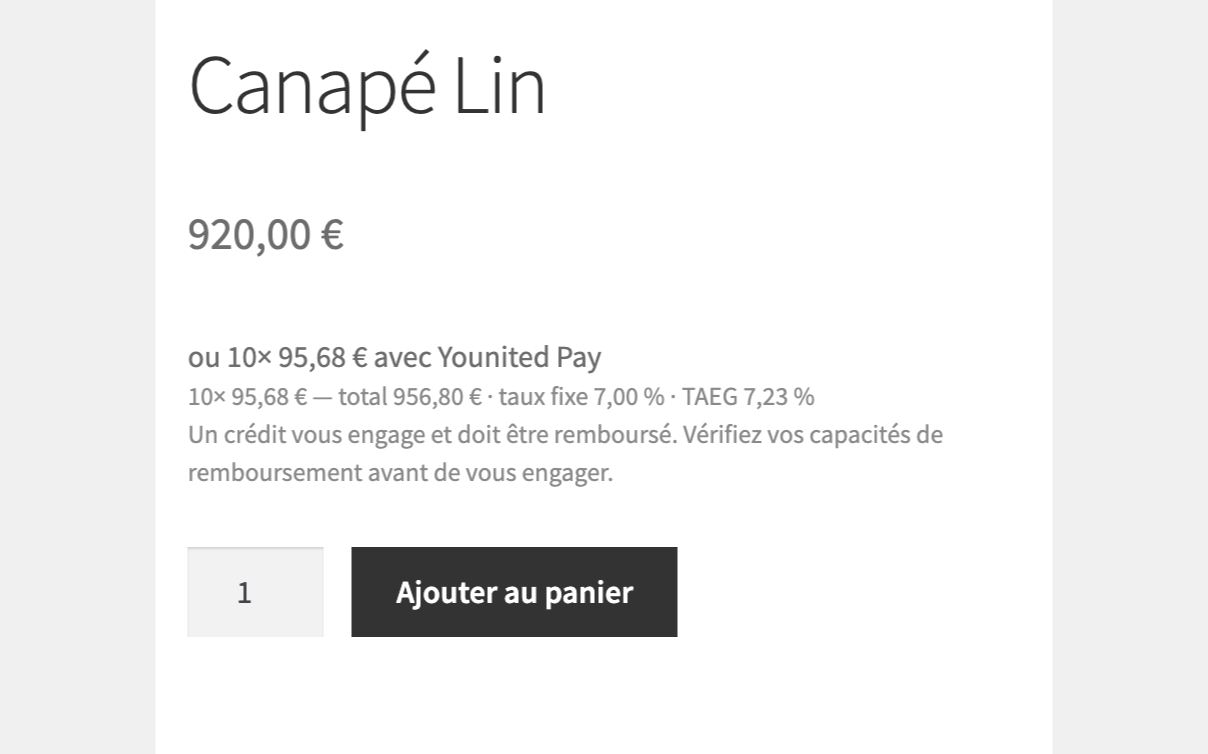
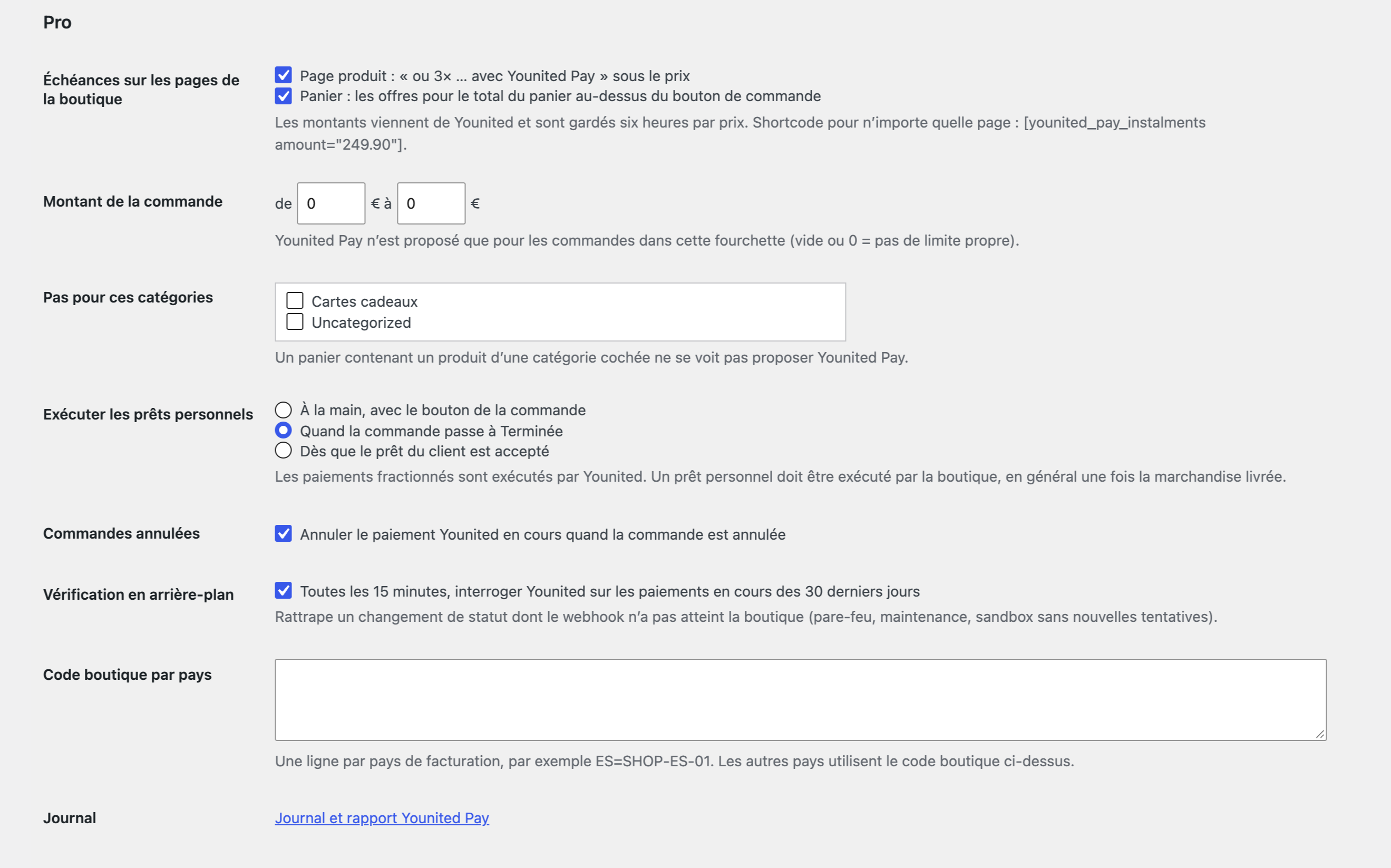
Younited Pay for WooCommerce: Younited plans at checkout, order status from Younited, an Execute button for personal loans. Refunds and the product installment line in Pro.
The free version works with no time limit. Pro adds the rest of the features in the table.


All settings live in one place: WooCommerce → Younited Pay.

The installment line “ou 3× … avec Younited Pay” under the price on the product page, the plans for the cart total in the cart, and the shortcode [younited_pay_instalments] for any page; the amounts come from Younited and are kept for six hours.

The base version is free. Pro costs 1290 UAH for a one-year licence. A year of updates, technical support and all Pro features.

A fresh install is the free version, nothing switches on by itself. The “Try Pro for 7 days” button → e-mail → the key right in the window and by e-mail.

Moving the site? Unlink the licence on the old domain and activate it on the new one yourself. A staging copy (staging., dev.) works with the same key and does not take a site slot. For studios — keys for 5 or 25 sites, or unlimited.
 WordPress 6.4+, WooCommerce 8.6+, PHP 7.4+.A Younited Pay merchant account: Client ID, Client secret and Shop code.Shop currency in euros (EUR); the shop on HTTPS and reachable from the internet.The order must carry the buyer contacts and address: they go to Younited for the application.
Younited Pay at the checkout with Younited plans, order statuses from Younited, signed notifications, buyer return to the order-pay page, status check, loan execution, connection check…

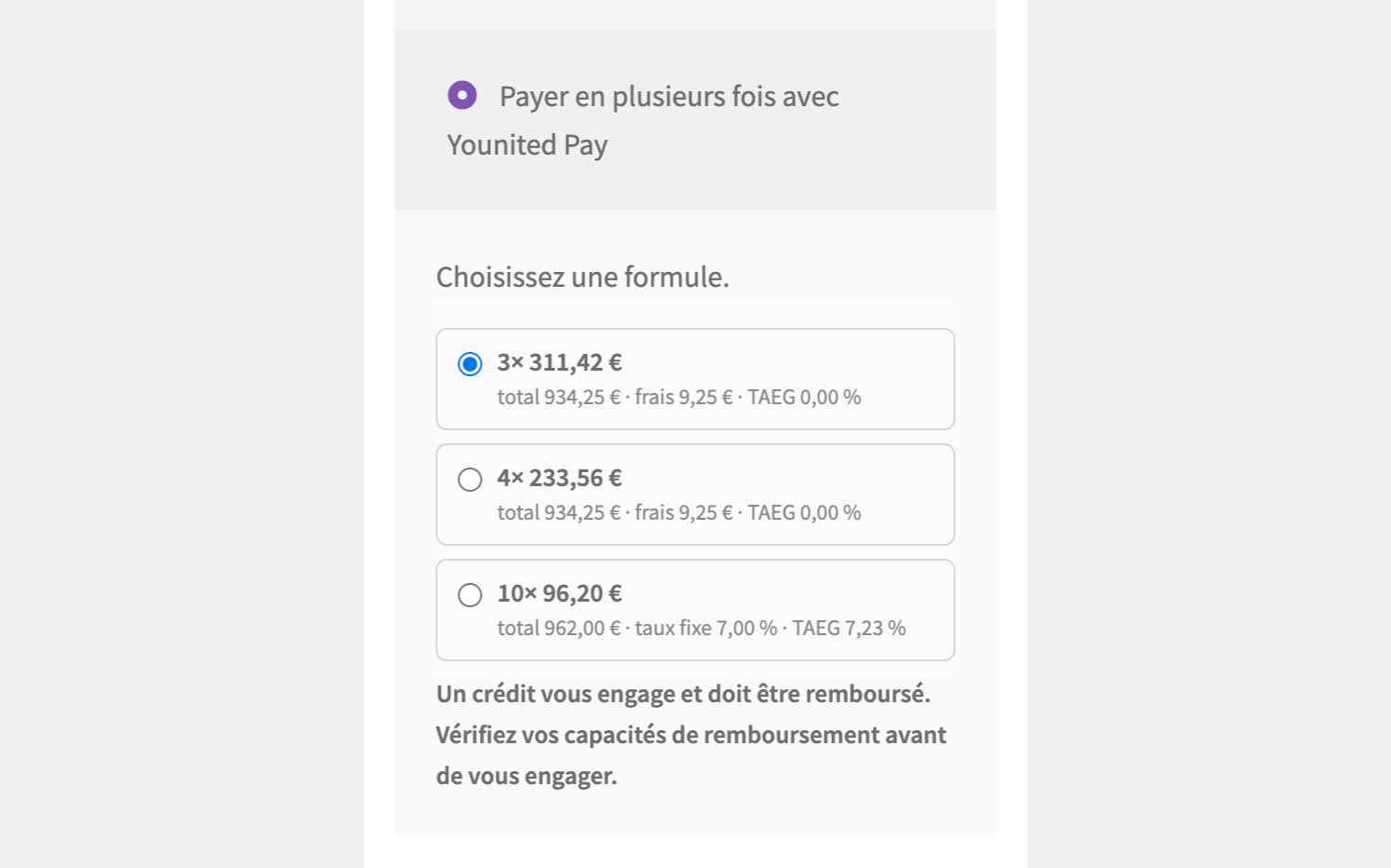
Younited Pay for WooCommerce adds a payment method “Payer en plusieurs fois avec Younited Pay” to the checkout: the buyer picks one of the plans Younited offers for the cart amount (split into 2-4 payments or a loan over several months) and applies on a secure Younited page. The module works directly with your own Younited merchant account, with no middleman. It works with the classic and block checkout and HPOS. The module interface is in English and French.
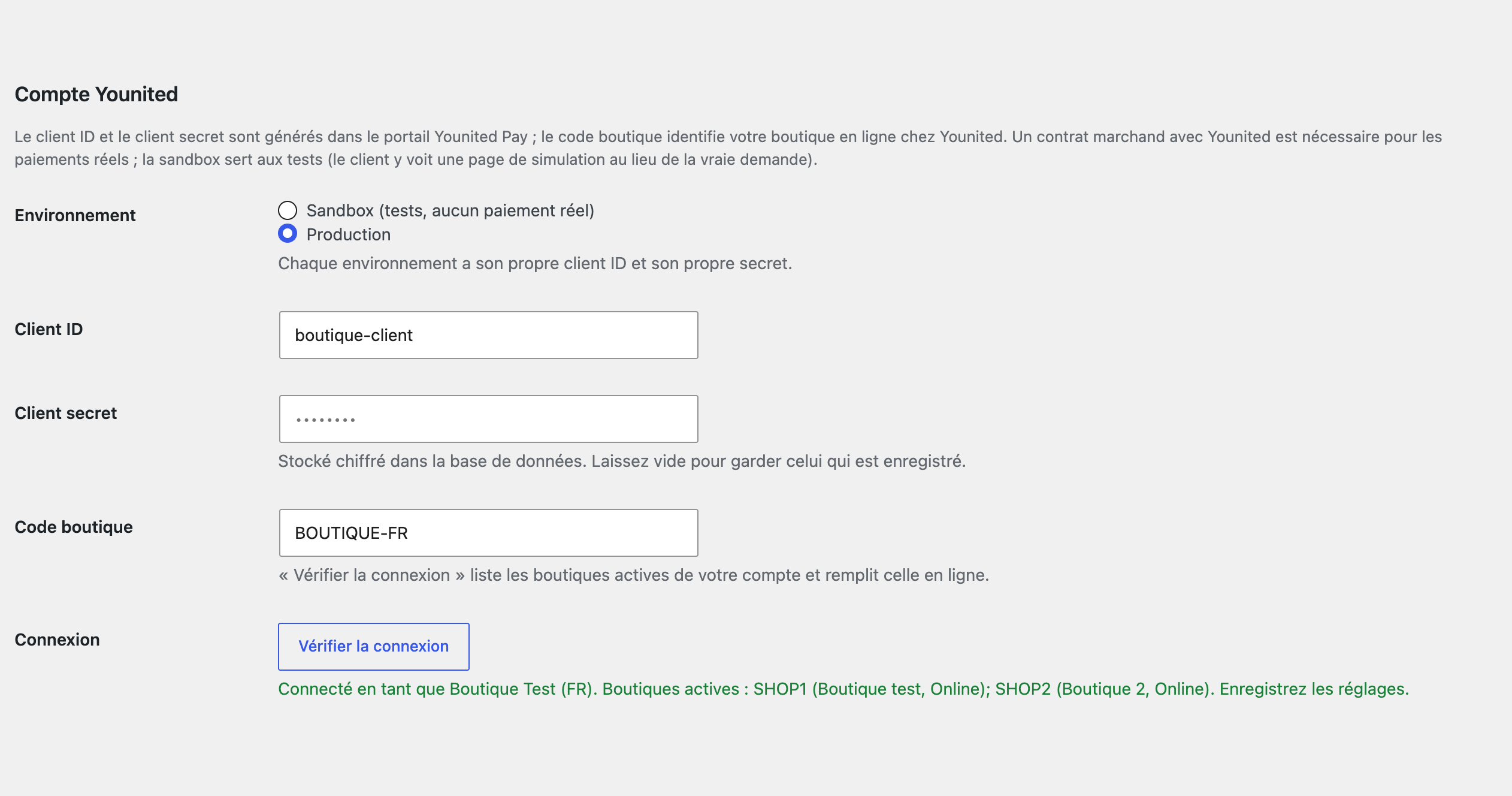
All settings live in one place: WooCommerce → Younited Pay. Pick sandbox or production and enter the Client ID, the Client secret (stored encrypted) and the Shop code. “Vérifier la connexion” fetches a token, lists the active shops of your account and fills in the online one. “Afficher les offres pour ce montant” shows which plans Younited returns for any amount; the numbers of payments in the plans are a list, 3, 4 and 10 by default. At the checkout the plans under the method are exactly those Younited returned for the cart amount: instalment, first instalment, total, cost, fixed rate and APR (TAEG), with the standard credit reminder. Younited computes these figures, the module does not. The payment is created with the basket, shipping, coupons, contacts and addresses of the buyer, and the buyer goes to the Younited page. When the buyer comes back, the status is read from Younited: a refusal or cancellation sends them to the order-pay page with a plain message, and they can pay again or another way. The notification address is sent with every payment, so nothing is registered in the portal; a notification is only a reason to read the payment from Younited again, and with the webhook signature key (HMAC-SHA256) unsigned calls are refused. The order has a box with the payment, plan and status, a “Vérifier le statut du paiement” button and an “Exécuter le paiement” button for an accepted personal loan; split payments are executed by Younited itself.
The installment line “ou 3× … avec Younited Pay” under the price on the product page, the plans for the cart total in the cart, and the shortcode [younited_pay_instalments] for any page; the amounts come from Younited and are kept for six hours. Refunds from WooCommerce, full and partial, go to Younited; refunds made in the Younited portal are recorded in the order. Automatic execution of an accepted loan when the order becomes Completed or right after acceptance. Cancelling the payment at Younited when the order is cancelled, plus an “Annuler chez Younited” button and a button for a new application link. Every 15 minutes a background check asks Younited about open payments of the last 30 days. Your own order amount range, excluded product categories and a Shop code for each billing country. An event journal, a 30-day report by status and a CSV export.
The module is not on wordpress.org yet: the free version and Pro are one archive from this page. Without a key it works as the free version.
Didn't find the answer? Message us on Telegram and we'll reply within a business day.
 @catcode_support
Setup, compatibility, activation
No. It is an independent integration through the public Younited Pay API; Younited is a trademark of its owner.
A merchant contract with Younited and the data from the Younited Pay portal: Client ID, Client secret and Shop code. Younited sets the connection terms and limits.
No. The module shows the plans and the reminder as Younited returns them. Check the advertising and buyer information requirements for your shop with Younited or a lawyer.
Press "Vérifier le statut du paiement" in the order: the module reads the payment from Younited. In Pro the background check does it every 15 minutes.
Younited executes split payments. An accepted personal loan is executed with the "Exécuter le paiement" button in the order, and in Pro also automatically by order status.
No. The buyer applies on the Younited page; the shop receives a payment number and a status.
No, euros only: the method is not shown for other currencies.
Yes, with the classic checkout and HPOS too.
Pro switches off, the free part keeps working.
No reviews yet. Be the first.
No questions yet. Ask one — we answer within 24 hours.
We build custom modules for WordPress, WooCommerce, OpenCart and Shopify. Tell us about the task and we'll prepare an estimate.
Order a custom module
—
Charged in UAH; your bank converts it to your currency. EUR price is approximate.

CatCode assistant
Just now


CatCode assistant
Online

I’ll help with your website task
Describe your website task — I’ll find a ready-made module or pass it to a developer for an estimate. Modules, custom features, layout, integrations, speed, migration, technical SEO.
