
















WooCommerce
990 UAH644 UAH/year≈ €14
Black November: −35% on all modules until 30 November Black November: −35% until 30 November Choose a module
 Website auditA PDF report by email in 3 minutesCheck a website
Everyday tasks
Image compressorSize, quality and WebP in bulkQR generatorLink, Wi-Fi, payment to IBANVAT calculator20, 14, 7% and amount in wordsTransliterationOfficial Ukrainian standardWebsite checks
PHP and pluginsPHP version, WordPress, pluginsGoogle Merchant feedFields, prices, GTIN, imagesDomain emailSPF, DKIM, DMARC, blacklistsAI search readinessllms.txt, bots, markupAll 9 toolsEnter at least 2 characters

A Centas invoice from every WooCommerce order: VAT, i.SAF codes, company codes at the checkout, no duplicates; Pro adds invoices by status, payments, stock, a journal.
The free version works with no time limit. Pro adds the rest of the features in the table.


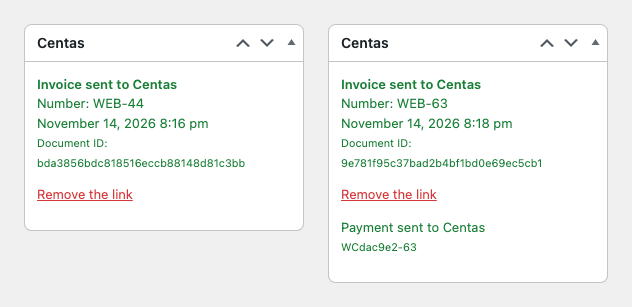
The order screen gets a “Centas” box with the “Send invoice to Centas” button.

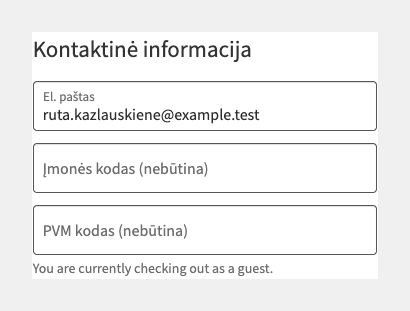
The “Įmonės kodas” (company code) and “PVM kodas” (VAT code) fields switch on with one tick: they appear on the classic and the block checkout, stay optional and never block an order.

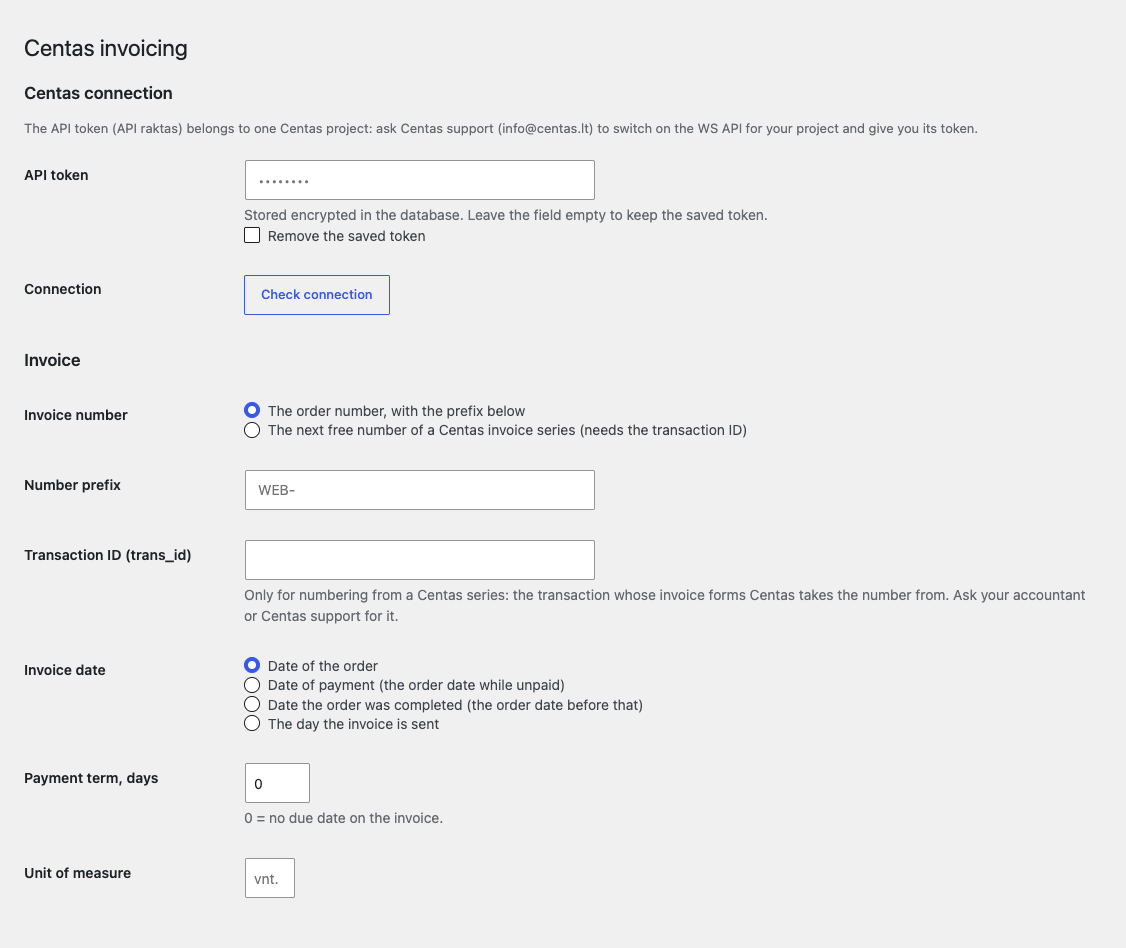
WooCommerce → Centas. The token comes first: it is stored encrypted and never shown back, and “Check connection” only reads the project’s product list and writes nothing to Centas.

A fresh install is the free version, nothing switches on by itself. The “Try Pro for 7 days” button → e-mail → the key right in the window and by e-mail.

Moving the site? Unlink the licence on the old domain and activate it on the new one yourself. A staging copy (staging., dev.) works with the same key and does not take a site slot. For studios — keys for 5 or 25 sites, or unlimited.
 WordPress 6.2+, WooCommerce 7.0+ (HPOS, block checkout), PHP 7.4+.A Centas project with the WS API and a project token; one token belongs to one project.Interface language: English, lietuvių (the Lithuanian translation comes with Pro).
Connection to the Centas WS API with a token, an invoice from the order (buyer, lines with SKU, prices without VAT, rates, i.SAF codes, fees, shipping), company code and VAT code fields at…


Centas Invoicing for WooCommerce creates sales invoices in the Lithuanian accounting program Centas straight from your shop orders through its WS API: the “Send invoice to Centas” button on the order sends the buyer, the lines with prices without VAT, VAT rates and i.SAF codes, fees and paid shipping, and the totals with and without VAT match the order.
What you need from Centas. A Centas project with the WS API switched on and the project token (API raktas): Centas support (info@centas.lt) switches the WS API on and issues the token. You agree the WS terms with Centas; the plugin adds no fee per document.
The order screen gets a “Centas” box with the “Send invoice to Centas” button. After sending, the box shows the invoice number, the date, the document ID in Centas and a “Remove the link” link, so the order can be sent again after the document was deleted in Centas. In Pro the sent payment is shown there too.
An invoice never goes twice: the document ID is stored on the order, and a double click or two runs at once are blocked. If Centas does not answer in 8 seconds, the box says there was no answer and the plain button is switched off: only “Send anyway” with a confirmation is left, because the invoice may already exist. If Centas refuses, its reason is in the order note and the button stays. Connection and token errors are explained in words, without raw cURL text.
The invoice lines carry the product code (SKU), quantity, the price without VAT after discounts and coupons, the VAT rate and the i.SAF code of that rate; fees and paid shipping go as separate lines. If the lines do not add up to the order total without VAT, the invoice is still created and the order note carries a warning with both amounts in the shop format, so you can check the document in Centas.
The “Įmonės kodas” (company code) and “PVM kodas” (VAT code) fields switch on with one tick: they appear on the classic and the block checkout, stay optional and never block an order. If another plugin already collects the codes, enter the meta keys it saves them under. Centas recognises a returning buyer by company code, e-mail or WooCommerce customer number, and the plugin sets the buyer type by country: the country of the shop, the EU or a third country.
WooCommerce → Centas. The token comes first: it is stored encrypted and never shown back, and “Check connection” only reads the project’s product list and writes nothing to Centas. Then numbering (the order number with a prefix, or the next number of a Centas series with the trans_id), the invoice date (order, payment, completion or the day of sending), the payment term, the unit of measure, paid shipping as a line and a note on the invoice.
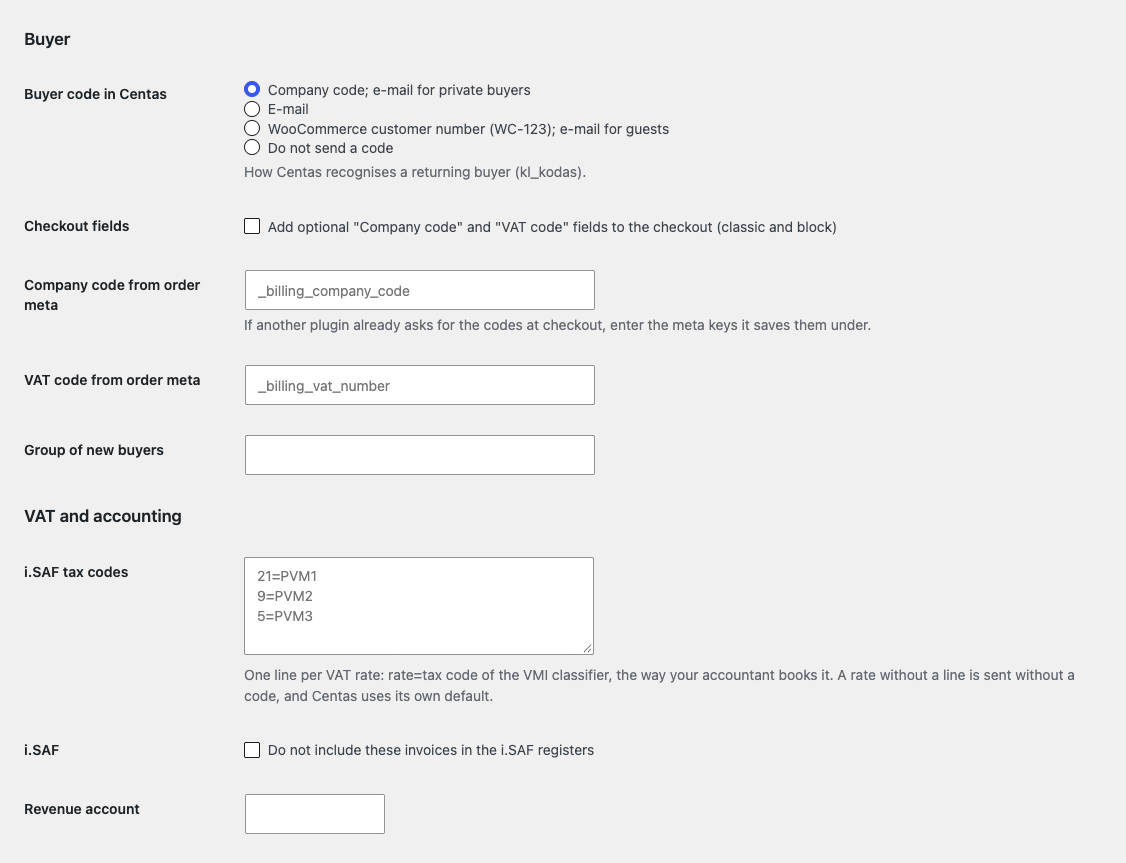
Further down are the buyer code, the checkout fields and the i.SAF codes per rate: a line “21=PVM1” maps a rate to the code of the VMI classifier the way your accountant books it. A separate tick keeps invoices out of the i.SAF registers. The revenue, VAT and buyer debts accounts, projektas and who issued the invoice with a position are optional; Centas fills empty fields with its own.
Invoices by status: you tick the statuses, the order is queued and goes in the background through Action Scheduler (or WP-Cron), never during checkout. Network failures and server errors are tried again twice, 10 minutes apart. The bulk actions “Send invoices to Centas” and “Send payments to Centas” appear in the order list, on the HPOS and on the classic screen.
Payments: a paid order goes into Centas through payments/import with a unique RefNr of the shop and the order, your IBAN and a payment type; payment methods such as cash on delivery are skipped. The “Check payments in Centas” button reads payments/export and shows which payments were found and which were not.
Products: every hour the stock (of all warehouses or one) and, if you want, the prices are read from products/export by SKU in portions of 200, and WooCommerce products with a SKU go to products/import. Up to three extra Centas projects: a token and the buyer countries; an order goes to the first project that fits, or to the one picked on the order screen.
The journal shows every invoice, payment and sync with its time, state and reason (the last 300 entries), and the failed ones can be sent again with “Send again”. Pro also brings updates from catcode.com.ua and the Lithuanian interface translation.
Selling on OpenCart? There is a separate module for it: Centas Invoicing for OpenCart (4.x, 3.x, 2.3).
Didn't find the answer? Message us on Telegram and we'll reply within a business day.
 @catcode_support
Setup, compatibility, activation
No, it is an independent integration by CatCode. Centas is a trademark of its owner; the plugin is not affiliated with Centas or endorsed by it.
A Centas project with the WS API switched on and the project token. Centas support switches the WS API on.
No: the Centas WS API has no call for it. Correct the document in Centas, then remove the link on the order and send it again.
The order box explains that there was no answer: the invoice may or may not have been created. Check Centas and press "Send anyway" if needed. The plugin will not send it a second time by itself.
No. Sending runs in the background or from a button in the admin; Centas is never called at the checkout.
A tick in the settings adds two optional fields to the classic and the block checkout. You can also take the codes from the meta fields of another plugin.
Centas has no webhooks. The plugin sends invoices and payments itself, checks payments by a button, and reads stock and prices every hour (Pro).
Yes, Pro takes up to three extra projects: a token and the buyer countries, or a pick on the order screen. Without Pro such an order is refused, not sent to the main project.
Yes: with HPOS order storage and the classic one, and with the block and the classic checkout.
Pro switches off and invoices queued by status stop with a note and a journal row. The free part (an invoice from the order by a button) keeps working.
No reviews yet. Be the first.
No questions yet. Ask one — we answer within 24 hours.
We build custom modules for WordPress, WooCommerce, OpenCart and Shopify. Tell us about the task and we'll prepare an estimate.
Order a custom module
—
Charged in UAH; your bank converts it to your currency. EUR price is approximate.

CatCode assistant
Just now


CatCode assistant
Online

I’ll help with your website task
Describe your website task — I’ll find a ready-made module or pass it to a developer for an estimate. Modules, custom features, layout, integrations, speed, migration, technical SEO.