
















WooCommerce
1 290 UAH839 UAH/year≈ €17
Black November: −35% on all modules until 30 November Black November: −35% until 30 November Choose a module
 Website auditA PDF report by email in 3 minutesCheck a website
Everyday tasks
Image compressorSize, quality and WebP in bulkQR generatorLink, Wi-Fi, payment to IBANVAT calculator20, 14, 7% and amount in wordsTransliterationOfficial Ukrainian standardWebsite checks
PHP and pluginsPHP version, WordPress, pluginsGoogle Merchant feedFields, prices, GTIN, imagesDomain emailSPF, DKIM, DMARC, blacklistsAI search readinessllms.txt, bots, markupAll 9 toolsEnter at least 2 characters

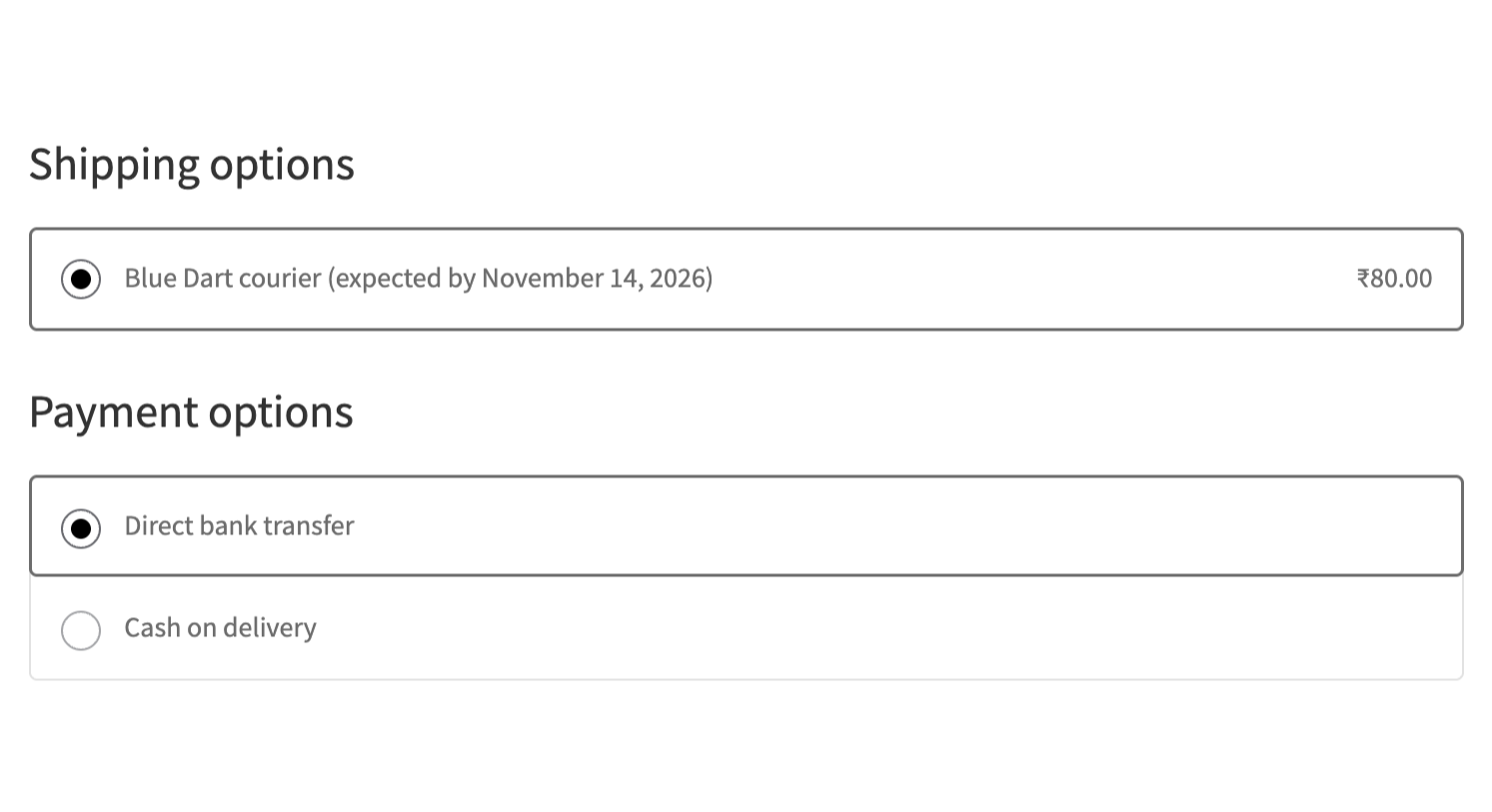
Blue Dart delivery for shops in India: the method shows only for PIN codes Blue Dart serves, and the waybill and the label are made from the order in one click.
The free version works with no time limit. Pro adds the rest of the features in the table.


The settings live in one place: WooCommerce → Blue Dart.

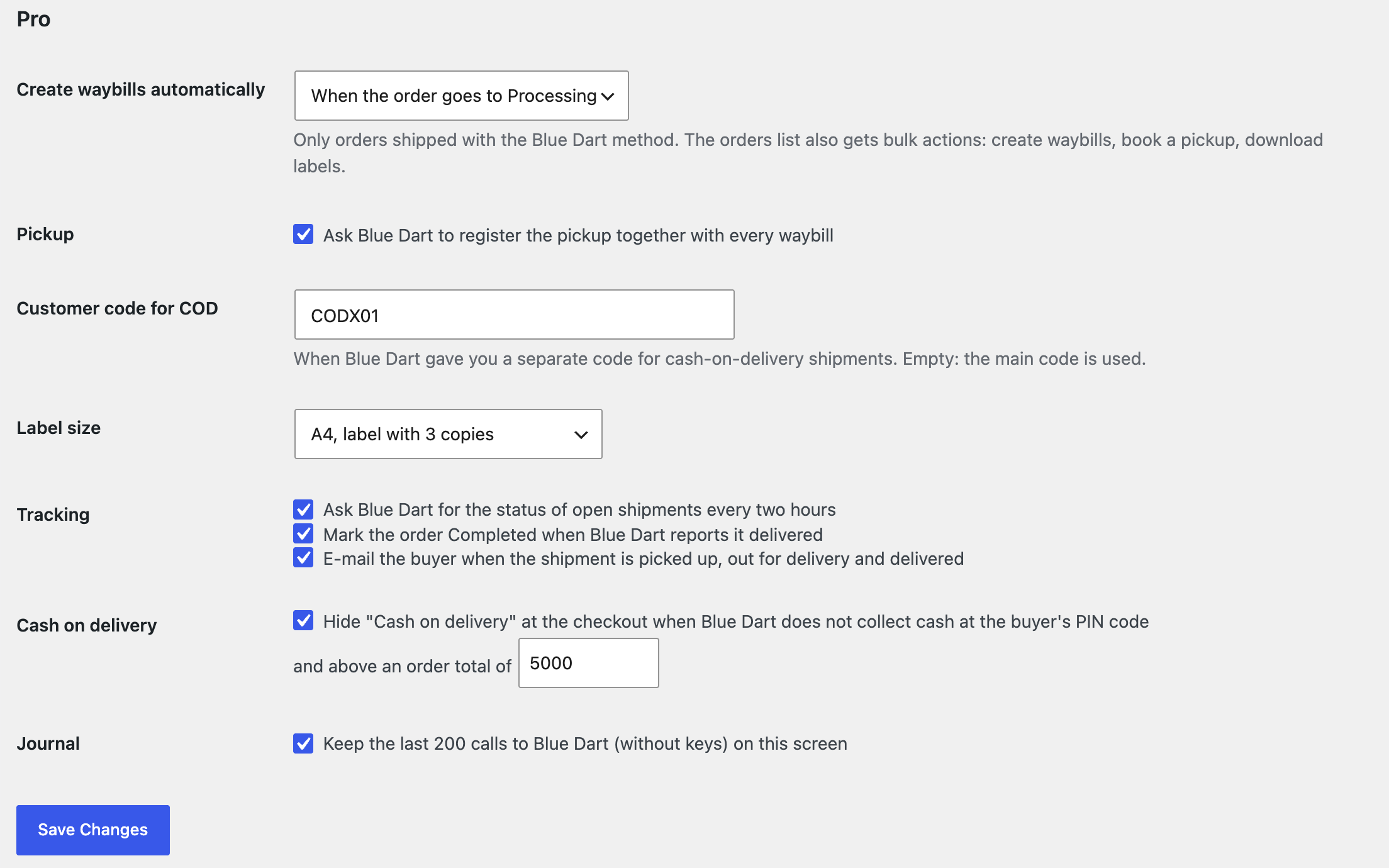
A waybill made automatically when the order goes to Processing or Completed. Bulk actions on the orders list: waybills for many orders in one call (20 at a time), one pickup for the selected orders, a zip with all their labels.

The base version is free. Pro costs 1290 UAH for a one-year licence. A year of updates, technical support and all Pro features.

A fresh install is the free version, nothing switches on by itself. The “Try Pro for 7 days” button → e-mail → the key right in the window and by e-mail.

Moving the site? Unlink the licence on the old domain and activate it on the new one yourself. A staging copy (staging., dev.) works with the same key and does not take a site slot. For studios — keys for 5 or 25 sites, or unlimited.
 WordPress 6.4+, WooCommerce 8.6+, PHP 7.4+.A Blue Dart (DHL eCommerce India) account with API access; an app on the DHL API Developer Portal.A shop in India with the INR currency and a shipping zone for India; https.
The Blue Dart method with your own price, a PIN code check at the checkout, a waybill from the order (prepaid and cash on delivery), a label PDF, the waybill number and TrackDart for the buyer.


Blue Dart Shipping for WooCommerce connects your shop to your own Blue Dart (DHL eCommerce India) account through the Blue Dart API gateway. At the checkout the “Blue Dart” method appears only for the PIN codes Blue Dart serves; on the order one button books the waybill with the buyer’s address, the weight and the total, and the label PDF is kept with the order. The buyer sees the waybill number and a TrackDart link on the order page and in the e-mails. The module works on the classic and the block checkout, with HPOS; the interface is English, for the Indian market.
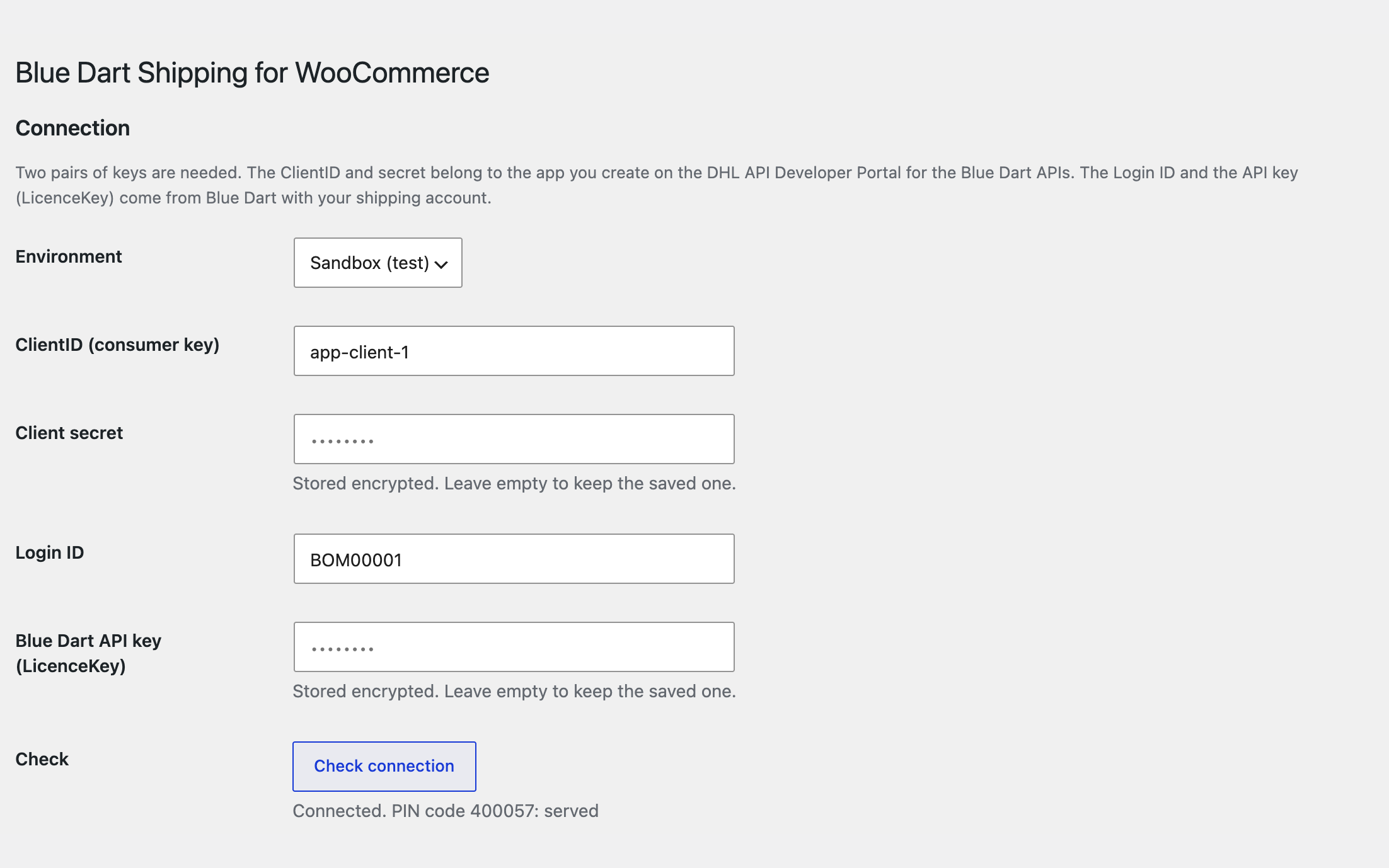
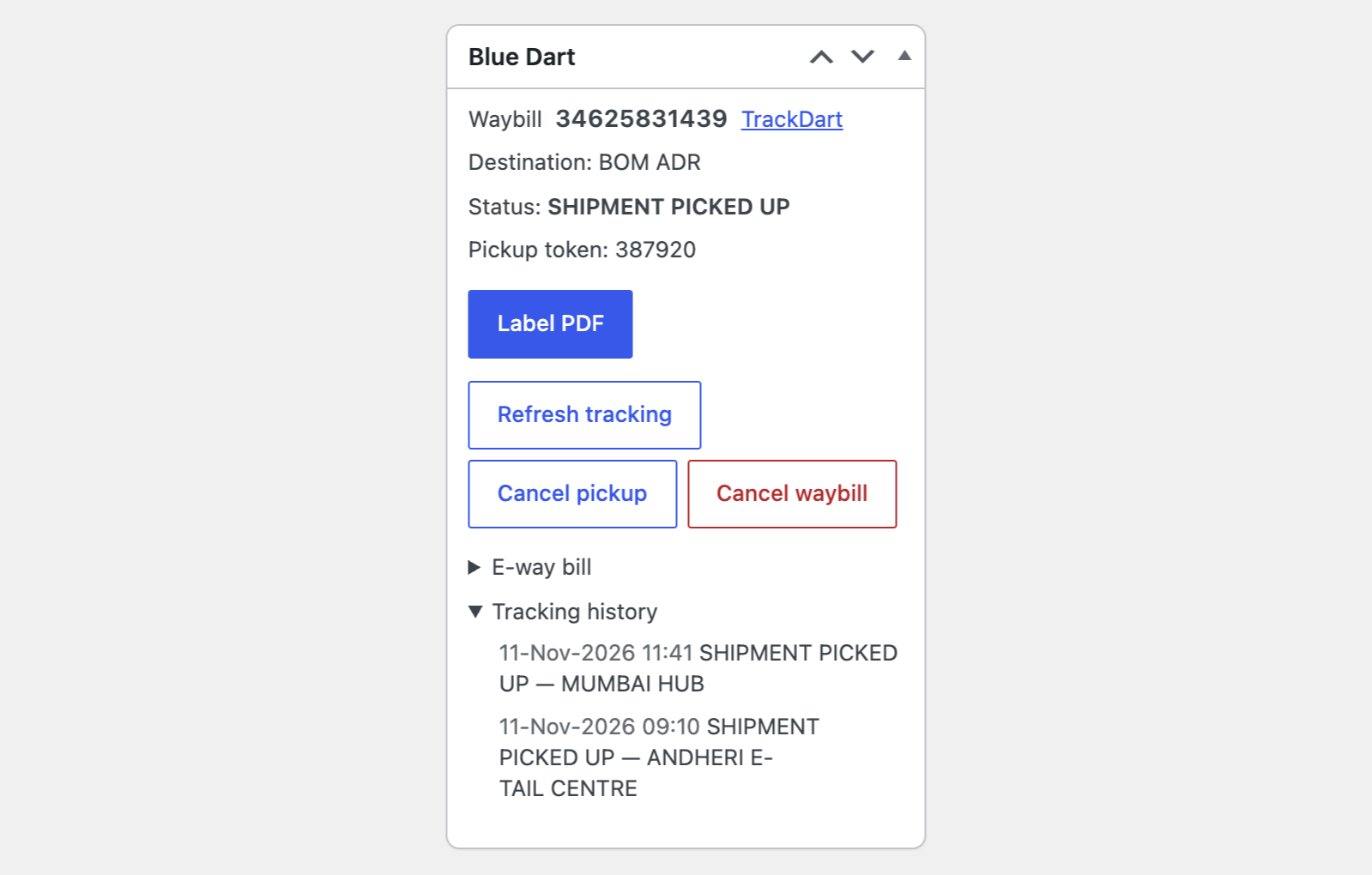
The settings live in one place: WooCommerce → Blue Dart. Enter the ClientID and secret of the app you made on the DHL API Developer Portal, the Login ID, the API key (LicenceKey), the customer code and the area code that Blue Dart gives you with your account, and your pickup address. Choose the sandbox or live mode and press “Check connection”: the module gets a token and at once shows whether Blue Dart serves your PIN code. The keys are stored encrypted and never printed back into the form. In your India shipping zone add the “Blue Dart” method and set its price: for the first kilogram, optionally for every further one, free shipping from an amount or with a free-shipping coupon, a weight limit. You set the price: the Blue Dart API does not calculate a rate, so the module does not pull one. At the checkout the method is hidden for PIN codes Blue Dart does not serve (the answer is cached for 12 hours); if the gateway does not answer, the method stays and orders are never blocked. The “Try a PIN code” button on the settings screen checks any PIN code for prepaid and for cash on delivery. On the order the “Blue Dart” box books the waybill: the address, the weight, the number of pieces and the order total go to Blue Dart; cash-on-delivery orders go out with the amount to collect, the others as prepaid. The label PDF that Blue Dart returns is kept with the order and opens with the “Label PDF” button. Blue Dart accepts Latin letters only on a waybill, so an address in Hindi or another script has to be edited in the order before the waybill is created; the module says so instead of sending bad data. The buyer sees the waybill number and a TrackDart link in “My account → Orders” and in the order e-mails.
A waybill made automatically when the order goes to Processing or Completed. Bulk actions on the orders list: waybills for many orders in one call (20 at a time), one pickup for the selected orders, a zip with all their labels. Pickups: registered with every waybill, or booked from the order, and cancelled. Cancelling a waybill before Blue Dart scans the shipment in, and making a new one. The e-way bill number for a waybill is sent to Blue Dart from the order. Tracking: open shipments are checked about every two hours, every status goes into the order notes, the history shows on the order and for the buyer, and the order turns Completed on delivery. E-mails to the buyer: picked up, out for delivery, delivered. Cash on delivery rules: “Cash on delivery” is hidden at the checkout where Blue Dart does not collect cash at the PIN code, and above the order total you set. The expected delivery date next to the method title (Transit Time API). A separate customer code for cash on delivery, the label size (A4, A4 with 3 copies, 55 × 30, 89 × 60), a journal of the last 200 calls to Blue Dart without keys. A licence with a 7-day trial and updates from the admin.
The module is not on wordpress.org yet: the free version and Pro are one archive from this page. Without a key it works as the free version.
Didn't find the answer? Message us on Telegram and we'll reply within a business day.
 @catcode_support
Setup, compatibility, activation
No. It is an independent integration made by us; Blue Dart and DHL belong to their owners and have nothing to do with our module.
Yes. Waybills are booked on your own account, with your own keys and rates. The module does not sign the contract with Blue Dart.
No. The gateway API has no price calculation, so the shipping price at the checkout is the one you set on the method: for the first kilogram, for further ones, free from an amount.
Blue Dart accepts Latin letters only on a waybill. Edit the address in the order and create the waybill again; the module says so instead of sending bad data.
The checkout keeps working: the method stays with your price. Creating a waybill says that Blue Dart could not be reached, and you can repeat it later.
Pro switches off, the free part keeps working.
No reviews yet. Be the first.
No questions yet. Ask one — we answer within 24 hours.
We build custom modules for WordPress, WooCommerce, OpenCart and Shopify. Tell us about the task and we'll prepare an estimate.
Order a custom module
—
Charged in UAH; your bank converts it to your currency. EUR price is approximate.

CatCode assistant
Just now


CatCode assistant
Online

I’ll help with your website task
Describe your website task — I’ll find a ready-made module or pass it to a developer for an estimate. Modules, custom features, layout, integrations, speed, migration, technical SEO.