
















WooCommerce
990 UAH644 UAH/year≈ €14
Black November: −35% on all modules until 30 November Black November: −35% until 30 November Choose a module
 Website auditA PDF report by email in 3 minutesCheck a website
Everyday tasks
Image compressorSize, quality and WebP in bulkQR generatorLink, Wi-Fi, payment to IBANVAT calculator20, 14, 7% and amount in wordsTransliterationOfficial Ukrainian standardWebsite checks
PHP and pluginsPHP version, WordPress, pluginsGoogle Merchant feedFields, prices, GTIN, imagesDomain emailSPF, DKIM, DMARC, blacklistsAI search readinessllms.txt, bots, markupAll 9 toolsEnter at least 2 characters

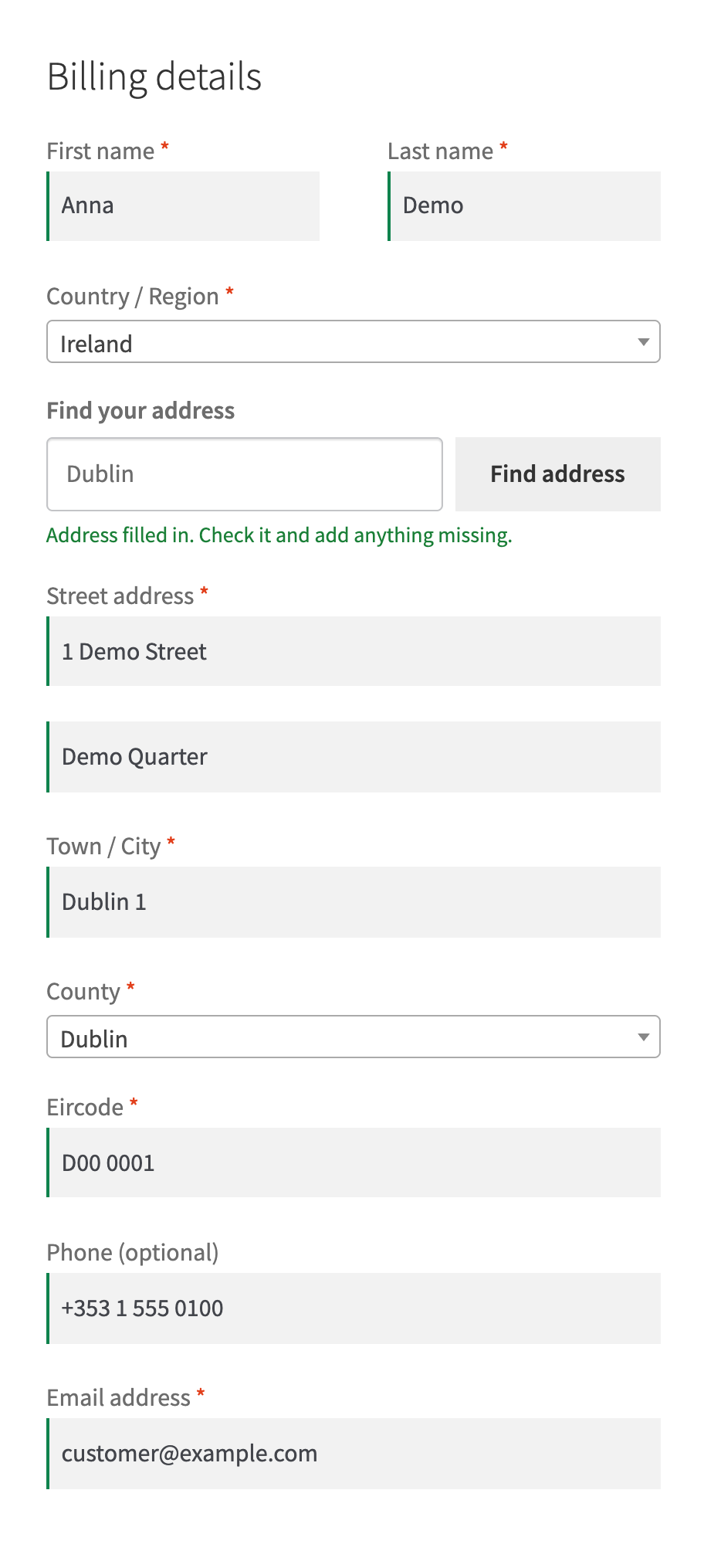

Eircode and address lookup at the WooCommerce checkout through Autoaddress: address lines, town, county and Eircode fill in by themselves; Pro adds suggestions, an address check, a report and spending limits.
The free version works with no time limit. Pro adds the rest of the features in the table.


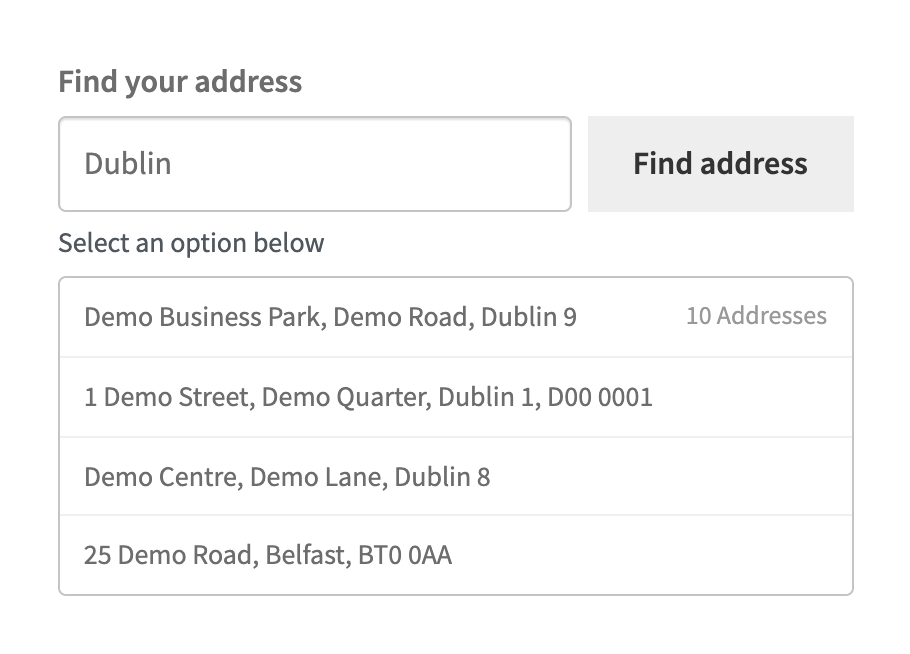
When the country of the address is Ireland, a “Find your address” box appears above the address fields (above billing, above shipping or both, as you choose).

WooCommerce → Autoaddress: paste the key and press “Check connection” — the plugin gets a session token and tells you whether Autoaddress accepted the key.

Suggestions while typing. Addresses appear as the buyer types, after a 300 ms pause, without pressing the button.

A fresh install is the free version, nothing switches on by itself. The “Try Pro for 7 days” button → e-mail → the key right in the window and by e-mail.

Moving the site? Unlink the licence on the old domain and activate it on the new one yourself. A staging copy (staging., dev.) works with the same key and does not take a site slot. For studios — keys for 5 or 25 sites, or unlimited.
 WordPress 6.4+, WooCommerce 8.6+ (HPOS and block checkout are supported), PHP 7.4+.An Autoaddress account and an API key of version 3.0.Plugin interface language: English.
Better address search: searching by Eircode and Irish addresses now goes through Autoaddress suggestions, so the right Irish addresses are found.
Connection with an Autoaddress key, address search by Eircode on the classic and block checkout, filling in the address, town, county and Eircode.


Autoaddress Eircode Lookup for WooCommerce adds a “Find your address” box to the checkout: the buyer types an Eircode or the start of the address, picks the address from a list, and the address lines, town, county and Eircode fill in by themselves. It uses the Autoaddress 3.0 API with your own Autoaddress key; the key stays on your shop server.
What you need at Autoaddress. Your own Autoaddress account (Account Centre) with an integration and an API key of version 3.0. Lookups are paid to Autoaddress under your plan; the plugin itself charges nothing per lookup.
When the country of the address is Ireland, a “Find your address” box appears above the address fields (above billing, above shipping or both, as you choose). The buyer types an Eircode (for example D08 XY01), part of an address or a business name and presses “Find address” or Enter; Enter searches and does not place the order. For other countries the box is hidden. A result that is a building or a business park with several addresses opens into its own list.
The chosen address fills in the address lines, town, county and Eircode. The county is matched to the WooCommerce county list by its English or Irish name, and the Eircode is written as “A65 F4E2”. It works the same on the classic and the block checkout; on a phone the search field uses a 16 pixel font.
Nothing forces the buyer to use the finder: the address fields stay as they are. When Autoaddress cannot be reached, the box says so in one sentence and the buyer types the address by hand; an order is never blocked because of it. The key and the short-lived token never reach the browser: the checkout talks only to your shop, and the shop asks Autoaddress.
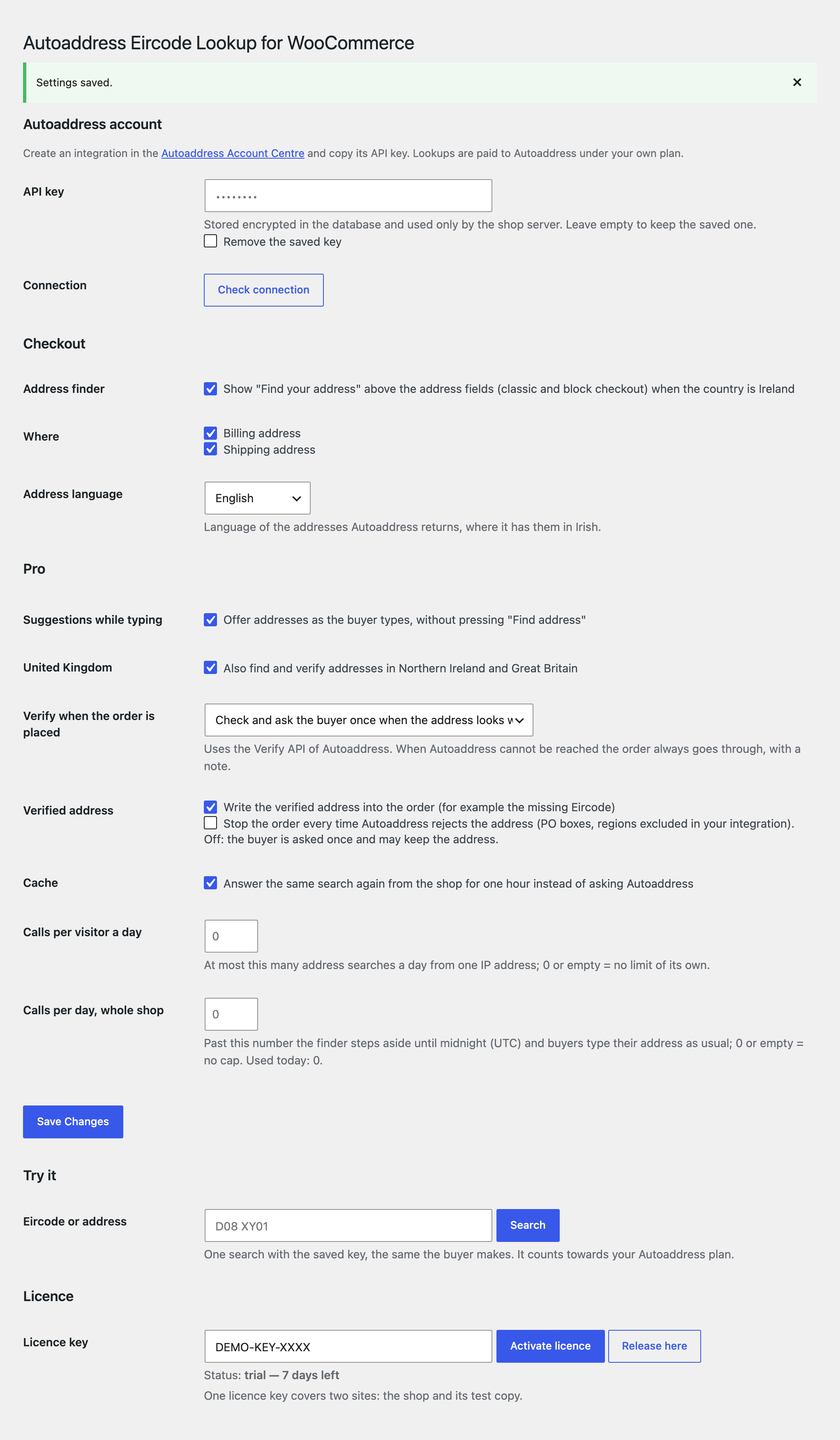
WooCommerce → Autoaddress: paste the key and press “Check connection” — the plugin gets a session token and tells you whether Autoaddress accepted the key. The saved key is never printed back; an empty field keeps the saved one, and “Remove the saved key” removes it.
Choose where to show the finder (billing, shipping) and the address language (English or Irish, where Autoaddress has it). The “Try it” section runs one trial search with the saved key; it counts towards your Autoaddress plan like a buyer’s search. The plugin interface is in English.
Suggestions while typing. Addresses appear as the buyer types, after a 300 ms pause, without pressing the button. A manual search cancels the pending suggestion, so one action of the buyer is one paid call.
Address check when the order is placed. The delivery address goes through the Autoaddress Verify API. Modes: off, a note on the order only, or “ask once”: for an inexact or incomplete address the order stops once with the Autoaddress message and a suggested address, and placing the order again keeps the address as the buyer typed it. When Autoaddress cannot be reached the order goes through with a “not verified” note. The check works on the block checkout too.
Rejected addresses. Addresses that your Autoaddress integration rejects (PO boxes, excluded regions) can stop the order every time. It is off by default: the buyer is asked once and may keep the address.
Verified address in the order. A missing Eircode or a corrected line can be written into the order, with a note saying so.
On the order screen. An “Address check” box: the result of the check, the Autoaddress ID, the coordinates with a map link (when your integration returns them) and a “Verify again” button.
Address report. Orders whose address was not confirmed (close match, incomplete, rejected, check unavailable) for the last 7, 30, 90 or 365 days, with CSV export.
Northern Ireland and Great Britain. Finding and checking also works for addresses of the country GB.
Spending control. A limit of searches per visitor a day, a limit of searches a day for the whole shop (past it the finder hides and buyers type the address by hand) and one hour of cache for repeated searches.
Didn't find the answer? Message us on Telegram and we'll reply within a business day.
 @catcode_support
Setup, compatibility, activation
No, it is an independent integration by CatCode. Autoaddress and Eircode are trademarks of their owners; the plugin is not affiliated with or endorsed by Autoaddress.
Yes: the key is yours and lookups are paid to Autoaddress under your plan. The plugin takes no money per lookup.
No. The address fields stay as they are; the finder only fills them in.
The box says so and the buyer types the address by hand. An order is never blocked because Autoaddress cannot be reached.
The box shows only when the country of the address is Ireland. Pro adds Northern Ireland and Great Britain.
Yes, on the classic and the block checkout, for the billing and the shipping address.
Pro switches off and the free part keeps working: the connection and the address search at checkout.
One key covers two sites: the shop and its test copy.
No reviews yet. Be the first.
No questions yet. Ask one — we answer within 24 hours.
We build custom modules for WordPress, WooCommerce, OpenCart and Shopify. Tell us about the task and we'll prepare an estimate.
Order a custom module
—
Charged in UAH; your bank converts it to your currency. EUR price is approximate.

CatCode assistant
Just now


CatCode assistant
Online

I’ll help with your website task
Describe your website task — I’ll find a ready-made module or pass it to a developer for an estimate. Modules, custom features, layout, integrations, speed, migration, technical SEO.