
















OpenCart
1 290 UAH839 UAH≈ €17
Black November: −35% on all modules until 30 November Black November: −35% until 30 November Choose a module
 Website auditA PDF report by email in 3 minutesCheck a website
Everyday tasks
Image compressorSize, quality and WebP in bulkQR generatorLink, Wi-Fi, payment to IBANVAT calculator20, 14, 7% and amount in wordsTransliterationOfficial Ukrainian standardWebsite checks
PHP and pluginsPHP version, WordPress, pluginsGoogle Merchant feedFields, prices, GTIN, imagesDomain emailSPF, DKIM, DMARC, blacklistsAI search readinessllms.txt, bots, markupAll 9 toolsEnter at least 2 characters

FatturaPA e-invoices from OpenCart through Aruba. Checked on an Aruba mock.
The free version works with no time limit. Pro adds the rest of the features in the table.


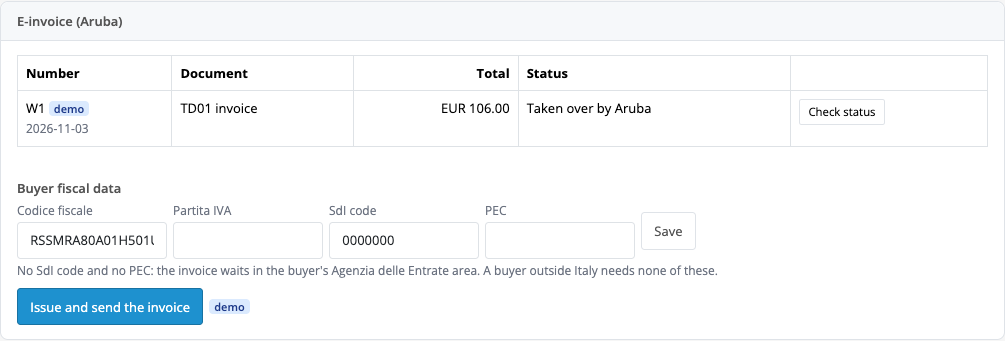
A panel on the order page: the Create and send invoice button builds the XML, sends it to Aruba and shows the status (taken over, sent, delivered or refused with the reason).

Sending on the chosen status, a TD04 credit note on the refund status (once), the mapping of payment methods to MP codes, skipped countries and an only-with-fiscal-data mode.

The base version is free. Pro costs 1490 UAH, a perpetual licence. One payment, no yearly fees.

A fresh install is the free version, nothing switches on by itself. The “Try Pro for 7 days” button → e-mail → the key right in the window and by e-mail.

Moving the site? Unlink the licence on the old domain and activate it on the new one yourself. A staging copy (staging., dev.) works with the same key and does not take a site slot. For studios — keys for 5 or 25 sites, or unlimited.
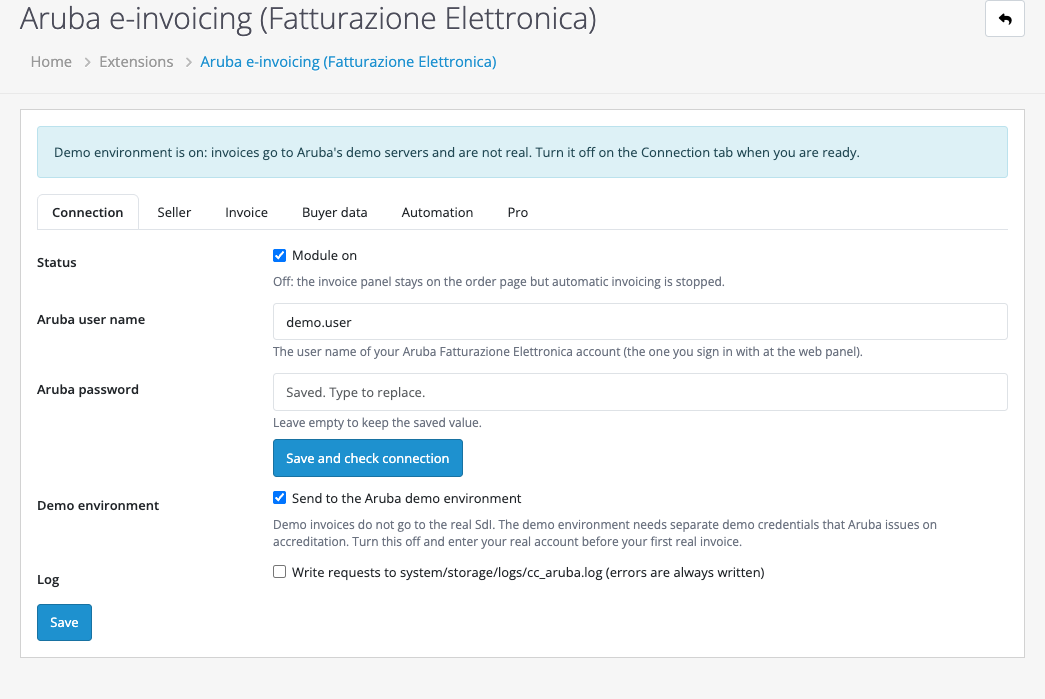
 OpenCart 4.0.2 or newer (4.1.0.3 and 4.0.2.3 tested).PHP 8.0+, the cURL extension.An Aruba Fatturazione Elettronica account with API access (a trial needs the demo credentials from Aruba).
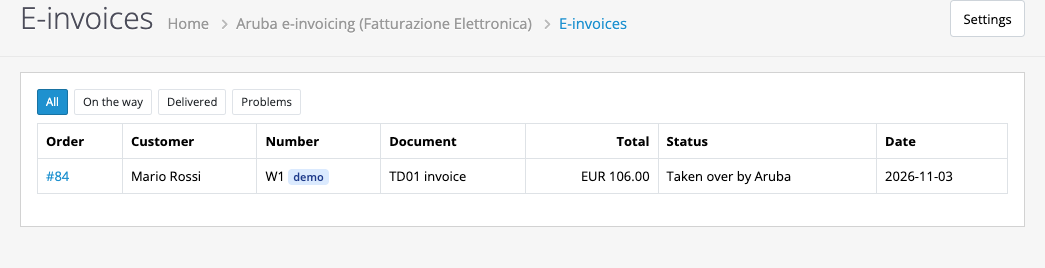
A FatturaPA invoice from an order, status, a list.



Aruba Fatturazione Elettronica builds the Italian FatturaPA e-invoice (XML) from an OpenCart order, sends it through the Aruba API to the SdI exchange system and shows the status on the order page. The buyer data are the codice fiscale, the P.IVA, the codice destinatario and the PEC. In Pro an invoice is sent on a status and a refund sends a TD04 credit note. Aruba materials show only a WooCommerce plugin; there is no OpenCart connector.
This is a legal document: the invoice file was not checked against the official XSD, and an accountant should look at it before going live.
A panel on the order page: the Create and send invoice button builds the XML, sends it to Aruba and shows the status (taken over, sent, delivered or refused with the reason). The buyer data come from the checkout fields or are entered in the panel. A second click does not send the file twice; if Aruba did not answer the upload, the module says plainly that the invoice may have arrived and asks you to look for it in your Aruba panel.
Sending on the chosen status, a TD04 credit note on the refund status (once), the mapping of payment methods to MP codes, skipped countries and an only-with-fiscal-data mode.
OpenCart 4.0.2 or newer is required. Do not rename the archive.
Didn't find the answer? Message us on Telegram and we'll reply within a business day.
 @catcode_support
Setup, compatibility, activation
No. We made the module; Aruba is the name of the service.
No. An invoice is a legal document: check the regime, the Natura code and the rate with your accountant before you switch to live mode.
Pro switches off, the free part keeps working.
No reviews yet. Be the first.
No questions yet. Ask one — we answer within 24 hours.
We build custom modules for WordPress, WooCommerce, OpenCart and Shopify. Tell us about the task and we'll prepare an estimate.
Order a custom module
—
Charged in UAH; your bank converts it to your currency. EUR price is approximate.

CatCode assistant
Just now


CatCode assistant
Online

I’ll help with your website task
Describe your website task — I’ll find a ready-made module or pass it to a developer for an estimate. Modules, custom features, layout, integrations, speed, migration, technical SEO.
