















OpenCart
990 UAH644 UAH≈ €13
Black November: −35% on all modules until 30 November Black November: −35% until 30 November Choose a module
 Website auditA PDF report by email in 3 minutesCheck a website
Everyday tasks
Image compressorSize, quality and WebP in bulkQR generatorLink, Wi-Fi, payment to IBANVAT calculator20, 14, 7% and amount in wordsTransliterationOfficial Ukrainian standardWebsite checks
PHP and pluginsPHP version, WordPress, pluginsGoogle Merchant feedFields, prices, GTIN, imagesDomain emailSPF, DKIM, DMARC, blacklistsAI search readinessllms.txt, bots, markupAll 9 toolsEnter at least 2 characters
Pix, instalment cards and boleto through Appmax for OpenCart 4.x, 3.x, 2.3 (Brazil). Pix is free, Pro adds cards, boleto and refunds. Lifetime licence.
The free version works with no time limit. Pro adds the rest of the features in the table.


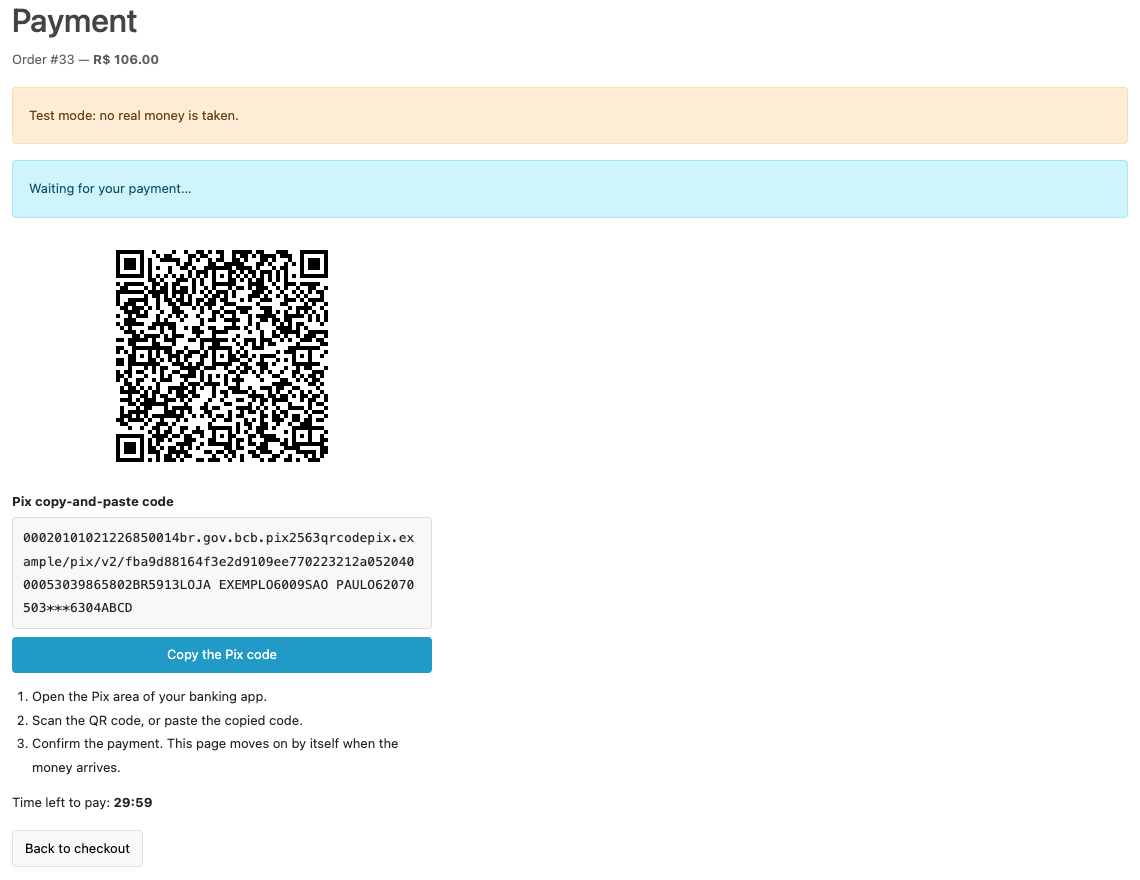
At the payment step the buyer sees the Appmax method. In the free version it is Pix: after “Continue to payment” a page opens with the QR code, the “copia e cola” code with a copy button and a timer to the end of the code.

Extensions → Extensions → Payments → Appmax Pix, Card & Boleto: the tabs “General”, “Checkout”, “Order statuses” and “Pro”.

A fresh install is the free version, nothing switches on by itself. The “Try Pro for 7 days” button → e-mail → the key right in the window and by e-mail.

Moving the site? Unlink the licence on the old domain and activate it on the new one yourself. A staging copy (staging., dev.) works with the same key and does not take a site slot. For studios — keys for 5 or 25 sites, or unlimited.
 OpenCart 4.0.2.0–4.1.x, 3.0.x or 2.3.0.2; PHP 7.0+ for 2.3, the cURL extension.An Appmax merchant account with access to the API screen (Client ID and Client Secret). If the API item is not in the panel, Appmax support opens it.Store currency BRL, or another currency converted to BRL at the store exchange rate.For the watchdog in Pro — the OpenCart 4 scheduler or a cron job at the address from the settings.The webhook address must be reachable from the internet (HTTPS).
For OpenCart 4.x, 3.x and 2.3: connection to Appmax, Pix with a payment page and an automatic move on, a webhook with read-back, the amount check, CPF/CNPJ.
Appmax Pix, Card & Boleto for OpenCart 4.x, 3.x and 2.3 takes the payments of your store through the Brazilian payment service Appmax: Pix with a QR code, credit cards with up to 12 instalments and the boleto bancário. The buyer pays on a page of your store, the order is confirmed when Appmax receives the money, and the admin sees every attempt, amount and refund in the order.
What you need from Appmax. Your own Appmax merchant account with access to the API screen of the panel (Client ID and Client Secret) and, for card payments, the External ID of the store. The store currency is the real (BRL); in other currencies the method either charges in BRL at the store exchange rate or hides itself, as you choose. Appmax charges its own fees for payments under your plan.
At the payment step the buyer sees the Appmax method. In the free version it is Pix: after “Continue to payment” a page opens with the QR code, the “copia e cola” code with a copy button and a timer to the end of the code. When the money arrives, the page moves on to the successful order by itself, without a click on “Back to the store”.
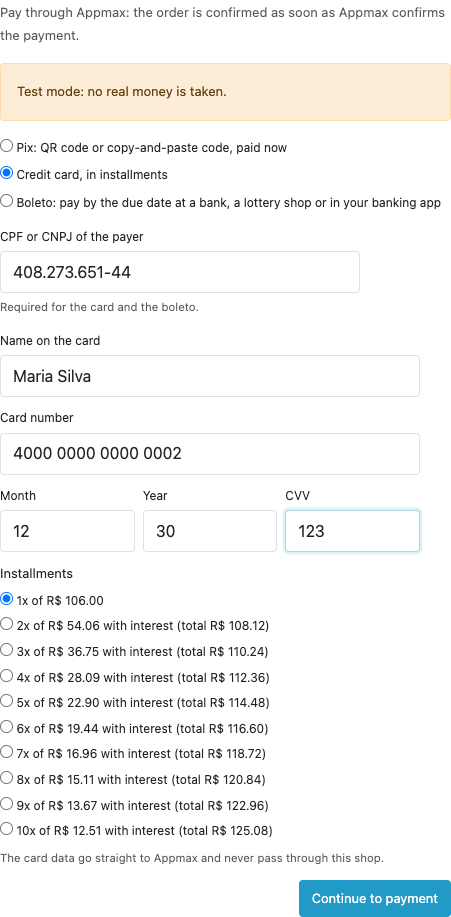
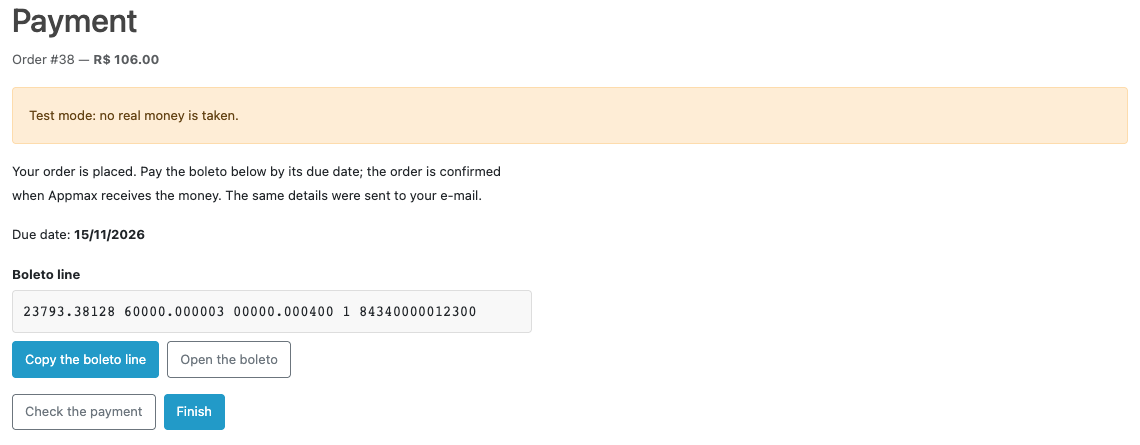
In Pro checkout has two more ways. Card: a form with Appmax JS fields, so the card number goes straight to Appmax and never passes through your store; instalments up to 12 payments on Appmax rates with the interest and the total shown, or interest-free at the store’s expense. Boleto: the payment line, the due date, the buttons “Copy the boleto line” and “Open the boleto”, and the same details go in the e-mail.
The payer’s CPF or CNPJ is validated (the new alphanumeric CNPJ too); it is optional for Pix and required for the card and the boleto. The phone with the area code is asked only when the order has none. CPF, house number and district come from our Brazilian fields module. If a card is declined, the buyer sees a plain message, the cart stays, and another card or another way can be tried.
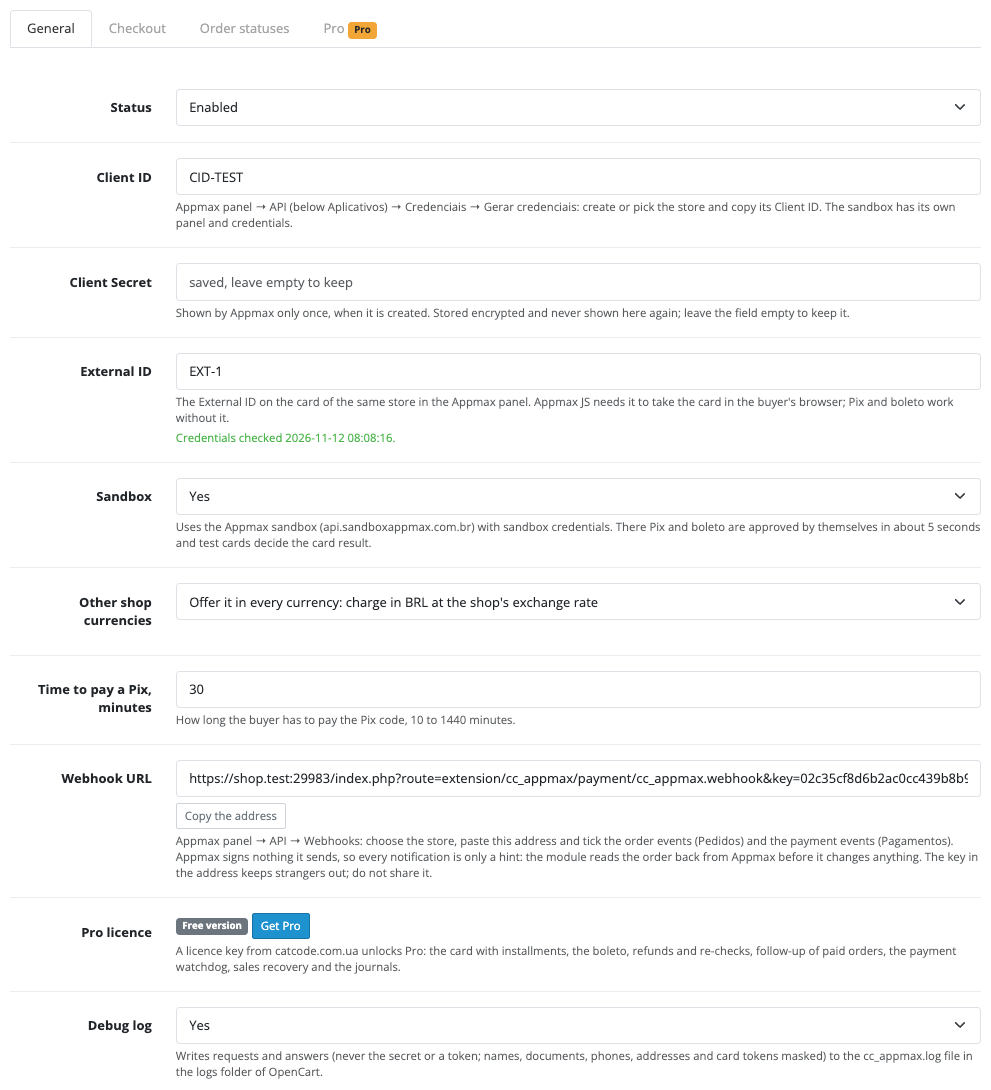
Extensions → Extensions → Payments → Appmax Pix, Card & Boleto: the tabs “General”, “Checkout”, “Order statuses” and “Pro”. You paste the Client ID, Client Secret and External ID from the Appmax panel, choose sandbox or live mode and press “Check connection”: the module gets a token and checks the connection. The secret is stored encrypted and is never shown back.
The same page holds the webhook address with a secret key: you paste it in the Appmax panel → API → Webhooks. Appmax signs nothing, so every notification is only a hint: the module reads the order back from Appmax and only then changes the status. There are the time to pay a Pix (10–1440 minutes), a geo zone, a minimum amount, the method name and description for every language, and the order statuses.
On the order page an Appmax box appears: the status, the amount, the way (for example “card (2x)”), the Appmax order number, the reference and a table of payment attempts with the Appmax answer. The buttons “Check at Appmax” and (Pro) “Refund” work from there; for a refund you can enter part of the amount or leave the field empty to refund everything.
In Pro a refund goes in full or in part for cards and Pix. Refunds and chargebacks made in the Appmax panel change the order in your store: through the webhook and the watchdog. The watchdog (the OpenCart 4 scheduler or a cron address) closes payments the buyer abandoned and finishes cards held by the anti-fraud check. Appmax sales recovery (a beta in Appmax itself) passes the buyer and the cart at the payment step if you switch it on; it is off by default.
The payment journal shows every attempt: the order, the amount, the way, the module status, the Appmax number, the refunded amount and the action buttons; a separate request journal holds the latest calls to Appmax with the answer and the time.
Didn't find the answer? Message us on Telegram and we'll reply within a business day.
 @catcode_support
Setup, compatibility, activation
No, it is an independent integration with Appmax made by CatCode. Appmax is a trademark of its owner.
An Appmax merchant account and its credentials from the API screen: Client ID and Client Secret. For cards also the External ID of the store.
The order is confirmed once Appmax confirms the payment: the payment page checks it by itself, and the webhook and the watchdog (Pro) back it up. Check the webhook address in the Appmax panel and the “Check at Appmax” button in the order.
The page offers a new code. The old code stays under watch: if it is paid later, the order goes to review as a double payment.
No. The card form works through Appmax JS, and the store receives only a token.
No. The module takes Pix, cards and the boleto; carts with subscriptions do not see it.
The real (BRL). For other currencies you can choose in the settings to charge in BRL at the store exchange rate or to hide the method.
OpenCart 4.0.2.0–4.1.x, 3.0.x and 2.3.0.2: three separate archives in one product.
Yes, for OpenCart it is one payment and a lifetime licence, for two sites.
Pro switches off and the free part keeps working: Pix stays.
No reviews yet. Be the first.
No questions yet. Ask one — we answer within 24 hours.
We build custom modules for WordPress, WooCommerce, OpenCart and Shopify. Tell us about the task and we'll prepare an estimate.
Order a custom module
—
Charged in UAH; your bank converts it to your currency. EUR price is approximate.

CatCode assistant
Just now


CatCode assistant
Online

I’ll help with your website task
Describe your website task — I’ll find a ready-made module or pass it to a developer for an estimate. Modules, custom features, layout, integrations, speed, migration, technical SEO.
