Get in touch
  • OpenCart
  • CRM and integrations
  • v1.0.0

Klaviyo Connector for OpenCart — events, profiles and subscriptions from your store to Klaviyo

Klaviyo integration for OpenCart 4, 3 and 2.3 over the official REST API: klaviyo.js and forms, product views, cart, Started Checkout with a cart link, Placed Order and Ordered Product, subscriptions only with the customer's tick. Pro — Fulfilled / Canceled / Refunded Order, product catalog with variants, past orders, SMS consent and newsletter box sync.

Download Free
Pro · lifetime licence The more sites, the less each one costs
Compatibility
OpenCart 4.0.2.0+ and 4.1.x (tested on 4.1.0.3 with PDO and 4.0.2.3) · OpenCart 3.x (tested on 3.0.5.0) · OpenCart 2.3.0.2 · PHP 7.0+ (tested on 7.0, 8.1, 8.2 and 8.3) · nginx + PHP-FPM and Apache
Version
v1.0.0 (OpenCart 4)
v1.0.0 (OpenCart 3.x)
v1.0.0 (OpenCart 2.3)
Licence
one site, lifetime
Trial
7 days, no card, one per site
Or all 144 Pro modules with All Access — 4 990 ₴ / year

What Free has,
and what Pro adds

The free version works with no time limit. Pro adds the rest of the features in the table.

Feature Free Pro
Connection with a Klaviyo private API key: account check, public key filled in, choice of the subscriber list ✔ ✔
klaviyo.js on the storefront: Klaviyo forms, Active on Site, identify of a logged-in customer ✔ ✔
"Wait for cookie consent" mode: Cookiebot, CookieYes or your banner's cookie ✔ ✔
Viewed Product and Recently Viewed Items, Added to Cart from the AJAX cart of any theme ✔ ✔
Started Checkout with a link that restores the cart on any device (30 days) ✔ ✔
Placed Order and Ordered Product: total in the order currency, discount and coupon, tax, shipping, addresses, product options ✔ ✔
Customer profile in Klaviyo: name, phone in E.164, address, language ✔ ✔
Newsletter subscription only with the customer's tick (the stock OpenCart box or ours, unticked), the consent text is kept with the order ✔ ✔
Queue with retries on Klaviyo rate limits and outages, 30-day API log, Klaviyo panel on the order page ✔ ✔
Stock OpenCart checkout and CatCode One Page Checkout ✔ ✔
Staging guard: a copy of the shop does not write into the live Klaviyo account ✔ ✔
Module languages: English, Ukrainian, Russian ✔ ✔
Fulfilled Order, Canceled Order and Refunded Order by your statuses, with the reason from the comment — ✔
Product catalog in Klaviyo: products, categories, variants by option with stock — for product blocks and Back in Stock — ✔
Past orders for a period (backfill: in reports and segments, flows do not fire) — ✔
Import of existing OpenCart newsletter subscribers with consent — ✔
Separate SMS consent at checkout, E.164 phone by the address country — ✔
Newsletter box in the account, at registration and in the admin ↔ subscribe and unsubscribe in Klaviyo — ✔

What it looks like

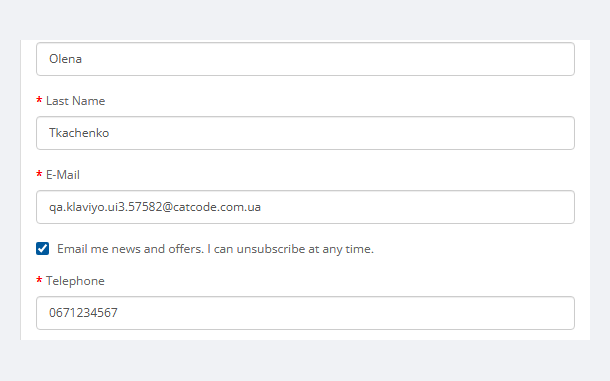
Newsletter consent box under the email field at the OpenCart checkout
OpenCart 3 guest checkout: our consent box under the email field, unticked by default. In OpenCart 4 and in One Page the shop’s own newsletter box is the consent.
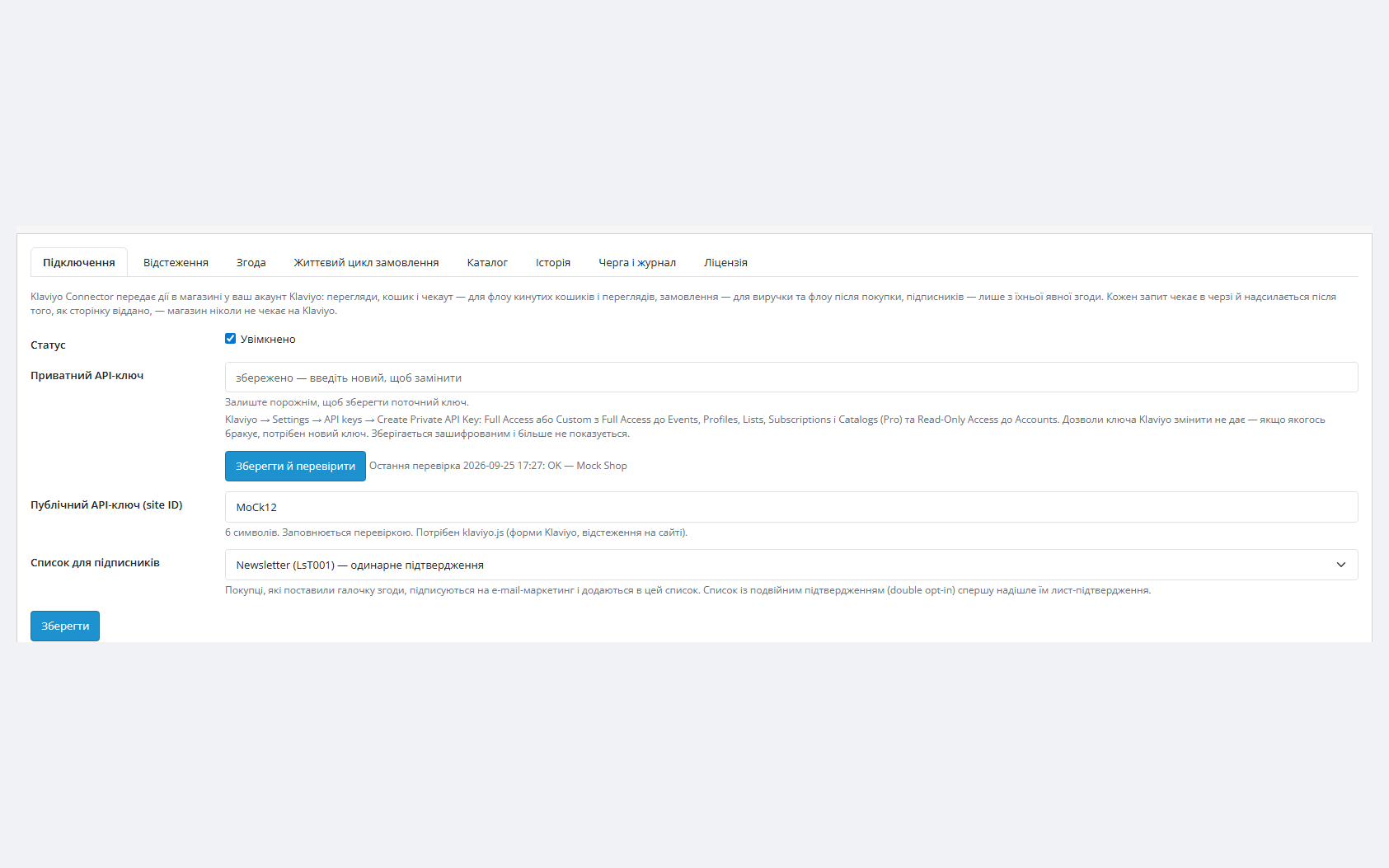
Klaviyo Connector connection in OpenCart 4: private key, public key, subscriber list
Extensions → Modules → Klaviyo Connector → Connection (admin in Ukrainian): key stored encrypted, last check OK, public key taken from the account, subscriber list chosen.
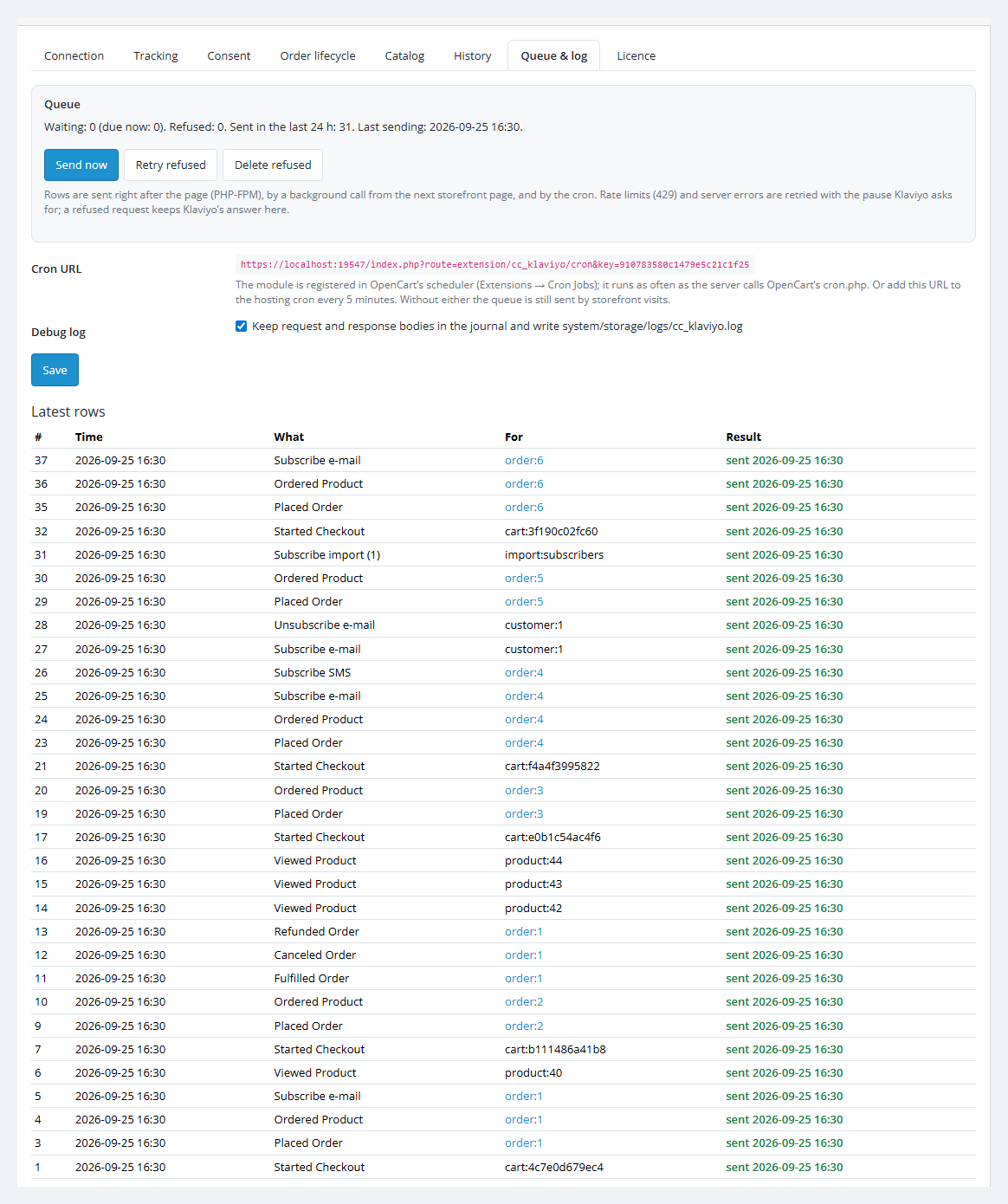
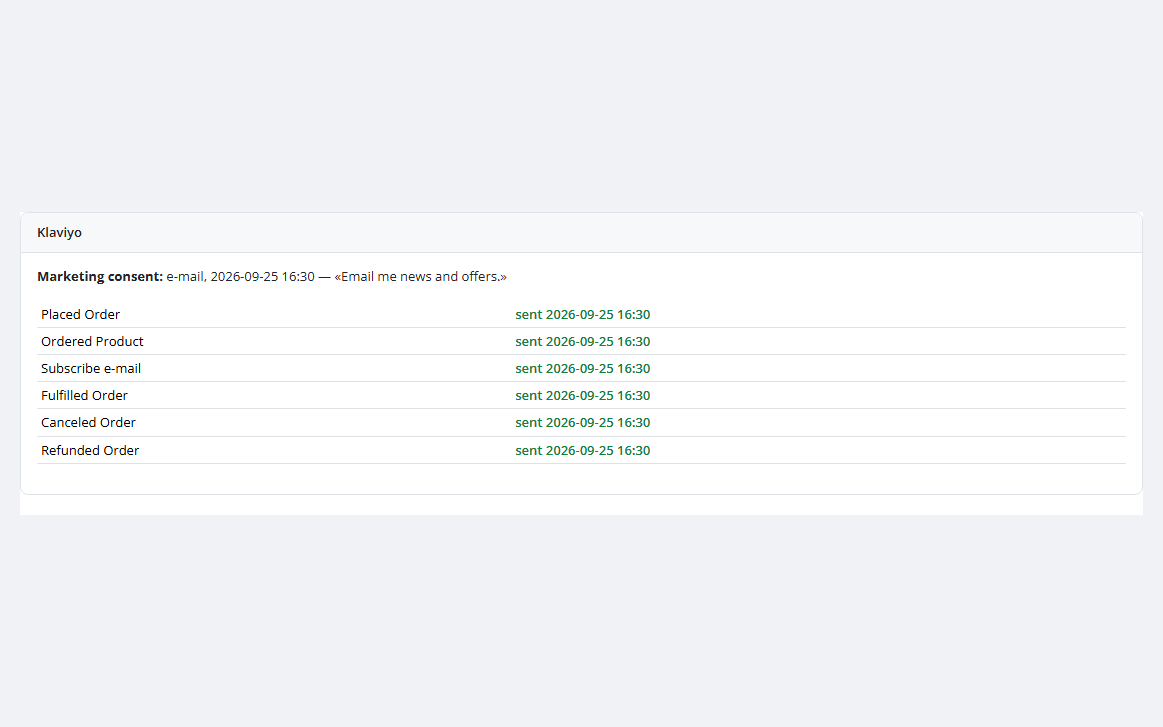
Klaviyo Connector queue and log: sent order, cart and subscription events
Queue & log tab: Started Checkout, Placed Order, Ordered Product, subscriptions and order lifecycle events with the result of every request; below — the 30-day API log.

The trial starts when you ask

A fresh install is the free version, nothing switches on by itself. The “Try Pro for 7 days” button → e-mail → the key right in the window and by e-mail.

One key — one site

Moving the store? Unbind the licence on the old domain and activate it on the new one yourself. If our server is unreachable, Pro keeps working for 14 more days. For studios — keys for 5 or 25 sites, or unlimited.

Technical requirements

  • OpenCart 4.0.2.0+ and 4.1.x (tested on 4.1.0.3 with the PDO driver and on 4.0.2.3), 3.x (tested on 3.0.5.0) or 2.3.0.2.
  • PHP 7.0+ as your OpenCart version needs it (tested on 7.0, 8.1, 8.2 and 8.3). cURL and OpenSSL extensions.
  • Server: nginx with PHP-FPM or Apache — both tested.
  • A Klaviyo account with a private API key.
  • A cron is optional: the queue is also sent by storefront visits. OpenCart 4 has its own scheduler; for OpenCart 3 and 2.3 you can add the cron URL from the Queue & log tab.
  • Module languages: English, Ukrainian, Russian — by the admin language; the consent box text follows the storefront language.

Version history

Fulfilled Order, Canceled Order, Refunded Order Current

By the statuses you choose, once per order, with the same ID as the Placed Order — this is how Klaviyo counts cancellations and refunds in CLV.

Product catalog in Klaviyo

Products, categories and variants by option values (size, colour) with stock and price.

Past orders

For the period you pick, marked as backfill: they show in reports, CLV and segments, but flows do not fire on them.

All versions (5)
Existing subscribers

Of the OpenCart newsletter go to your Klaviyo list as a historical consent import.

SMS consent

As a separate box at checkout and the newsletter box sync in the customer account, at registration and in the admin.

Frequently bought with Klaviyo Connector for OpenCart

4 modules in one order — 40% cheaper than separately

“Store starter” bundle Klaviyo Connector Nova Poshta Premium LiqPay Telegram notifications and Viber/SMS for customers Need more — all 144 modules in All Access for 4 990 ₴.
3 790 ₴ lifetime instead of 6 260 UAH bought separately
Buy the bundle →

Full module description

Klaviyo Connector for OpenCart connects a store on OpenCart 4, 3 or 2.3 to Klaviyo over the official REST API. It sends Klaviyo what flows and segments are built on: product views, the cart, the checkout start with a link that brings the cart back, orders with everything in them and the customer profile — and subscribes to marketing only those who ticked the box themselves. Running WooCommerce? See Klaviyo Connector for WooCommerce.

How it was tested, honestly. Klaviyo has no sandbox, so the module is built on the official Klaviyo API documentation (revision 2026-07-15) and tested end to end against a simulation of that API — the formats of events, subscriptions, catalog calls and error answers checked against the documentation — on OpenCart 4.1 (PDO), 4.0.2.3, 3.0.5.0 and 2.3.0.2, on nginx with PHP-FPM and on Apache, next to the stock checkout and CatCode One Page Checkout. It has not run on a live Klaviyo account yet — try it on yours in the 7-day Pro trial. The log shows every request and Klaviyo’s answer, and if Klaviyo answers differently from its documentation, we fix it quickly.

What the customer sees

  • Nothing extra on the storefront. klaviyo.js loads asynchronously, Klaviyo forms (popups, embedded) show up as you set them in Klaviyo. A page never waits for Klaviyo: all requests go after the page is served.
  • Marketing consent is a separate, unticked box. Where the checkout already has OpenCart’s own newsletter box (OpenCart 4, One Page), that box is the consent. Where it does not (guest checkout in OpenCart 3 and 2.3), our box sits under the email field, in the storefront language; the text can be changed per language.
  • The abandoned cart comes back. The customer clicks the link in the Klaviyo email and the cart with the same products and options opens even on another device, for 30 days.
  • Cookies by the rules. The “wait for cookie consent” mode loads klaviyo.js only after consent in Cookiebot, CookieYes or your own banner.

What the store gets

  • “Save and check” verifies the key against the Klaviyo account, fills in the public key for klaviyo.js and loads all your lists. A Klaviyo error is shown in plain words with the HTTP code.
  • The private key is stored encrypted (AES-256 with HMAC), never printed back into the form and never written to the log.
  • Placed Order and Ordered Product come from the same order history call OpenCart itself uses: the stock checkout, One Page, payment callbacks and a status change in the admin give the event once. The total is in the order currency; lines carry the image, link, categories, brand and options, plus the discount with the coupon code, tax, shipping and addresses.
  • Started Checkout carries the cart link and the cart lines, one event per customer and cart content a day, as soon as the email is known: the customer is logged in or typed it at checkout.
  • The customer profile: name, E.164 phone by the address country, address and language — inside the order event. A phone Klaviyo would refuse is left out and the event still goes.
  • A queue instead of calls during the purchase. An event is written to the queue and sent after the page answers, by a background call from the next storefront page or by the cron. A Klaviyo rate limit (429) pauses exactly as long as Klaviyo asks, server errors retry with growing delays, a refused request keeps Klaviyo’s answer in the log.
  • A key without a needed scope (403) does not stop everything: only requests of that kind wait, the admin tells which scope is missing, all other events keep going.
  • A copy of the store on another address (staging, a move) sends nothing until you confirm it is the live store.

How it works — step by step

  1. Key. In Klaviyo: Settings → API keys → Create Private API Key (Full, or Custom with access to Events, Profiles, Lists, Subscriptions, Catalogs and read access to Accounts).
  2. Connection. Extensions → Modules → Klaviyo Connector → Connection: paste the key, “Save and check”, choose the list for subscribers.
  3. Tracking and consent. Tracking and Consent tabs: which events to send, the cookie mode, the box text for each language.
  4. Flows in Klaviyo. The Started Checkout, Placed Order and Viewed Product metrics appear in Klaviyo with the first events — abandoned cart, post-purchase and browse abandonment flows are built on them.
  5. Pro. Order lifecycle, Catalog and History tabs: statuses for the events, catalog sync, past orders and subscribers.

Under the hood

  • Klaviyo REST API, revision 2026-07-15: Create Event, Bulk Subscribe / Unsubscribe, catalog items, variants and categories, Accounts, Lists. Authorization with the Klaviyo-API-Key header.
  • No duplicates: every event has a stable unique_id (installation prefix + order number), so a repeated request or a repeated order history call does not create a second event in Klaviyo.
  • Stock OpenCart events: the module listens to addHistory in OpenCart 4 and addOrderHistory in 3.x and 2.3, so it sees orders from any checkout and any payment that goes through the core.
  • No writes to the OpenCart session: the visitor state (email, consent, cart snapshot) lives in the module’s own table, so parallel checkout requests are never overwritten.
  • A Pro gate without bricking: when the trial ends, only the Pro features stop.
  • Removing the module clears its events, cron jobs and permissions; the module tables with the settings copy and the cart restore links of emails already sent stay, so updates and reinstalls lose nothing. To remove the data completely, drop the oc_cc_klaviyo_* tables.

How to install

  1. OpenCart 4: Extensions → Installer → upload cc_klaviyo.ocmod.zip (do not rename the archive) and click Install. OpenCart 3: Extensions → Installer → cc_klaviyo-oc3.ocmod.zip, then Extensions → Modifications → Refresh. OpenCart 2.3: upload the contents of the upload/ folder from cc_klaviyo-oc23.ocmod.zip to the store root (FTP or the hosting file manager) — the 2.3 Installer does not copy files without FTP set up.
  2. Extensions → Extensions → Modules → Klaviyo Connector → Install, then Edit.
  3. Connection: the Klaviyo private key, “Save and check”, the subscriber list, status Enabled.
  4. For Pro: paste the licence key from the email after payment or click “Start the 7-day trial” on the Licence tab.

Questions
about the module

Didn't find the answer? Message us on Telegram and we'll reply within a business day.

@catcode_support Setup, compatibility, activation
What do I need?

A Klaviyo account and a private API key: Settings → API keys → Create Private API Key, Full or Custom with full access to Events, Profiles, Lists, Subscriptions and Catalogs and read access to Accounts. Klaviyo does not let you change the scopes of a key — if one is missing, you create a new key.

Which Klaviyo account was the module tested with?

Klaviyo has no sandbox. The module is built on the official Klaviyo API documentation (revision 2026-07-15) and tested end to end against a simulation of that API on OpenCart 4.1, 4.0.2.3, 3.0.5.0 and 2.3.0.2, on nginx with PHP-FPM and on Apache. It has not run on a live Klaviyo account yet — try it on yours in the 7-day Pro trial; Klaviyo's answer to every request is in the log.

Why doesn't Klaviyo show views and carts of anonymous visitors?

Klaviyo records browser events only for visitors it already knows: after a click in a Klaviyo email, a Klaviyo form, or when the customer is logged in or typed the email at checkout. Klaviyo's own integrations work the same way. Once the email is known, the module sends these events from the server, so ad blockers do not cut them.

Will customers be subscribed without their consent?

No. The profile and order events always go to Klaviyo (they are transactional data); an email or SMS subscription happens only when the customer ticked the box. The box is unticked by default, and its text and time are kept with the order.

I run several stores on one Klaviyo account.

Every installation gets its own prefix for order IDs, so order #125 of two stores does not merge into one. Events carry the store name. An OpenCart multistore works with one set of settings for all storefronts.

Klaviyo answered 403.

The key is valid but lacks the scope for that call (most often Subscriptions or Catalogs). The module shows which call was refused, those requests wait in the queue and all other events keep going. Create a new key with the access needed and save it — the held requests go out at once.

What if I don't want to pay for Pro?

klaviyo.js, views, cart, Started Checkout, Placed Order, profiles and subscriptions with consent stay free with no time limit.

Not quite what you are looking for?

We build custom modules for WordPress, WooCommerce, OpenCart and Shopify. Tell us about the task and we'll prepare an estimate.

Order a custom module