

















OpenCart
1 290 UAH839 UAH≈ €17
Black November: −35% on all modules until 30 November Black November: −35% until 30 November Choose a module
 Website auditA PDF report by email in 3 minutesCheck a website
Everyday tasks
Image compressorSize, quality and WebP in bulkQR generatorLink, Wi-Fi, payment to IBANVAT calculator20, 14, 7% and amount in wordsTransliterationOfficial Ukrainian standardWebsite checks
PHP and pluginsPHP version, WordPress, pluginsGoogle Merchant feedFields, prices, GTIN, imagesDomain emailSPF, DKIM, DMARC, blacklistsAI search readinessllms.txt, bots, markupAll 9 toolsEnter at least 2 characters

Younited Pay for OpenCart 4.x, 3.x, 2.3: pay in installments with the Younited plans, signed notifications, order statuses. Refunds and the product installment line in Pro. Lifetime licence.
The free version works with no time limit. Pro adds the rest of the features in the table.


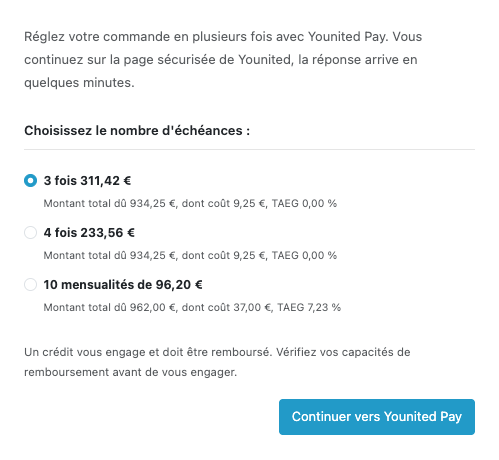
At checkout the buyer picks “Payer en plusieurs fois avec Younited Pay”.

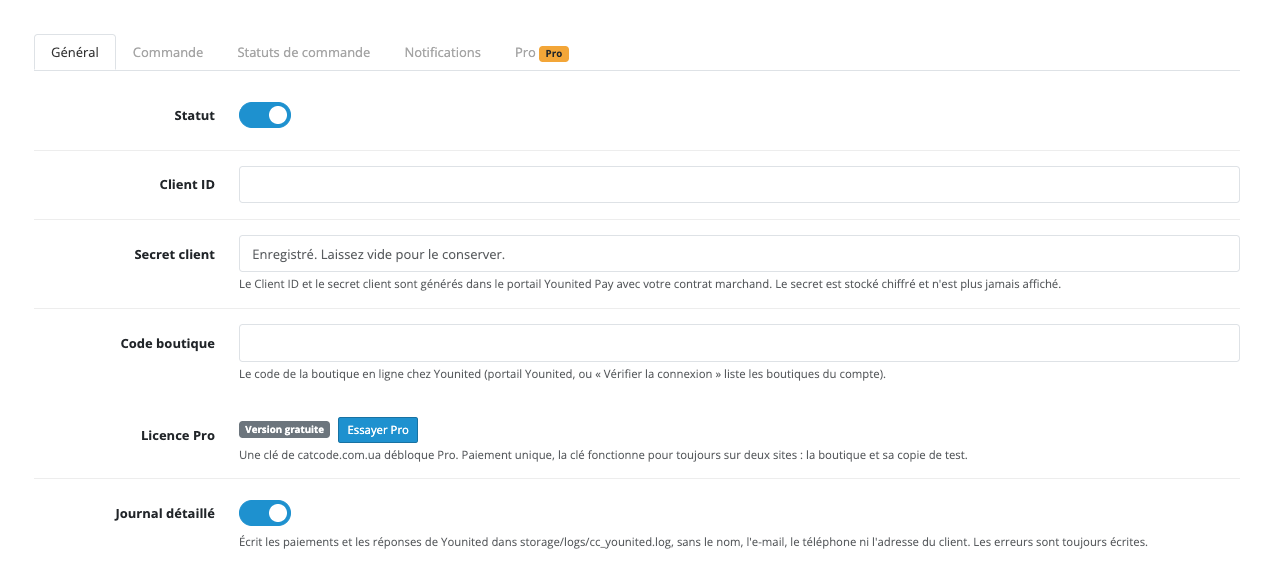
Extensions → Extensions → Payments → Younited Pay by CatCode: the tabs “Général”, “Commande”, “Statuts de commande”, “Notifications” and “Pro”.

A fresh install is the free version, nothing switches on by itself. The “Try Pro for 7 days” button → e-mail → the key right in the window and by e-mail.

Moving the site? Unlink the licence on the old domain and activate it on the new one yourself. A staging copy (staging., dev.) works with the same key and does not take a site slot. For studios — keys for 5 or 25 sites, or unlimited.
 OpenCart 4.0.2.x and 4.1.x, 3.0.x or 2.3.0.2; PHP 7.0+ for 2.3 and 3.x, the cURL extension.A Younited Pay merchant account: Client ID, Client secret and Shop code.The shop currency is the euro (EUR): the Younited API has no currency field, so without EUR the method is hidden.A shop on HTTPS reachable from the internet: Younited returns the buyer and sends notifications to the shop address.The order must have the buyer contacts and an address: they are passed to Younited for the application.For the hourly check in Pro: the OpenCart 4 scheduler or a cron at the address from the settings for 3.x and 2.3.
For OpenCart 4.x, 3.x and 2.3: the Younited Pay payment method with the Younited plans for the order amount, signed notifications, order statuses from the API answer, automatic execution of…


Younited Pay for OpenCart 4.x, 3.x and 2.3 adds a payment method “Payer en plusieurs fois avec Younited Pay” to checkout: the buyer picks one of the plans Younited offers for the amount of the order (a split into 2 to 4 payments, a credit over several months) and applies on the secure Younited page. The module works with your own Younited merchant account, without a middleman. The module interface is in French and English.
What you need from Younited. A merchant contract with Younited and the data from the Younited Pay portal: the Client ID, the Client secret and the Shop code. The terms, the limits and the cost for the buyer are set by Younited. The module works in euros: the store must have the EUR currency.
At checkout the buyer picks “Payer en plusieurs fois avec Younited Pay”. Under the method the plans Younited returned for the amount of this very order are shown, for example “3 fois”, “4 fois” or “10 mensualités”: the installment, “Montant total dû”, the cost and the APR (TAEG) of each plan. These figures come from Younited, the module does not calculate them. Below them stands a reminder that a credit is a commitment and the buyer should consider their ability to repay. After “Continuer vers Younited Pay” the buyer lands on the Younited page, applies and comes back to the shop. If the buyer cancels or Younited does not accept the application, a clear page with a “Payer autrement” button is shown and the products go back to the cart, options included. If the answer from Younited has not arrived yet, the order is confirmed as soon as the notification comes.
Extensions → Extensions → Payments → Younited Pay by CatCode: the tabs “Général”, “Commande”, “Statuts de commande”, “Notifications” and “Pro”. On “Général” you enter the Client ID, the Client secret and the Shop code and choose sandbox or production. The Client secret is stored encrypted and is never shown again. The “Vérifier la connexion” button gets a token, lists the shops of your account and says whether your Shop code is one of them.
The “Commande” tab sets the method name and text for every language, the minimum and maximum order total in euros, the geo zone and the sort order, and the moment the order is placed: when the buyer goes to Younited (with a status of your choice) or only after the application is approved. The plans the buyer sees come from the Younited offer for the amount; in the settings you can keep only the payment counts you want.
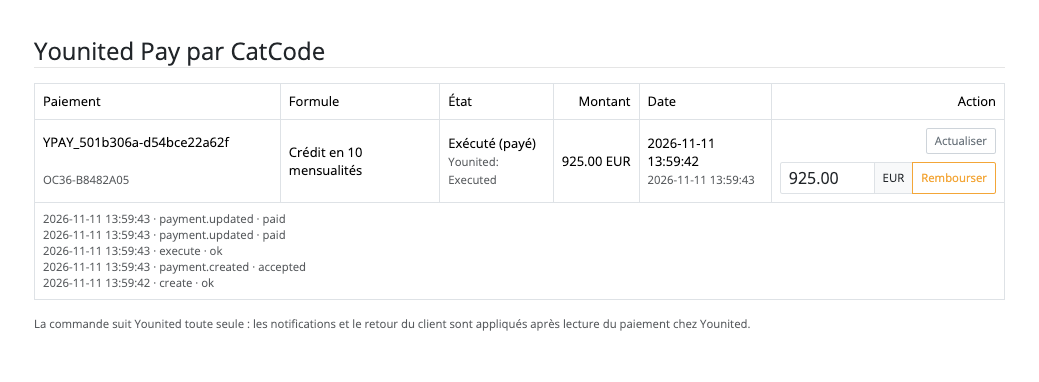
Order statuses follow the Younited notifications: approved, accepted, executed, failed, cancelled, fully refunded. The notifications are signed (HMAC-SHA256 with the key from the “Notifications” tab), and in any case the module first reads the payment at Younited and only then changes the order; the history gets one line per change. If the executed amount differs from the order total, the order is not marked paid but flagged for review. The notification address travels with every payment, so it does not have to be entered in the portal. The “Envoyer une notification de test” button asks Younited to call the shop and shows the answer; the last notification is shown on the settings page.
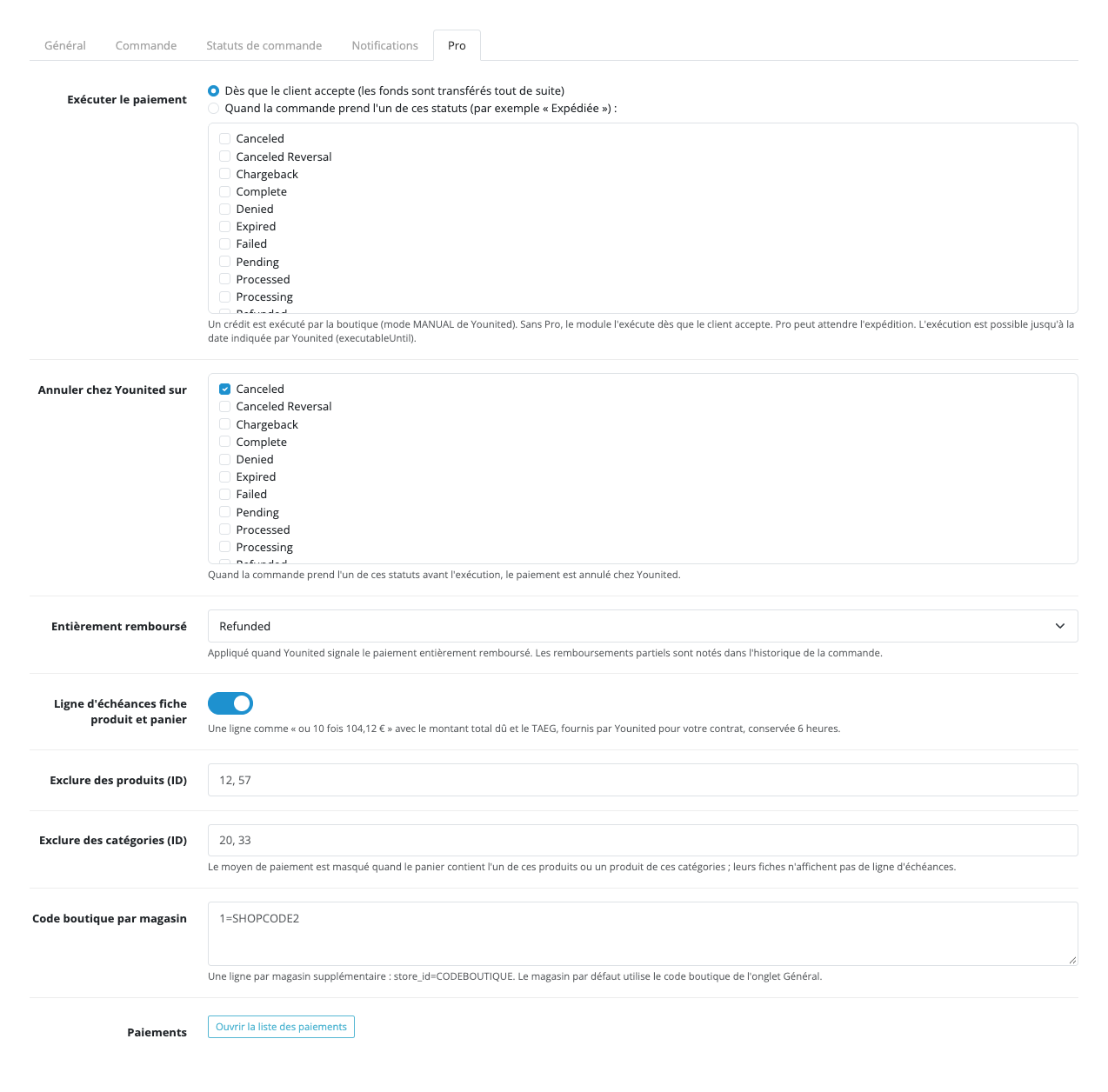
In the free version an accepted credit is executed right away, so the money moves without anyone clicking; a split into several payments is executed by Younited itself. Pro gives a choice: execute the credit only when the order gets the statuses you choose (for example “Expédiée”), plus the “Exécuter”, “Annuler le paiement” and “Rembourser” (full or partial refund) buttons on the order page. A separate status goes to fully refunded orders, and the payment at Younited can be cancelled on chosen order statuses.
The installment line (Pro) on the product page and in the cart: “ou 10 fois …” with the total due and the APR Younited returns for your contract (cached for 6 hours). The payment journal with a filter by state and dates, totals “executed/refunded” and a CSV export. An hourly check of payments with no news works with the OpenCart 4 scheduler or with a cron URL on the host for 3.x and 2.3. Also set: excluded products and categories and a Shop code per store of a multistore.
Didn't find the answer? Message us on Telegram and we'll reply within a business day.
 @catcode_support
Setup, compatibility, activation
No, it is an independent integration through the public Younited Pay API. Younited is a trademark of its owner.
A merchant contract with Younited and the data from the Younited Pay portal: the Client ID, the Client secret and the Shop code. The terms of connection and the limits are set by Younited.
No. The module shows the plans and the reminder as Younited returns them. For the advertising and information requirements of your own shop, ask Younited or a lawyer.
The free version executes an accepted credit right away. With Pro it can be executed on an order status you choose, for example after shipping. A split into payments is executed by Younited itself.
No. The buyer applies on the Younited page, and the shop gets only the payment number and the status.
Through signed Younited notifications and when the buyer returns; the module always reads the payment at Younited first. With Pro the hourly check finds payments that sent no news.
The order is not marked paid: it is flagged for review with a note, and you decide what to do.
No, only with the euro: Younited does not send a currency in the API, so the method is not shown for other currencies.
OpenCart 4.0.2.x, 4.1.x, 3.0.x and 2.3.0.2: three separate archives in one product.
Yes, for OpenCart it is one payment and a lifetime licence for two sites.
No reviews yet. Be the first.
No questions yet. Ask one — we answer within 24 hours.
We build custom modules for WordPress, WooCommerce, OpenCart and Shopify. Tell us about the task and we'll prepare an estimate.
Order a custom module
—
Charged in UAH; your bank converts it to your currency. EUR price is approximate.

CatCode assistant
Just now


CatCode assistant
Online

I’ll help with your website task
Describe your website task — I’ll find a ready-made module or pass it to a developer for an estimate. Modules, custom features, layout, integrations, speed, migration, technical SEO.
