
















OpenCart
Abandoned Cart Recovery for OpenCart 2.3, 3.x and 4.x
Free + Pro
1 290 UAH≈ €26
v1.2.4
 Website auditA PDF report by email in 3 minutesCheck a website
Everyday tasks
Image compressorSize, quality and WebP in bulkQR generatorLink, Wi-Fi, payment to IBANVAT calculator20, 14, 7% and amount in wordsTransliterationOfficial Ukrainian standardWebsite checks
PHP and pluginsPHP version, WordPress, pluginsGoogle Merchant feedFields, prices, GTIN, imagesDomain emailSPF, DKIM, DMARC, blacklistsAI search readinessllms.txt, bots, markupAll 9 toolsEnter at least 2 characters
Proof of age with Yoti before the OpenCart 4.x, 3.x, 2.3 checkout; Pro adds ages by category and product, webhook, journal, CSV. Lifetime licence.
The free version works with no time limit. Pro adds the rest of the features in the table.


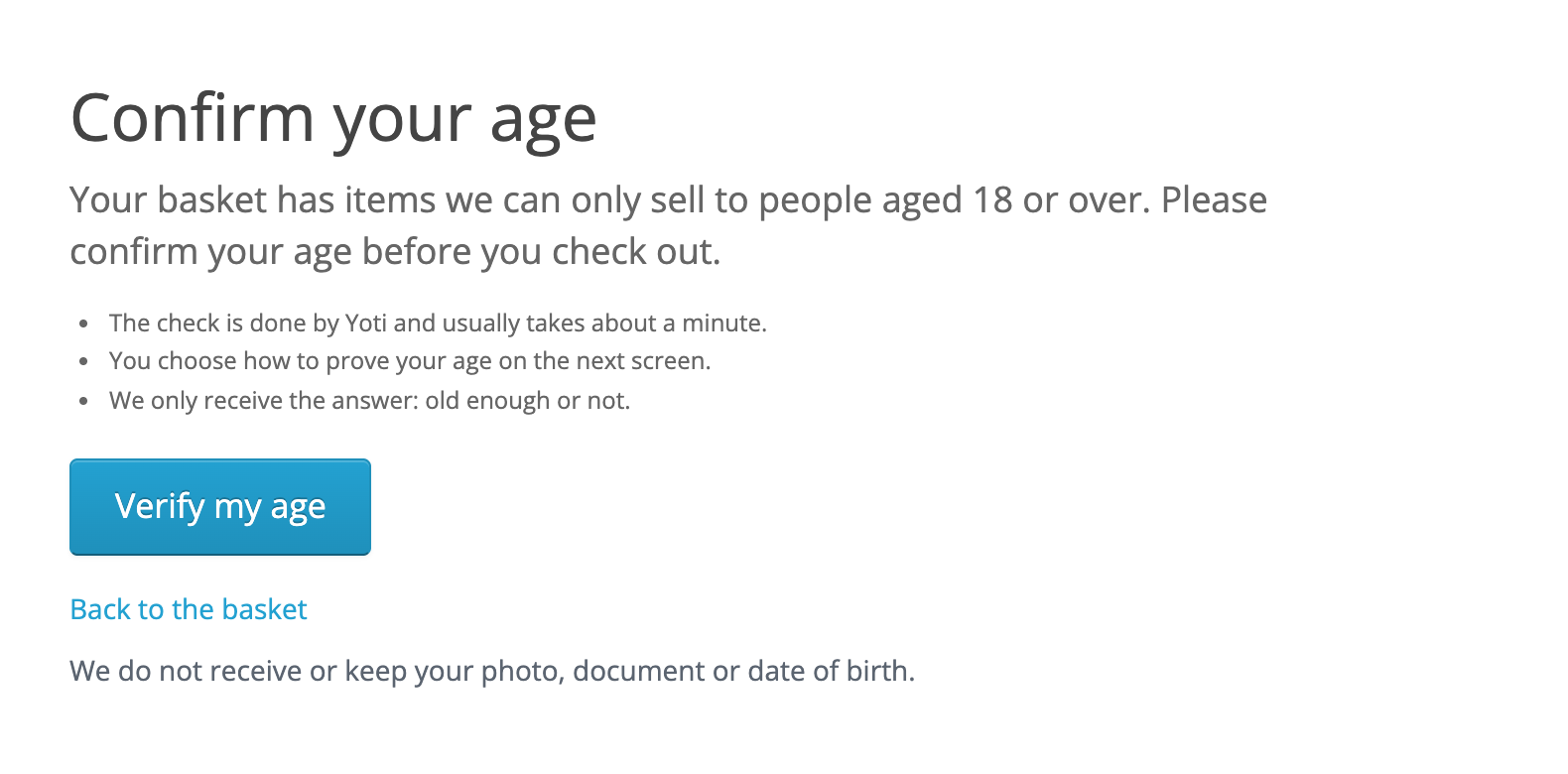
The buyer presses Checkout and lands on the “Confirm your age” page: why the shop is asking, three short points and the “Verify my age” button.

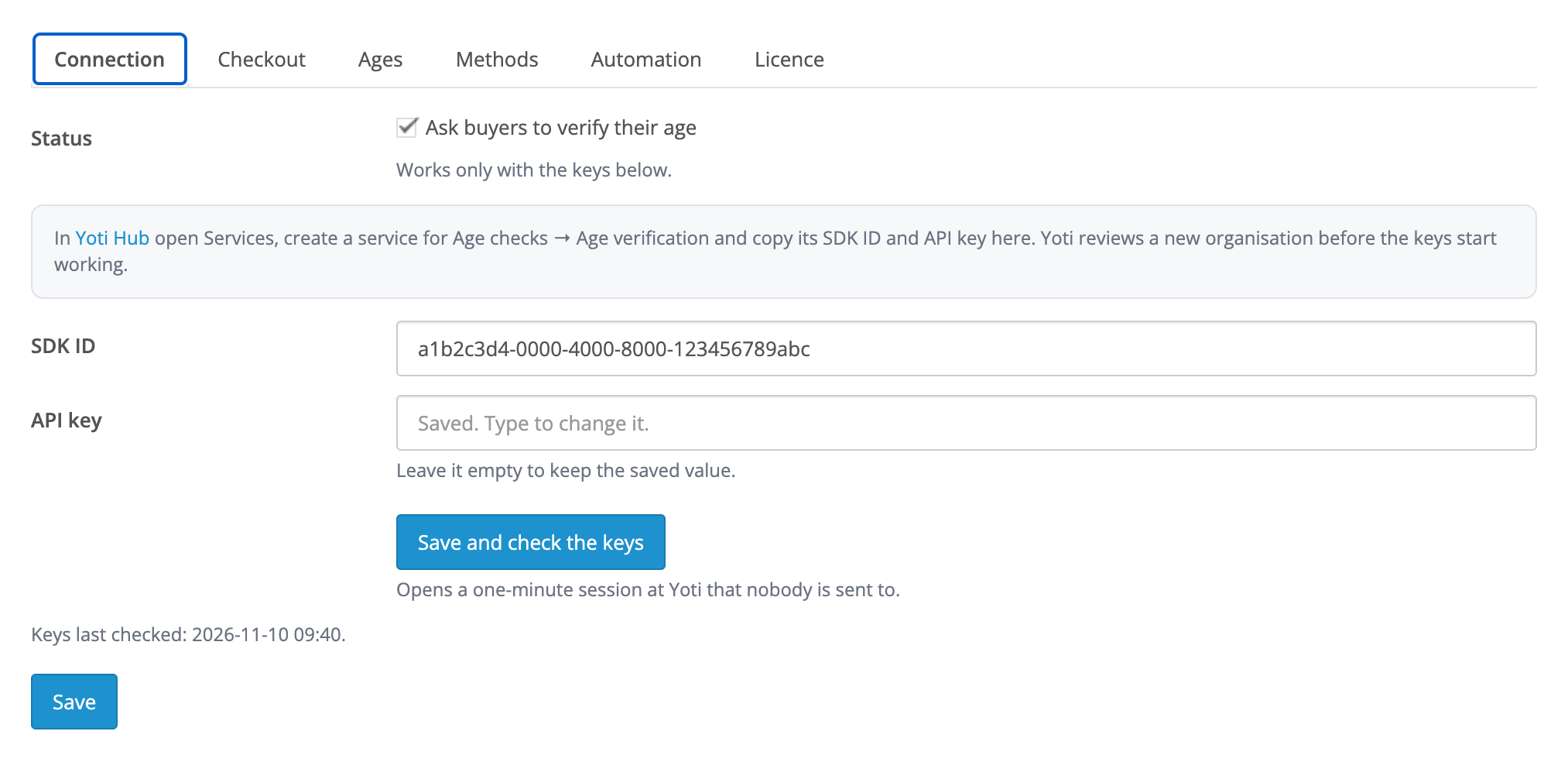
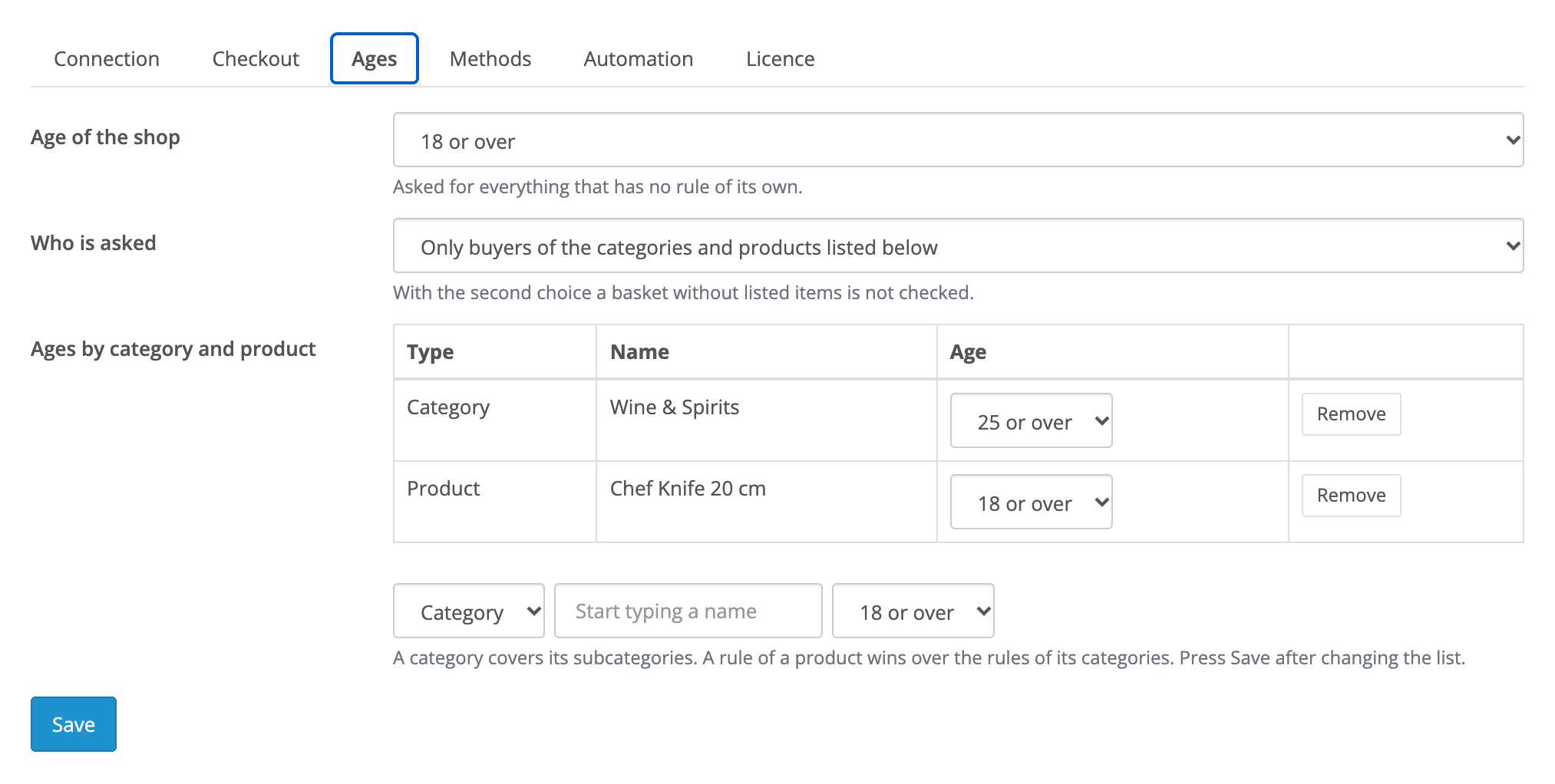
Extensions → Modules → Age Verification with Yoti: the Connection, Checkout, Ages, Methods, Automation and Licence tabs.

The base version is free. Pro costs 1 290 UAH, a one-time payment for a lifetime licence.

A fresh install is the free version, nothing switches on by itself. The “Try Pro for 7 days” button → e-mail → the key right in the window and by e-mail.

Moving the site? Unlink the licence on the old domain and activate it on the new one yourself. A staging copy (staging., dev.) works with the same key and does not take a site slot. For studios — keys for 5 or 25 sites, or unlimited.
 OpenCart 4.0.2.0–4.1.x, 3.0.x or 2.3.0.2; PHP 7.0+ for 2.3, the cURL extension.A Yoti Hub account with a service for Age checks → Age verification: its SDK ID and API key.HTTPS on the shop for Yoti notifications (Pro).The standard OpenCart checkout; a third-party one-page checkout with its own confirm step is not blocked, and its orders get the “Age NOT verified” mark.
For OpenCart 4.x, 3.x and 2.3: proof of age 18 or over with Yoti before the checkout, no order without it, the result on the order page and in the history, a check of the keys.



Age Verification with Yoti for OpenCart 4.x, 3.x and 2.3 asks the buyer to prove their age with Yoti before the checkout opens. It is made for UK shops that sell age-restricted goods: alcohol, vapes, knives, adult products.
How the age is proven. Yoti does the check on its own screen: facial age estimation (a selfie), Digital ID in the Yoti app, or an ID document with a selfie. The shop receives only the answer, old enough or not, with the method and the Yoti session number. The photo, the document and the date of birth never reach the shop.
The buyer presses Checkout and lands on the “Confirm your age” page: why the shop is asking, three short points and the “Verify my age” button. The button opens Yoti’s screen, where the buyer chooses how to prove their age. After the answer they are back in the checkout with the same basket, and a second order in the same session goes through without being asked again. If Yoti could not confirm the age, the buyer left the screen or the session ran out of time, the page says so in plain words and offers “Try again”; the basket stays. The number of attempts a day is limited (5 by default).
Extensions → Modules → Age Verification with Yoti: the Connection, Checkout, Ages, Methods, Automation and Licence tabs. The connection needs the SDK ID and the API key of an Age verification service from Yoti Hub. “Save and check the keys” shows straight away whether Yoti accepts them and says what is wrong: an unknown SDK ID or a wrong key. The API key is stored encrypted and is never sent back to the form.
An order cannot be placed without proof of age by going around the page either: the standard confirm step of OpenCart is closed on the server, the buyer sees a notice with a “Verify my age” link instead of the Confirm Order button, and no order is created. Third-party one-page checkouts with their own confirm step are not blocked: such an order is created with the “Age NOT verified” mark, shown on the order page and in the order history.
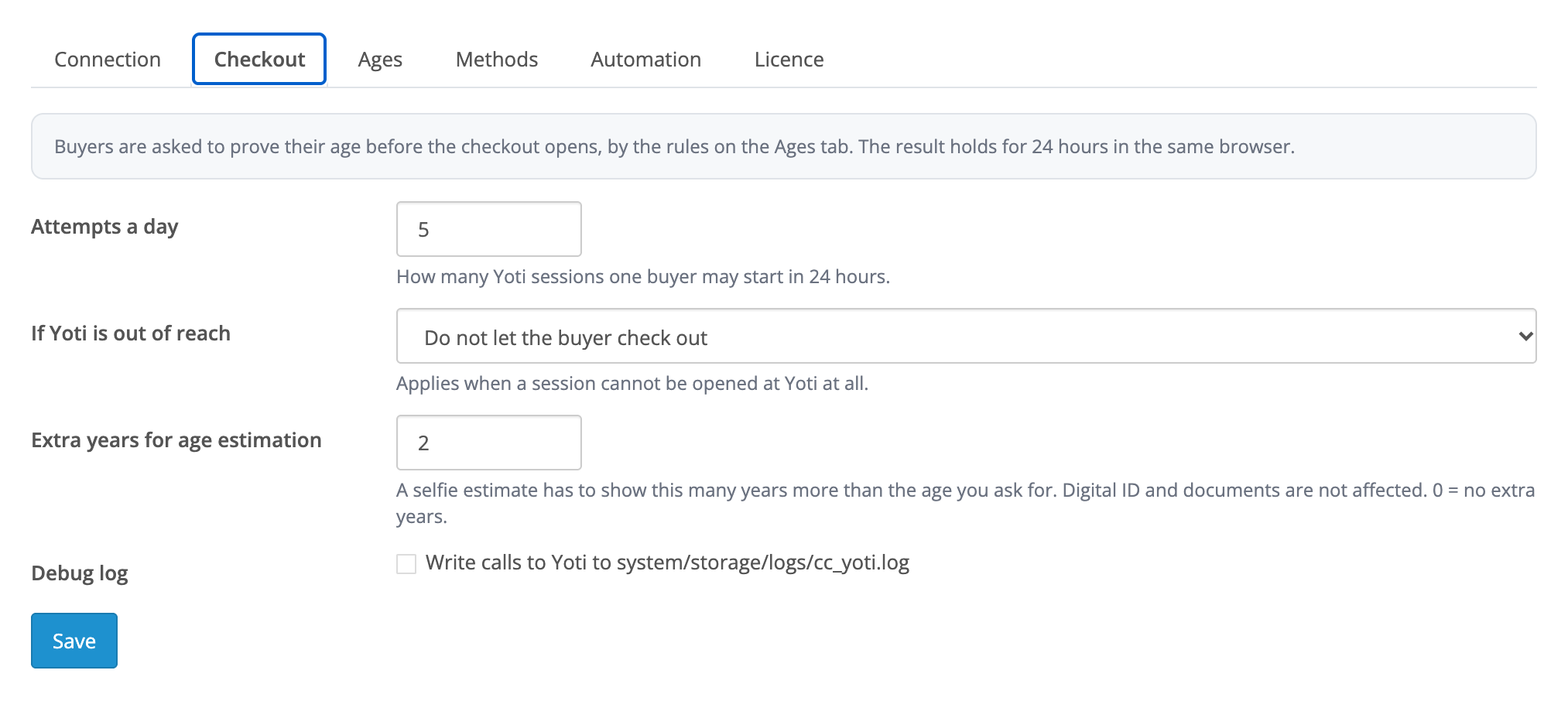
The order page gets an “Age verification” box: a one-line summary (green when the age is proven, red when it is not), the age the shop asked for, the method, the time of the answer, the Yoti session and the Yoti evidence ID. The same summary is written as a line in the order history. On the Checkout tab you decide what happens when Yoti is out of reach: keep the buyer out of the checkout, or let them through and mark the order as “Age NOT verified”. The same tab has the extra years for age estimation: a selfie estimate has to show that many years more than the age you ask for; Digital ID and documents are not affected.
Pro makes the age flexible. The age of the shop is 18, 21 or 25; categories (with their subcategories) and products can have rules of their own, and the rule of a product wins over the rule of its category. In the “only listed” mode a basket without listed items is not asked. On the Methods tab you choose what the buyer is offered: facial age estimation, Digital ID, an ID document, credit card, mobile provider (the last two work for the age of 18 only), and the country preselected for the document.
Automation in Pro: Yoti notifies the shop about every result, so the answer arrives even when the buyer closes Yoti’s page and does not come back; the shop needs HTTPS for the notifications. A buyer with an account is remembered for the number of days you set, or for good, and is not asked again. The age can be asked before a new account is created. The “Age checks” journal under Sales lists every attempt: date, purpose, age, method, result, Yoti session, customer and order, with filters and a CSV export.
Didn't find the answer? Message us on Telegram and we'll reply within a business day.
 @catcode_support
Setup, compatibility, activation
No, it is an independent integration through the public Yoti Age Verification API. Yoti is a trademark of its owner.
A Yoti Hub account and a service for Age checks → Age verification. Its SDK ID and API key go into the module.
In the free version: facial age estimation, Digital ID and an ID document with a selfie. In Pro you choose the methods yourself, including credit card and mobile provider for the age of 18.
No. The shop receives only the answer, the method, the session number and the evidence ID from Yoti.
Not through the standard OpenCart checkout: its confirm step is closed on the server. A third-party one-page checkout with its own confirm step is not blocked, and its order gets the "Age NOT verified" mark.
You choose: keep the buyer out of the checkout, or let them through and mark the order as "Age NOT verified".
The module is a tool for proof of age. Which goods you sell from which age, and which rules you follow, is for the shop to decide.
OpenCart 4.0.2.0–4.1.x, 3.0.x and 2.3.0.2: three separate archives in one product.
Yes, for OpenCart it is one payment and a lifetime licence for two sites.
No reviews yet. Be the first.
No questions yet. Ask one — we answer within 24 hours.
We build custom modules for WordPress, WooCommerce, OpenCart and Shopify. Tell us about the task and we'll prepare an estimate.
Order a custom module
—
Charged in UAH; your bank converts it to your currency. EUR price is approximate.

CatCode assistant
Just now


CatCode assistant
Online

I’ll help with your website task
Describe your website task — I’ll find a ready-made module or pass it to a developer for an estimate. Modules, custom features, layout, integrations, speed, migration, technical SEO.
