
















OpenCart
990 UAH644 UAH≈ €14
Black November: −35% on all modules until 30 November Black November: −35% until 30 November Choose a module
 Website auditA PDF report by email in 3 minutesCheck a website
Everyday tasks
Image compressorSize, quality and WebP in bulkQR generatorLink, Wi-Fi, payment to IBANVAT calculator20, 14, 7% and amount in wordsTransliterationOfficial Ukrainian standardWebsite checks
PHP and pluginsPHP version, WordPress, pluginsGoogle Merchant feedFields, prices, GTIN, imagesDomain emailSPF, DKIM, DMARC, blacklistsAI search readinessllms.txt, bots, markupAll 9 toolsEnter at least 2 characters

OpenCart 4.x, 3.x, 2.3 customers and orders in Yespo (eSputnik); in Pro — automatic sending, segments, messages by status, cart events. Lifetime licence.
The free version works with no time limit. Pro adds the rest of the features in the table.


Every order reaches Yespo as two records. First the contact: name, e-mail, phone as digits with the country code (380 for Ukraine), address, language and customer number.

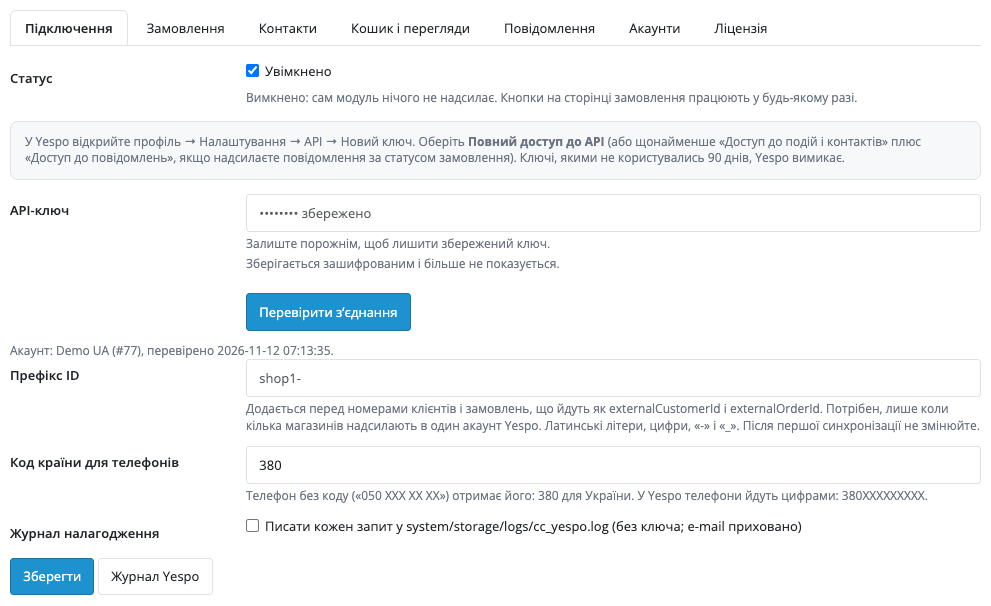
Extensions → Modules → Yespo (eSputnik) Sync: the tabs “Connection”, “Orders”, “Contacts”, “Cart and views”, “Messages”, “Accounts” and “Licence”.

A fresh install is the free version, nothing switches on by itself. The “Try Pro for 7 days” button → e-mail → the key right in the window and by e-mail.

Moving the site? Unlink the licence on the old domain and activate it on the new one yourself. A staging copy (staging., dev.) works with the same key and does not take a site slot. For studios — keys for 5 or 25 sites, or unlimited.
 OpenCart 4.0.2.0–4.1.x, 3.0.x or 2.3.0.2; PHP 7.0+ for 2.3, the cURL extension.A Yespo (eSputnik) account and an API key (full access, or access to events, contacts and messages).For retries, cart events and the import check in Pro — a scheduled task (cron) every 5–15 minutes at the address shown on the “Cart and views” tab; OpenCart 4 can run it with its own scheduler.Currencies UAH, USD and EUR; Yespo may refuse other currencies, and the reason is then shown in the job.
For OpenCart 4.x, 3.x and 2.3: connection with an API key, status mapping, a Yespo box in the order with buttons and a retry.


Yespo (eSputnik) Sync for OpenCart 4.x, 3.x and 2.3 sends the customers and orders of your store to your Yespo (eSputnik) account: a contact with the name, e-mail and phone, then the order with its number, items, total and status. That data then works in your Yespo campaigns, scenarios and segments, and nothing is typed twice.
What you need from Yespo. Your own Yespo (eSputnik) account and an API key: profile → Settings → API → “New key” with full access (or at least access to events and contacts plus access to messages, if you send messages by status). SMS, Viber and e-mails are sent and charged by Yespo on your plan. The key is stored encrypted and is never shown back on the page.
Every order reaches Yespo as two records. First the contact: name, e-mail, phone as digits with the country code (380 for Ukraine), address, language and customer number. Then the order: number, items, total and status. Customer and order numbers go with a prefix you set: it is needed when several stores send data into one account.
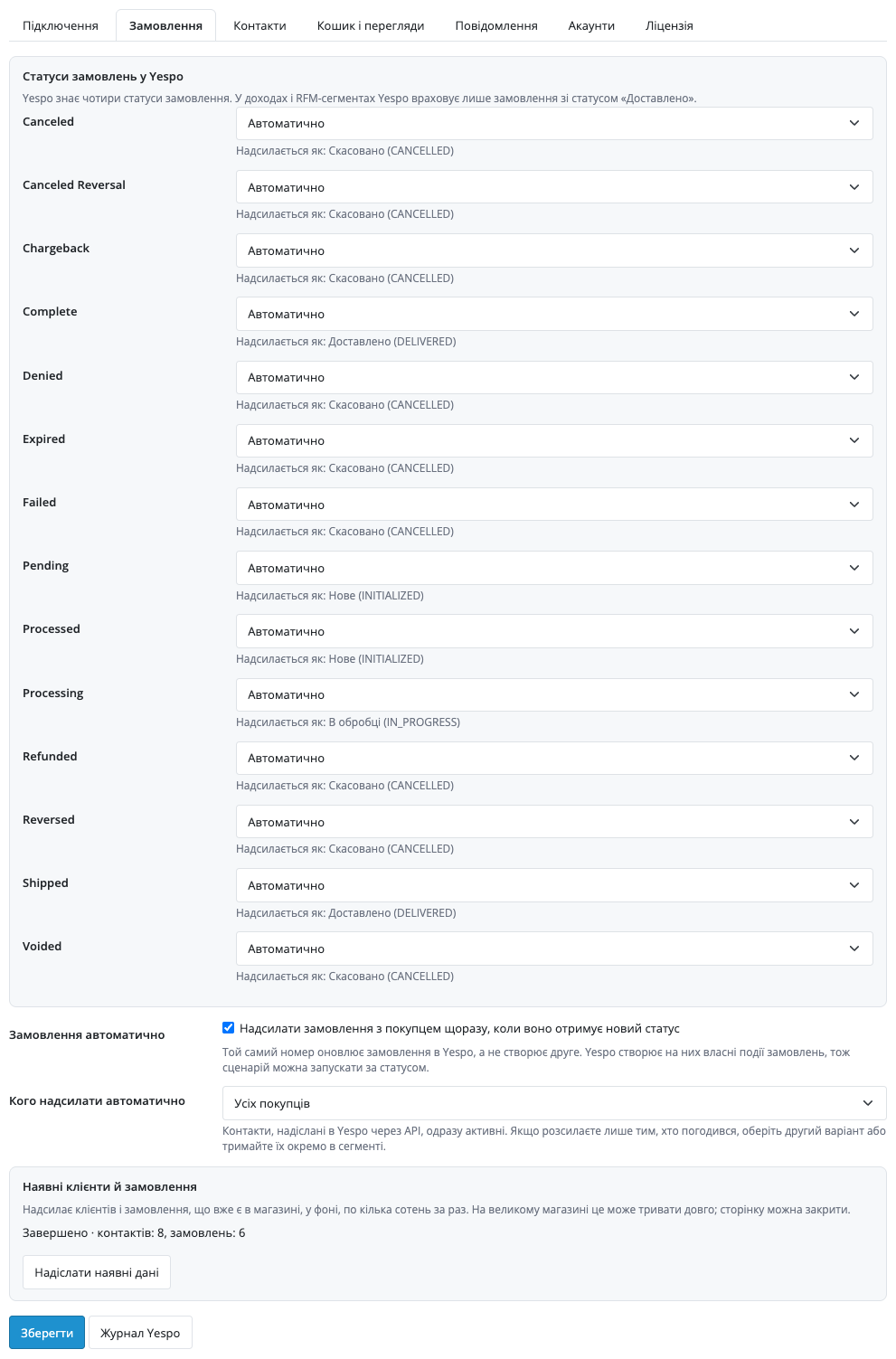
OpenCart statuses map to Yespo statuses automatically by name: cancelled ones — CANCELLED, a new order — INITIALIZED, processing — IN_PROGRESS, completed ones — DELIVERED. Every mapping can be changed by hand. In revenue and RFM segments Yespo counts only orders with the DELIVERED status. The same number updates the order in Yespo instead of creating a second one.
Extensions → Modules → Yespo (eSputnik) Sync: the tabs “Connection”, “Orders”, “Contacts”, “Cart and views”, “Messages”, “Accounts” and “Licence”. You paste the API key, press “Check connection” — the module shows the name of your Yespo account — and save. The Yespo journal opens from the button under the tabs and from the Marketing menu.
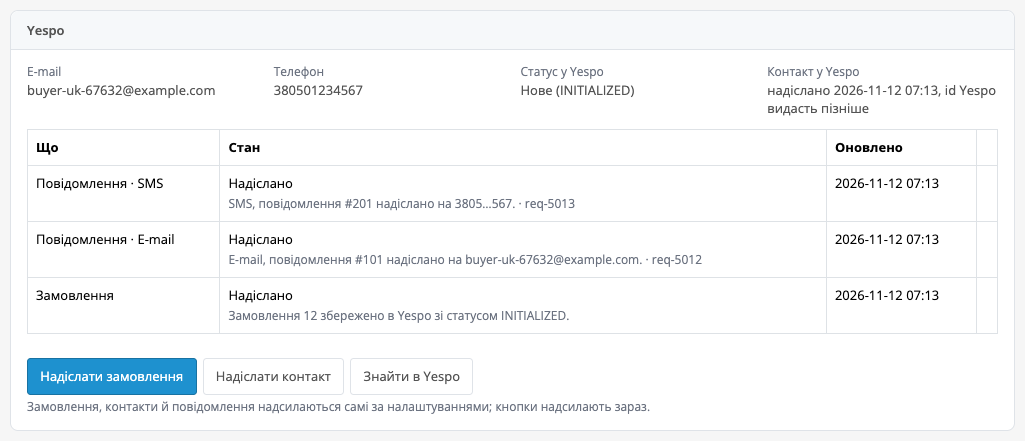
On the order page in the admin a Yespo box appears: e-mail, phone, the status in Yespo, the contact and a table of the jobs for this order with their state. The buttons “Send order” (contact and order), “Send contact” and “Look up in Yespo” work in any case, even when automatic sending is off. If Yespo refused a request, the reason is in the table, and “Retry” queues the job again. If Yespo did not answer, the order in your store is not affected.
In Pro, on the “Orders” tab, you switch on automatic sending: the order goes to Yespo in the background every time it gets a new status, together with the buyer as a contact. You choose whom to send: all buyers or only those who agreed to the newsletter. Yespo builds its own order events on these orders, so a scenario can be started by status.
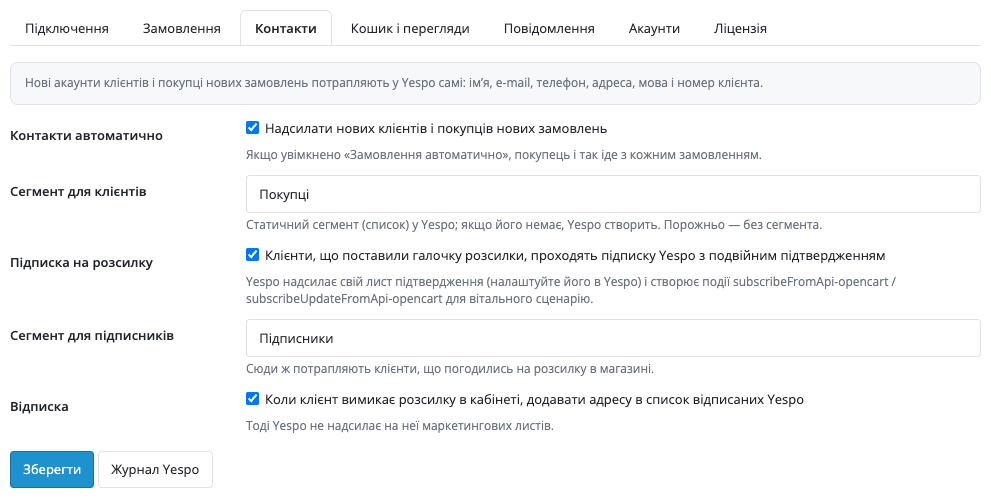
Contacts sent through the API are active in Yespo at once. If you send newsletters only to those who agreed, choose “only subscribed” or keep the contacts in a separate segment.
On the “Contacts” tab new customers (on registration and on the first order) reach Yespo by themselves. You set segments for customers and for subscribers: if a segment does not exist in Yespo, Yespo creates it. Customers who ticked the newsletter box go through the Yespo sign-up with double opt-in (Subscribe contact): Yespo sends its own confirmation e-mail, which you set up in Yespo. When a customer turns the newsletter off in the account, the address is added to the Yespo unsubscribed list and gets no more marketing e-mails.
The “Cart and views” tab holds the events for Yespo scenarios. Abandoned cart: when a signed-in customer left a cart and did not place an order, the event goes after 15 minutes to 7 days (you choose), once per cart, and a placed order stops it. Product view: once a day for a customer and a product. The event type names are yours; scenarios for the abandoned cart and for returning to a viewed product are built on them.
Messages by status: in Yespo you prepare the message (Messages → Email, SMS or Viber), in the module you enter its ID for e-mail, SMS and Viber for each order status, and “Load messages from Yespo” fills the lists. The order data goes into the message as Velocity parameters: number, status, total, currency, first name, store name, order link, date and the list of items. One message goes per status and order, even when a comment was changed without a status change. Sending is charged on your Yespo plan.
The “Send existing data” button sends the customers and orders that are already in the store: in the background, contacts 500 per step with a check of the import status in Yespo, orders 200; the page can be closed. In a multi-store shop each store can have its own Yespo account with its own encrypted key, while the others send to the main account with the store ID. The journal shows every job with filters and a retry; if Yespo did not answer, the module retries up to eight times with a growing pause.
Didn't find the answer? Message us on Telegram and we'll reply within a business day.
 @catcode_support
Setup, compatibility, activation
No, it is an independent integration with Yespo (eSputnik) made by CatCode. Yespo and eSputnik are trademarks of their owner.
Yes, it is one platform with one API; it works with an account under either name.
Yespo first accepts the data and processes it in the background, so it can take a minute. If a record is refused, the reason is in the job on the order page.
Yespo disables API keys that have not been used for 90 days. Enable the key again in Yespo (profile → Settings → API) or create a new one.
Yespo, from your account and on your plan. The module only passes the status and the order data into the message you prepared.
Contacts sent through the API are active in Yespo. If you send only to those who agreed, choose the “only subscribed” mode on the “Orders” tab or keep the contacts in a separate segment.
The order in your store is placed normally. In Pro the module retries up to eight times with a growing pause, and you can retry a job by hand at any time.
OpenCart 4.0.2.0–4.1.x, 3.0.x and 2.3.0.2 — three separate archives in one product.
Yes, for OpenCart it is one payment and a lifetime licence, for two sites.
Pro switches off and the free part keeps working: the buttons on the order page stay.
No reviews yet. Be the first.
No questions yet. Ask one — we answer within 24 hours.
We build custom modules for WordPress, WooCommerce, OpenCart and Shopify. Tell us about the task and we'll prepare an estimate.
Order a custom module
—
Charged in UAH; your bank converts it to your currency. EUR price is approximate.

CatCode assistant
Just now


CatCode assistant
Online

I’ll help with your website task
Describe your website task — I’ll find a ready-made module or pass it to a developer for an estimate. Modules, custom features, layout, integrations, speed, migration, technical SEO.