

















OpenCart
Abandoned Cart Recovery for OpenCart 2.3, 3.x and 4.x
Free + Pro
1 290 UAH≈ €26
v1.2.4
 Website auditA PDF report by email in 3 minutesCheck a website
Everyday tasks
Image compressorSize, quality and WebP in bulkQR generatorLink, Wi-Fi, payment to IBANVAT calculator20, 14, 7% and amount in wordsTransliterationOfficial Ukrainian standardWebsite checks
PHP and pluginsPHP version, WordPress, pluginsGoogle Merchant feedFields, prices, GTIN, imagesDomain emailSPF, DKIM, DMARC, blacklistsAI search readinessllms.txt, bots, markupAll 9 toolsEnter at least 2 characters

OpenCart 4.x, 3.x, 2.3 orders in Uspacy CRM as a deal or lead; Pro adds automatic sending, contacts, products and stages in both directions. Lifetime license.
The free version works with no time limit. Pro adds the rest of the features in the table.


The order appears in the CRM as one record.

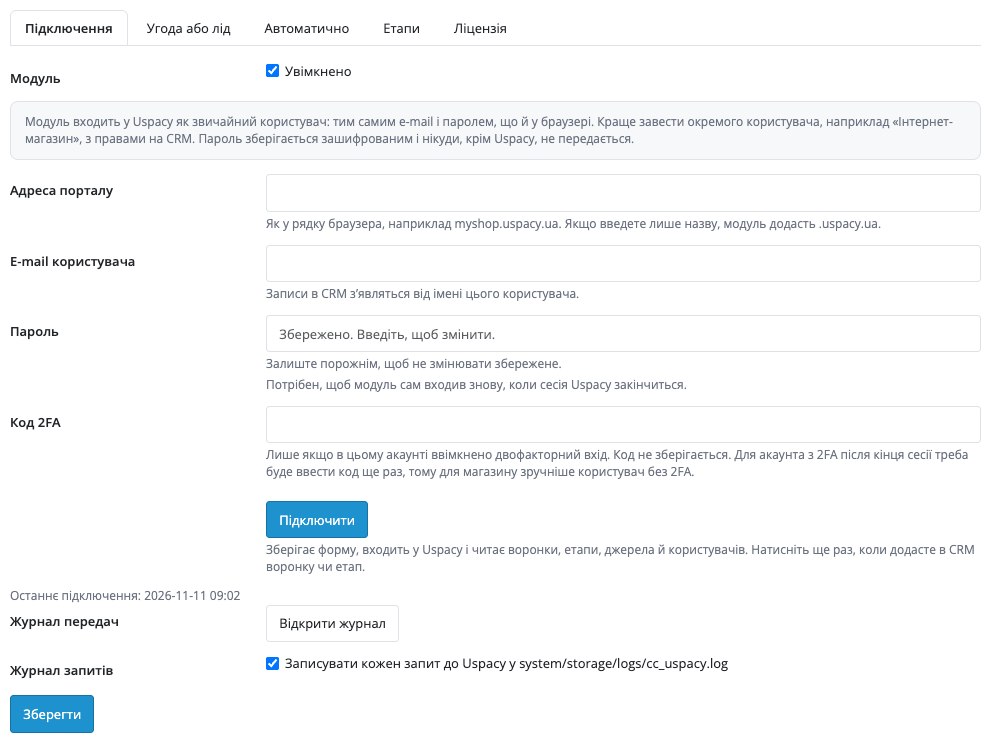
Extensions → Modules → Uspacy CRM: the tabs “Connection”, “Deal or lead”, “Automatic”, “Stages” and “License”.

A fresh install is the free version, nothing switches on by itself. The “Try Pro for 7 days” button → e-mail → the key right in the window and by e-mail.

Moving the site? Unlink the licence on the old domain and activate it on the new one yourself. A staging copy (staging., dev.) works with the same key and does not take a site slot. For studios — keys for 5 or 25 sites, or unlimited.
 OpenCart 4.0.2.0–4.1.x, 3.0.x or 2.3.0.2; PHP 7.0+ for 2.3, the cURL extension.A Uspacy portal and a user with CRM rights (better a separate one, without 2FA).For retries and stage checks in Pro: a scheduled job (cron) every 5 minutes; OpenCart 4 can run it with its own scheduler.Customer phones are sent in the +380 format.
For OpenCart 4.x, 3.x and 2.3: a deal or lead from an order with one button, pipeline, responsible user, source, order contents in a comment, result and a retry without duplicates.



Uspacy CRM for OpenCart 4.x, 3.x and 2.3 sends store orders to Uspacy as a deal or a lead: the customer, phone, e-mail, amount, pipeline, responsible user, source, and the order contents in a comment. The manager works with the order in the CRM and nothing is typed twice.
What you need from Uspacy. A Uspacy portal and a user with CRM rights. The module signs in to Uspacy the way you do: portal address, e-mail and password. The password is stored encrypted and is sent nowhere except Uspacy; it is better to create a separate user, for example “Online store”.
The order appears in the CRM as one record. A deal gets a title with the order number, the order amount, the pipeline and the responsible user; a lead gets the first name, last name, +380 phone, e-mail, source and responsible user. The order contents go into a comment: products with options and article, discount, delivery, address, payment method, total and the customer comment. The customer gets the order in the store in any case: if Uspacy does not answer, the order stays in the store and the transfer can be repeated.
Extensions → Modules → Uspacy CRM: the tabs “Connection”, “Deal or lead”, “Automatic”, “Stages” and “License”. You enter the portal address and the e-mail and password of a Uspacy user and press “Connect”: the module signs in to Uspacy and reads the pipelines, stages, sources and users, which are at once available in the select fields. If the account has two-factor sign-in, a 2FA code is entered; the code is not stored.
The order page in the admin gets a Uspacy CRM block with a “Send to Uspacy” button: by the setting it creates a deal (pipeline, amount, responsible user) or a lead (first name, last name, phone, e-mail, source, responsible user). The block shows the result: state, deal or lead number, stage. If Uspacy rejects the request, the error text is in the block and in the order history, with “Try again” and “Forget” buttons at hand. Before a retry the module looks for an already created record by title among the records with the customer e-mail or phone, so no duplicate appears even after a broken connection.
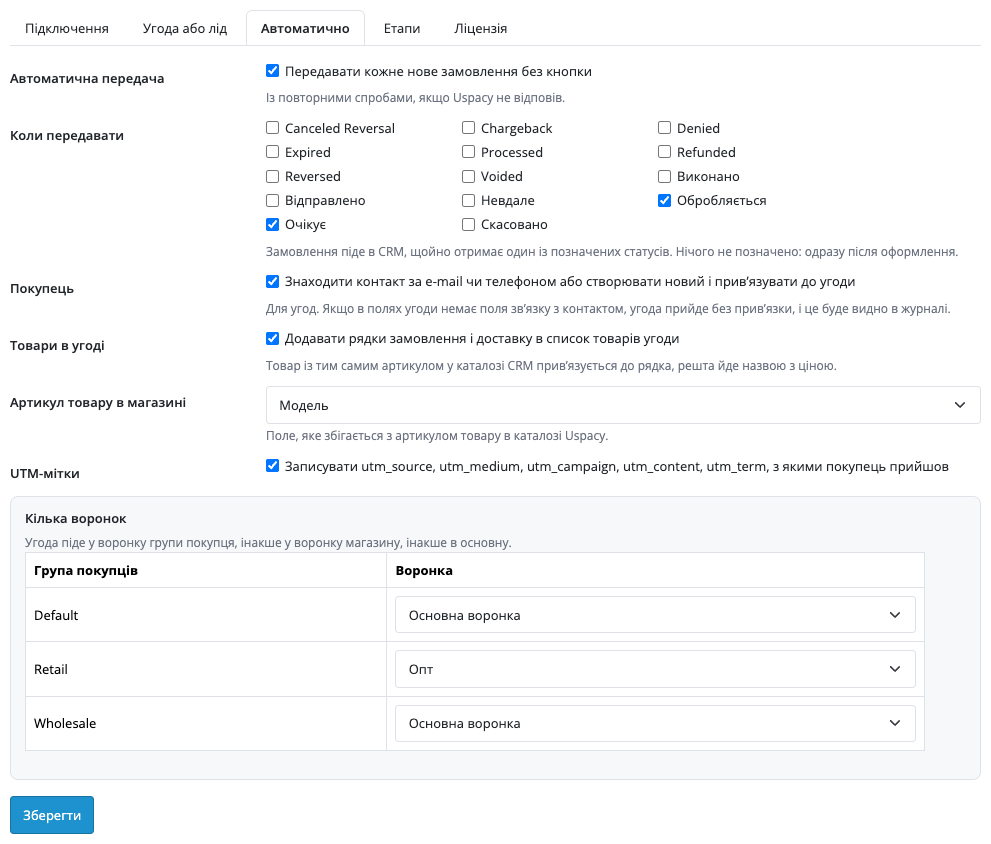
In Pro the “Automatic” tab turns on sending of every new order without the button: right after checkout or on the statuses you mark. If Uspacy does not answer, the module retries up to eight times with pauses from 90 seconds to 8 hours, and after a rate-limit answer it leaves the CRM alone for 65 seconds. The customer contact is searched by e-mail, then by phone, or a new one is created and linked to the deal. The order lines and delivery go into the deal product list: a product with the same article in the CRM catalogue is linked to the line, the rest goes by name with its price.
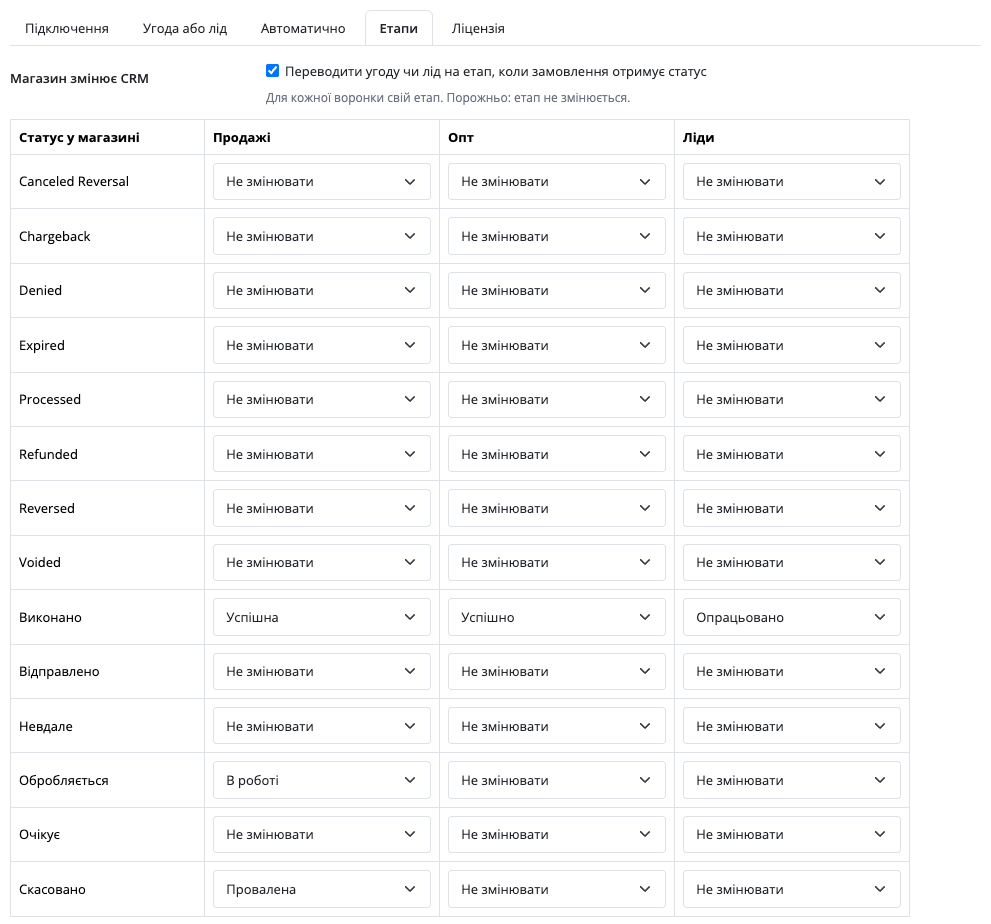
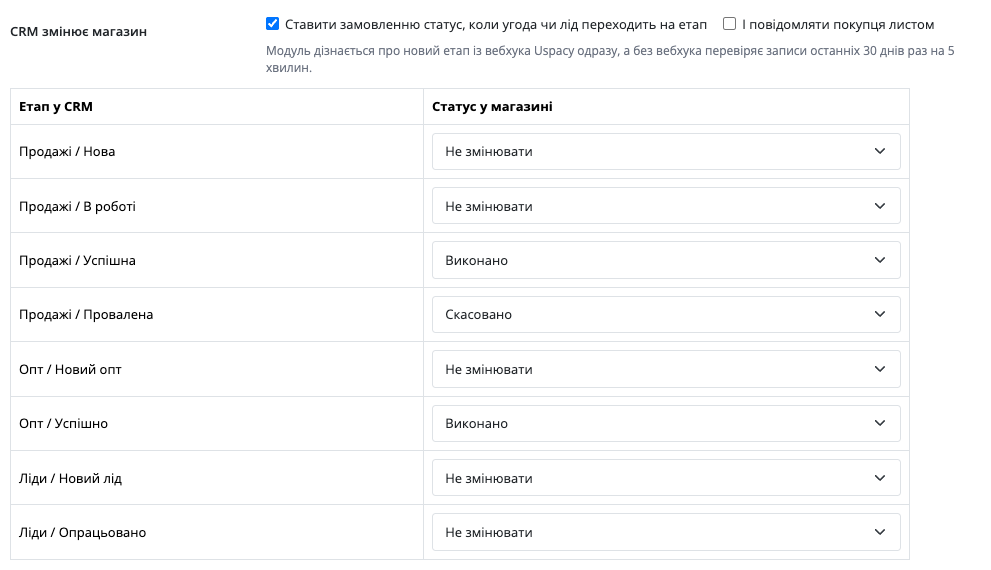
The “Stages” tab maps statuses in both directions. A store status moves the deal or lead to a stage: each pipeline and the leads have their own stage, and closing stages get a success or failure state. A stage in the CRM sets the order status in the store: the module learns about the change from the Uspacy webhook, added with the “Add webhook to Uspacy” button, and without the webhook it checks the records of the last 30 days every 5 minutes; the customer can get an e-mail about the new status. Several pipelines are chosen by customer group, otherwise by store, otherwise the main one is used.
The transfer log (Pro) shows every order with its CRM record number, stage and state, with the filters “All”, “Queued”, “Not sent” and “In CRM”. It also has a retry of everything not sent and a transfer of older orders from a chosen date, up to 500 at a time. The UTM marks the customer arrived with go into the deal or lead, even if the order is sent on a later status or by hand.
Didn't find the answer? Message us on Telegram and we'll reply within a business day.
 @catcode_support
Setup, compatibility, activation
No, it is an independent integration with Uspacy CRM. Uspacy is a trademark of its owner.
The password is stored encrypted in the store database and is sent only to Uspacy to sign in. It is better to create a separate user, for example “Online store”, with CRM rights instead of using your own account.
Yes: the 2FA code is entered when connecting and is not stored. When the Uspacy session ends the code is needed again, so a user without 2FA suits a store better.
You choose one of the two on the “Deal or lead” tab. A deal gets a pipeline and an amount, a lead gets the first name, last name, phone, e-mail and source.
The order stays in the store. The order block shows the error, and “Try again” looks for an already created record before it retries, so there is no duplicate. In Pro the retries run by themselves, up to eight times.
Yes, if the Uspacy webhook is added: the “Add webhook to Uspacy” button registers it, and the module user has to be a portal administrator for that. Without the webhook the module checks the records of the last 30 days every 5 minutes. This is a Pro feature.
OpenCart 4.0.2.0–4.1.x, 3.0.x and 2.3.0.2: three separate archives in one product.
Yes, for OpenCart it is one payment and a lifetime license, for two sites.
No reviews yet. Be the first.
No questions yet. Ask one — we answer within 24 hours.
We build custom modules for WordPress, WooCommerce, OpenCart and Shopify. Tell us about the task and we'll prepare an estimate.
Order a custom module
—
Charged in UAH; your bank converts it to your currency. EUR price is approximate.

CatCode assistant
Just now


CatCode assistant
Online

I’ll help with your website task
Describe your website task — I’ll find a ready-made module or pass it to a developer for an estimate. Modules, custom features, layout, integrations, speed, migration, technical SEO.
