
















OpenCart
1 290 UAH839 UAH≈ €17
Black November: −35% on all modules until 30 November Black November: −35% until 30 November Choose a module
 Website auditA PDF report by email in 3 minutesCheck a website
Everyday tasks
Image compressorSize, quality and WebP in bulkQR generatorLink, Wi-Fi, payment to IBANVAT calculator20, 14, 7% and amount in wordsTransliterationOfficial Ukrainian standardWebsite checks
PHP and pluginsPHP version, WordPress, pluginsGoogle Merchant feedFields, prices, GTIN, imagesDomain emailSPF, DKIM, DMARC, blacklistsAI search readinessllms.txt, bots, markupAll 9 toolsEnter at least 2 characters


ThePay for OpenCart 4.x, 3.x, 2.3 (Czech Republic): card and bank transfer payments on the ThePay page; Pro adds all methods, all currencies, partial refunds, a payment watchdog and a journal. Lifetime licence.
The free version works with no time limit. Pro adds the rest of the features in the table.


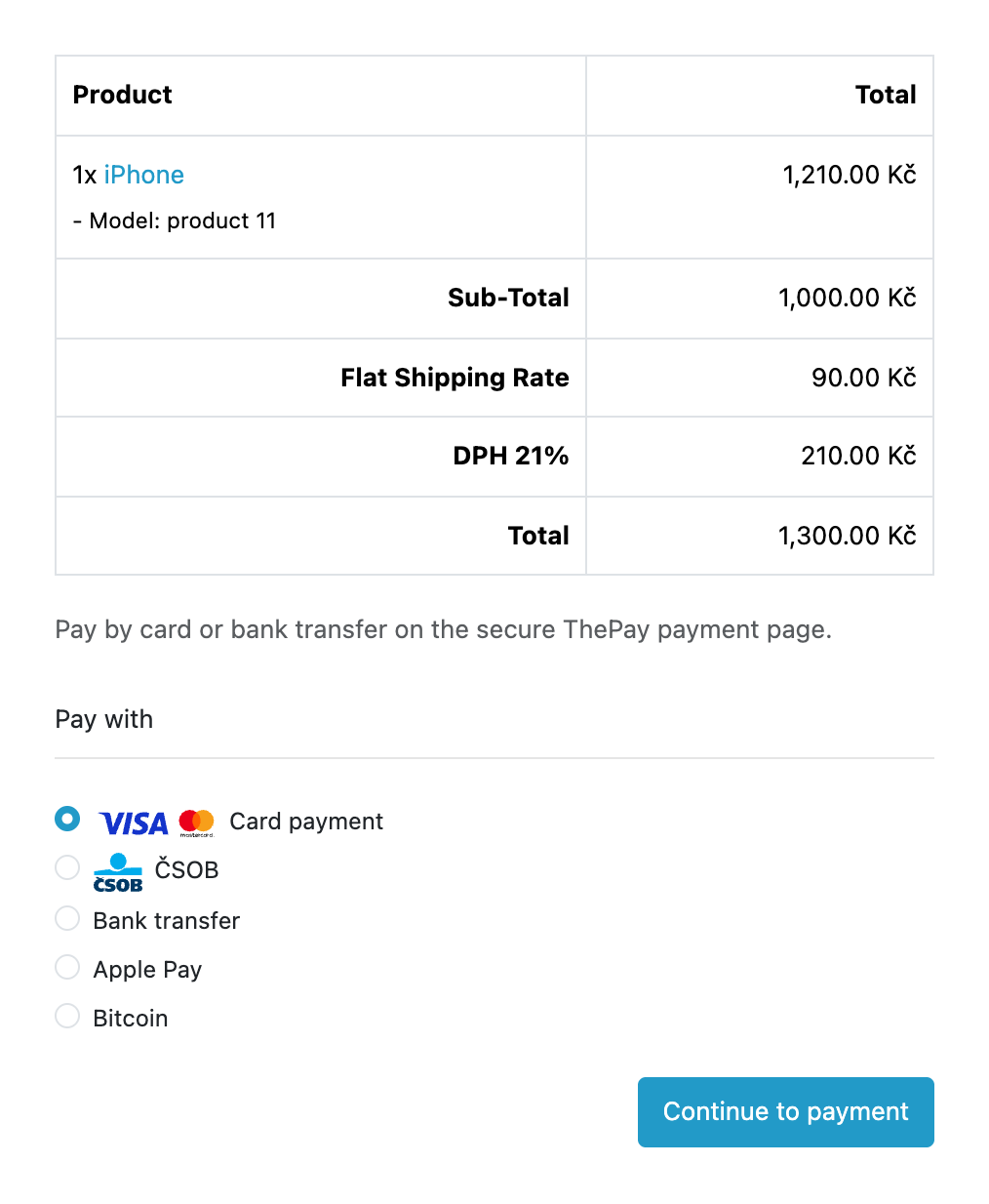
At the checkout the buyer chooses “Online payment (ThePay)”, sees the payment methods of your project with logos (card, bank buttons) and presses “Continue to payment”.

Extensions → Extensions → Payments → ThePay Payments (CatCode): the tabs “General”, “Checkout”, “Order statuses” and “Pro”.

A fresh install is the free version, nothing switches on by itself. The “Try Pro for 7 days” button → e-mail → the key right in the window and by e-mail.

Moving the site? Unlink the licence on the old domain and activate it on the new one yourself. A staging copy (staging., dev.) works with the same key and does not take a site slot. For studios — keys for 5 or 25 sites, or unlimited.
 OpenCart 4.0.2.x–4.1.x, 3.0.x or 2.3.0.2; PHP 7.0+ for 2.3, the cURL extension.A contract with ThePay is required: Merchant ID, Project ID and the API password from the ThePay admin.ThePay accepts requests only from IP addresses added to the allowed list in its admin: without that every request gets 403. “Check connection” shows the server address to add; behind NAT or a proxy the outgoing address may differ from it.The free version accepts CZK and EUR; other shop currencies are converted to CZK (or EUR, if that is the shop currency) at the OpenCart rate, or the method is hidden. All the currencies of the project are in Pro.The free version shows the methods tagged “card” and “bank transfer”; Apple Pay, Google Pay, Bitcoin, deferred payments and other methods without those tags are in Pro.The list of methods is cached for 10 minutes: a method switched off in the ThePay admin may still be shown at the checkout for up to 10 minutes; an attempt to pay with it ends with a message and the buyer chooses another.ThePay notifications arrive without a signature, so the module always re-reads the payment through the API before it changes an order: a forged request changes nothing.The payment validity defaults to 1440 minutes (1 day, within 15–10080), so that a bank transfer has time to arrive; it can be changed in the settings.On OpenCart 4 the payment watchdog runs from the built-in scheduler once an hour; on 3.x and 2.3, or instead of the scheduler, call the cron URL from the settings on your hosting, for example every 15 minutes.
For OpenCart 4.x, 3.x and 2.3: card and bank transfer payments on the ThePay page, a check of every payment at ThePay before an order changes, pay again, amount matching, the demo and live…


ThePay Payments for OpenCart 4.x, 3.x and 2.3 takes card and bank transfer payments through the Czech ThePay payment gateway with your own merchant contract: the buyer pays on the secure ThePay page, and the card never passes through your site. An order changes its status only after the module has read the payment back from ThePay.
At the checkout the buyer chooses “Online payment (ThePay)”, sees the payment methods of your project with logos (card, bank buttons) and presses “Continue to payment”. The module creates a payment at ThePay and sends the buyer to the secure page, where they pay with the chosen method. After paying, ThePay returns them to the site.
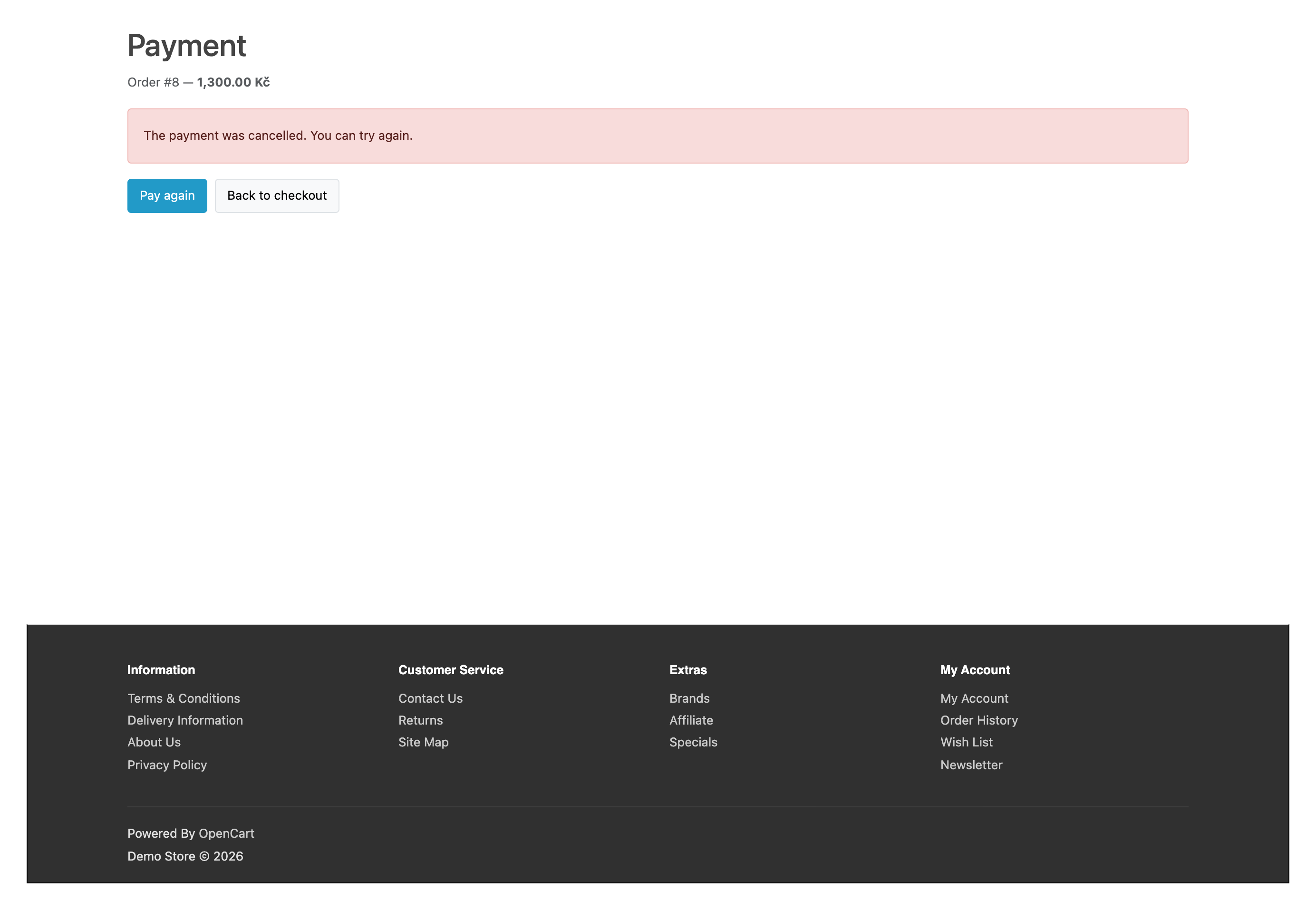
The order status changes only after the module has asked ThePay for the state of this payment; both the ThePay notification and the buyer’s return trigger that. If the buyer cancelled or the payment did not go through, they see a plain message with the buttons “Pay again” and “Back to checkout”, and the cart stays. “Pay again” reuses the same ThePay payment while it can still be paid, so no second payment appears.
The payment amount, currency, order number and project are matched with the order. If the cart changed after the payment was created or ThePay returned a different amount, the order gets the status “Needs review” with an explanation. A second payment of the same order is marked in the order, so a double payment is not lost, and a late or older payment state does not roll back an order that is already paid.
When the shop currency is neither koruna nor euro, the free version converts the amount to CZK (or to EUR, if that is the shop currency) at the OpenCart rate or hides the payment method. Pro accepts all the currencies your ThePay project supports.
Extensions → Extensions → Payments → ThePay Payments (CatCode): the tabs “General”, “Checkout”, “Order statuses” and “Pro”. Copy the Merchant ID, Project ID and API password from the ThePay admin, paste them on the “General” tab, choose the demo or live environment and press “Check connection”: the module checks the project, loads its methods and tells you what is wrong if ThePay rejected the password (401), the server IP address (403) or the project. The API password is stored encrypted and is not shown again.
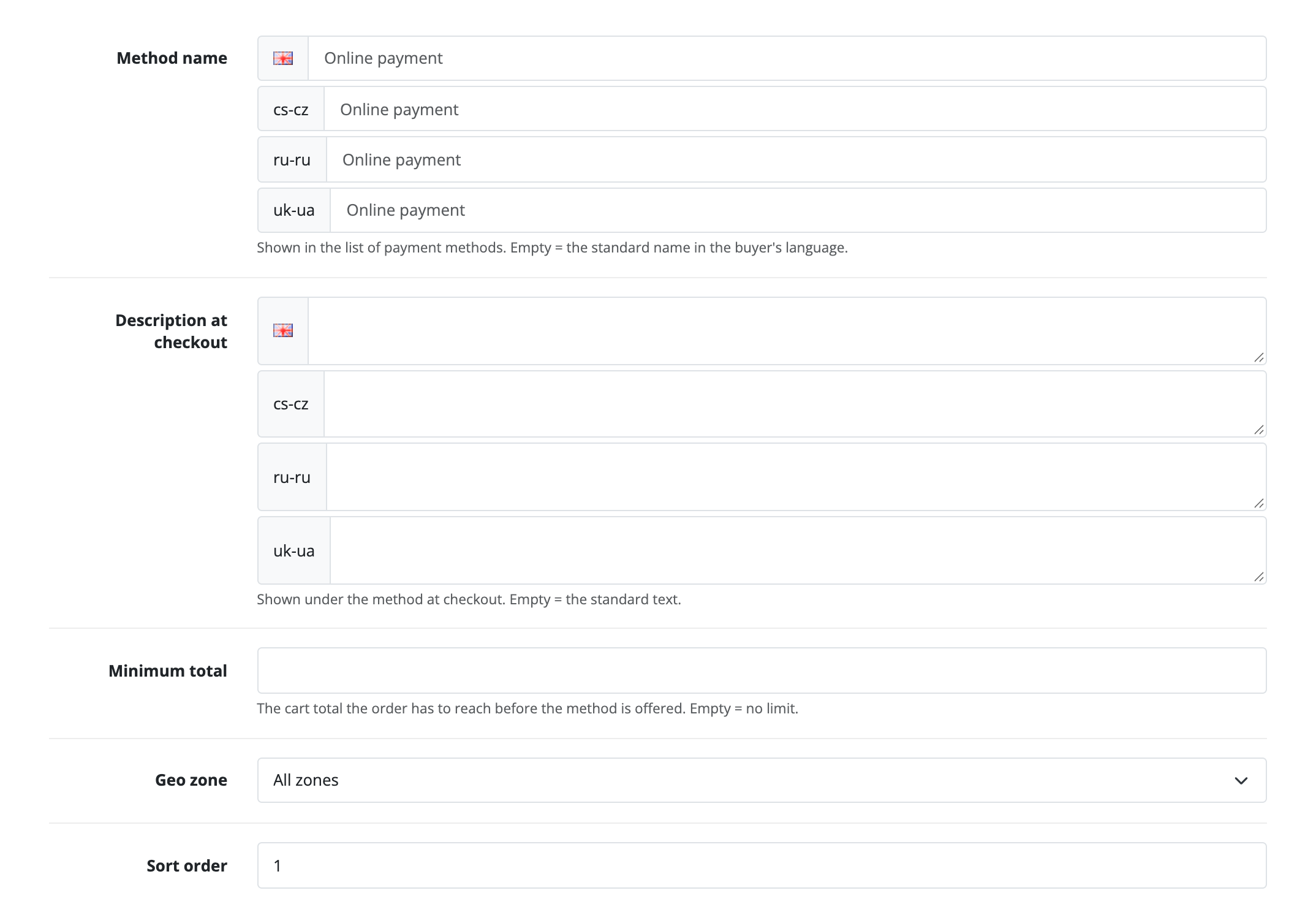
On the “Checkout” tab you set the method name and the description under it for every shop language, the minimum total, the geo zone and the sort order; on “Order statuses” you choose the statuses for “Paid”, “Needs review” and “Refunded”. The buyer-facing texts are in English and Czech, amounts are shown in the shop format (for example 1,300.00 Kč), and the ThePay page opens in the buyer’s language.
The Pro tab opens all methods of the project, the choice of where the buyer picks the method (at the shop checkout with the method already chosen, or freely on the ThePay page), the conversion currency, a separate ThePay project for each OpenCart shop, the ThePay notification address, the payment watchdog state with a manual check button and the URL for the hosting cron. The order page shows the payment, amount, method, identifier and payment attempts; the “Refund” button returns everything left, and in Pro you can enter the amount of a partial refund, and several partial refunds add up. “Check at ThePay” re-reads the payment, and refunds made in the ThePay admin are picked up and set the order to “Refunded”. The payment journal opens from the settings page.
Without a licence the Pro fields are shown disabled with an explanation, and stored Pro values do not reach the requests to ThePay. The “Try Pro” button starts a 7-day trial.
Didn't find the answer? Message us on Telegram and we'll reply within a business day.
 @catcode_support
Setup, compatibility, activation
No, it is an independent integration through the public API. ThePay is a trademark of its owner.
In the ThePay admin after you sign the merchant contract. Without a contract the module cannot work.
ThePay accepts requests only from IP addresses added to the allowed list in your ThePay admin (otherwise 403) and only with the right API password (otherwise 401). Add the server address that "Check connection" shows.
No. The buyer pays on the secure ThePay page, and only the result comes back to the site.
After the module has asked ThePay for the payment state and received "paid". The buyer's return without ThePay's confirmation does not pay the order.
The ThePay notification settles the order without the buyer's return; in Pro the payment watchdog also picks up the ones whose notification did not arrive.
In the free version, the methods of your project tagged "card" and "bank transfer". Apple Pay, Google Pay and others are in Pro.
Yes: a full refund with one button on the order page is in the free version, partial refunds are in Pro.
The free version supports CZK and EUR (others are converted at the OpenCart rate, or the method is hidden); Pro supports all the currencies your ThePay project accepts.
OpenCart 4.0.2.x–4.1.x, 3.0.x and 2.3.0.2: three separate archives in one product.
Yes, for OpenCart it is a single payment and a lifetime licence, for two sites.
Pro switches off and the free part keeps working.
No reviews yet. Be the first.
No questions yet. Ask one — we answer within 24 hours.
We build custom modules for WordPress, WooCommerce, OpenCart and Shopify. Tell us about the task and we'll prepare an estimate.
Order a custom module
—
Charged in UAH; your bank converts it to your currency. EUR price is approximate.

CatCode assistant
Just now


CatCode assistant
Online

I’ll help with your website task
Describe your website task — I’ll find a ready-made module or pass it to a developer for an estimate. Modules, custom features, layout, integrations, speed, migration, technical SEO.