
















OpenCart
Abandoned Cart Recovery for OpenCart 2.3, 3.x and 4.x
Free + Pro
1 290 UAH≈ €26
v1.2.4
 Website auditA PDF report by email in 3 minutesCheck a website
Everyday tasks
Image compressorSize, quality and WebP in bulkQR generatorLink, Wi-Fi, payment to IBANVAT calculator20, 14, 7% and amount in wordsTransliterationOfficial Ukrainian standardWebsite checks
PHP and pluginsPHP version, WordPress, pluginsGoogle Merchant feedFields, prices, GTIN, imagesDomain emailSPF, DKIM, DMARC, blacklistsAI search readinessllms.txt, bots, markupAll 9 toolsEnter at least 2 characters
OpenCart prices and stock on Takealot (South Africa); Pro brings sales as orders with fees. Lifetime licence.
The free version works with no time limit. Pro adds the rest of the features in the table.


A buyer on Takealot sees your product on the Takealot catalogue page with your price in rand and availability from your warehouse.

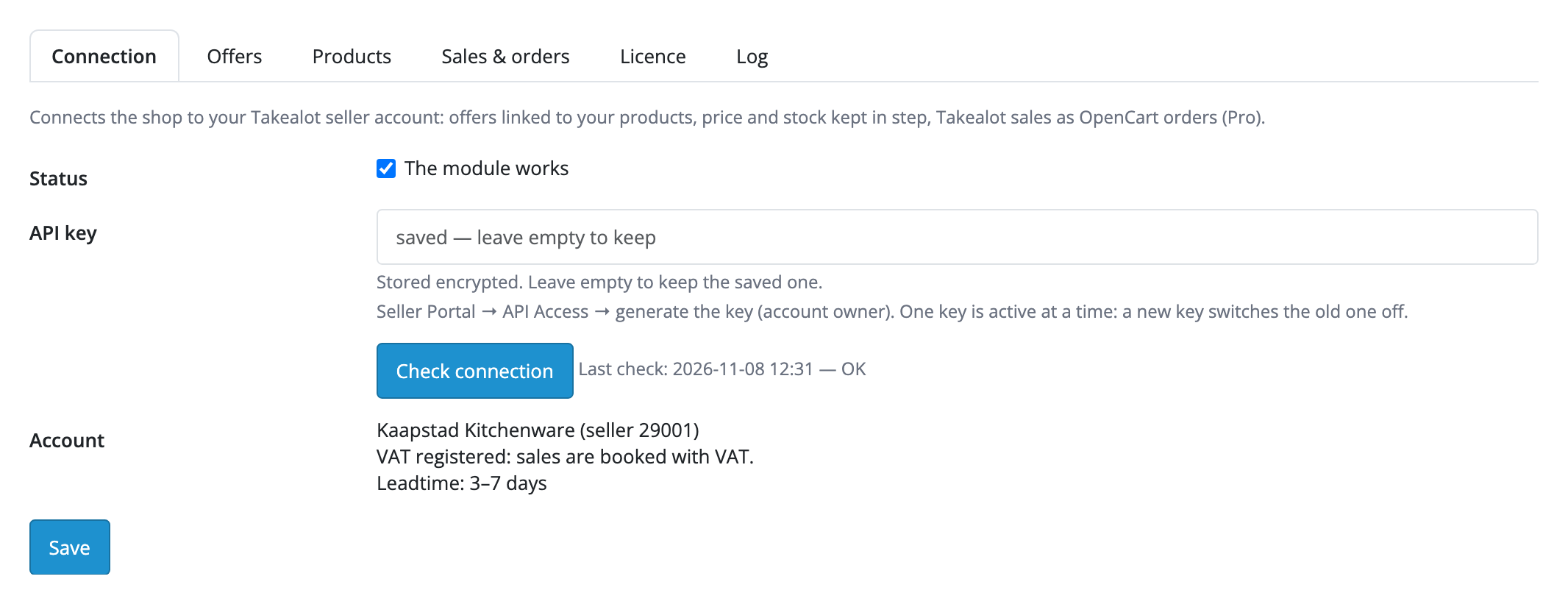
Extensions → Modules → Takealot Marketplace Connector, tabs “Connection”, “Offers”, “Products”, “Sales & orders”, “Licence”, “Log”. “Connection” has the API key from the Seller Portal and “Check connection” with the seller name, VAT registration and leadtime range. “Offers” has automatic sync, the warehouse for the stock, the SKU source and the barcode field (EAN, UPC, ISBN), new offer creation, prices with or without VAT, the VAT rate, the rate to ZAR, markup and rounding.

The base version is free. Pro costs 1 290 UAH, a one-time payment for a lifetime licence.

A fresh install is the free version, nothing switches on by itself. The “Try Pro for 7 days” button → e-mail → the key right in the window and by e-mail.

Moving the site? Unlink the licence on the old domain and activate it on the new one yourself. A staging copy (staging., dev.) works with the same key and does not take a site slot. For studios — keys for 5 or 25 sites, or unlimited.
 OpenCart 4.0.2.0–4.1.x, 3.0.x or 2.3.0.2, PHP 7.0+.A Takealot seller account and an API key (Seller Portal → API Access, generated by the account owner).A barcode (EAN / UPC / ISBN) on products that need a new offer: Takealot creates one only for a product from its catalogue.Cron for regular sending (built in on OpenCart 4); for the Pro webhook, a site on HTTPS.
For OpenCart 4.x, 3.x and 2.3: connection with an API key, offer import and linking, prices, RRP, leadtime and stock, new offers by barcode.


Takealot Marketplace Connector for OpenCart 2.3, 3.x and 4.x connects the shop to your seller account on Takealot, the South African marketplace. The module links your Takealot offers to products and keeps their price, RRP, leadtime and the stock of your warehouse the same as in the shop. Pro brings Takealot sales into OpenCart as orders with fees, cancellations and returns.
A buyer on Takealot sees your product on the Takealot catalogue page with your price in rand and availability from your warehouse. The price goes out in whole rand with VAT, with your markup and an exchange rate when the shop does not sell in ZAR. A disabled or deleted product gets stock 0 on Takealot.
Extensions → Modules → Takealot Marketplace Connector, tabs “Connection”, “Offers”, “Products”, “Sales & orders”, “Licence”, “Log”. “Connection” has the API key from the Seller Portal and “Check connection” with the seller name, VAT registration and leadtime range. “Offers” has automatic sync, the warehouse for the stock, the SKU source and the barcode field (EAN, UPC, ISBN), new offer creation, prices with or without VAT, the VAT rate, the rate to ZAR, markup and rounding.
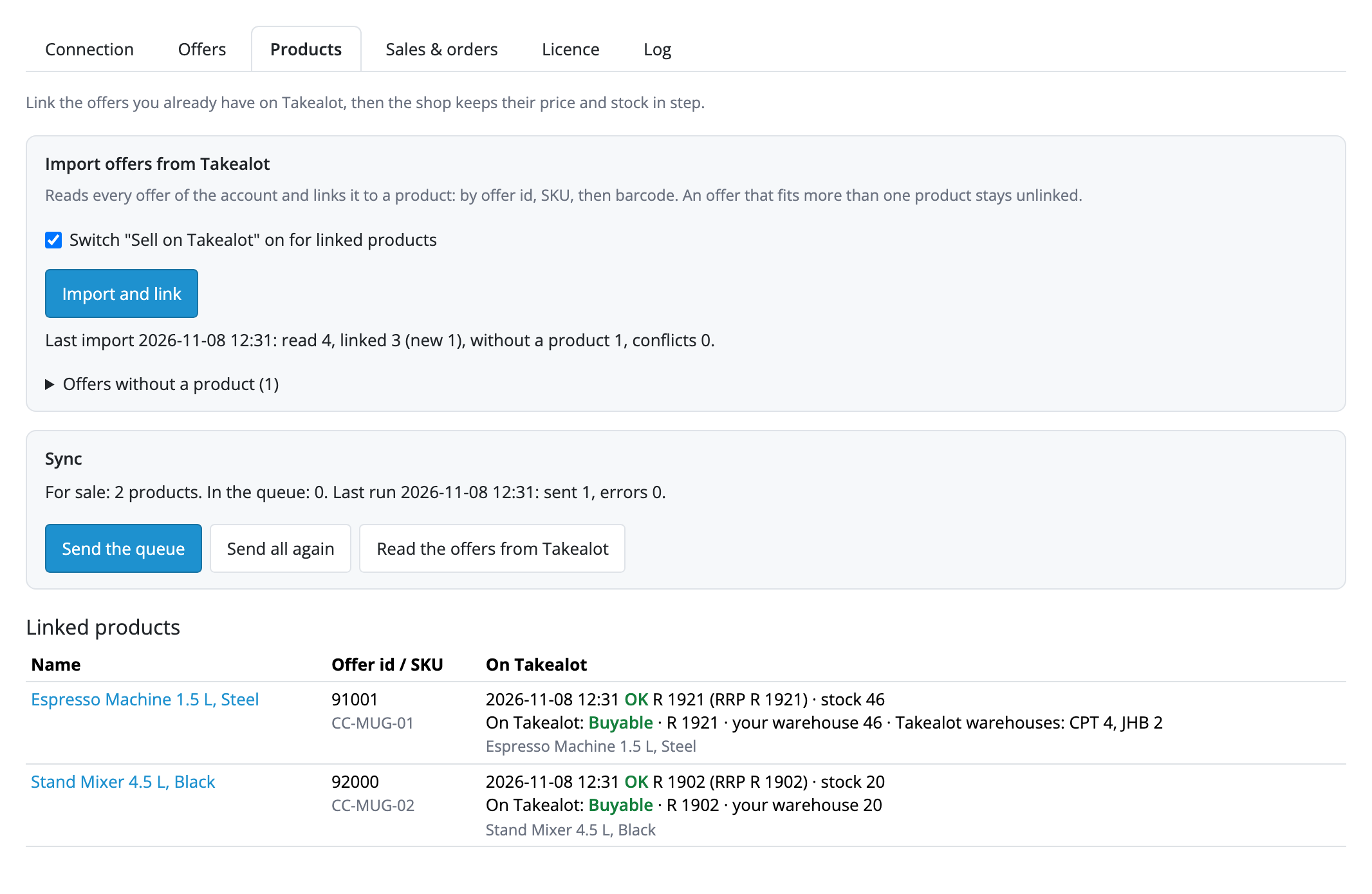
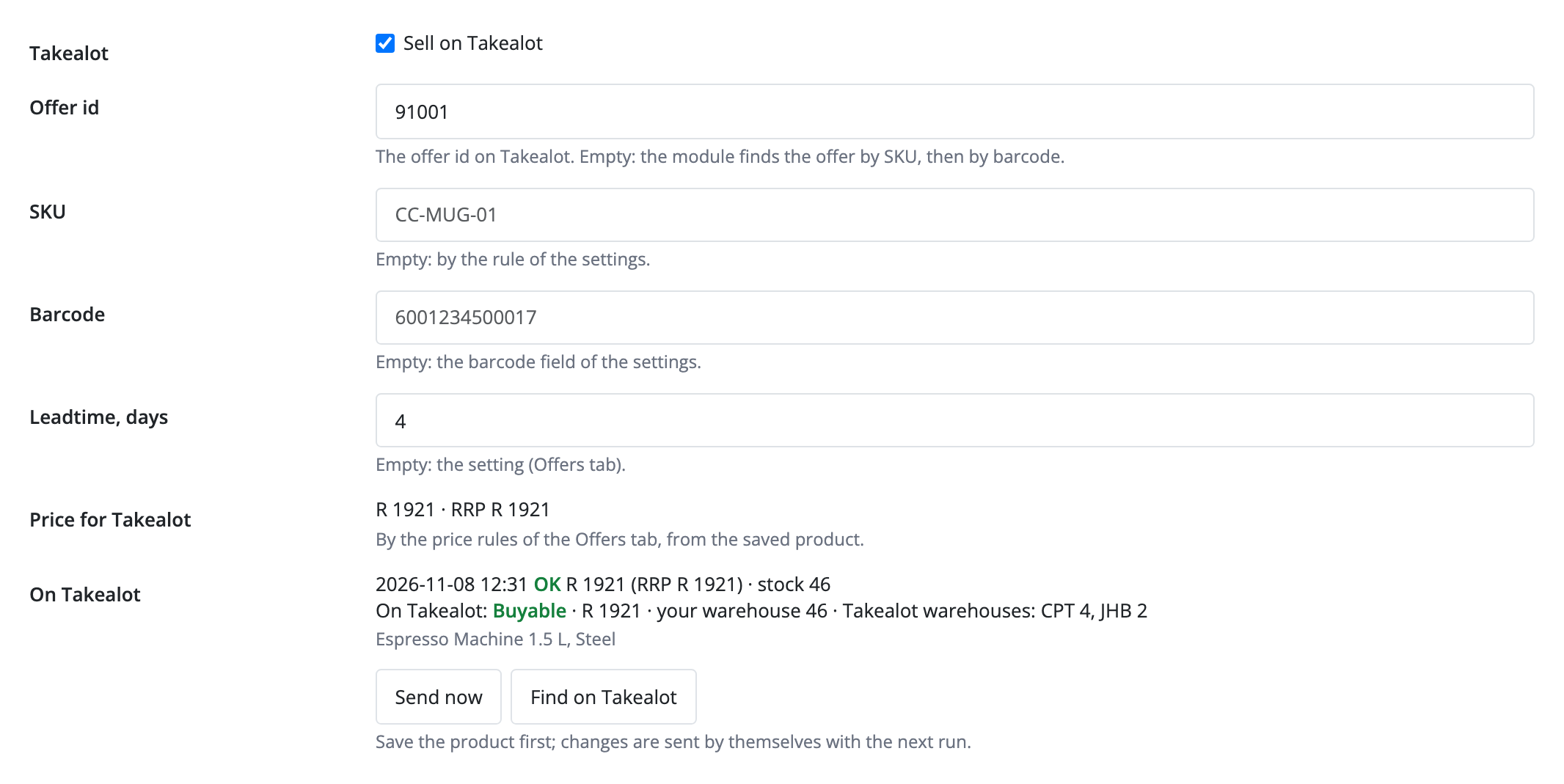
“Import and link” reads every offer of the account and links it to a product by offer id, SKU, then barcode; an offer that fits more than one product stays unlinked. Products get a Takealot tab: sell or not, offer id, SKU, barcode, leadtime, the price for Takealot and the state on Takealot with Takealot warehouses (CPT, JHB, DBN), plus “Send now” and “Find on Takealot”.
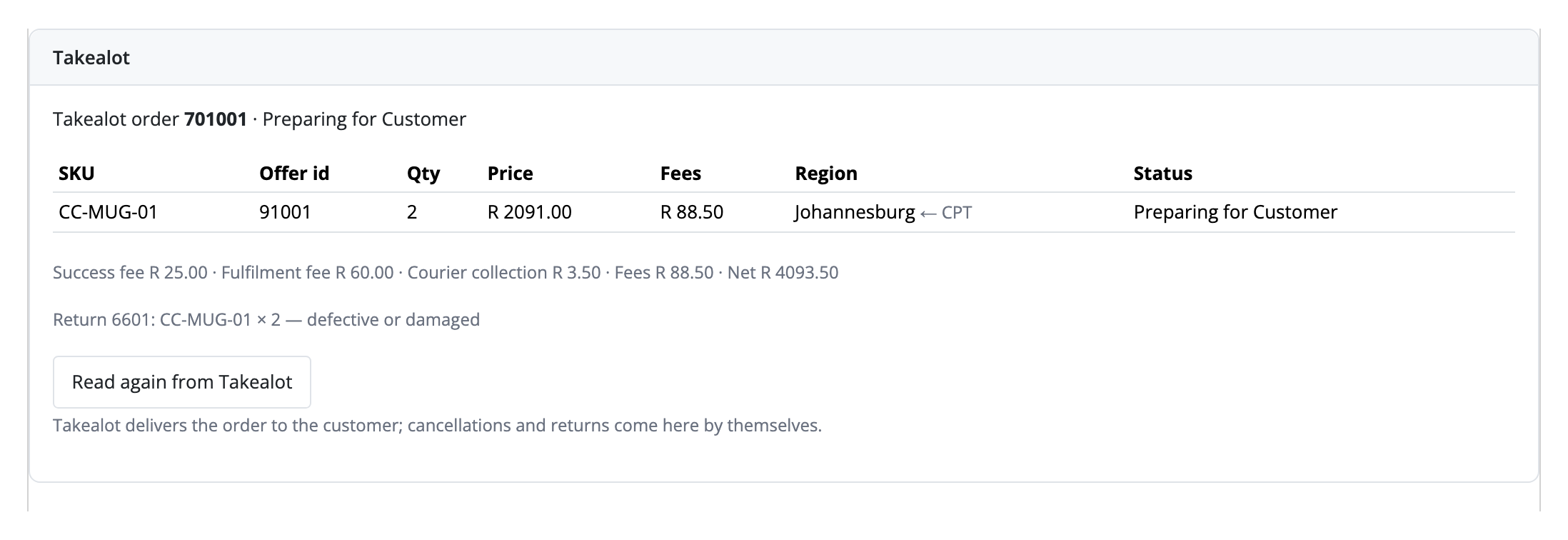
In Pro, Takealot sales become OpenCart orders: a check every 10 minutes, an hourly re-read of recent ones, and at once through the webhook. The lines of one Takealot order go into one order, amounts in ZAR, VAT as a separate line, stock reduced the standard way. Takealot fees and what is left after them are shown in the order panel and history. A cancellation on Takealot sets “Canceled” and returns the stock, a return becomes a note, and when everything came back the status is “Refunded”.
Didn't find the answer? Message us on Telegram and we'll reply within a business day.
 @catcode_support
Setup, compatibility, activation
No, it is an independent integration through the public Takealot Marketplace API. Takealot is a trademark of its owner.
No. Takealot creates an offer only for a product already in its catalogue, by barcode. A seller adds new products through the Seller Portal.
Takealot delivers the orders itself and does not pass buyer details to the seller. The order has the Takealot number, lines, amounts, fees and region.
No: one OpenCart product is one offer.
Yes, a one-time payment, no yearly fees.
Yes, a separate plugin.
No reviews yet. Be the first.
No questions yet. Ask one — we answer within 24 hours.
We build custom modules for WordPress, WooCommerce, OpenCart and Shopify. Tell us about the task and we'll prepare an estimate.
Order a custom module
—
Charged in UAH; your bank converts it to your currency. EUR price is approximate.

CatCode assistant
Just now


CatCode assistant
Online

I’ll help with your website task
Describe your website task — I’ll find a ready-made module or pass it to a developer for an estimate. Modules, custom features, layout, integrations, speed, migration, technical SEO.
