
OpenCart · WordPress
Storepulse — store monitor with Telegram alerts
Free + Pro
890 UAH/year
v1.0.1
Enter at least 2 characters

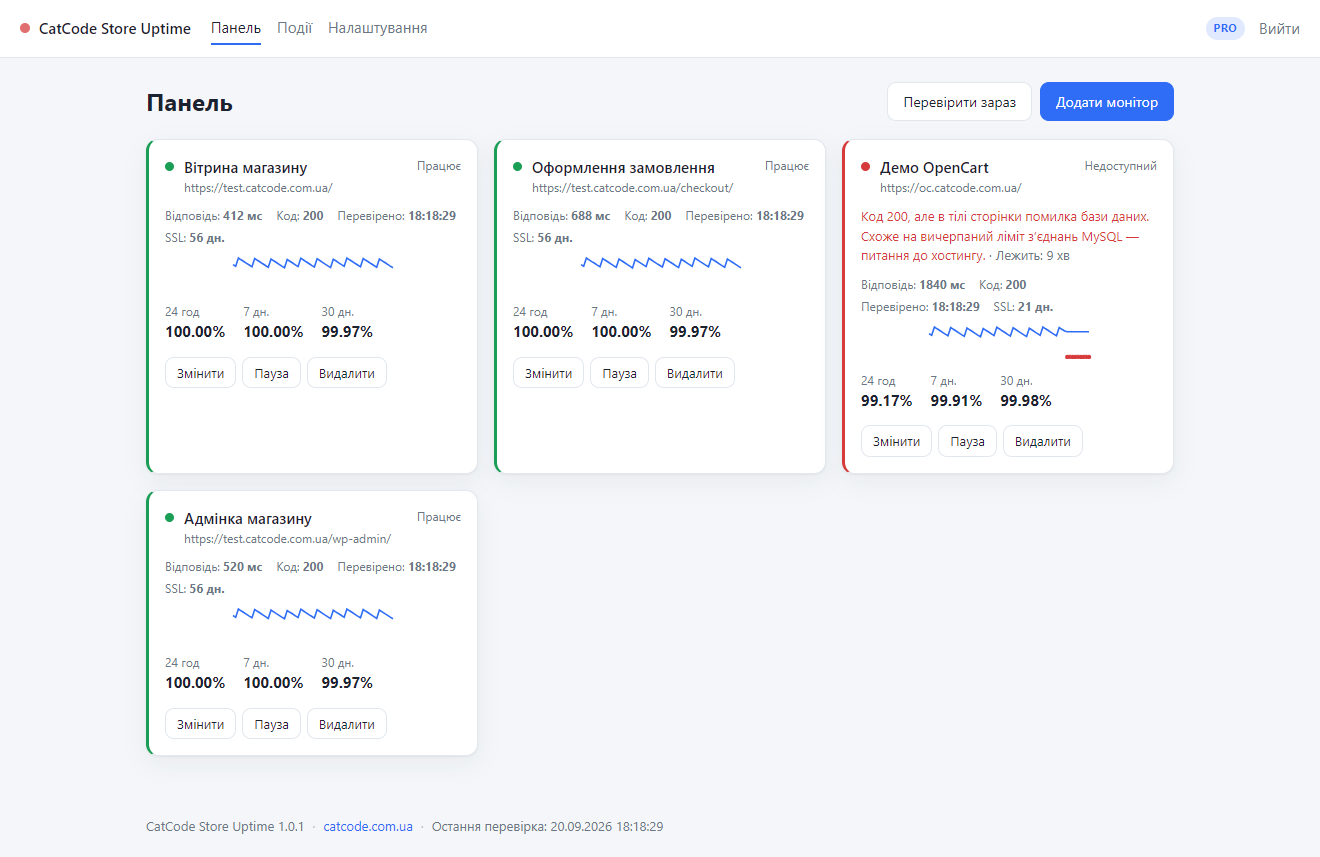
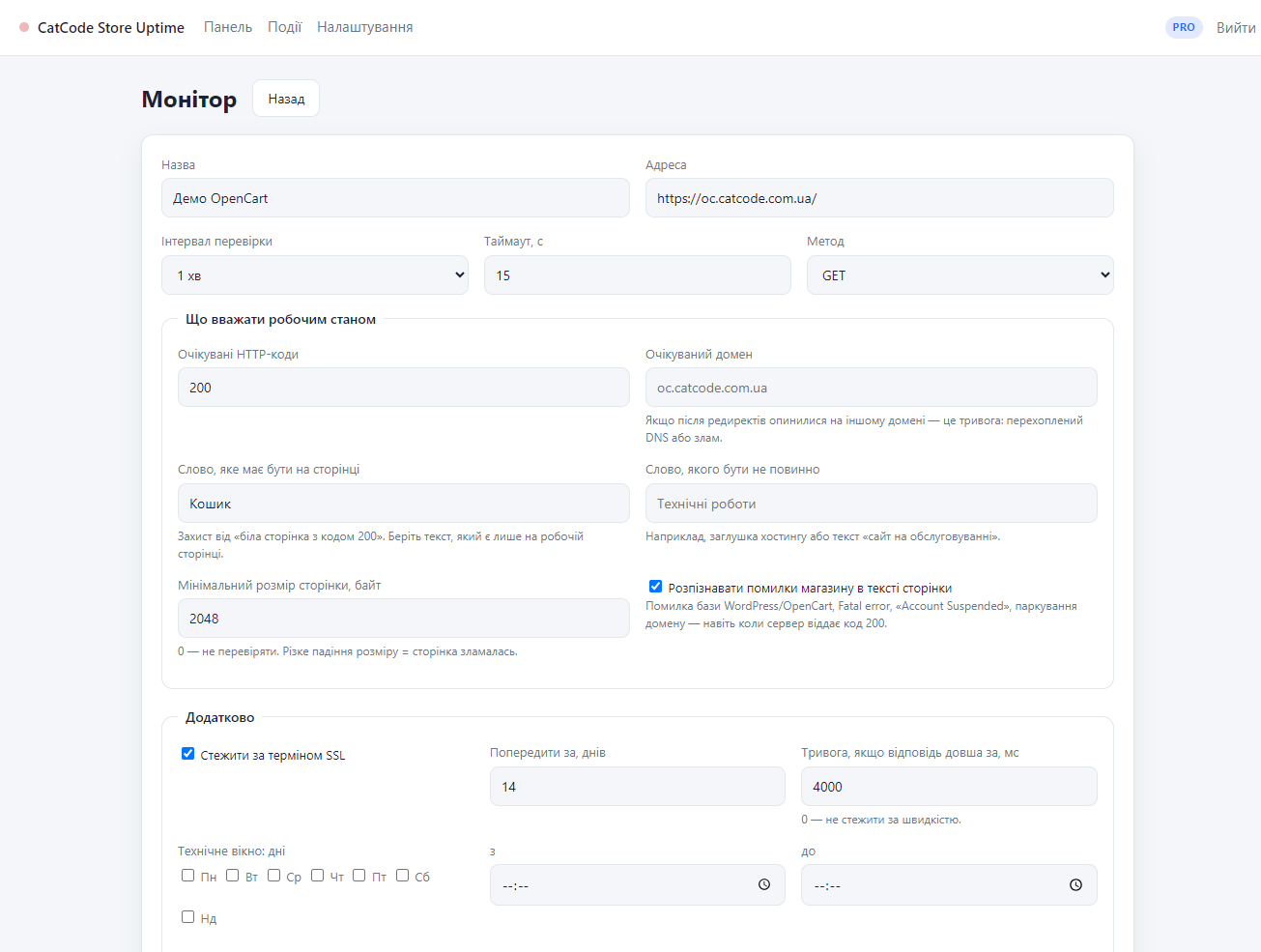
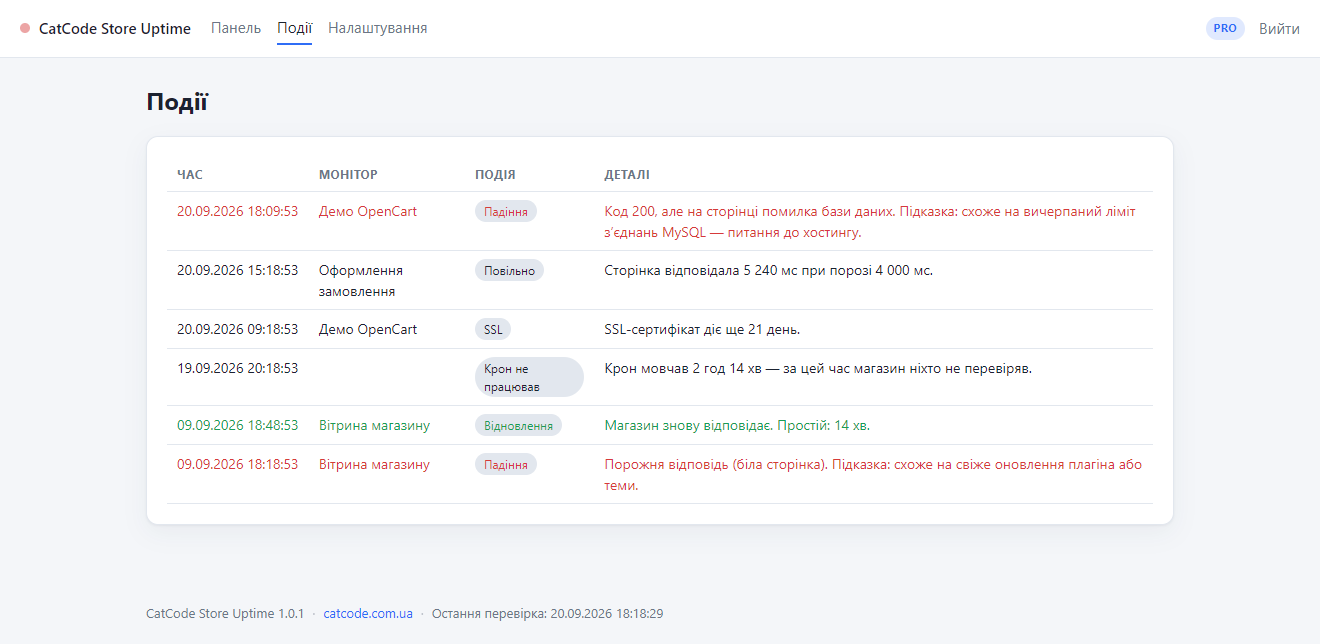
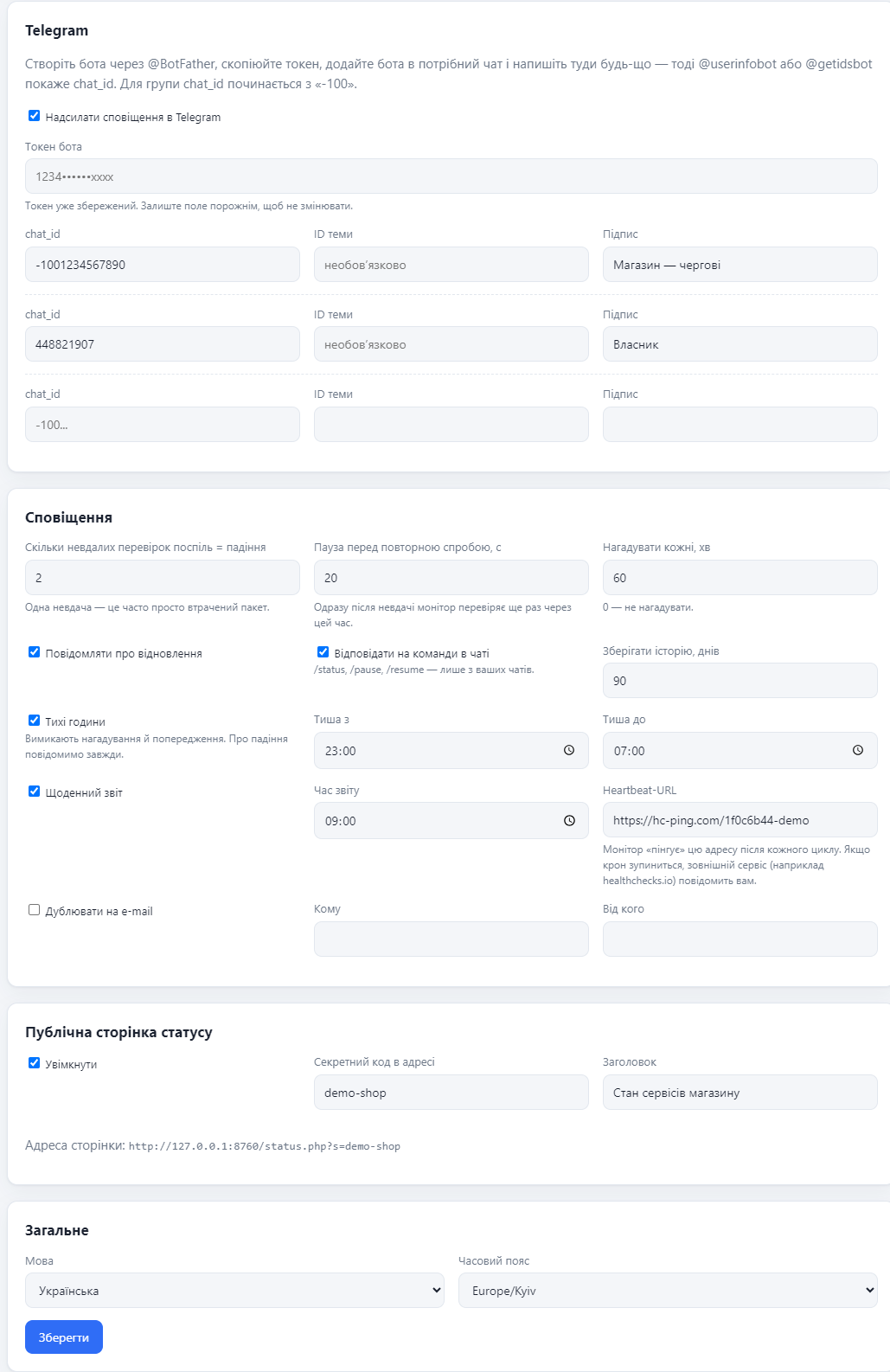
A standalone PHP application that watches your store from the outside and writes to Telegram when it goes down. It detects a database error, a Fatal error and a blank page even when the status code is 200. Free — 2 monitors with no time limit; Pro — no limits, SSL, digests, status page.
The free version works with no time limit. Pro adds the rest of the features in the table.


Ordinary monitors check the HTTP status code. But 200 does not mean “the store works”: a page can return 200 and still show the shopper a database error, a blank screen or a hosting stub.

The message carries not a dry error code but a reason in plain language and a theory about what to do.

Free — free forever: 2 monitors, a 5-minute interval, 1 Telegram chat, the full store-error detection, the event log and the retry before an alert.

A fresh install is the free version, nothing switches on by itself. The “Try Pro for 7 days” button → e-mail → the key right in the window and by e-mail.

Moving the store? Unbind the licence on the old domain and activate it on the new one yourself. If our server is unreachable, Pro keeps working for 14 more days. For studios — keys for 5 or 25 sites, or unlimited.
 PHP 7.4 or newer (tested on 7.4.33 and 8.3.31);write access to the application folder and to data/;cURL (without it, it falls back to file_get_contents);OpenSSL — so that the bot token and the licence key are stored encrypted;cron every minute; if the host has no cron, an external pinger on the tokenised URL;no database required: no MySQL, no composer, no dependencies.
The Europe/Kyiv time zone only exists in tzdata 2022b and newer, so on PHP 7.4 and 8.0 every request emitted a notice and broke the session and the redirects; an unknown identifier is now…
HTTP checks of the storefront, cart, checkout and admin from 1 minute; store-error detection at status code 200; Telegram alerts with a hint; failure confirmation by a second check; SSL…
4 modules in one order — 40% cheaper than separately



Storepulse is an uptime monitor for your online store with alerts in Telegram. It is not a plugin — it is a standalone PHP application you install on your own hosting, and it watches the store from the outside. Every minute it opens your pages the same way a shopper does, and when the store stops working it writes to Telegram: what exactly broke, when, and what to do about it.
This is the most common mistake that makes monitoring go silent exactly when you need it. If the monitor sits on the same hosting as the store, it goes down together with the store — and there is nobody left to send the alert. That is why Store Uptime is a separate application and not a WooCommerce or OpenCart plugin: a plugin inside the store physically cannot report that the store is unreachable.
Put it on any other hosting: a cheap shared account, a subdomain of another project, a VPS. It barely uses any resources — all it needs is PHP and cron. The installer and the readme inside the archive say this explicitly.
Ordinary monitors check the HTTP status code. But 200 does not mean “the store works”: a page can return 200 and still show the shopper a database error, a blank screen or a hosting stub. Store Uptime looks at what the shopper sees and recognises in the response body:
Fatal error, Parse error and the WordPress critical error served with code 200;Plus two things classic monitors do not have at all. First: a failure is confirmed by a second check a few seconds later, so one lost packet will not wake you up at night. Second: downtime of the monitoring itself is caught separately — if cron stayed silent for more than 30 minutes, that is an event and a message, not a fake “100% uptime”.
The message carries not a dry error code but a reason in plain language and a theory about what to do. For example:
With Pro you can also write to the bot: /status returns a summary of every monitor, /pause and /resume turn the checks off and on — handy before planned maintenance.
config.php.Free — free forever: 2 monitors, a 5-minute interval, 1 Telegram chat, the full store-error detection, the event log and the retry before an alert.
Pro — 890 UAH per year for one copy of the application. A longer term is cheaper: 2 years — 1690 UAH, 3 years — 2350 UAH, 4 years — 2920 UAH, 5 years — 3340 UAH. There are no automatic charges; renewal is manual, with reminders by e-mail 14, 7, 3 and 1 day before the end. When the term expires the application and its Pro features keep running — only updates and support stop.
OpenCart stores get a lifetime licence. For OpenCart, Pro costs 890 UAH once: no term, no renewals, no reminders. It has its own “Buy for OpenCart” button. The yearly licence with a 1–5 year choice applies to WooCommerce / WordPress.
Before buying there is a 7-day Pro trial: one button in “Settings → Licence”, no card required.
Storage is JSON files with flock: a ring buffer of results per monitor plus daily rollups, so “uptime over 30 days” stays true even on a one-minute interval. Concurrent cron runs are separated by tick.lock — no duplicate alerts. Error signatures are searched in the first 20,000 characters of the response body. The panel has its own login, and 5 failed attempts lock the form for 15 minutes. The data/ folder is closed with .htaccess, and the readme has an nginx snippet. The interface and the alerts are available in Ukrainian, Russian and English.
/uptime/ on a subdomain.* * * * * /usr/bin/php /path/to/uptime/cron.php >/dev/null 2>&1Updating means replacing the application files; config.php and data/ are left alone, so settings and history survive.
Didn't find the answer? Message us on Telegram and we'll reply within a business day.
 @catcode_support
Setup, compatibility, activation
@catcode_support
Setup, compatibility, activation
No. It is a standalone PHP application installed on hosting that watches the store from the outside. A plugin inside the store goes down together with it and never gets to send anything — so a plugin simply cannot do this job. The store itself can be anything: WooCommerce, OpenCart, a hosted platform or a custom build.
Because then the monitor goes silent when the server fails, and you learn about the outage from your customers. Install it on any other hosting: it needs very little, and the cheapest shared account with PHP and cron is enough.
UptimeRobot looks at the HTTP status code. A store can return 200 and still show the shopper a database error, a blank page or a hosting stub — to an ordinary monitor that is "all good". Store Uptime reads the page body, recognises those cases and puts the reason and a hint into the alert instead of a bare code.
PHP 7.4 or newer, write access to the application folder and a cron job every minute. No database is required — the data lives in JSON files. If the host has no cron, the "Cron" section gives you a tokenised URL for an external pinger.
Free gives two monitors (two pages of one store, or two different stores); Pro has no limit. The licence is bound to the copy of the application, not to the number of stores.
A lifetime one: 890 UAH once, with no term and no renewals. Use the “Buy for OpenCart” button. The 1–5 year licence is for WooCommerce / WordPress only.
This is about the yearly WooCommerce / WordPress licence — OpenCart has no term. The application keeps running and sending alerts, and the Pro features (the 1-minute interval, extra chats, SSL, quiet hours, the digest and the status page) stay on — only updates and support stop. The free mode has no time limit.
Yes, for 7 days. The trial starts with one button in "Settings → Licence", and no card is required.
No reviews yet. Be the first.
No questions yet. Ask one — we answer within 24 hours.
We build custom modules for WordPress, WooCommerce, OpenCart and Shopify. Tell us about the task and we'll prepare an estimate.
Order a custom module
—

CatCode assistant
Just now


CatCode assistant
Online

I’ll help with your website task
Describe your website task — I’ll find a ready-made module or pass it to a developer for an estimate. Modules, custom features, layout, integrations, speed, migration, technical SEO.
