
















OpenCart
990 UAH644 UAH≈ €14
Black November: −35% on all modules until 30 November Black November: −35% until 30 November Choose a module
 Website auditA PDF report by email in 3 minutesCheck a website
Everyday tasks
Image compressorSize, quality and WebP in bulkQR generatorLink, Wi-Fi, payment to IBANVAT calculator20, 14, 7% and amount in wordsTransliterationOfficial Ukrainian standardWebsite checks
PHP and pluginsPHP version, WordPress, pluginsGoogle Merchant feedFields, prices, GTIN, imagesDomain emailSPF, DKIM, DMARC, blacklistsAI search readinessllms.txt, bots, markupAll 9 toolsEnter at least 2 characters

seQura for OpenCart 4.x, 3.x, 2.3 (Spain): pay in instalments or later at checkout with the form on the page. Licence for good.
The free version works with no time limit. Pro adds the rest of the features in the table.


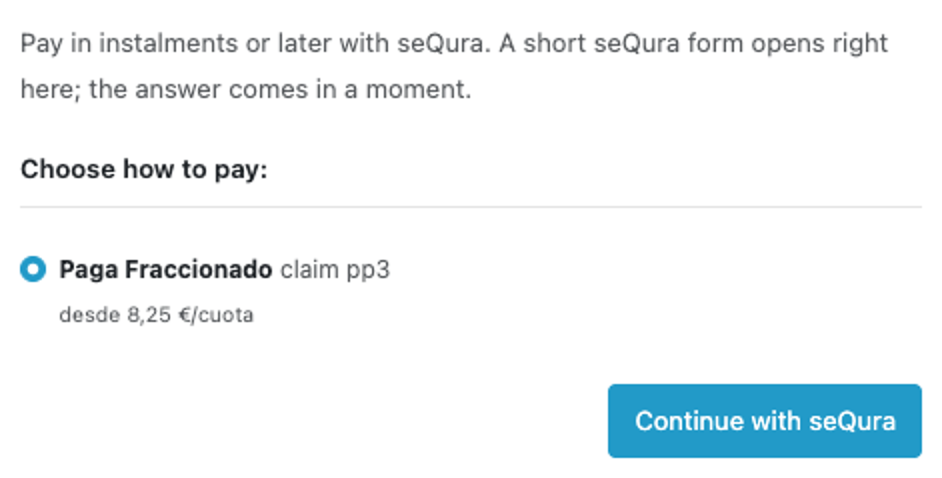
At checkout the shopper picks seQura, sees the product with the instalment amount (for example “desde 8,25 €/cuota”), clicks “Continue with seQura”, and the seQura form opens over the page: details, SMS code, payment.

Extensions → Extensions → Payments → seQura: API username and password, merchant reference and environment (sandbox or live).

A fresh install is the free version, nothing switches on by itself. The “Try Pro for 7 days” button → e-mail → the key right in the window and by e-mail.

Moving the site? Unlink the licence on the old domain and activate it on the new one yourself. A staging copy (staging., dev.) works with the same key and does not take a site slot. For studios — keys for 5 or 25 sites, or unlimited.
 OpenCart 4.0.2.x–4.1.x, 3.0.x or 2.3.0.2; the cURL extension; the store over HTTPS.A seQura merchant with API data; live mode works after seQura activates the account. The store currency is the euro and the country is Spain, as in your seQura account.The method is shown only for products seQura has opened for your merchant, and only within the amount range seQura sets for the product.seQura accepts an order number only once per merchant: the test copy of a store needs a separate seQura merchant or a sandbox account. If two stores confirm an order with the same number under one merchant, seQura refuses the second one; the order is not placed, and the reason is visible in the log and on the order tab.If seQura’s notification does not arrive (no HTTPS, a firewall or Cloudflare blocking seQura’s addresses), the shopper is approved but the order stays without a status. The settings show a warning about HTTPS.In the free version shipping is reported to seQura in the seQura portal (or by Pro, by statuses); the “Cancel at seQura” button does not change the order status in the store.
Admin: the language flag no longer shows as a broken image; admin layout fixes; buyers return to the store in their language.
For OpenCart 4.x, 3.x and 2.3: seQura at checkout with the identification form on the page, the order after seQura confirms, orders under review, notification signature, the seQura order…


seQura for OpenCart (4.x, 3.x and 2.3) adds the seQura payment method to the checkout: the shopper pays in instalments or later, and the store receives the full amount from seQura. seQura’s identification form opens right on the checkout page, with no redirect to another site.
What you need from seQura. A seQura merchant contract and API data (username, password and merchant reference). Which products a shopper can use is decided by seQura for your merchant: the module shows the ones seQura opens for the order amount.
At checkout the shopper picks seQura, sees the product with the instalment amount (for example “desde 8,25 €/cuota”), clicks “Continue with seQura”, and the seQura form opens over the page: details, SMS code, payment. After confirmation the shopper returns to the order success page. The method is shown only when the seQura product is available for the cart amount, the delivery country and the currency.
The order is created in the store only after seQura’s notification and the store’s confirmation, so a shopper who closes the form leaves no empty orders. An order seQura puts under review gets the “on hold” status and becomes approved or rejected by itself when seQura reports the decision; each change is one line in the history.
Extensions → Extensions → Payments → seQura: API username and password, merchant reference and environment (sandbox or live). The “Check connection” button lists the account merchants, currency, countries and seQura products, and the module hides the password after saving. seQura’s notification signature (X-SeQura-Signature) is verified, links are signed, and the latest calls to seQura are visible in the settings.
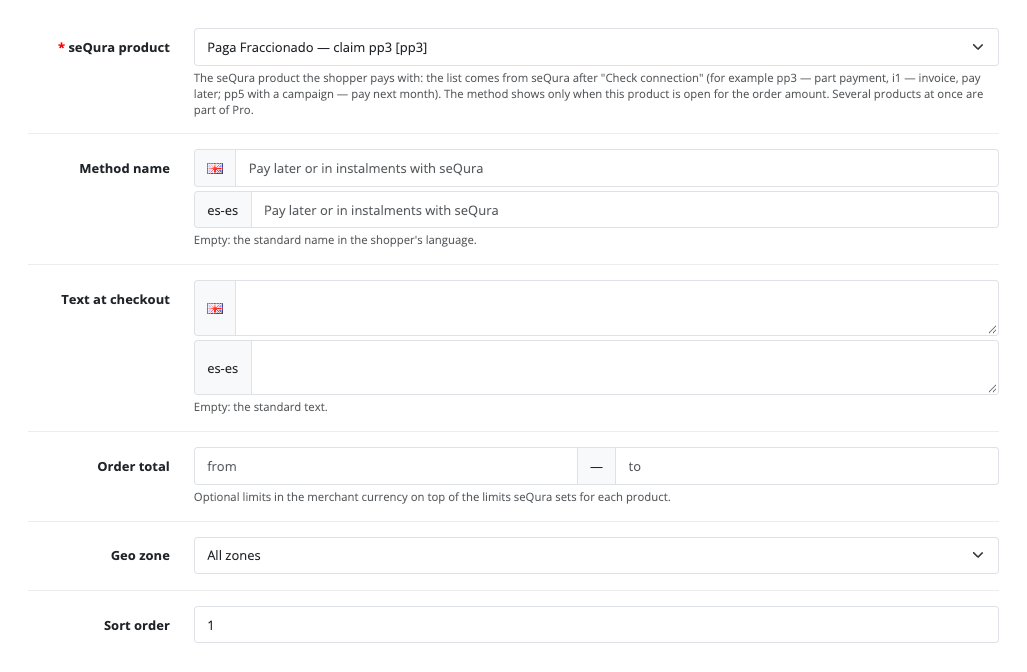
The “Checkout” tab: the seQura product (one in Free), the method name and checkout text for every language, amount limits, geo zone and sort order. The “Status” tab: the statuses for approved, rejected and under-review orders.
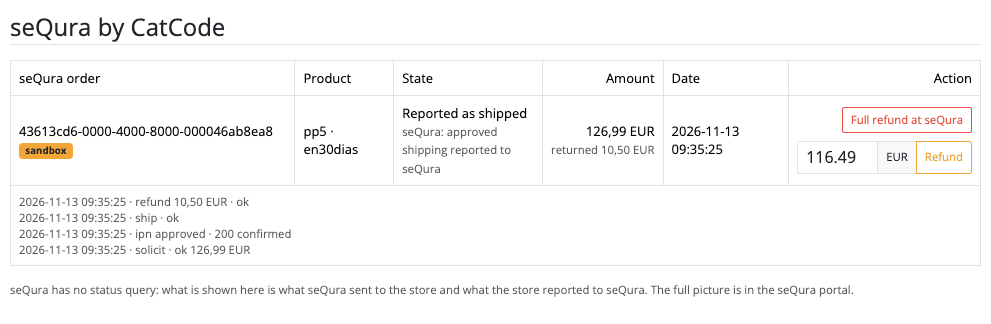
The order gets a “seQura” tab: the seQura order number, product, state, amounts and the event log. The “Cancel at seQura” button cancels the order at seQura; you change the order status in the store yourself.
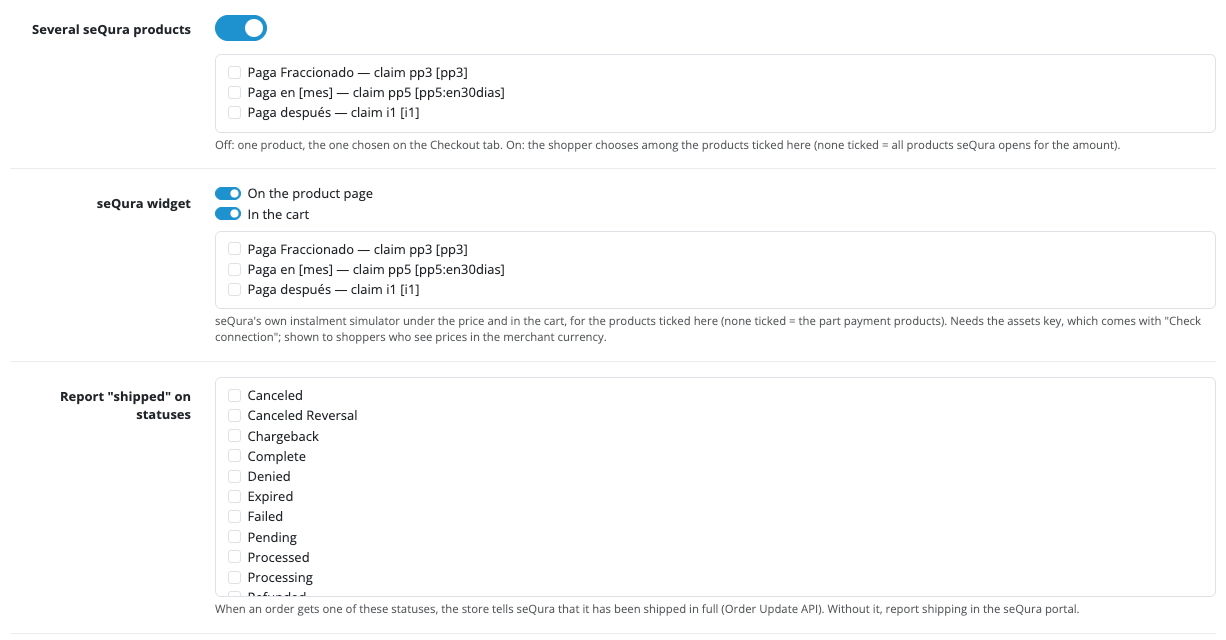
Pro lets the shopper choose among several seQura products, shows the seQura instalment widget under the product price and in the cart, tells seQura about shipping when an order reaches a status you choose, and cancels the order at seQura on the “Canceled” status. The module answers seQura cancellation requests by itself, and partial refunds and “Report shipped” are available from the order page.
The “seQura payments” log shows every attempt with its state in words (form shown, approved and confirmed, not confirmed, cancelled), the reason of a refusal, the amount and the returned amount, with filters by state and date and a CSV export. In the Pro settings you can exclude products and categories: the method is hidden for a cart that holds them, and their pages show no widget.
Didn't find the answer? Message us on Telegram and we'll reply within a business day.
 @catcode_support
Setup, compatibility, activation
No, it is an independent seQura integration by CatCode. seQura is a trademark of its owner.
A seQura merchant with API data: username, password and merchant reference. Live mode is switched on after seQura activates the account.
The ones seQura has opened for your merchant and for which the order amount is within the limit. In Free the shopper sees one product you choose, in Pro several to choose from.
No. seQura accepts an order number only once per merchant, so the test copy needs a separate seQura merchant or a sandbox account. Otherwise the confirmation of a second order with the same number is refused.
After seQura's notification and the store's confirmation. If seQura puts the order under review, it stays "on hold" and becomes approved or rejected by itself.
In Pro: by order statuses and with a button on the order page. In Free you mark shipping in the seQura portal.
No order is created in the store, the cart stays, and the shopper can try again.
OpenCart 4.0.2.x–4.1.x, 3.0.x and 2.3.0.2: three separate archives in one product.
Yes, for OpenCart it is one payment and a licence for good, for two sites.
Pro switches off and the free part keeps working.
No reviews yet. Be the first.
No questions yet. Ask one — we answer within 24 hours.
We build custom modules for WordPress, WooCommerce, OpenCart and Shopify. Tell us about the task and we'll prepare an estimate.
Order a custom module
—
Charged in UAH; your bank converts it to your currency. EUR price is approximate.

CatCode assistant
Just now


CatCode assistant
Online

I’ll help with your website task
Describe your website task — I’ll find a ready-made module or pass it to a developer for an estimate. Modules, custom features, layout, integrations, speed, migration, technical SEO.