
















OpenCart
1 290 UAH839 UAH≈ €17
Black November: −35% on all modules until 30 November Black November: −35% until 30 November Choose a module
 Website auditA PDF report by email in 3 minutesCheck a website
Everyday tasks
Image compressorSize, quality and WebP in bulkQR generatorLink, Wi-Fi, payment to IBANVAT calculator20, 14, 7% and amount in wordsTransliterationOfficial Ukrainian standardWebsite checks
PHP and pluginsPHP version, WordPress, pluginsGoogle Merchant feedFields, prices, GTIN, imagesDomain emailSPF, DKIM, DMARC, blacklistsAI search readinessllms.txt, bots, markupAll 9 toolsEnter at least 2 characters


Holded for OpenCart 4.x, 3.x, 2.3 (Spain): invoices from the order page free; Pro adds status rules, credit notes, payments, stock and a journal. A licence for life.
The free version works with no time limit. Pro adds the rest of the features in the table.


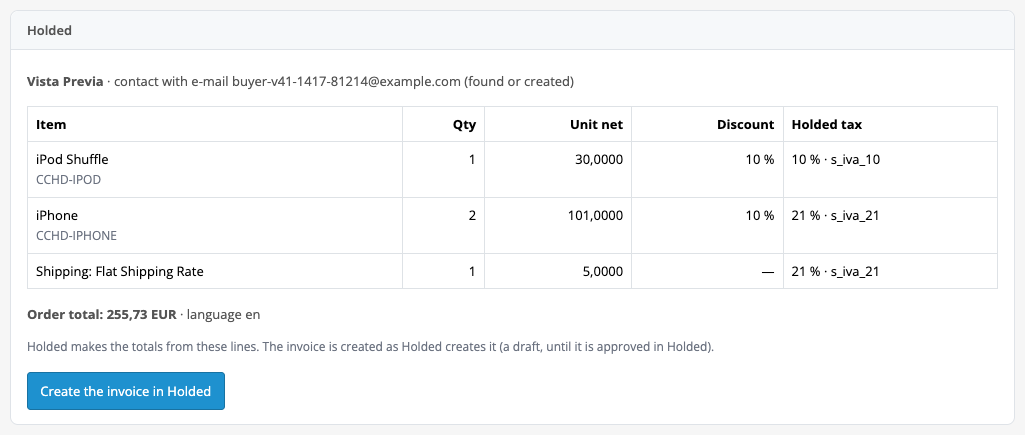
The order page gets a “Holded” box: the contact (by the buyer e-mail, found or created), a table of lines with item code, quantity, price without tax, discount and the Holded tax, and the order total.

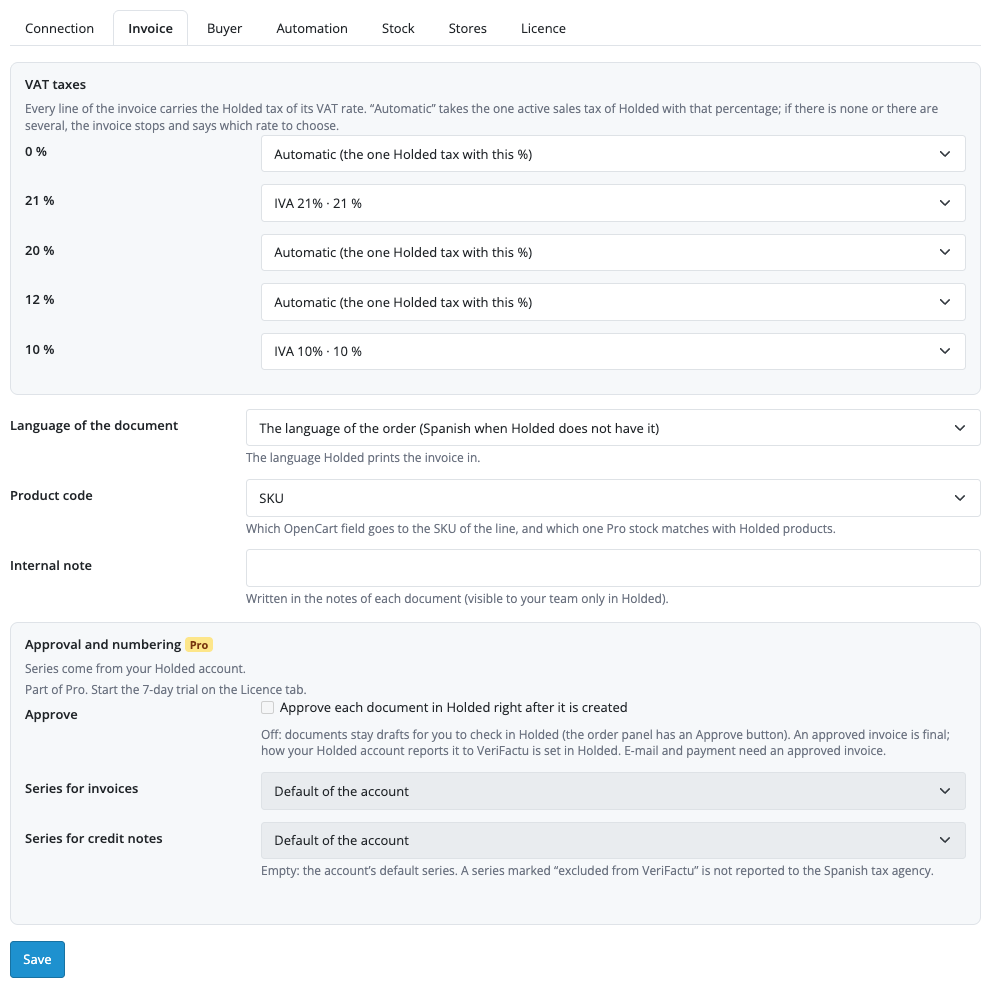
Extensions → Extensions → Modules → Holded Invoices: seven tabs, “Connection”, “Invoice”, “Buyer”, “Automation”, “Stock”, “Stores” and “Licence”.

A fresh install is the free version, nothing switches on by itself. The “Try Pro for 7 days” button → e-mail → the key right in the window and by e-mail.

Moving the site? Unlink the licence on the old domain and activate it on the new one yourself. A staging copy (staging., dev.) works with the same key and does not take a site slot. For studios — keys for 5 or 25 sites, or unlimited.
 OpenCart 4.0.2.x–4.1.x, 3.0.x or 2.3.0.2; the cURL extension; a store address on https.A Holded account and an API key with the scopes listed above.An invoice approved in Holded is final. Approval is off by default: documents stay drafts and you check them in Holded. How Holded reports an approved invoice to VeriFactu is set in Holded: the module does not change it, and it shows a series that Holded marks as excluded from VeriFactu next to the series choice.Holded counts API calls per account per month: an invoice takes 2 to 4 calls, and each Pro step (approval, read-back, e-mail, payment, a stock move per line) one more. The lists of taxes, series and warehouses are kept for an hour to save calls; the module reads the calls left from the Holded response header.If the shop also runs another Holded connector, documents for the same orders can be doubled.Stock: a quantity change whose answer from Holded was lost is never resent (the row names the SKU to check); the first time a product is matched, the OpenCart quantity becomes the Holded figure; products with variants in Holded are left alone.Stores with their own key: taxes are matched by percentage only, the default series is used, and payments and stock are handled for the main account only.A credit note is issued for the whole invoice only; there are no partial refunds.
For OpenCart 4.x, 3.x and 2.3: Holded invoices from the order page, the contact by e-mail, a map of VAT rates to Holded taxes, PDF, English and Spanish.


Holded Invoices for OpenCart 4.x, 3.x and 2.3 creates invoices in the Spanish Holded service straight from store orders: a button on the order page finds or creates the buyer as a Holded contact, passes the order lines with your IVA rates, reads the document total back, compares it with the order and gives you the PDF.
What you need from Holded. A Holded account and an API key created in Configuración → Desarrolladores → Credenciales (“Agregar API Token”, scopes “Por áreas”). Scopes for Free: Ventas → Facturas (Full), Ventas → Configuración de facturación (Leer), Contabilidad → Impuestos (Leer), Contactos → Contactos (Full); for Pro also Contabilidad → Bancos (Leer), Inventario → Productos (Full) and Inventario → Almacenes (Leer). Holded itself is paid under your plan: the module adds no per-document fee.
The order page gets a “Holded” box: the contact (by the buyer e-mail, found or created), a table of lines with item code, quantity, price without tax, discount and the Holded tax, and the order total. The “Create the invoice in Holded” button creates the document; the box then shows the type, number, total, status and the PDF and E-mail (Pro) buttons.
Holded creates a document as a draft, and the series number (for example F260086) appears after approval. In Free you check and approve the draft in Holded; in Pro you can turn on approval right after creation or press “Approve” in the order. A coupon goes as a line discount, shipping as its own line. The module reads the total back from Holded and compares it with the order: if they differ, the note shows both amounts.
Extensions → Extensions → Modules → Holded Invoices: seven tabs, “Connection”, “Invoice”, “Buyer”, “Automation”, “Stock”, “Stores” and “Licence”. On the first one you paste the API key and press “Save and test the connection”: the module checks every permission it reads, names the missing ones and shows how many VAT rates it matched to Holded taxes. The key is stored encrypted.
On “Invoice” every VAT rate of the shop (0, 21, 10%…) is mapped to a Holded sales tax: “Automatic” takes the single active tax with that percentage, and if there is none or there are several, the invoice stops and names the rate to choose. The same tab holds the language of the document (the order language, Spanish when Holded does not have it), the item code (SKU or model) and an internal note that only your team sees in Holded. “Buyer” describes how the buyer becomes a Holded contact.
The “Automation”, “Stock” and “Stores” tabs are for Pro. Without a key they open with an explanation and disabled fields, and stored Pro values are not shown.
Pro creates invoices on its own: when an order reaches one of the statuses you pick (for example “Processing”). A credit note for the whole invoice is made by button or at a refund status (“Refunded”): the invoice number goes into its description, which is how it refers to the invoice. A payment is registered on the Holded bank account of its payment method: at once for an order paid online, or at a status you choose for cash on delivery or a bank transfer. Holded can send the approved document to the buyer itself, with the e-mail template of your account. The NIF/CIF comes from a buyer field at checkout or is typed in the order, and the contact is found by it.
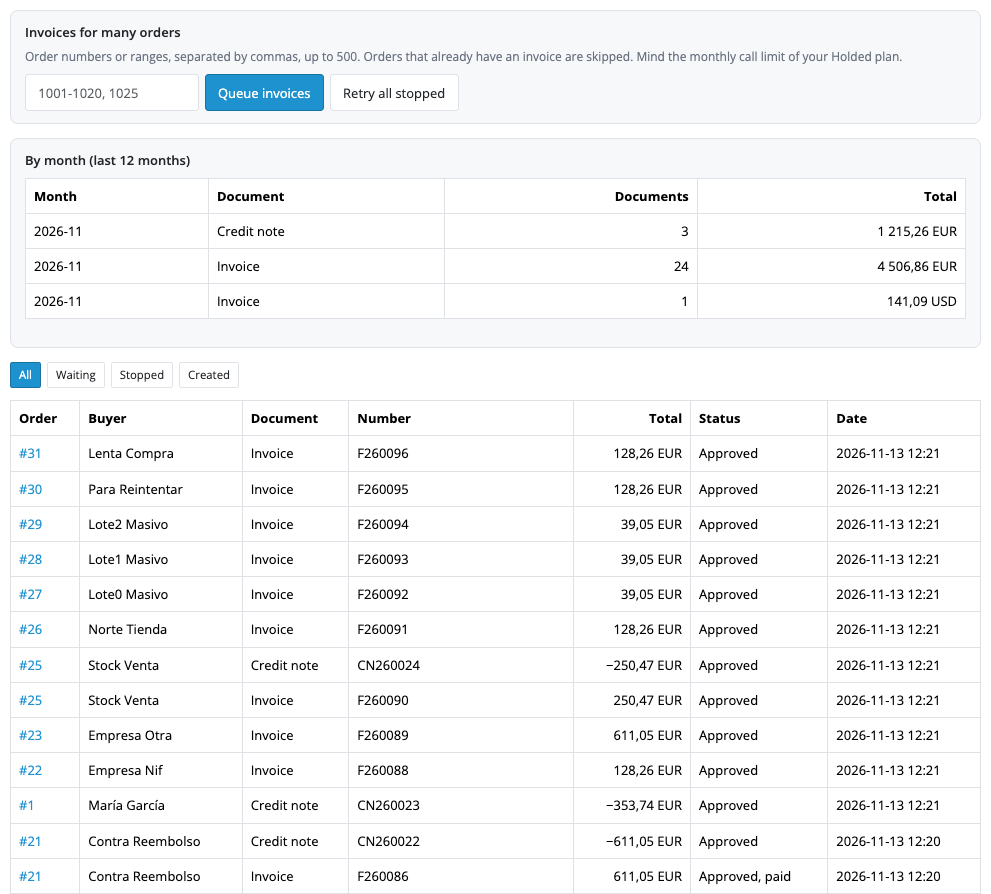
Stock: products are matched by SKU or model, and Holded and OpenCart each receive the other’s changes instead of overwriting the quantity. A sale takes the quantity off the chosen Holded warehouse, a credit note brings it back, and what changed in Holded is added to the OpenCart quantity. OpenCart stores can each have their own Holded key. The “Holded invoices” journal in the Sales menu shows each document with its status, filters, totals by month, “Queue invoices” for bulk invoicing by order numbers and “Retry all stopped”.
Didn't find the answer? Message us on Telegram and we'll reply within a business day.
 @catcode_support
Setup, compatibility, activation
No, it is an independent Holded integration by CatCode. Holded is a trademark of its owner.
A Holded account and an API key with the scopes listed on the "Connection" tab.
Holded creates a document as a draft, and the series number appears after approval. In Free you approve the invoice in Holded; in Pro with the "Approve" button in the order, or automatically if you turn approval on.
A draft can be changed in Holded. An approved invoice is final: a credit note corrects it (Pro: a button in the order or a refund status).
The module writes the invoice number in the description of the credit note. A credit note covers the whole invoice; there are no partial refunds.
The invoice is not created, and the message names the rate for which you need to choose a tax on the "Invoice" tab.
The module queues the row for a retry and first looks for the document in Holded by the order description, so there will be no second invoice.
Yes, in Pro: "Queue invoices" takes order numbers and ranges (up to 500), "Retry all stopped" repeats the stopped ones.
OpenCart 4.0.2.x–4.1.x, 3.0.x and 2.3.0.2: three separate archives in one product.
Yes, for OpenCart it is a one-time payment and a licence for life, for two sites.
Pro turns off, invoices queued by status stop with a reason, and the free part keeps working.
No reviews yet. Be the first.
No questions yet. Ask one — we answer within 24 hours.
We build custom modules for WordPress, WooCommerce, OpenCart and Shopify. Tell us about the task and we'll prepare an estimate.
Order a custom module
—
Charged in UAH; your bank converts it to your currency. EUR price is approximate.

CatCode assistant
Just now


CatCode assistant
Online

I’ll help with your website task
Describe your website task — I’ll find a ready-made module or pass it to a developer for an estimate. Modules, custom features, layout, integrations, speed, migration, technical SEO.